How is Salesforce CRM Different from Salesforce CMS?
When teams debate CRM vs CMS, they often miss the real problem: customer data and content are living in separate…

When teams debate CRM vs CMS, they often miss the real problem: customer data and content are living in separate silos. You're staring at two filing cabinets. One holds every scrap of customer information—purchase history, support tickets, emails, deal stages. The other holds every piece of content you've ever published—blog posts, product pages, brochures. For years, these cabinets have lived in different rooms, managed by different teams. Your customers now expect the person at the first cabinet to instantly pull the right item from the second, tailored to who they are and what they need at that exact moment. That's not a luxury; it's the baseline for doing business in a world where customers have more choices and less patience than ever.
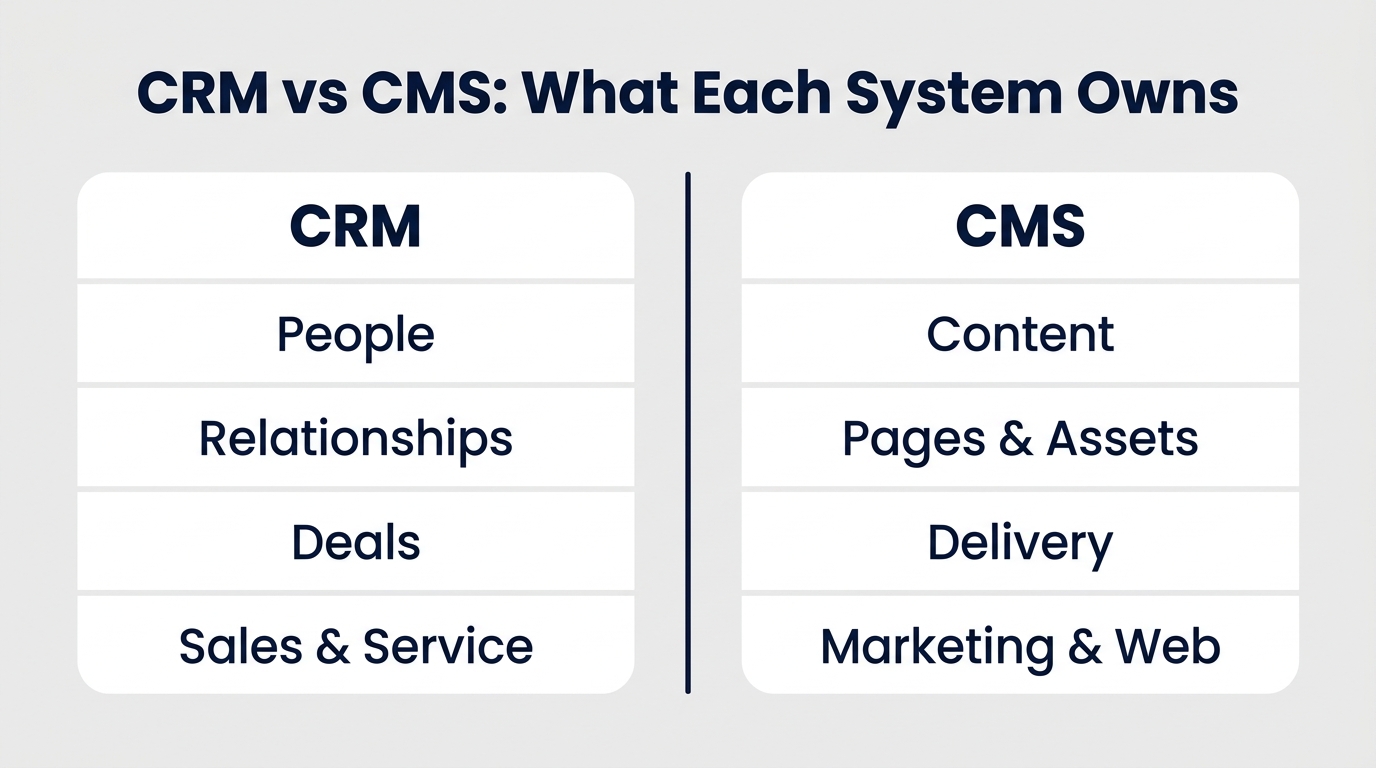
In plain terms, a CRM is the system of record for people and relationships—every customer, prospect, conversation, and deal. A CMS is the system of record for content and how it gets delivered—every page, post, asset, and publishing rule. This is the central CRM vs CMS distinction, but it's only the beginning. The real question isn't which one you need; it's how you bring them together to create experiences that feel personal, timely, and coherent across every touchpoint. When you understand the CRM vs CMS relationship, you see that each system brings a critical piece to the customer experience puzzle.
The traditional question—"Do I need a CRM or a CMS?"—starts from the wrong place. The competitive divide isn't between companies that own one system or the other; it's between organizations that keep customer memory and content voice in separate silos, and those that connect them into a single, trusted source of truth. In the AI era, winners will unify the customer record with content delivery so AI can assemble, personalize, and serve the right message from your own material at the moment of need. That's why this guide goes beyond definitions to show you the CRM vs CMS convergence, the integration points, and the practical steps to make it happen.
Here's what we'll cover: first, what a CRM really is and why it matters; second, what a CMS has become in the age of headless delivery; third, how Salesforce fits into both sides of the CRM vs CMS picture; fourth, the integration that powers personalization; and finally, why a unified record isn't just nice-to-have but non-negotiable for AI. We'll close with role-level guidance to help you decide what your business needs.
| Aspect | CRM | CMS | Salesforce Product |
|---|---|---|---|
| Purpose | Manage customer relationships and sales pipeline | Manage and deliver content across channels | Sales Cloud, Service Cloud (CRM); Salesforce CMS (content delivery) |
| Primary User | Sales, Service, Marketing | Marketing, Content, Web Teams | CRM teams; Salesforce CMS for content teams |
| Core Data Object | Customer record (accounts, contacts, opportunities) | Content assets (pages, posts, images) | Customer 360 (CRM); content in Salesforce CMS |
| Position in Stack | Back-office system of record | Front-end delivery layer | Back office for CRM; front-end/delivery for CMS |
Two Systems, One Goal: Why This Isn't a Choice
The two-filing-cabinet analogy exposes the friction. A sales rep at a B2B software company needs to send a personalized proposal based on a prospect's industry and past interactions. That requires data from the customer cabinet (CRM) and the right case study from the content cabinet (CMS). Similarly, an e-commerce customer returns a product and expects the website to reflect their purchase history, show relevant recommendations, and perhaps surface a support article. In both scenarios, both systems must work together in real time to deliver a seamless experience. This is a real CRM vs CMS scenario, playing out every day in companies that haven't yet connected the two.
If the two cabinets never talk, the result is generic messaging, missed upsell opportunities, and a disjointed customer experience. The problem isn't that you lack data or content; it's that they live in different worlds. The convergence isn't optional; it's the foundation of modern personalization. Without it, even the most sophisticated AI will struggle to deliver value because it's working with incomplete or disconnected information.
"CRM remembers who your customer is; CMS remembers what you can say to them. AI turns that into a conversation."
To unify them, you first need to be crystal clear about what each system is and isn't. Only then can you see where they complement each other and where the integration points lie. This foundational understanding is essential before you dive deeper into the CRM vs CMS debate.
What a CRM Is: The System of Record for People and Relationships
A CRM is the system of record for your customers and prospects—every interaction, every deal, every service case. In practice, that means the CRM holds customer records: accounts, contacts, leads, opportunities, and cases. Sales, service, and marketing teams use it to track relationships, manage pipelines, and resolve issues with full context. Salesforce defines CRM as technology for managing all your company's relationships and interactions with customers and potential customers. IBM describes a CRM system as the tools and processes that help businesses manage customer data and interactions across the entire lifecycle.
Think of a sales rep preparing for a call. Before dialing, they open the CRM and see the lead's entire history: previous emails, call notes, past purchases, and the current deal stage. That context changes the conversation from cold outreach to a personalized follow-up. A service agent resolving a support ticket can see the customer's product, account status, and previous tickets, which shortens resolution time and improves trust. This is the essence of customer relationship management: keeping every interaction in one place so each touch feels informed.
Inside Salesforce, the CRM side is delivered through Sales Cloud and Service Cloud. These clouds share a unified customer record—often called Customer 360—so sales, service, and marketing teams work from the same view of the customer. That unified record is the backbone of AI-era personalization, but it only matters if the content system can act on it. When evaluating your options, remember that the CRM holds the data that makes personalization possible. This is the CRM vs CMS distinction that matters most.
What a CMS Is: The System of Record for Content and Its Delivery
A CMS is the system of record for your content—every page, post, and asset—and the rules for how it gets delivered. In the traditional sense, a CMS is where marketing and content teams create, manage, and publish web content. IBM defines a content management system as a software application that lets users create, manage, modify, and publish digital content without needing to code from scratch. The primary users are marketers, content editors, and web teams. That's the side that handles what your customers see and read.
But the modern CMS has evolved beyond the page builder. Headless CMS architecture separates content creation and storage from the front-end delivery layer. Instead of being locked to a single website template, content is stored once and served via APIs to any channel: a website, mobile app, partner portal, or commerce storefront. IBM's Think Topics hub explains headless and composable content delivery as a modern approach that gives teams the flexibility to publish across many channels from one back end.
For example, a marketing team using a headless CMS writes a product update once, and that content appears on the corporate site, inside a mobile app, and on a third-party marketplace listing—without duplicating work. An e-commerce team can push product descriptions to both their web storefront and an external channel from a single content source. This flexibility in content delivery is a key differentiator when you're weighing the CRM vs CMS choice.
Salesforce CMS serves as a hybrid and headless content delivery system: content created in Salesforce CMS can be served into Experience Cloud community portals, Commerce storefronts, and external channels via APIs. That distinction matters—Salesforce CMS is about structured content delivery, not just building a standalone website. Understanding the difference between CRM and CMS helps you see why Salesforce offers both as separate but complementary tools.
The debate often loses sight of this: both systems serve different masters, but the ultimate goal is the same—delivering the best possible experience to your audience. The good news is that integrating them is less about ripping out what you have and more about building smart connections. When you weigh your options, the CRM vs CMS comparison is not about one being better; it's about seeing where each fits in your stack.
Is Salesforce a CRM or a CMS? The Short Answer
The short answer is both, but they are different products serving different purposes. Salesforce CRM is the customer relationship layer, delivered through Sales Cloud and Service Cloud, backed by a unified customer record. Salesforce CMS is the content delivery layer, designed to serve content into Experience Cloud, Commerce, and outside channels using hybrid and headless delivery patterns. When people ask "Salesforce CRM or CMS?", the answer is that you likely need both to create a complete customer experience. This is a common CRM vs CMS question, and the answer isn't an either/or.
Here's the practical split. A company using Salesforce Sales Cloud tracks deals, manages contacts, and forecasts pipeline. The same company uses Service Cloud to handle support cases and field service. Those two clouds share the customer record. Separately, the marketing team can use Salesforce CMS to author content once and deliver it to the Experience Cloud portal, the commerce storefront, or a mobile app—each channel consuming the same content via APIs. This is a classic example of how these two systems aren't competing but cooperating.
The key is that both systems rely on each other. The CRM holds the customer context that determines which content to show. The CMS provides the assets that make the interaction engaging. When you map out the CRM vs CMS landscape, you see that they are two halves of a whole. Without the other, neither can deliver the full promise of personalization.
Salesforce's own AI layer, Agentforce, sits on top of both. Agentforce is built as an AI agent platform that can reason, act, and use company data from Salesforce. This is the crucial insight: Agentforce agents can only be as accurate as the data and content they can access. A unified customer record from the CRM side plus structured, accessible content from the CMS side is what lets agents answer from your own material rather than hallucinating from fragments. The CRM vs CMS distinction becomes less about picking a side and more about building a bridge between them.
Seeing both side by side clarifies that the real opportunity isn't choosing one; it's building the connective tissue between them. This is the core of CRM and CMS integration.
The Integration That Powers Personalization
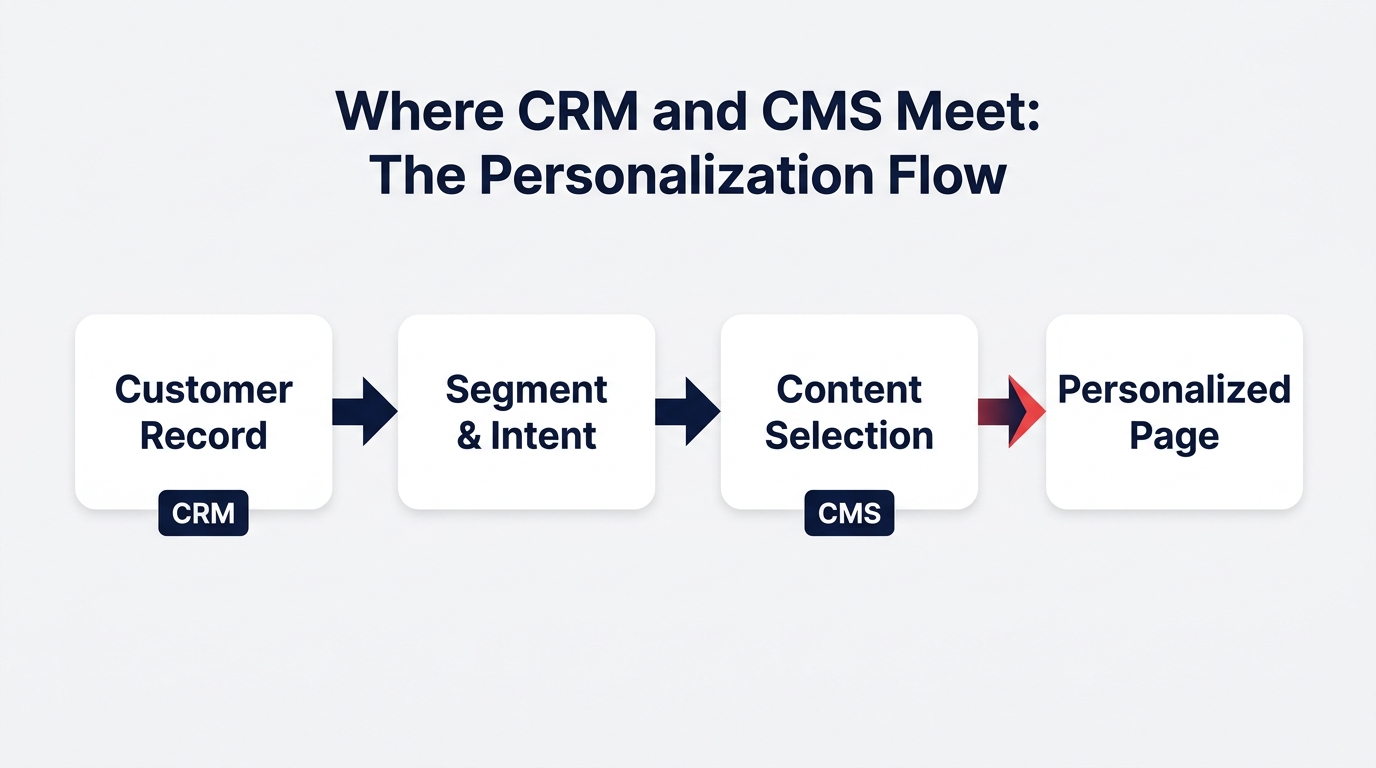
The meeting point is simple: CRM data determines who the audience is, and CMS content determines what they see. In a headless delivery pattern, the CMS serves content through APIs, and the CRM supplies the context that selects which content variant to render. For example, a returning visitor to an e-commerce site might see product recommendations based on their past purchases (from CRM) presented inside personalized content blocks (from CMS). A B2B prospect on a pricing page could see case studies from their own industry because the CRM identified their vertical and the CMS matched the relevant asset. This is the heart of CRM vs CMS integration, and it's what makes personalization possible.
Salesforce's architecture supports this through Salesforce Customer 360, which provides a unified customer record that can be used to drive personalization across channels. When that record is connected to Salesforce CMS, content delivery becomes context-aware: the same content item can be assembled differently for a first-time visitor, a loyal customer, or a high-value prospect. This synergy is what keeps the CRM vs CMS debate from being an either/or—it's about how they work together.
What happens when the two systems hold conflicting records? The experience breaks. A customer who has already purchased a product continues to see ads for that same product. A returning support customer gets a generic homepage that ignores their open case. Marketing sends a promotion for a service the customer has already canceled. Inconsistency between CRM data and CMS content undermines trust and wastes budget. Integration isn't a nice-to-have; it's the only way to keep your message aligned with your customer's reality. That's why the connection matters so much.
The AI Era: Why a Unified Customer Record Is Now Non-Negotiable
AI agents like Salesforce's Agentforce are already expected to answer questions, recommend actions, and draft content using your company's own data and knowledge. Agentforce can access customer data, run flows, and take action across Salesforce apps. But an agent can only answer accurately if it can connect the customer record to the right content. Picture this: a customer asks a chatbot, "Do you have a replacement for my broken part?" The agent needs the purchase history from the CRM and the product manual from the CMS. If those are disconnected, the agent either gives a generic answer or makes an error. This is where CRM and CMS integration becomes a business critical decision.
AI can also assemble content on the fly—composing a personalized email, generating a product description variant, or tailoring a landing page. But that assembly only works when the underlying systems are connected. The AI needs to know who the customer is (CRM) and what content assets exist (CMS) before it can choose and arrange the right pieces. A unified customer record gives AI the context it needs to personalize; a structured CMS gives AI the building blocks. The difference between CRM and CMS becomes less about what they are and more about how they feed AI.
For decision-makers, the question isn't whether to adopt AI, but how to prepare your data and content. This framework helps you see that both are feeding the same intelligent system. It's not about replacing one with the other, but about making sure they work together seamlessly.
The CRM vs CMS pairing becomes the foundation for AI-driven personalization. When you connect the two, you unlock the ability to deliver relevant content at every stage of the customer journey. This is where the real value lies, and it's why so many organizations are investing in CRM vs CMS integration projects.
Human review remains essential for what gets published. AI shouldn't have the final say on regulated, brand-sensitive, or customer-facing content. The practical pattern is AI drafts or suggests, humans approve, and the content system delivers. This is why Webuters' CRM and ERP transformation services focus not just on data migration but on connecting systems so AI has a trustworthy foundation.
Do You Need Both? Role-Level Guidance for Your Business
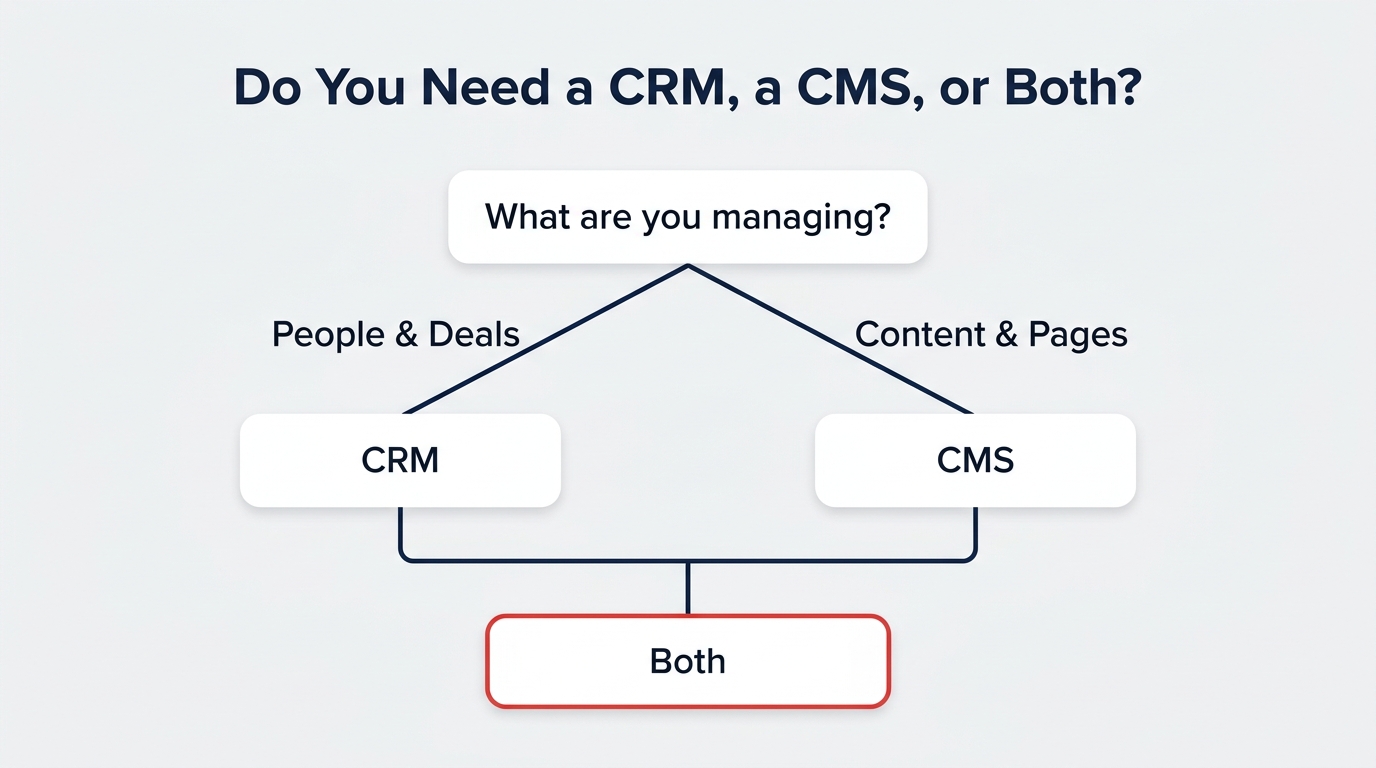
Most growing organizations need both a CRM and a CMS, but the priority and pain point differ by role. The question often comes down to who is feeling the pain most acutely, and that's where the CRM vs CMS decision gets practical.
For a marketing lead, the CMS is the daily workspace—content creation, campaign pages, and publishing. But personalization stalls without CRM data. A marketing lead who only has a CMS can publish content, but they cannot tailor it to visitor history, segment behavior, or lifecycle stage. Often, moving from a traditional to a headless CMS is the first upgrade, because headless delivery makes it possible to serve the same content to multiple channels and then attach CRM-driven personalization on top. We've written about moving from a traditional to a headless CMS if you want the full picture. This is a practical scenario we see all the time.
For a sales ops manager, the CRM is the system of record—pipeline and deals. But sales reps waste time hunting for the latest version of a one-pager, or they send outdated collateral because the content library is disconnected. Integrating the CMS into the CRM means sales teams can access approved, current content directly from the opportunity record. That integration closes the loop between content creation and deal execution. The alignment here is critical to sales efficiency.
For an e-commerce owner, the answer is almost always both, plus commerce capabilities. The CRM feeds customer history and segmentation; the CMS delivers product story and educational content; and the commerce engine handles transactions. Salesforce's Salesforce B2B vs B2C Commerce solutions plug into this same data model, allowing personalized product recommendations and content-rich storefronts. Our digital commerce services help e-commerce teams connect CRM data, CMS content, and commerce APIs into one flow. Understanding the dynamics here helps you design a system that serves both your team and your customers.
Common mistakes we see include treating a CRM as a CMS (forcing sales reps to copy-paste content from a file share), treating a CMS as a CRM (trying to manage customer relationships in a web page database), and keeping the two systems in separate silos with no integration plan. The fix isn't to buy more software; it's to clarify what each system owns and then build the data connections that let them work as one. The CRM vs CMS decision doesn't have to be painful when you have a clear integration roadmap. That's the approach that pays off.
When you choose the right strategy, the CRM vs CMS balance becomes a powerful lever for growth. It's not about one winning over the other; it's about each playing its role in a unified system.
Frequently Asked Questions
Is Salesforce a CRM or a CMS?
Salesforce is both, but they are separate products. Salesforce CRM includes Sales Cloud and Service Cloud, built on a unified customer record. Salesforce CMS is the hybrid/headless content delivery system that serves content into Experience Cloud, Commerce, and external channels. They are designed to work together, making the Salesforce question less about choosing and more about integrating.
What is the difference between CRM and CMS?
The core difference is the data they manage. A CRM manages people and relationships—customer records, deals, tickets. A CMS manages content and delivery—pages, posts, assets, and publishing rules. CRM is a back-office system of record; CMS is a front-end delivery layer. That's the simplest breakdown.
Can a CRM replace a CMS?
No. A CRM isn't built to manage structured content, workflows, and multi-channel delivery. A CMS isn't built to manage sales pipelines, service tickets, or customer histories. Trying to replace one with the other creates a data model mismatch and a poor user experience for both teams. When deciding, remember they serve distinct purposes. The CRM vs CMS comparison shows they are complementary, not interchangeable.
Does Salesforce CMS require Experience Cloud?
Salesforce CMS can deliver content to Experience Cloud, but it isn't required to use Experience Cloud. Salesforce CMS also supports headless delivery via APIs to external channels and can feed Commerce storefronts. You can use Salesforce CMS for content authoring and delivery without building a full Experience Cloud community.
What is the difference between CRM, CMS and ERP?
A CRM is the system of record for customer relationships and interactions. A CMS is the system of record for content and its delivery. An ERP is the system of record for core business operations—finance, inventory, HR, and supply chain. They overlap at the edges, but each has a distinct primary mandate. A unified architecture often connects all three so customer, content, and operational data inform each other. When you evaluate your stack, consider how an ERP might factor into your overall system design.
Make Them Speak the Same Language
The two filing cabinets no longer have to live in separate rooms. CRM remembers who your customer is; CMS remembers what you can say to them. AI turns that into a conversation—but only if the customer record and the content library are unified and trusted. The CRM vs CMS debate is really about integration, not selection.
The business implication is clear: organizations that keep customer data and content in disconnected systems will spend more on marketing that misses, agents that guess, and experiences that feel generic. Organizations that connect them will be able to personalize at scale, answer accurately with AI, and move faster than competitors still debating which is the right choice. That's the lesson that matters.
If you're ready to move beyond the either/or debate and unify your CRM and CMS for AI-ready personalization, we can help. Start with a conversation about our CRM and ERP transformation services. We'll help you map what each system should own, design the integration, and build the trust layer your AI needs to deliver experiences that feel anything but generic.
Salesforce development services
Configuration, custom development and integrations that fit how your teams work.
See Salesforce services
Krishna is the Founder and CEO of Webuters, a technology leader specializing in Generative AI, intelligent automation, enterprise software, and digital transformation. He helps organizations leverage emerging technologies to drive innovation, operational efficiency, and business growth. Through his writing, Krishna shares insights on AI adoption, technology leadership, product innovation, and the future of work, helping leaders navigate change and build future-ready organizations.
Follow Krishna on LinkedIn