
Litify Integrations: Connecting Intake, Documents, Telephony and Finance
Litify integrations are often tested by a quiet failure: a website lead arrives after hours, never appears in Litify, and a paralegal retypes it the next morning. When the managing partner asks who owns the intake handoff, no one can answer. The software was not broken. The workflow had no owner.
Think of a law firm's systems as a relay race. The baton is a client record, and every handoff is a moment where a runner can drop it. Litify integrations should be treated as links between Litify, which runs on Salesforce, and a firm's intake, telephony, document and finance systems, so records move automatically with a clear owner for every failure. The hard part is agreeing on the workflow rules that keep two systems from silently drifting apart.
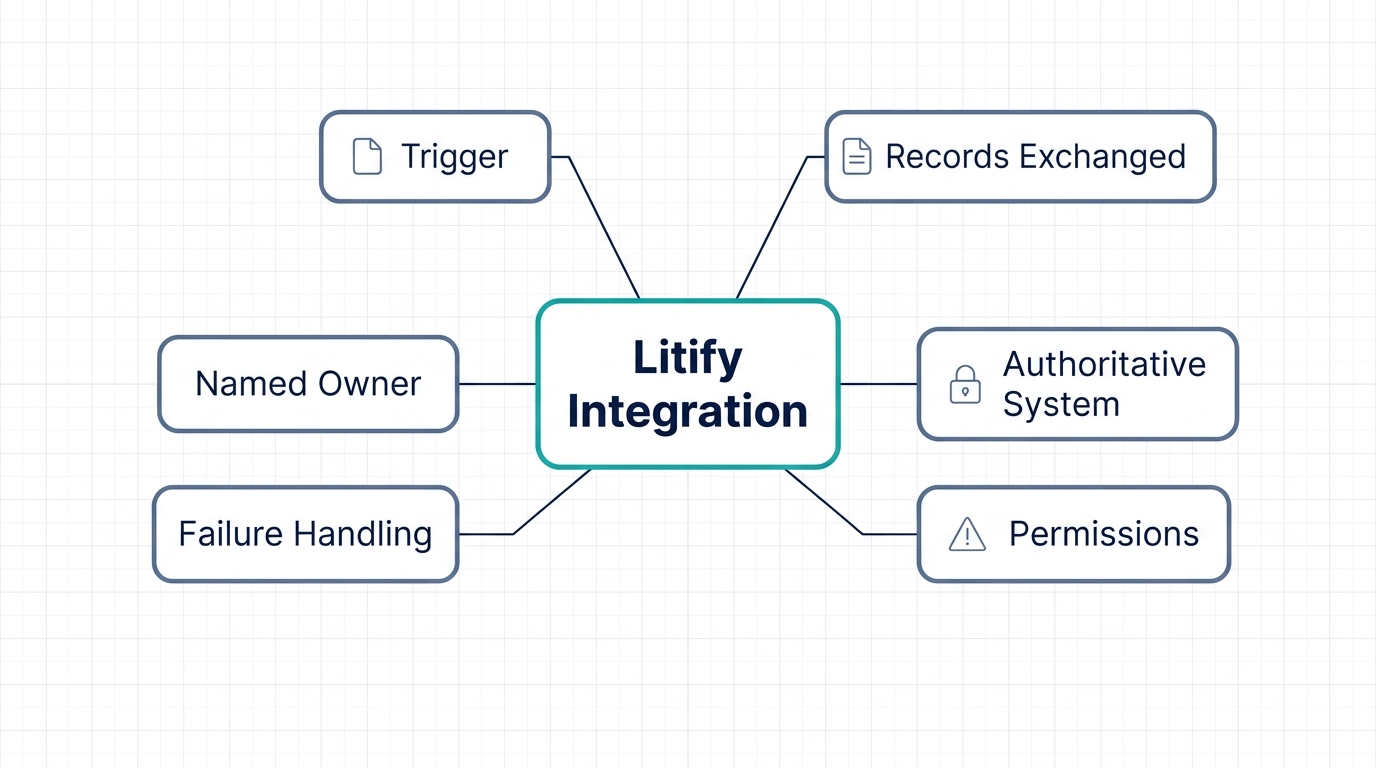
A single Litify integration is an operational agreement. It needs a named trigger, a system of record, mapped fields, permissions, a failure path, and a person who owns the exception queue. This post walks through the four Litify integrations that matter most for law firms: web and form intake, telephony and call tracking, document management, and accounting and finance. Each uses the same template, followed by an illustrative mapping table, an exception-handling walkthrough, and a direct-API-versus-middleware decision guide.
Why Litify Integrations Are Operational Agreements, Not Just Connections
Litify runs on the Salesforce platform, so the data model, object permissions, and API surface come from Salesforce rather than a standalone legal tool Litify platform overview. The same platform that powers sales, service, and custom apps undergirds the legal case management layer Salesforce Platform overview. It means a firm can apply the same discipline it already uses for Salesforce legal integrations to its legal operations workflows.
The value of a connection is not a list of supported logos. It is knowing which record owns a fact, who can change it, and what happens when a change fails. A web-form lead may never reach the case management view because a validation rule silently skipped the sync, and unless someone watches that queue, the error stays invisible until a client asks for an update. That is why mature Litify integrations are judged by their exception queue, not by their connector count.
The same discipline applies to data migration. When a firm moves historical matters into Litify, every field must be mapped to an owner and validated before the first record lands data migration field mapping. If you design the mapping and ownership rules once for day-to-day Litify integrations, you can reuse them for migration and avoid re-litigating the same decisions.
Most failures we see are ownership failures, not API failures: no one was assigned to notice, escalate, and fix the failed sync before a client or deadline exposed it. The pattern is consistent across every integration we have helped review.
An integration without a named owner is just a rumor about where the data went.
The next sections walk through each workflow using the same template. All Litify integrations deserve their own named trigger, owner, and failure path.
Web and Form Intake Integration: Trigger, Records and the System of Record
Trigger: A website form submission, a landing-page asset download, or a chat handoff creates an inbound lead record. Records exchanged: Contact details, matter type, source attribution, consent flags, and any attachments move from the form endpoint into Litify/Salesforce objects. Authoritative system: The intake form system is authoritative at creation. After the lead is accepted, the Litify/Salesforce contact and matter records become authoritative. This switch must be written down, not assumed.
A Litify intake integration lives or dies on that switch. Permissions: The integration account should have the minimum object and field-level access required. Over-broad API responses are a recognized security risk. Broken object level authorization describes how endpoints can expose more than intended, and broken object property level authorization covers leaking fields the account should not see. Use a dedicated integration user with scoped permissions.
Failure handling: Validation failures, such as a missing required field, malformed email, or duplicate contact, should be logged with the source payload and retried safely. A duplicate email address should not silently overwrite a contact; it should be flagged for review. Operational owner: Name the intake manager or legal operations lead who reviews the exception queue daily. This person owns the handoff between marketing and legal, and this is where most Litify integrations succeed or fail quietly.
If you are still aligning on what Salesforce Litify is, our guide on what Salesforce Litify is covers the platform basics.
Telephony and Call Tracking Integration: Matching Calls to Matters
Trigger: An inbound or outbound call ends, or a call-tracking platform records a new lead. Records exchanged: Call metadata, timestamp, duration, direction, recording link, tracking number, contact match, and a task or activity record on the related matter. Authoritative system: The phone system is authoritative for call events; Litify/Salesforce is authoritative for contact identity and matter linkage. Disagreements should resolve toward the case management record, not the call log.
A call event is a classic integration trigger: the platform receives an event and applies a rule to create or update a record application integration concepts. A telephony integration should never invent a contact. Permissions: Call recordings and transcripts can carry sensitive information, so access should be limited to the roles that need it, with object and field-level checks on the API surface. Failure handling: Unmatched phone numbers should be routed to a review queue rather than creating a new contact, which would corrupt reporting. Operational owner: The intake supervisor or IT administrator who owns the call-matching queue. Firms that skip this step often discover weeks later that their Litify integrations have been quietly dropping calls during peak intake periods.
Teams that need custom endpoint work often pair it with our Salesforce development services.
Document Management Integration: Versions, Permissions and the Matter Folder
Trigger: A document is uploaded, versioned, or linked from the firm's document platform to a matter. Records exchanged: Document metadata, name, version, author, date, matter reference, the link or file itself, and the permissions that determine who can see it. Authoritative system: That platform is authoritative for file content and version history; Litify/Salesforce is authoritative for matter linkage and access entitlement. Write this down or teams will store copies in both places.
Document syncing is where access rules become visible. Permissions: The connection should check object and field-level access before exposing document metadata through an API, because over-broad responses are a recognized authorization failure mode. Failure handling: A document that fails to link should be quarantined and assigned, not silently attached to the wrong matter. Operational owner: The records manager or legal operations lead who owns document linkage. Litify integrations of this kind prevent two teams from claiming the same folder as truth.
The same field ownership and validation questions reappear when moving documents and matter records during migration field mapping and data migration concepts. This is the kind of record-linkage work covered by our Salesforce integration services. Firms that treat this work as connectors rather than ownership rules learn the hard way, and their Litify integrations carry the cost.
Accounting and Finance Integration: Invoices, Trust and the Ledger
Trigger: A time entry is approved, an invoice is issued, or a payment is recorded. Records exchanged: Matter reference, client reference, time and expense lines, invoice status, payment status, and trust account movements. Authoritative system: The accounting system is authoritative for the ledger, balances, and invoice numbers; Litify/Salesforce is authoritative for matter and client identity. The connection should never invent a financial number.
Finance demands the strictest controls of the four Litify integrations. Permissions: Finance data is the most sensitive data in the firm, so API access should be restricted to the integration account and audited, with strict object and field-level authorization. Failure handling: A failed invoice post must not create a duplicate in either system. Idempotency keys or a natural-key check should make retries safe. Operational owner: The finance manager or controller who owns the reconciliation exception queue.
Reconciliation is a data-integrity problem, not a feature gap what application integration involves. We have delivered this pattern as a real-time Salesforce and NetSuite integration, presented here as Salesforce integration evidence rather than Litify work. In many firms, these connections are among the highest-stakes Litify integrations because a single duplicated invoice erodes trust with both the client and the finance team.
Field Mapping in Practice: An Illustrative Intake-to-Matter Example
Field mapping is where Litify integrations live or die. A visible mapping table with source field, target field, transformation, and owner turns tribal knowledge into an auditable artifact. The table below is illustrative, using generic field names, and should be replaced with the firm's actual fields before build. Treat it as a template, not a universal answer.
Every row needs an owner so that when a field stops populating, someone knows who to ask. Mapping discipline also pays off during data migration data migration field mapping.
| Source Field | Litify/Salesforce Field | Transformation | Owner |
|---|---|---|---|
| inquiry_type | Matter_Type__c | Map web values to picklist values | Intake Manager |
| contact_email | Trim and lowercase | Legal Operations | |
| email_opt_in | HasOptedIn__c | Normalize to Boolean | Legal Operations |
| source_campaign | LeadSource | Map marketing campaign codes | Marketing Ops |
| incident_date | Incident_Date__c | Parse date format to ISO | Intake Manager |
When an Intake Record Fails Validation: An Exception-Handling Walkthrough
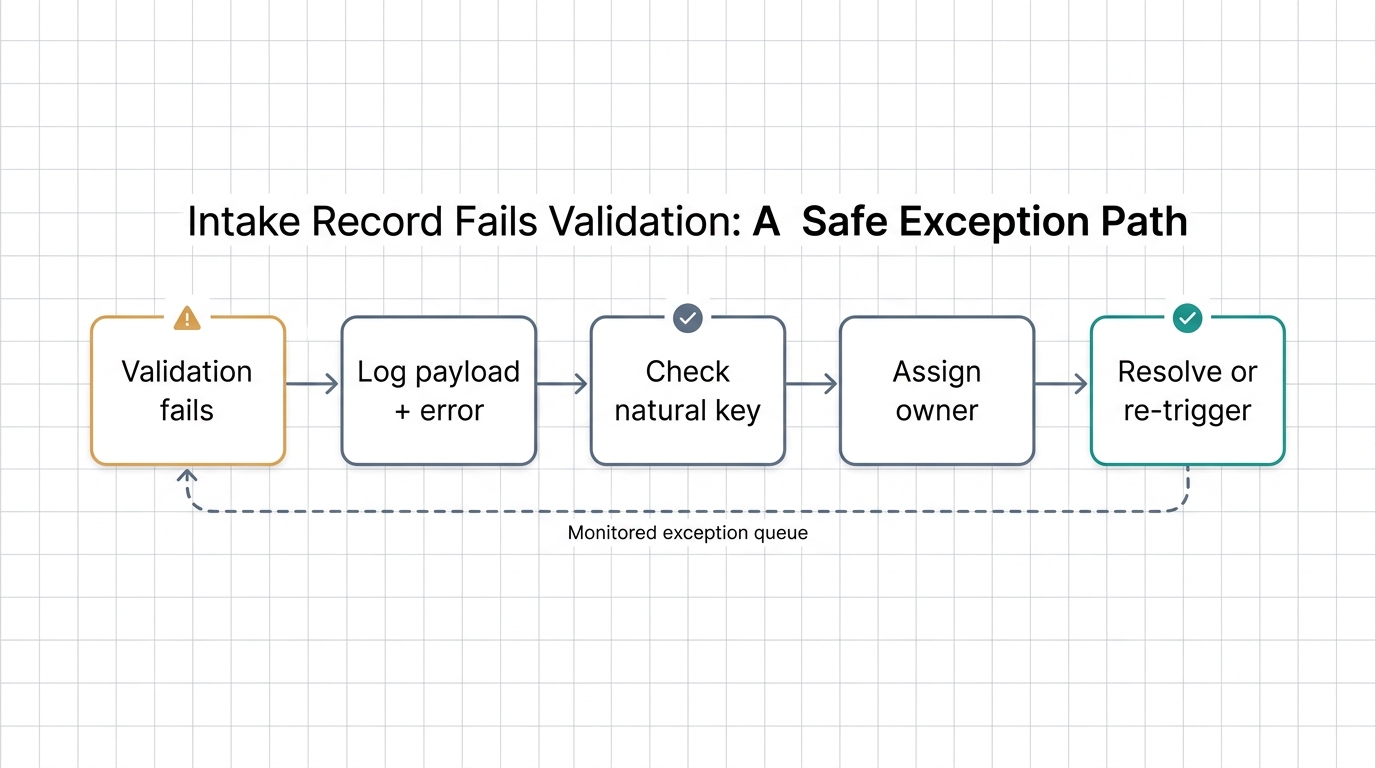
In Litify integrations, failed transactions are normal, not exceptional. The difference is whether the failure becomes a routine task or a silent data leak. Here is a safe pattern for an intake record that fails validation.
- An intake record fails validation because a required field is missing or malformed.
- The integration logs the source payload, the error, and a correlation ID so the failure can be traced without guessing.
- The retry is idempotent: it checks for an existing record using a natural key, such as source system plus source record ID, before creating anything.
- The exception is assigned to a named owner, the intake manager, with a due-by time.
- The owner either corrects the source data and re-triggers, or resolves the exception manually with a note.
Strong error handling depends on knowing which system owns the record and which fields are immutable application integration patterns. That single design choice is what separates reliable Litify integrations from ones that merely look connected on a diagram.
With a reliable exception queue, the connection stops being a support burden and starts behaving like infrastructure.
Direct API or Integration Middleware: A Decision Guide for Legal Operations
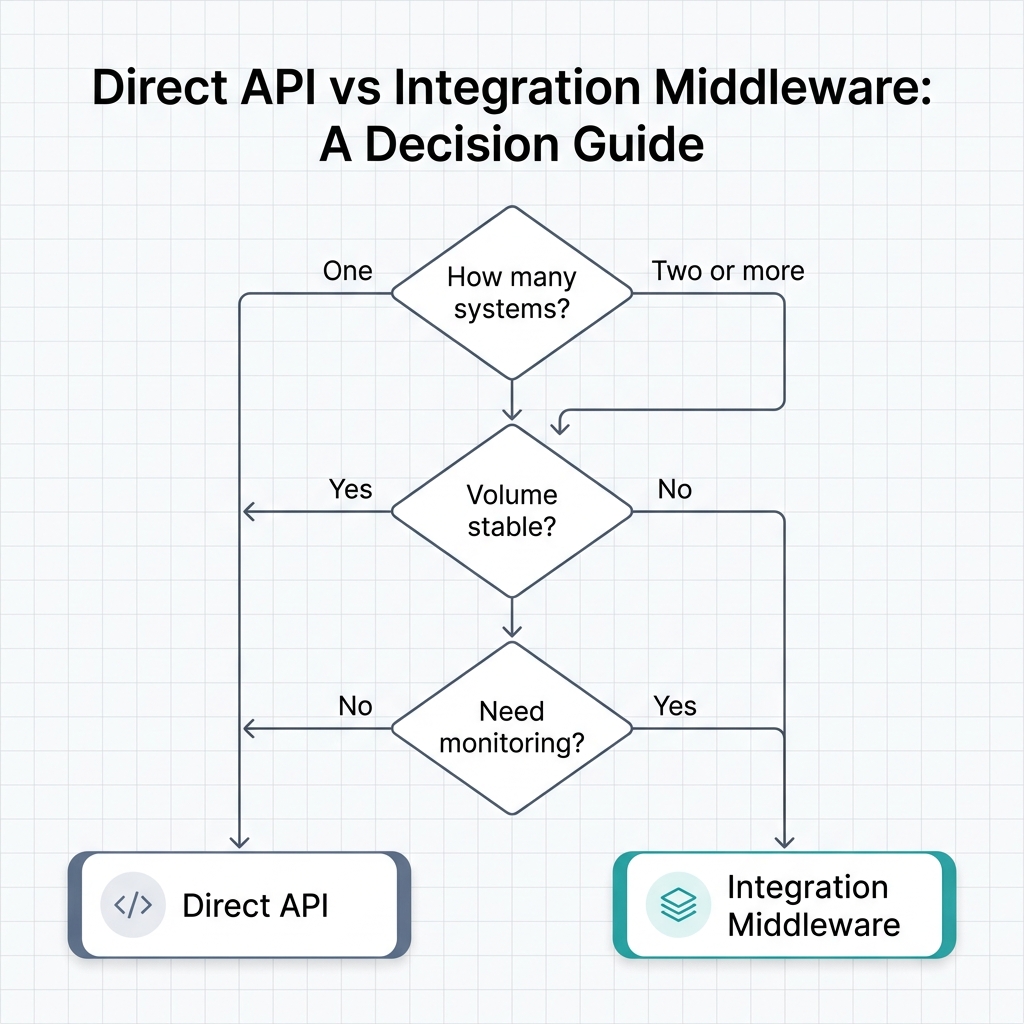
Choosing between direct APIs and middleware should follow from the workflow, not vendor fashion. Direct APIs fit small, stable, high-control point-to-point flows where the team can own the code and the monitoring. Middleware fits multi-system, higher-volume flows that need transformation, monitoring, retry logic, and reuse across several Litify integrations.
A REST API approach may be enough for a single intake form with a simple retry. A firm connecting intake, telephony, documents, and finance across two or more systems may benefit from integration middleware that centralizes monitoring and mapping. The decision is about operational control and visibility, not just technical capability application integration.
Litify runs on Salesforce, so the integration surface inherits the same platform model Litify platform overview and Salesforce Platform overview. In practice, the firms that get the most value from their Litify integrations are the ones that choose the pattern before the build, not after the first outage.
For teams that want a single partner across the stack, our Salesforce integration services and Litify consulting, customization and integration services cover both sides.
Start With Ownership, Not Connectors
Return to the opening story: the missing intake record was never an API problem; it was an ownership problem. The firm had a connector, but no one was assigned to notice the silent skip.
The practical implication is simple. Pick one workflow this quarter. Name the trigger. Declare the system of record. Map the fields. Define permissions. Write the failure path. Assign the owner. Choosing direct APIs or middleware follows from that definition, not the other way around.
Start with a single intake flow, because it is the highest-volume path a firm runs. A team that documents the exception path before build avoids duplicate matters later, and that discipline carries into every Litify integrations project the firm attempts next.
Have a Litify integrations backlog? Discuss one workflow with our team. If custom endpoint work is involved, our Salesforce development services can help design and build the connection, and our Litify consulting, customization and integration services cover a full scope review.
Frequently Asked Questions About Litify Integrations
What is a Litify integration?
A Litify integration is a defined workflow that connects Litify, which runs on Salesforce, to another system such as a web form, phone platform, document management tool, or accounting package. It specifies the trigger, records exchanged, authoritative system, permissions, failure handling, and a named operational owner.
Does Litify integration require middleware?
Not always. Small, stable point-to-point flows can often run on direct APIs. Multi-system, higher-volume flows may benefit from middleware for transformation, monitoring, retry logic, and reuse.
Who should own an integration workflow?
Each workflow needs a named owner. Typically intake belongs to legal operations or an intake manager, telephony to an intake supervisor or IT admin, documents to a records manager, and finance to a controller. The owner reviews the exception queue and resolves failures.
How do you avoid duplicate records when an integration retry fails?
Use idempotency keys or a natural key, such as source system plus source record ID. Before creating a record, check for an existing match. If a match is found, update it instead of inserting a duplicate. Log the payload and error with a correlation ID for traceability.
How do Litify integrations differ from a plain connector?
A connector moves data. A defined integration adds trigger conditions, the authoritative system of record, mapping rules, permissions, error handling, and a named owner. The connector is only the transport layer.
Can integrations break during a data migration?
Yes. Migration often exposes field-ownership conflicts in Litify integrations that were invisible during steady-state operation. Documenting mapping and validation rules before migration reduces the risk of duplicate or orphaned records.
How do I start a Litify integrations project without a full rebuild?
Start with one workflow, such as web intake, and treat it as the template for every Litify integrations initiative that follows. Write down the trigger, the system of record, and the named owner before any build work begins.

Loading...