
nCino Implementation: Phases, Slip Points and Partner Selection
What an nCino implementation actually involves: the phases and who from your side must show up, the two phases that reliably slip, the real cost of…

You’ve watched the demo. The flows are clean, the dashboards glisten, and the sales team promises a modern lending future. Then you sign, and reality sets in: an nCino implementation involves nine phases: discovery, design, configuration, integration, data migration, testing, training, go-live, and post-launch. Each phase demanding time from your team. That journey is rarely a straight line; it is a long-haul flight through weather. The destination is clear, but how you prepare for the turbulence determines whether you land on time. An nCino implementation is as much about people and process as it is about technology.
Vendor material is excellent at describing where nCino can take your lending operations. It is almost silent about the operational work required to get there. You’re left with a critical question: what will this project actually demand from my team, and where are the hidden traps? The answer is that a successful nCino implementation depends less on the software’s features and more on how honestly you plan the integration, data migration, internal resourcing, and partner selection. Underestimating any one of these four areas is the difference between an on-time go-live and a project that slips and burns budget. Success in nCino implementation hinges on your ability to align these moving parts.
This guide gives you a practitioner’s roadmap. In the sections ahead, we’ll walk through each phase, then examine the two places projects reliably slip integration at the core banking boundary and data migration. Next, we’ll explore the configuration-versus-customisation trade-off and the real internal cost of under-resourcing. And a neutral framework for evaluating any delivery partner and answer the most common questions buyers ask. By the end, you’ll know exactly what to expect and how to lead the project with confidence. This is the nCino implementation guide we wish we had before our first go-live.
What an nCino Implementation Actually Involves: The Phase Table
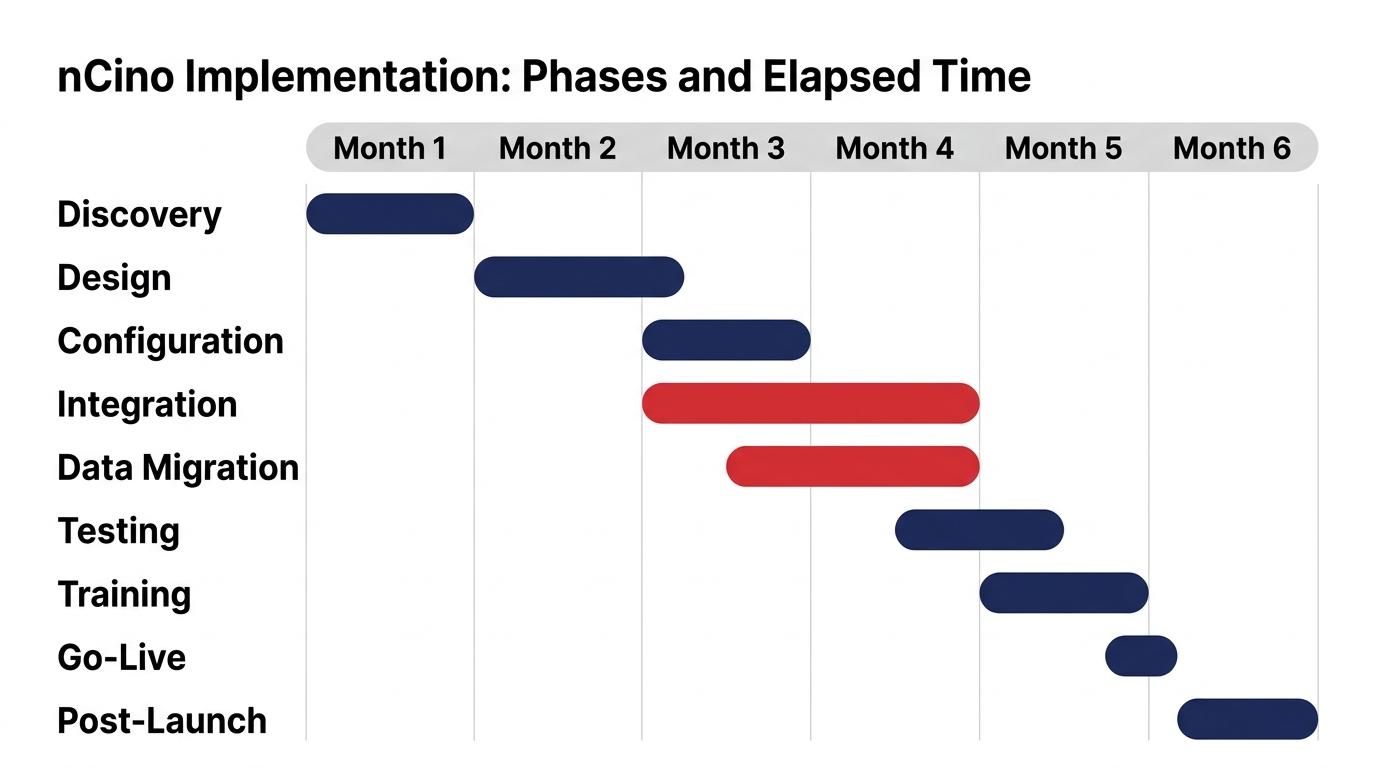
First, a clarification: nCino is not a Salesforce product. It is an independent platform built on Salesforce, meaning implementation work leverages Salesforce configuration but adds banking-specific layers on top. Understanding this distinction matters because it shapes how you approach configuration, integration, and partner skills. Salesforce positions itself heavily in financial services, as seen on its Financial Services Software & CRM page, but that ecosystem only matters if the foundational implementation is sound.
The table below breaks down the typical phases, duration ranges, and the client-side people you need to involve. These ranges are planning expectations drawn from common project patterns, not fixed promises. Your actual timeline will vary with scope, data readiness, and integration complexity. Use this table to build your resource plan early, not to set an unrealistic go-live date. It serves as your compass throughout the nCino implementation.
| Phase | Typical Duration | Client-Side People Required | Key Activities |
|---|---|---|---|
| Discovery | 2–4 weeks | Product owner, operations lead, IT architect | Process mapping, requirements gathering, gap analysis |
| Design | 2–4 weeks | Business analyst, process owners, IT lead | Solution design, integration blueprint, data mapping plan |
| Configuration | 4–8 weeks | Salesforce admins, business analysts, product owner | Platform setup, workflow configuration, process alignment |
| Integration | 4–8 weeks | IT integration lead, core team, vendor | Core system APIs, middleware, error handling, security |
| Data Migration | 4–8 weeks | Data steward, IT, business validators | Extract, cleanse, map, validate, load, reconcile |
| Testing | 3–6 weeks | QA team, business users, IT | Unit testing, integration testing, user acceptance testing, regression |
| Training | 1–2 weeks | Trainers, super users, end users | Role-based training, documentation, sandbox practice |
| Go-Live | 1–2 weeks | All stakeholders, support team | Cutover, go-live checks, hyper-care |
| Post-Launch | 4–8 weeks | Product owner, support team, IT | Issue resolution, optimization, handover |
Some phases overlap. Data migration and integration often run in parallel because they depend on the same early design decisions. The important takeaway is that each phase requires named individuals from your organisation not just generic “business involvement.” A mid-sized credit union might spend two weeks on discovery because their process map is clear; a large bank with multiple product lines might need six weeks. The range exists because complexity varies. Your team’s availability can make or break the timeline, so plan for it.
With the full journey in view, we now turn to the two places where even well-planned projects reliably slip—integration at the core banking boundary and data migration.
The First Slip Point: Integration at the Core Banking Boundary
Your core banking system is the financial heart of the institution. It holds accounts, transaction histories, interest calculations, and security logic. nCino needs to read and write there to originate loans and manage the lending lifecycle. This is not just about plumbing; it’s about understanding how your core system thinks. The core system has its own data model, error codes, and transaction protocols. Every account type, product, and scenario must be mapped before you can estimate the integration effort honestly. That is where estimates break. Teams often size integration based on the happy path: customer account lookups and loan status updates. But the real complexity lives in edge cases: co-borrowers, guarantors, legacy products, and failure handling. If your core’s loan origination API does not include a field for co-borrower data, you may need a middleware workaround or a custom mapping. That discovery usually happens during integration testing, not during the sales cycle, and it adds weeks. Effective nCino implementation requires early and honest integration discovery.
Start integration discovery early. Bring your core system experts into the design phase. Define clear service-level expectations for data latency, error handling, and retry logic. Also, keep an eye on future capabilities. nCino’s Mortgage MCP for AI agent integration announcement signals that the platform is expanding connectivity options. Do not add that complexity now, but make sure your integration layer can accommodate future change without a complete rebuild. For many institutions, this is where they realize that a solid nCino implementation requires careful thinking about how the core system’s data model aligns with the new platform. That alignment is often best handled with the help of an experienced implementation partner who has navigated similar core banking integration projects.
If integration is where systems meet, data migration is where the messiest reality of your organisation surfaces, the second major slip point.
The Second Slip Point: Data Migration and the Dirty-Dataset Problem
Historical data is rarely as clean as the source system suggests. Duplicates, incomplete records, legacy field formats, and missing audit trails are the norm. Migration is not a copy-paste exercise. It requires extraction, cleansing, mapping, validation, and load and each step takes longer than most estimates, especially cleansing and validation. Validation is the hidden bottleneck. Business users must sign off on migrated data, but they are already stretched with their day jobs and project responsibilities. If you ask them to validate thousands of records in a week, the project stalls. Run a data audit before committing to a go-live date. Budget for rework. Use a framework like the NIST AI Risk Management Framework to think about data governance, but keep the focus practical: find the duplicates and discrepancies now, not during go-live. Data governance is part of any responsible nCino implementation.
A common example: a team assumes historic loan files have a single customer ID, but then discovers that multiple legacy systems used different identifiers. That forces a deduplication project that adds weeks and requires business decisions about which record is authoritative. If you wait until migration to find this, your go-live date is already at risk. The migration effort is often underestimated because the focus is on moving records, not on the business rules that govern them. Treat migration as a core part of your nCino implementation plan, not an afterthought.
Once integration and data are planned, the next decision is how far to bend the platform to your old processes configuration versus customisation.
Configuration vs. Customisation: The Hidden Cost of the Second Option
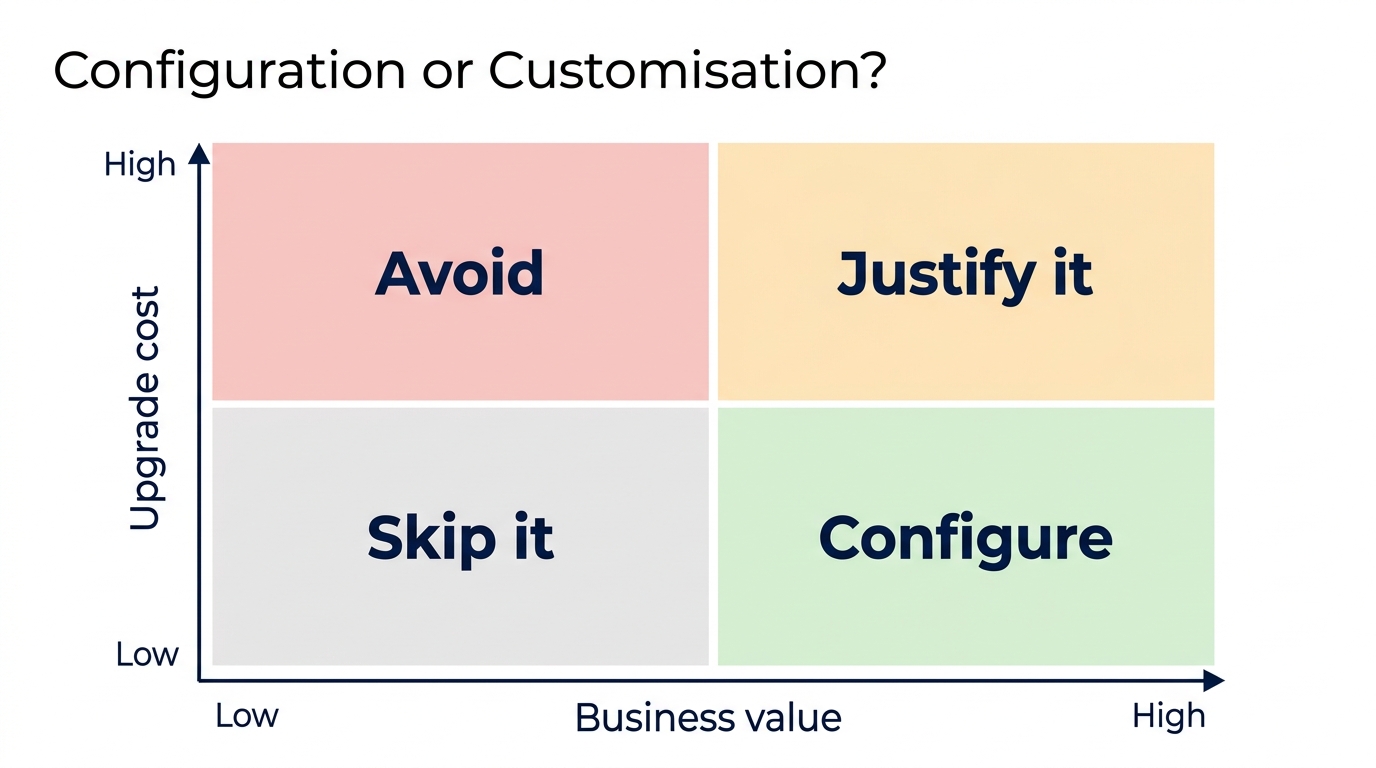
Configuration means using nCino’s native settings, workflows, and building blocks to match your processes without changing the platform’s code. Customisation means writing code or modifying the underlying platform, changes that can break on upgrade, require regression testing, and create ongoing dependency on the original builder. The long-term cost of customisation in an nCino implementation is upgrade friction. Every nCino release may not be compatible with your custom code. You must retest, patch, and sometimes rewrite to keep your environment current. That effort compounds over years and quietly drains budget and internal capacity. Effective platform configuration can prevent many of these issues from arising in the first place, which is why getting it right during nCino implementation is critical.
Here is a rule of thumb: customise only when a standard feature would force a critical workflow compromise that harms regulatory compliance or customer experience. Otherwise, adapt your process to the platform. A bank might customise the loan decision engine to support a unique credit policy, but a simpler configuration could handle 95% of cases. The remaining 5% may be better handled with a manual workaround or a separate process rather than code that ties you to the past. Because nCino is built on Salesforce, you can sometimes extend functionality using the broader Salesforce ecosystem without custom code. If you need a refresher on the platform’s foundation, see our article on what Salesforce nCino is. Understanding that relationship helps you make smarter build decisions. In any nCino implementation, the configuration vs customisation decision is one you should revisit at each phase, as the cost implications can shift.
Even with perfect technical planning, a project lives or dies by the people you dedicate, which leads to the most overlooked success factor.
The Real Cost: What Your Team Must Invest (and Why Under-Resourcing Sinks Go-Lives)
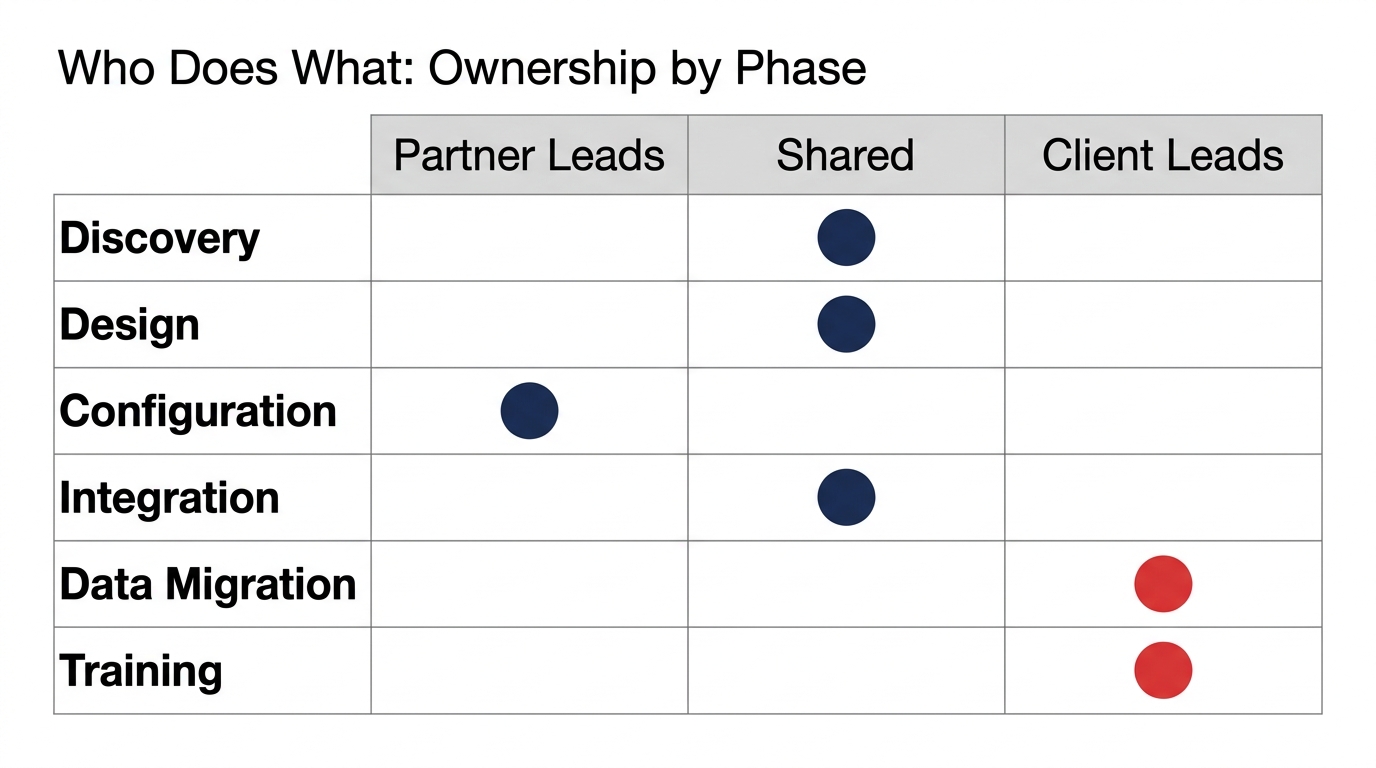
A frequent cause of slipped go-lives is under-resourced internal teams. This is a lesson we’ve seen repeat across institutions: teams that underestimate the internal effort almost always watch their timelines stretch. These are not advisory roles. They are named individuals with defined capacity, and they need to be backfilled from their daily responsibilities. Asking people to do this “on top of their day job” is the quickest way to delay decisions and stall progress. The table below shows typical time commitments by role. These ranges are illustrative, drawn from project patterns. Your exact allocation will depend on scope and project duration, but the message is clear: you must free up these people. During nCino implementation, your internal team’s bandwidth is a critical success factor.
| Role | Typical Time Commitment During Key Phases |
|---|---|
| Product owner | 30–50% during design, 70%+ during testing |
| Business analyst | 50–80% across the project |
| IT integration lead | 70–100% during integration |
| Data steward | 50–80% during data migration |
| Testers (UAT) | 50–100% during user acceptance testing |
The message is simple: a loan officer who is expected to be product owner but is given only a sliver of their time is a design decision waiting to stall. That is the practical reality. Under-resourcing is not a small risk; it is often a primary reason implementation timelines slip. Partner selection should include assessing whether the partner’s team composition matches your internal capacity. If you are short on data stewards, a partner that brings data migration specialists can be valuable. But no partner can replace your business decision-makers. However, without deliberate user adoption efforts, even the best-planned nCino implementation can fail to deliver value, so invest in change management from the start. For broader change management and CRM transformation insights, see our CRM and ERP transformation services.
Beyond the technical and resource planning, you must also invest in user adoption, the human side that often gets overlooked. User adoption is not automatic after go-live; it requires deliberate change management. If your team is not ready to embrace the new workflows, no amount of technical preparation will save the nCino implementation investment. A well-executed nCino implementation pays off only when users actually embrace the new system.
With the scope, slip points, and internal effort understood, the final major decision is who you trust to build with you.
How to Evaluate Any nCino Delivery Partner: Criteria, Not Sales Pitches
The right partner is not the one with the slickest pitch; it is the one with the strongest fit for your specific needs. Use these four criteria to evaluate any firm including ours, if we were in the running. This is neutral advice, not a sales steer, and it applies to any nCino consulting engagement. When you assess partners, keep these criteria front and centre.
1. Team composition: who actually does the work? Ask for the CVs of the people named in the proposal. Will senior consultants lead the project, or will junior offshore staff do the day-to-day work after the sales team leaves? A reputable partner will be transparent about roles and staffing.
2. Integration and migration track record. Ask for specific examples of similar core banking integrations and data migrations. Walk through a recent migration’s data cleansing log. Do they have a systematic approach, or is it ad hoc? General marketing case studies are not enough. A proven nCino implementation partner will have a structured method for handling the unexpected.
3. How change requests are priced after go-live. Is there a clear change management process? What are the hourly rates? Avoid partners who treat every small change as a new project. Post-go-live support should be predictable and documented.
4. What handover looks like. Will the partner train your team and document the solution so you are not forever dependent on them? A good partner builds your internal capability, not a dependency. When evaluating an implementation partner for an nCino implementation, these criteria will separate the wheat from the chaff.
If you are still comparing platforms or need a broader selection framework, read our guide on choosing a loan origination system. We also offer a practical reference on reimagining financial services with Salesforce.
Even after you have evaluated partners and planned the phases, you’ll still have practical questions, so we’ve answered the most common ones here.
Your nCino Implementation Questions, Answered
How long does an nCino implementation take?
A typical nCino implementation takes roughly 6–9 months for a standard rollout, but this is a planning estimate, not a guarantee. The actual timeline depends on scope, data readiness, and integration complexity. A simple single-product credit union might land in 6 months; a multi-product bank could take 12 months or more. Use the phase table to build a realistic schedule, and always include a buffer. nCino implementation timelines are often underestimated, so plan conservatively.
What does nCino integrate with?
nCino integrates with your core banking system, loan origination system (if separate), document management, and other third-party fintechs. The core banking integration is the most critical and most complex. The exact nCino integration work depends on what your core system supports and how well its APIs are documented.
Who should own an nCino implementation internally?
A named product owner with business authority is essential. That person must be able to make decisions about process and priorities. A programme manager should coordinate between IT and business teams. These roles need real time allocation, not just titles. Without dedicated owners, nCino implementation will stumble.
Can you customise nCino?
Yes, but with the trade-offs discussed. Customisation increases upgrade friction and long-term cost. Always prefer configuration where possible. Only customise when a standard feature would force a critical workflow compromise that harms regulatory compliance or customer experience.
What happens after go-live?
There is a post-launch support period, typically 4–8 weeks, where the project team remains engaged to resolve issues and optimise. Then the solution is handed over to your internal team. Plan for ongoing administration, maintenance, and continuous improvement. You will need internal Salesforce administrators or a managed service arrangement.
The Path Forward: Prepare for Turbulence, Not Just the Destination
The software will work if your preparation is honest. Integration, data, people, and partner are the levers you control. Use the phase table to set expectations, invest early in integration and data audits, allocate full-time internal roles, and apply neutral criteria when choosing a partner. A successful nCino implementation is far more about planning honesty than about software features; the features will work if your integration, data, people, and partner criteria are honest before you start.
That distinction matters because most implementation pain is self-inflicted through optimism. The vendor’s demo showed you the destination. This guide gave you the flight plan. The business implication is clear: every day of delay burns budget and morale, while a well-prepared team lands on time and captures value faster.
Before you commit to a go-live date, consider an independent readiness review of your implementation plan, focusing on integration, data, and resourcing. At Webuters, we bring Salesforce platform expertise and financial-services delivery experience to help you pressure-test your plan and identify gaps. Explore our insurance and finance industry solutions to see how we think about complex transformations. The question is not whether to use nCino; it is whether you are prepared for the work it demands. nCino implementation success starts with honest preparation, and we’re here to help.
Frequently Asked Questions
How long does an nCino implementation take?
A typical nCino implementation takes roughly 6–9 months for a standard rollout, but this is a planning estimate, not a guarantee. The actual timeline depends on scope, data readiness, and integration complexity. A simple single-product credit union might land in 6 months; a multi-product bank could take 12 months or more. Use the phase table to build a realistic schedule, and always include a buffer.
What does nCino integrate with?
nCino integrates with your core banking system, loan origination system (if separate), document management, and other third-party fintechs. The core banking integration is the most critical and most complex. The exact nCino integration work depends on what your core system supports and how well its APIs are documented.
Who should own an nCino implementation internally?
A named product owner with business authority is essential. That person must be able to make decisions about process and priorities. A programme manager should coordinate between IT and business teams. These roles need real time allocation, not just titles. Without dedicated owners, nCino implementation will stumble.
Can you customise nCino?
Yes, but with the trade-offs discussed. Customisation increases upgrade friction and long-term cost. Always prefer configuration where possible. Only customise when a standard feature would force a critical workflow compromise that harms regulatory compliance or customer experience.
What happens after go-live?
There is a post-launch support period, typically 4–8 weeks, where the project team remains engaged to resolve issues and optimise. Then the solution is handed over to your internal team. Plan for ongoing administration, maintenance, and continuous improvement. You will need internal Salesforce administrators or a managed service arrangement.
nCino implementation and integration
Plan the phases, the people and the integrations before the first sprint starts.
See nCino services
Krishna is the Founder and CEO of Webuters, a technology leader specializing in Generative AI, intelligent automation, enterprise software, and digital transformation. He helps organizations leverage emerging technologies to drive innovation, operational efficiency, and business growth. Through his writing, Krishna shares insights on AI adoption, technology leadership, product innovation, and the future of work, helping leaders navigate change and build future-ready organizations.
Follow Krishna on LinkedIn