
Claudeforce’s Developer Plugin Is the Real Story for Salesforce Teams (If You Can Govern It)
Claudeforce shipped two plugins: one for sales, one for developers. This guide shows how Salesforce MCP powers org discovery, impact analysis, and Apex.
Salesforce MCP is the part of the Claudeforce announcement almost nobody is talking about, and it is the part that will change how your team works. When Salesforce and Anthropic announced the Claudeforce partnership, every admin and architect I know asked the same question: is this the AI moment for Salesforce, or another partnership press release?
It is neither, quite. Two different tools shipped under one name, and the coverage has almost entirely followed the wrong one. The tool getting the headlines is a plugin that puts CRM data inside Claude for sales reps. The other is a plugin for Claude Code that works directly against your org metadata, Apex, deploys, security review. That second one is what changes how delivery teams build and maintain Salesforce, and hardly anyone is writing about it.
Worth clearing up the acronym first, because it is doing the real work here. Salesforce MCP is the Model Context Protocol, an open standard originally developed by Anthropic for connecting AI tools to data and systems, as Salesforce has adopted it across Agentforce and its developer tooling. It is not a Salesforce invention. It is the open interface that lets Claude reach into your org at all.
My argument is straightforward: the developer plugin can genuinely speed up org discovery, impact analysis, Apex drafting and migration prep. But it is a tool that amplifies whatever governance you already have, and exposes whatever you lack. Everything below is written for the person who will be accountable for that org afterwards.
Two Plugins, One Name: Why Most Coverage Missed the Developer Tool
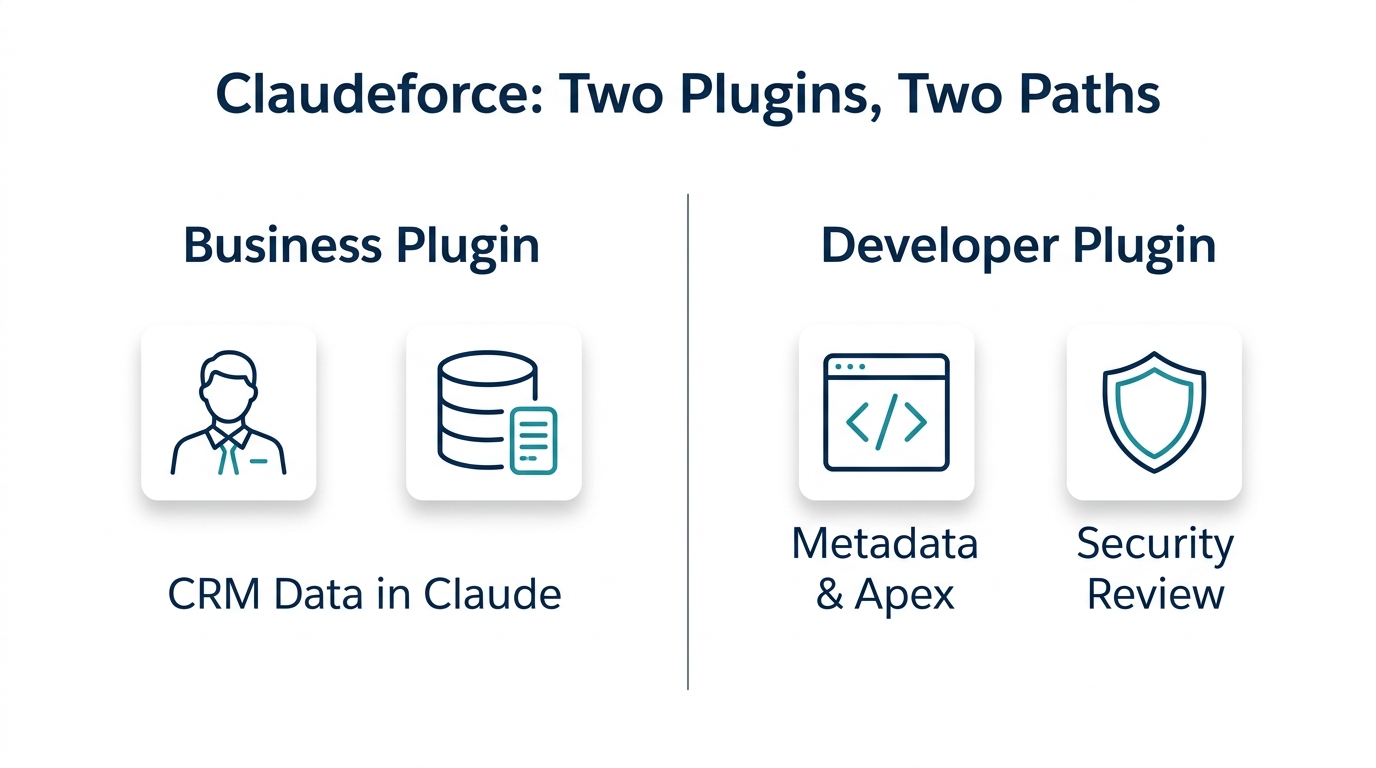
Salesforce and Anthropic announced a plugin that puts CRM data inside Claude, with prebuilt sales skills for pipeline, forecasting, and account research. The partnership has since expanded to regulated industries, signaling a push beyond the initial sales use case. This plugin is designed for reps who live in Salesforce and want Claude to summarize opportunities, highlight stalled deals, or answer account questions without leaving their workflow.
The Salesforce Development plugin for Claude Code is a developer tool that lets an AI agent work against your org’s metadata, Apex, deploy/retrieve, and security review. It is documented in Salesforce’s sf-skills repository, and it is the clearest working example of Salesforce MCP in practice. Meanwhile, the press release and early analysis confirm the Claudeforce initiative is still in pilot for the business plugin. It’s not about summarizing opportunities; it’s about letting an AI assistant read metadata, write Apex, prepare deployments, and run security checks. That’s the work your team does every day. And it’s the part that demands the most governance attention.
What Is Salesforce MCP? The Open Standard That’s Not a Salesforce Invention
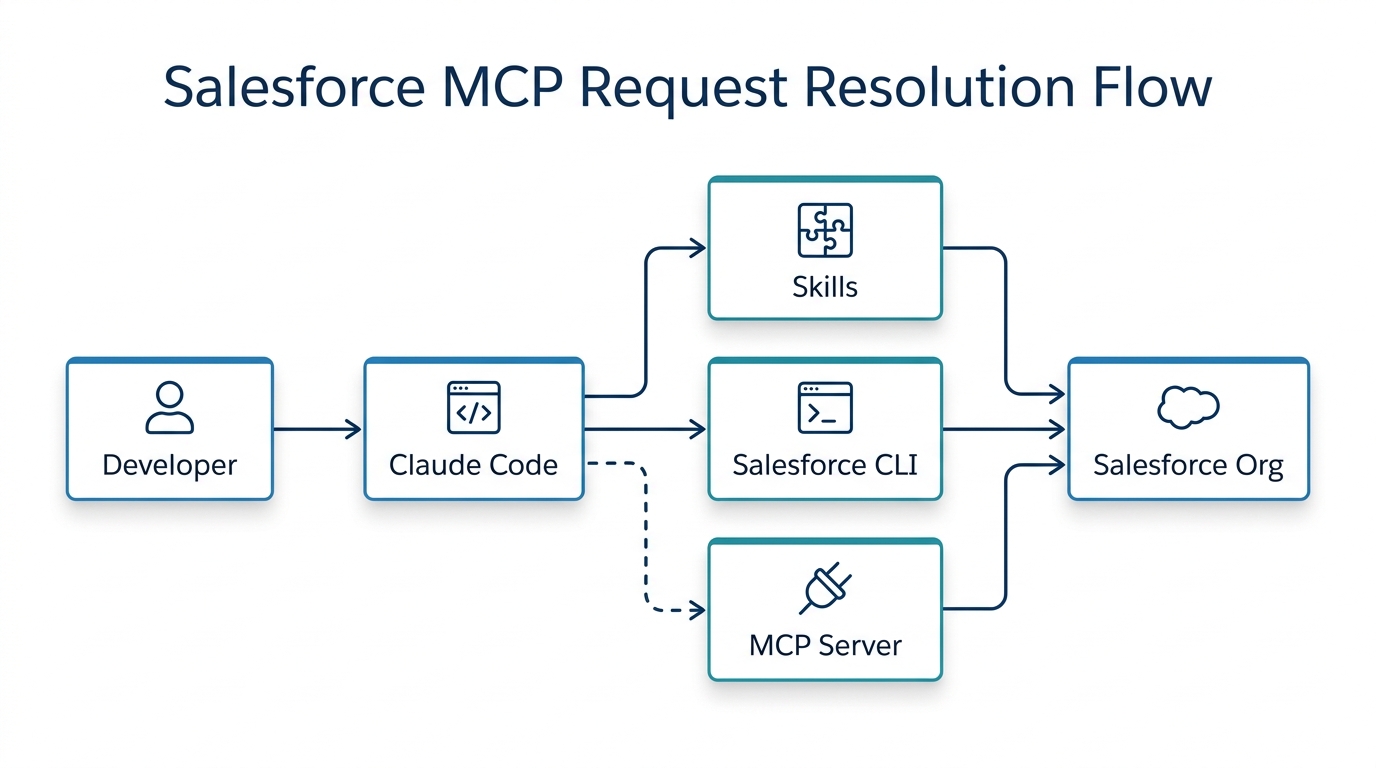
Salesforce MCP leverages the Model Context Protocol (MCP), an open standard originally developed by Anthropic for connecting AI tools to data and systems. Think of it as a universal USB port for AI, one standard way to plug any AI assistant into any system. Claude Code uses MCP to talk to external services, and Salesforce MCP is how that reaches your org; Salesforce has now adopted this standard across its platform, both in Agentforce and in developer tooling. That’s why the two Claudeforce plugins exist.
For the developer plugin, the interesting part is how it resolves requests. According to the sf-skills README, the plugin uses a three-tier resolution: skills first, then Salesforce CLI, then a Salesforce MCP server. Skills are prebuilt capabilities that encapsulate common Salesforce operations. The CLI is the trusted command-line tool that developers already use. The Salesforce MCP layer is the last resort when neither of the first two can handle the request; in the current plugin that means salesforce-api-context and salesforce-metadata-experts for API and metadata guidance, plus a local host that spawns the Apex and SOQL language servers and exposes them as MCP tools. This ordering matters because it prioritizes reliability over raw AI improvisation. When you ask Claude to retrieve metadata, it first tries the most deterministic path, the skill or CLI before falling back to the open Salesforce MCP connection. That design is the most reassuring thing about Salesforce MCP: it reduces the chance of the assistant improvising where a deterministic path exists.
In practice, that means a query like “Show me all validation rules on the Account object” is routed through a skill that knows exactly how to query metadata, not through a freeform AI guess.
It is worth separating two things that share an acronym. Agentforce MCP is about letting agents your business users run reach external systems at runtime. Salesforce MCP as the developer plugin uses it is a build-time capability: it reaches your metadata, your Apex and your deployment tooling while a developer is working, and it stops when the session does. The governance questions differ accordingly — Agentforce MCP raises questions about what your customers’ agents can touch in production, whereas the developer plugin raises questions about what your engineers can change and who reviewed it.
Inside the Developer Plugin: Metadata, Apex, Deploys, and Security Review
The Salesforce Development plugin for Claude Code is not a chatbot bolted onto your org. It’s a command-line tool that reads and writes metadata, drafts Apex, runs security reviews, and helps with deployments. Practically, it runs inside Claude Code against a Salesforce DX project and expects the Salesforce CLI, Node.js LTS and Python alongside it; it auto-detects the project and injects org context when the session starts. Installation is one command in Claude Code — /plugin install salesforce-development@claude-plugins-official — once you have authorised an org with sf org login web. What arrives is a library of roughly three dozen skills spanning Apex, Flow, declarative metadata, SOQL, deploy and retrieve, permission sets and sharing, and code analysis. From the sf-skills documentation, here’s what it can do today:
- Metadata authoring: Create or modify Apex classes, triggers, and custom metadata using natural language prompts. Claude drafts the code, and you review it before it goes anywhere.
- Apex development: Draft, review, and explain Apex logic. This is huge for understanding inherited code or iterating quickly on a new class.
- Deploy and retrieve: Move metadata between orgs (scratch, sandbox, production) using the plugin’s integration with Salesforce CLI. The plugin prepares the metadata deployment, but the deploy command still requires your explicit go.
- Security review: Run Salesforce Code Analyzer — PMD, the Apex security engine, ESLint and RetireJS behind a single command — and triage what it returns. The plugin surfaces and explains the findings; a human must still sign off.
- Reporting and discovery: Ask questions like “What custom objects exist?” or “Who has access to this permission set?” The plugin can generate an org inventory.
- Discover installed vs. available: Useful for license audits and feature adoption. You can ask what’s installed in your org versus what your edition supports.
Here’s a practical example. A new architect inherits a muddled org. Instead of spending days clicking through Setup, she opens Claude Code and types: “List all Apex classes, tell me which ones call System.debug, and explain what each one does.” Within minutes, she has a structured report of technical debt. Or, a migration lead asks: “What custom objects exist in the sandbox but not in production?” The plugin compares metadata and returns the delta. That’s real productivity, but it does not replace the architect’s judgment — it feeds it.
Salesforce MCP also matters for teams that need to standardize outputs. Because the plugin exposes a consistent interface, your org discovery reports, impact analyses, and security checks follow the same pattern every time.
Where This Genuinely Accelerates Delivery: Org Discovery, Impact Analysis, and Apex
Org discovery and documentation. On an inherited org, you often spend days mapping what exists. With Claude Code, you can get a structured inventory of metadata, Apex, and access in hours. The honest version of the benefit is narrower than the demos suggest: it compresses the reading, not the understanding. Someone still has to verify the inventory against how the business actually works, and that verification is where inherited orgs surprise you.
Impact analysis before a change. Before deleting a field or changing a validation rule, you need to know what breaks. Ask Claude to trace references across Apex, flows, and layouts. It can catch dependencies you might miss. However, the AI may not understand business context like why a certain field is still used in a financial reporting flow. A human must confirm the analysis.
Drafting and reviewing Apex. Claude can generate boilerplate code, write unit tests, and review for common security pitfalls. That accelerates the grunt work, but a senior developer must own the final logic, coding standards, and performance tuning: Apex development judgement does not transfer. AI-drafted Apex often reads cleanly and still fails under bulk data, because governor limits punish patterns that look perfectly reasonable on a single record. A reviewer who has been paged at 2am for a 101-query exception catches that; a demo does not.
Preparing a migration. For a data migration, Claude can profile source data, map fields, and generate Apex or Data Loader scripts. But the mapping and transformation rules need human sign-off. For example, mapping a legacy “CustomerType” picklist to a new “AccountSegment” field often involves business decisions that an AI can’t make alone.
The table below makes the division of labor clear.
| Task | What the plugin accelerates | What still requires a human |
|---|---|---|
| Org discovery and documentation | Generating metadata inventory, mapping custom objects and fields, explaining Apex classes | Validating the inventory, ensuring it matches business reality |
| Impact analysis | Tracing references across Apex, flows, layouts, and permission sets for a proposed change | Confirming the analysis, assessing business risk |
| Apex drafting and review | Writing boilerplate, unit tests, and security checks | Coding standards, logic correctness, performance optimization |
| Data migration prep | Profiling source data, mapping fields, generating scripts | Business mapping, transformation rules, data quality sign-off |
| Deploy and release | Preparing metadata deployment artifacts, retrieving metadata | Reviewing changeset, approving in change management, actual deploy to production |
| Security review | Flagging common vulnerabilities and permission risks | Final security sign-off, enforcing governance policies |
Notice the pattern: the plugin accelerates the preparation, not the decision. The deploy decision always stays human. If you want a genuinely low-risk first use, the plugin also ships a read-only architecture-review agent that grades a project against Salesforce’s Well-Architected pillars and returns a scored report with a governance checklist. It cannot change anything, which makes it the easiest thing to put in front of a cautious security team.
Security and Privacy: What a Cautious Admin Needs to Know Before Connecting Claude
Most AI-safety articles are generic; this one is specific to Salesforce. Before you connect Salesforce MCP to a real org, settle these six questions.
Permissions are inherited, not bypassed. An AI agent cannot see records the authenticated user cannot. Salesforce MCP runs with your user’s permissions, so least privilege still applies. If your user profile can’t see financial data, neither can the AI.
Connected-app and scope decisions. You must decide which OAuth scopes you grant. For initial POC, limit scopes to metadata read only. Do not grant write access until you’ve tested in a sandbox. The connected app is the gateway into Salesforce MCP; treat it like any other integration.
What leaves the org and where it goes. Claude Code sends your prompts and context to Anthropic’s API. That means your Apex code, metadata, and possibly data excerpts leave your Salesforce org. But for regulated industries, you need to review what metadata is being sent and ensure it doesn’t contain sensitive information. The partnership’s expansion to regulated industries suggests compliance capabilities, but you should still validate.
Write actions need approval gates. Never let an agent deploy to production directly, however good the Salesforce MCP tooling looks in a demo. Build a human review step into the pipeline. Worth knowing: the plugin does not leave this entirely to you. It ships hooks on sf project deploy — a production deploy-safety gate and an Apex pre-deploy diagnostics gate — so a guard rail exists in the tool as well as in your process. Treat it as a backstop for your review, never a substitute for it.
Audit trails are essential. Every change Claude suggests must be logged and traceable. Who asked for the Apex class? Who approved the deployment? If something goes wrong, you need to answer “who changed what and why.” The Salesforce MCP connection should be monitored as well.
The practical rule: sandbox first. Run the plugin against a scratch org or sandbox before production.
That’s where you learn what the plugin can do, where it hallucinates, and where your own review process needs to tighten.
What to Watch: The Moving Ground of Salesforce’s Skills Library
Even when you’ve governed correctly, remember this is moving ground. Salesforce’s own skills documentation warns that the library changes rapidly and does not carry the stability guarantees of GA platform APIs.
It is worth being precise about what is unstable here. Salesforce MCP itself is an implementation of an open, versioned protocol; the skills layer sitting on top of it is the part Salesforce warns will be renamed, restructured or removed between releases. So anything you build directly against a named skill should be designed to adapt, while integrations that go through the Salesforce MCP interface or the CLI sit on firmer ground. Two practical habits follow from that. Schedule a review of anything you automate on top of the skills, rather than assuming it still works. And for deploys that matter, keep the Salesforce CLI as the path of record and treat the plugin as an assistant to it, not a replacement for it.
Don’t bet your org’s core architecture on features that can shift without notice.
One reassurance: none of this locks you to a single vendor. The Model Context Protocol is open, so the same governance you build here applies to every other MCP server you connect.
Governance Is the Prerequisite: How to Adopt Salesforce MCP Responsibly
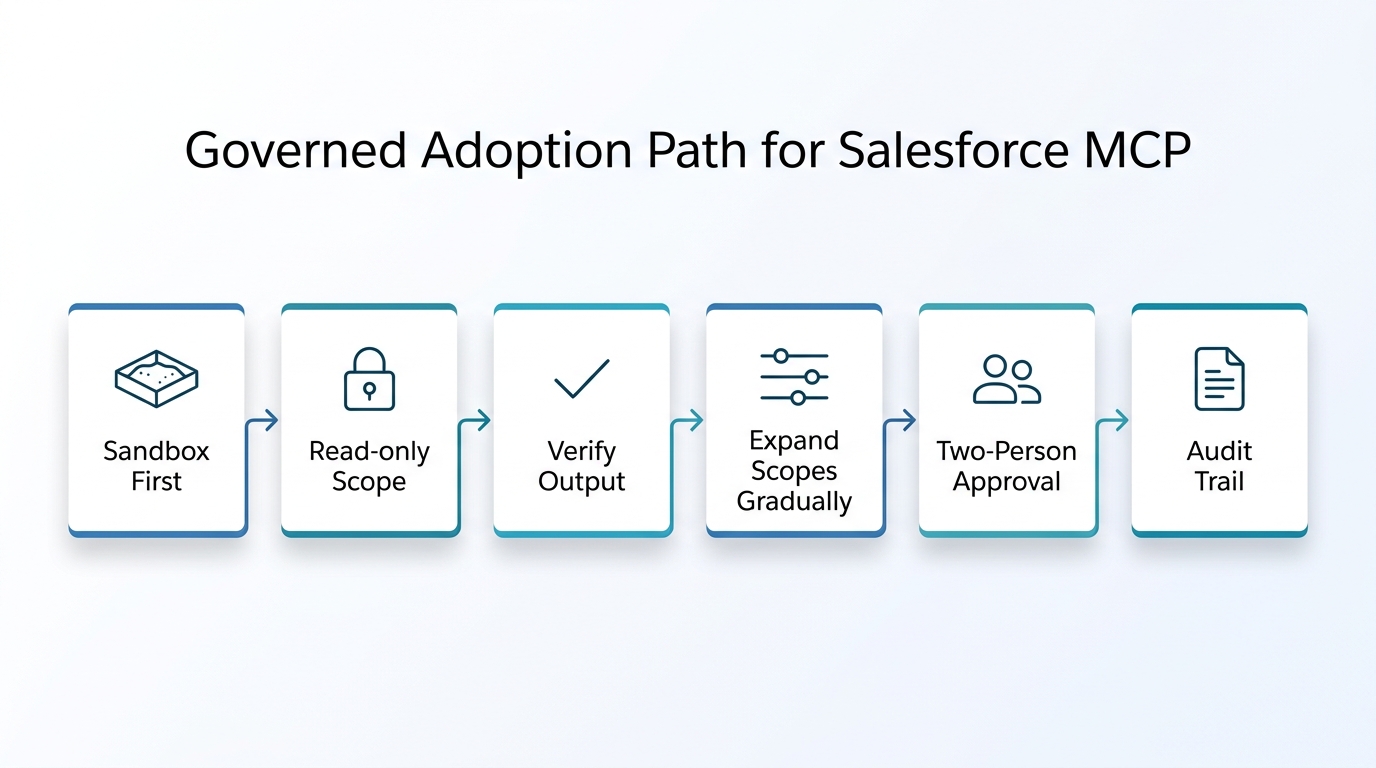
Adopting Salesforce MCP isn’t just about flipping a switch. You need to think about it as an ongoing practice that touches your team, your permissions, and your deployment pipeline. The good news is that the discipline you already apply to production changes — review, approval, audit — maps directly onto a Salesforce MCP workflow, with no new theory required.
Start with a small pilot. Pick a sandbox, give the developer plugin read-only access, and ask it to generate an org inventory. Have a senior developer verify the output. That single exercise will tell you more about the tool’s accuracy and your team’s comfort than any demo ever could.
From there, expand in a fixed order rather than by appetite:
- Read-only metadata scope in a sandbox, with a senior developer checking every output against the org.
- Write operations in a sandbox or scratch org only, with the Salesforce MCP connected app still scoped away from production.
- Production reads, once you know where the tool is reliable and where it guesses.
- Production writes under a two-person rule — one person reviews the change, a different person approves the deploy.
At every step, keep an audit trail that ties each change back to the request that produced it. If you cannot answer “who asked for this and who approved it” six months later, the Salesforce MCP rollout has outrun its governance.
This is how Salesforce MCP stops being a novelty and becomes a reliable part of your delivery toolkit. It’s the same governance muscle you’ve built for every other critical system. When you treat Salesforce MCP as a production change, you get its speed without sacrificing control.
Now, let’s talk about your org. At Webuters, we help teams adopt Salesforce MCP and the tooling around it safely. We start with a conversation about where AI can genuinely accelerate your delivery not with a code deployment. Our Salesforce development services cover everything from org audits to custom builds. If you want to avoid common AI pitfalls, our AI implementation challenges guide is a good place to start. And before you dive into any agent project, read AI agents explained for business leaders to ground your strategy.
The question isn’t whether AI will touch your Salesforce org — it already has. The question is whether you’ll govern it like a production change, with permissions, approvals, and audit trails, or let it roam free and hope for the best. Let’s have that conversation.
Start with one sandbox, a read-only scope, and a single org inventory you check by hand. That one exercise will tell you more about the plugin’s accuracy, and your team’s readiness, than any demo. If a wider CRM programme sits behind this, our CRM and ERP transformation services are where that conversation usually starts.
Frequently Asked Questions
What is Salesforce MCP?
Salesforce MCP is the application of the Model Context Protocol, an open standard originally developed by Anthropic, to Salesforce. It allows AI tools like Claude to connect to Salesforce data and systems through one standard interface, rather than a bespoke integration built for a single vendor. Salesforce now supports MCP across Agentforce and its developer tooling. This Salesforce MCP setup is what powers the developer plugin.
What is Claudeforce?
Claudeforce is the partnership between Salesforce and Anthropic, announced in 2026. It includes two plugins: a sales-focused plugin that puts CRM data inside Claude for business users, and a developer plugin for Claude Code that enables AI-assisted development, metadata management, and security review. The Claudeforce initiative is more than just the sales demo; the developer plugin is its technical core.
Can Claude write Apex and deploy it?
Yes, the developer plugin can draft Apex and prepare deployments, but it does not deploy autonomously. A human must review the code, approve the changeset, and execute the deployment through a controlled process.
Can an AI agent see data the user cannot?
No. The agent inherits the permissions of the authenticated user. If the user cannot see a record or field, the agent cannot either. This is why least privilege and dedicated service accounts are important. Salesforce MCP does not bypass these permission set rules.
Is this safe to use against a production org?
Not initially. Start in a sandbox or scratch org. Validate outputs, establish approval gates, and ensure audit trails before ever considering production. Even then, human review remains mandatory for any write operation.
Salesforce development services
Configuration, custom development and integrations that fit how your teams work.
See Salesforce services