AI Agents Explained: Finally, a Plain-English Guide for Business Leaders
Confused by AI agents? Get a plain-English definition, comparison with chatbots & copilots, real business examples, honest limits, and a leader’s evaluation…

AI agents are redefining how work gets done inside enterprises. You’ve likely heard the term in vendor pitches, earnings calls, and boardroom conversations but most business leaders still can’t explain it clearly. You’re not alone.
The noise around AI agents is deafening. Some vendors make them sound like magic; others promise they’ll replace entire departments. The truth is simpler and more useful: AI agents are a new category of enterprise software that can plan, use tools, and take action across your systems. But their success depends on clear goals, proper data access, and human oversight not on sci-fi ambition.
In this guide, we’ll cut through the hype. First, we’ll define what an AI agent really. Then, we’ll compare it side‑by‑side with chatbots and copilots so you’ll never confuse them again. We’ll walk through four concrete business examples across HR, finance, sales, and operations. After that, we’ll be honest about where AI agents still fail and what you must demand from any implementation. Finally, we’ll give you a practical framework to evaluate whether enterprise AI agents belong in your organization. By the end, you’ll be able to explain AI agents to your board with confidence.
What Is an AI Agent?
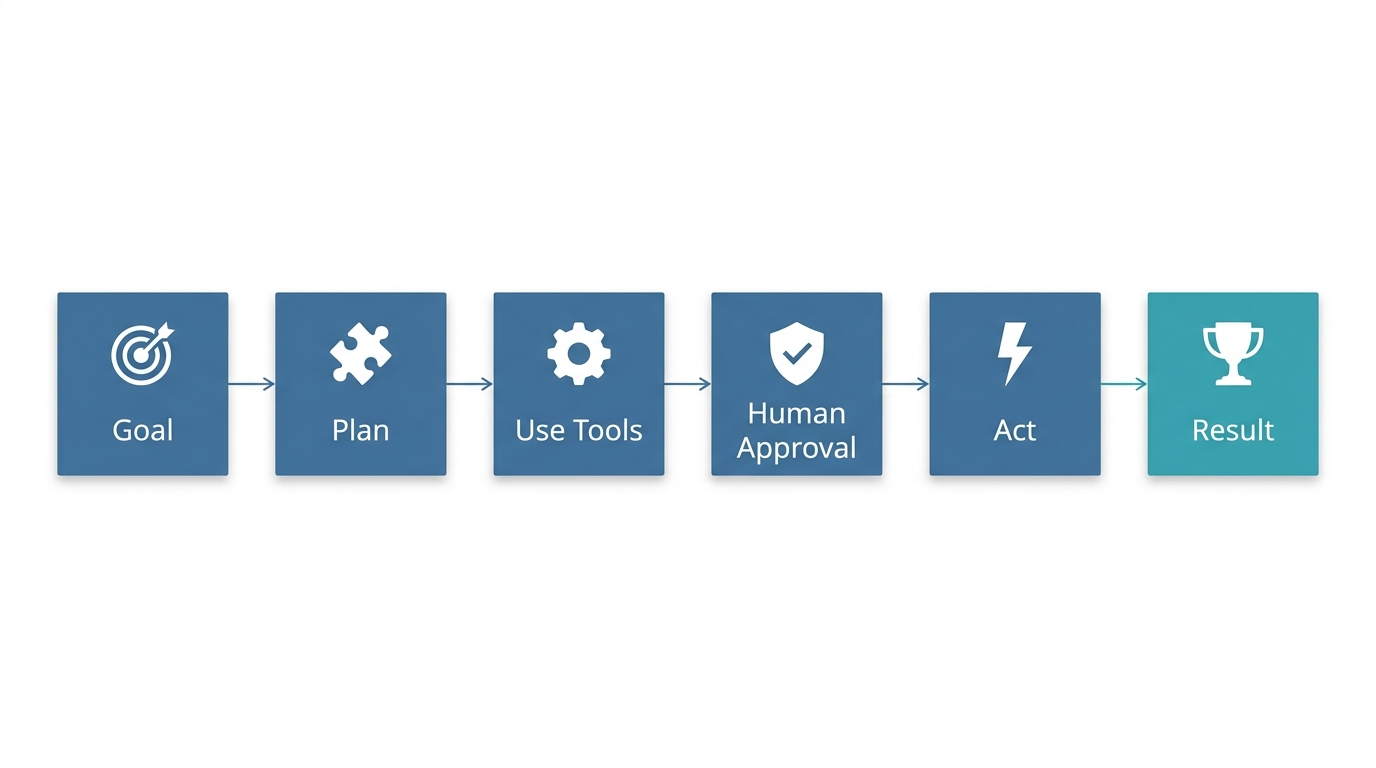
An AI agent is software that takes a business goal, breaks it into a series of steps, uses tools like your CRM, ERP, databases, or email, to gather information or perform actions, and then executes those steps, but only with the human approvals you build in. A chatbot answers questions. An AI agent does things: it can approve a leave request, compare sales data across two systems, or route an invoice for payment. Understanding how AI agents work is key to unlocking their potential: they combine perception, reasoning, and action.
Think of a chatbot as a helpful reference librarian. It can point you to the right shelf but can’t touch the books. An AI agent is more like a capable office manager: it understands your objective, coordinates across different departments, and actually moves work forward while you stay in control. This distinction matters because the business value lies in the work that gets done, not just the answers you receive.
AI agents are the first software that doesn’t just answer your questions …. it does your work. But that power comes with a catch: they’re only as good as the goals you set and the systems they can reach.
Major cloud providers and AI research labs converge on this operational view. IBM describes AI agents as systems that can perceive, reason, and act autonomously. Google Cloud emphasizes their ability to use tools and connect to real-world data. AWS frames them as goal-oriented software that makes decisions and performs tasks. In every case, the agent is not a chat interface but an action engine.
But that raises a practical question: if an AI agent can act, how is it different from the copilot your productivity suite just rolled out? The table below makes the boundaries crisp.
Chatbot vs Copilot vs AI Agent: The Leader’s Cheat Sheet
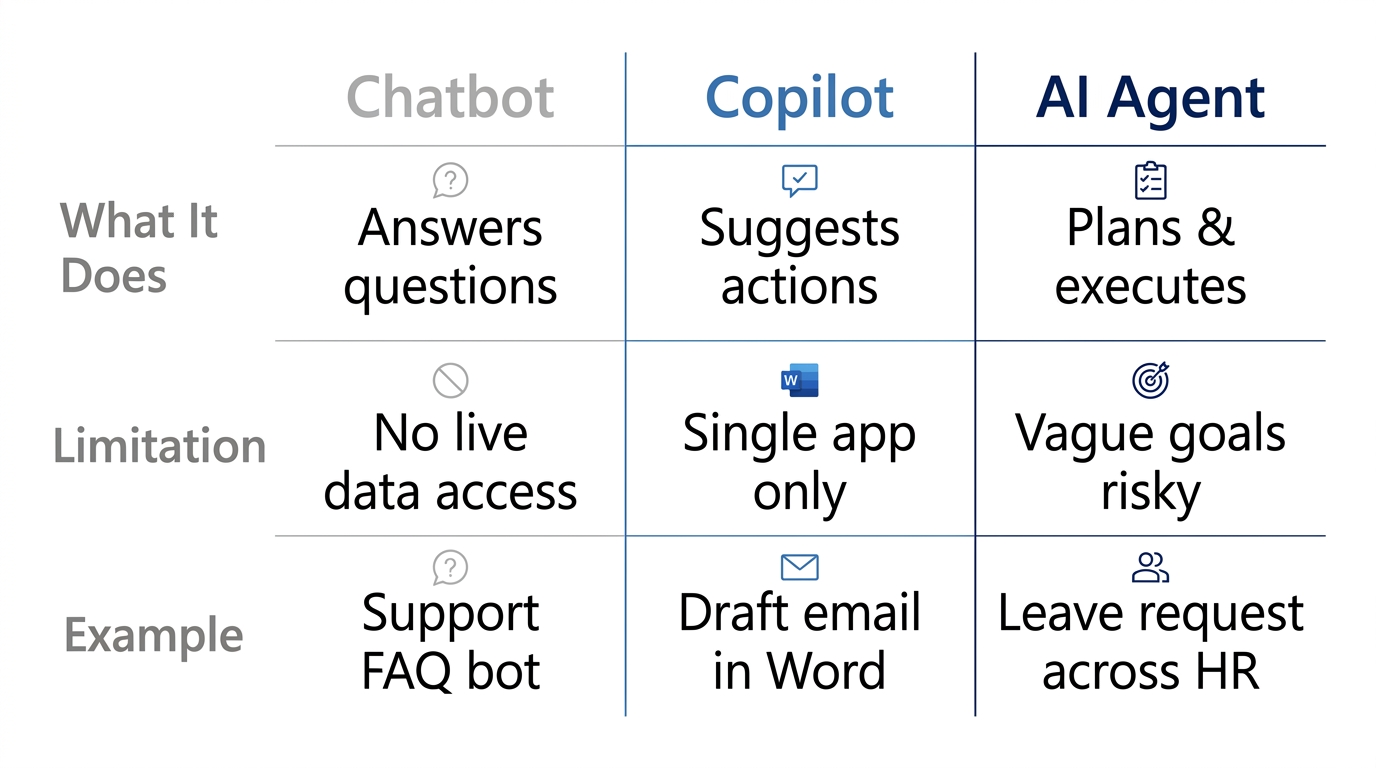
Vendors love to blur categories, but as a business leader, you need a clear cheat sheet. The table below strips away jargon and gives you a straight comparison. Each row answers two questions: “What does it do?” and “What can’t it do?”
| Tool | What It Does | What It Can’t Do | Example |
|---|---|---|---|
| Chatbot | Answers questions from a fixed knowledge base | Take actions or access live data | Support FAQ bot that retrieves help articles |
| Copilot | Suggests actions within one app (e.g., draft email, summarize a document) | Orchestrate across multiple systems | Copilot in Microsoft Word that helps compose a letter |
| AI Agent | Plans and executes multi-step tasks across apps and data sources | Handle vague goals or act without human approval for critical actions | Leave-request agent that checks balance, routes to manager, updates HR system |
The difference between a copilot and an AI agent is where the action happens. A copilot stays inside a single application. An AI agent moves work across your entire tech stack. Anthropic highlights that effective AI agents combine reasoning with tool use, transitioning from simple Q&A to multi-step orchestration. That orchestration is what creates real business value.
Now, to make this concrete, let’s walk through four everyday scenarios where agentic AI turns friction into flow.
Where AI Agents Actually Deliver Today: Four Departmental Examples
Abstract definitions get you only so far. The real question a leader asks is, “What will an AI agent actually do for my team next Monday?” Here are four real workflow examples that are delivering results right now.
HR: Leave Approval Without the Paper Chase.
An employee submits a time-off request. The AI agent checks their leave balance in the HRIS, reviews the team calendar for coverage, routes the request to the manager with a summary, records the approval in the system, and notifies payroll. The employee never touches a second screen, and the manager never chases a status. The AI agent handles the entire multi-step sequence, but the final approval still sits with a human. This is a classic case of business process automation enhanced by AI.
Finance: Invoice and Payment Cross-Reference.
A finance user asks, “Show me outstanding invoices over $50,000 for accounts that are also overdue on their last payment.” The AI agent queries the ERP for invoices, the CRM for payment status, and the billing system for delinquency flags. It compiles the results into a single report and logs the query for audit. No more exporting CSV files from three systems and manually matching rows.
Sales: Pipeline Risk Detection Across Systems.
A sales manager asks, “What deals over $100,000 in the pipeline have an open support ticket?” The AI agent pulls CRM pipeline stages, connects to the support desk, identifies accounts with unresolved issues, and flags at-risk deals. The team gets a morning summary that used to take an analyst two hours to assemble.
Operations: Sprint Health Snapshot.
An engineering lead says, “Give me this sprint’s health: completed vs. planned story points, plus any blockers from the last week.” The autonomous AI agent queries Jira (or similar), compares velocity across recent sprints, and surfaces unresolved blockers with ticket links. The lead can start the stand-up with facts, not a scramble for data.
These examples share a pattern: each starts with a clear goal, pulls from multiple data sources, performs a sequence of steps, and leaves the final call with a human. That pattern is the core of what makes AI agents for business so useful. But before you write the check, we need to talk about where they still stumble.
The Honest Limits: Where AI Agents Still Fail (And What You Must Demand)
Acknowledging limits isn’t weakness but the fastest way to avoid expensive pilot failures. Here are the three common failure modes we see in practice, and the non-negotiables you should bake into any AI agent initiative.
Ambiguous Goals.
If you tell an AI agent, “improve customer satisfaction,” it has no concrete metric or action. It needs explicit, measurable tasks: “Reroute support tickets open longer than 24 hours to a senior agent.” Anthropic emphasizes that simple, well-scoped workflows perform much more reliably than complex, open-ended ones. Vague instructions produce vague or dangerous outcomes.
Missing Data Access.
An AI agent can only act on systems it can reach. If your ERP doesn’t provide a secure API, or the CRM sits behind a legacy firewall, the AI agent is blind to half your business. Before you deploy, you must invest in integration. This is why enterprise platforms that provide pre-built connectors and enforce role-based access controls become essential they ensure the AI agent only touches what a given user would be authorized to access. IBM and Google Cloud both underscore that AI governance and data access controls are foundational for enterprise AI agents.
Actions Without Human Review.
The biggest risk: an AI agent that can approve expenses, delete records, or send customer communications without a human check. Non-negotiable rule: any action that changes a system of record, spends money, or impacts a customer must flow through a human approval. This isn’t optional; it’s the definition of “human in the loop.” A well-designed AI agent will recommend, prepare, and summarize but never execute a high-consequence action on its own. Approval workflows are essential to maintain control.
With these limits in mind, how do you decide where to start? The next section gives you a practical evaluation framework.
How to Evaluate Enterprise AI Agents: A Leader’s Framework
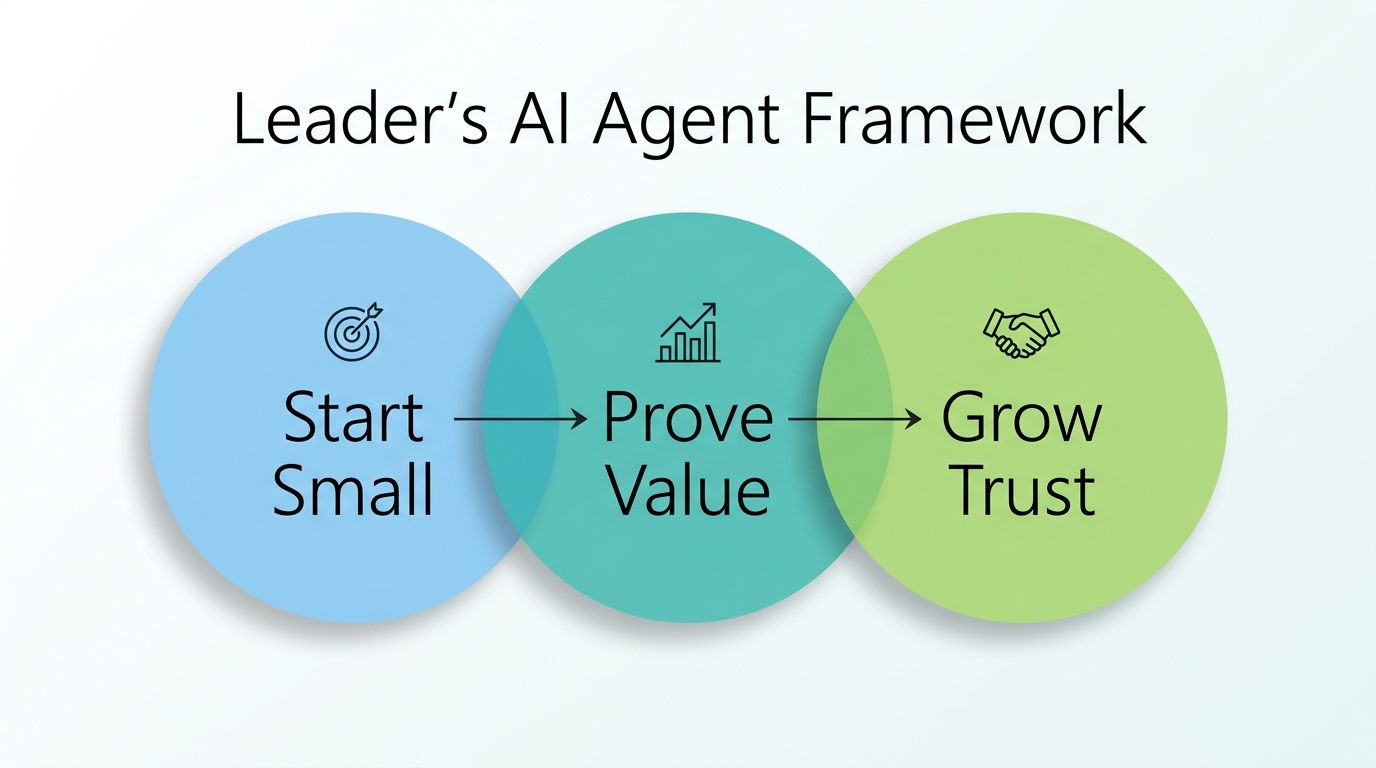
Most leaders we talk to want a clear, actionable playbook. Here’s our recommended sequence.
Start with one workflow. Pick a task that is repetitive, rules-based, spans two or more systems, but has low risk if something goes wrong. For example, automatically routing and logging internal help desk tickets. Measure the time saved, error reduction, or speed improvement for a small team before scaling. Consider cost and ROI from the start: track the hours reclaimed per week and the reduction in error rates. Even modest gains in a single workflow can justify the investment and build internal confidence.
Demand sources on every answer. Any AI agent you adopt must show you the exact data source behind each action it takes. No black boxes. This is especially critical when financial or customer data is involved. IBM highlights transparency and explainability as must-haves for enterprise AI.
Require an audit trail. Every query, every data lookup, every approval request logged immutably. If a compliance auditor asks why a record was updated, you need to point to the exact step, timestamp, and source. Without an audit trail, an AI agent is a liability.
Keep humans approving consequential actions. AI agents can suggest, draft, and summarize. But any action that writes to a system of record, moves money, or contacts a customer should require a human click. This is the “human-in-the-loop” principle, and it’s non-negotiable for high-stakes processes.
Consider platforms designed for enterprise orchestration. To make an AI agent work across your CRM, ERP, and HR systems securely, you need a layer that handles integration, permissions, and governance. Platforms like Webly by Webuters exist precisely for this purpose, providing pre-built connectors, role-based access, and guardrails so you don’t have to build it from scratch. If this resonates, our AI consulting services can help you identify the right AI use case and build generative AI solutions on a proven foundation.
The Bottom Line for Business Leaders
We started with a simple truth: AI agents are the first software that doesn’t just answer your questions; it does your work. That is a powerful shift, but it is only as valuable as the goals you set, the systems you connect, and the human oversight you build in. The real competitive advantage does not come from automating everything. It comes from carefully choosing one workflow, proving value, and scaling trust incrementally.
The business implication is clear: leaders who start with a focused, governed approach will see predictable gains while avoiding the pitfalls that plague unfocused AI initiatives. The next step is to pick one concrete workflow where an AI agent could save time or reduce errors, and run a small, measurable pilot. The leaders seeing real value from AI agents are not the ones automating the most tasks at once. They are the ones who chose one workflow, wired in approvals from day one, and let the results argue for expansion.
Frequently Asked Questions
What is an AI agent in simple terms?
An AI agent is software that takes a goal, breaks it into steps, uses tools (like your CRM or ERP) to get information or perform actions, and then executes those steps, while respecting human approvals. It does work, not just answers questions.
How do AI agents differ from chatbots?
A chatbot answers questions from a fixed knowledge base. An AI agent can plan multi-step tasks, pull data from multiple systems, and take actions like updating records or routing approvals. Think chatbot as a librarian, AI agent as an office manager. This is the core of the AI agent vs chatbot distinction.
Are AI agents fully autonomous?
In enterprise contexts, AI agents are semi-autonomous. They can execute sequences of actions, but for high-stakes tasks (like payments or system-of-record changes), human approval should always be required. Full autonomy is rare and risky. Even autonomous AI agents benefit from human oversight.
What are some real business uses of AI agents?
Real examples include: automated leave approval across HR and payroll; cross-referencing invoices and payments between ERP and CRM; detecting pipeline risks by connecting sales and support systems; and generating sprint health summaries from project management tools. These AI agent examples demonstrate practical value.
What are the risks of using AI agents?
Key risks: ambiguous goals leading to wrong actions; missing data access causing blind spots; and AI agents performing actions without human review. Mitigations include clear instructions, robust system integration, audit trails, and mandatory human approval for consequential actions. Strong AI governance is essential.
How should a business evaluate whether to use AI agents?
Start with one low-risk, rules-based workflow spanning multiple systems. Demand source transparency for every action, require an immutable audit trail, and keep humans approving consequential steps. Measure value before scaling. Work with experienced partners to identify the right use case.
If this resonates, contact us to scope one governed AI agent workflow for your organization. We’ll help you prove value on a single process before you commit to a platform.
AI adoption and workflow automation
Start with one workflow, prove it in production, then scale what works.
See AI services
Krishna is the Founder and CEO of Webuters, a technology leader specializing in Generative AI, intelligent automation, enterprise software, and digital transformation. He helps organizations leverage emerging technologies to drive innovation, operational efficiency, and business growth. Through his writing, Krishna shares insights on AI adoption, technology leadership, product innovation, and the future of work, helping leaders navigate change and build future-ready organizations.
Follow Krishna on LinkedIn