
PHP2Shell: How to Check Your Site Is Really Patched (WordPress, WooCommerce, Magento, Laravel)
PHP2Shell is fixed only when the PHP build serving your site is patched and restarted. How to verify it for WordPress, WooCommerce, Magento and Laravel.

PHP2Shell is the name for two critical flaws in the PHP engine, and the most common mistake this week is checking the wrong thing. A WordPress dashboard says everything is up to date, a hosting panel says "PHP updated", and the terminal prints a reassuring version. None of those proves the site is safe. For a business the stakes are concrete: a site exposed to PHP2Shell can hand an attacker customer data and credentials, force a cleanup that takes the site offline, and leave you unable to answer the first question a customer, insurer or auditor will ask, which is whether you were patched and when.
A site is protected from PHP2Shell only when the PHP build that actually serves its web requests is a fixed PHP release or a distribution build that lists both PHP2Shell CVE IDs, and that PHP process has been restarted since the update. Everything in this guide is about proving those three conditions, site by site.
php -vtells you what is installed for the command line. It does not tell you what is serving your website.
What PHP2Shell is, in two minutes
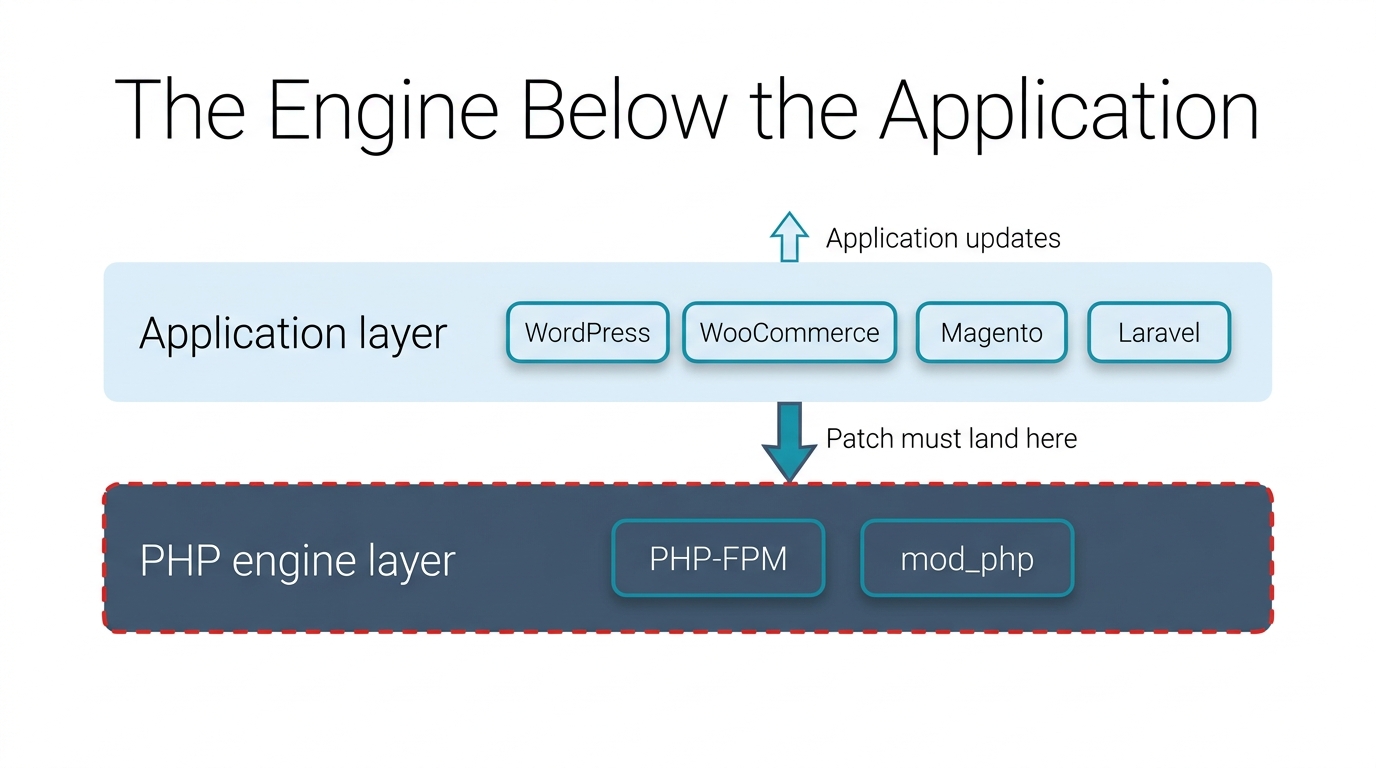
The PHP project's security advisory describes two critical vulnerabilities that can allow unauthenticated remote code execution. They are tracked as CVE-2026-109618 and CVE-2026-109619 and are fixed in PHP 8.5.12, 8.4.27, 8.3.36 and 8.2.35. The PHP security advisory says every PHP installation serving web requests is at risk, including PHP-FPM, Apache with mod_php, php-cgi, FrankenPHP and LiteSpeed, with the highest risk on Apache mod_php.
Two details shape the response. First, the flaws are in the engine, so they are reachable before any application code runs. Second, the clock is short: SecurityWeek reported exploitation attempts against PHP2Shell hitting security sensors around the time the patches landed, and CISA's alert on the PHP vulnerabilities asks organizations to inventory every system running PHP and patch internet-facing systems first. If you also run Node.js or self-managed GitLab, our triage guide to this week's critical security patches covers what to patch first.
Why php -v can mislead you
One server can run several PHP versions side by side: one for the command line, one or more PHP-FPM pools for websites, and sometimes Apache's mod_php. Each is a separate binary with its own configuration. php -v reports only the command-line binary that happens to be first on your path, so when you check PHP version this way you learn about the terminal, not the website.
We saw this first-hand while patching our own multi-site server this week. The command line reported one PHP branch, while our main website was served by a different PHP-FPM pool, and several more branches were still running for other sites. If we had stopped at php -v, we would have patched one version and left the live sites on others.
To find the PHP that serves each site, follow the request rather than the shell:
- Open the site's web server configuration. In Apache, look for a
SetHandlerorProxyPassMatchline that points at a PHP-FPM socket such asphp8.x-fpm.sock, or for mod_php being loaded. In Nginx, followfastcgi_passto its socket. - Map the socket to its pool and binary. The socket name usually tells you the PHP branch, and the pool file in the matching
fpm/pool.ddirectory confirms it. - Check that exact package, using the evidence in the next section.
- Restart that pool (or Apache, for mod_php) and confirm the process start time is after the update.
If you cannot read the configuration, a temporary phpinfo() page shows the serving version. Delete it as soon as you have read it; it should never stay online.
Which PHP builds contain the PHP2Shell patch
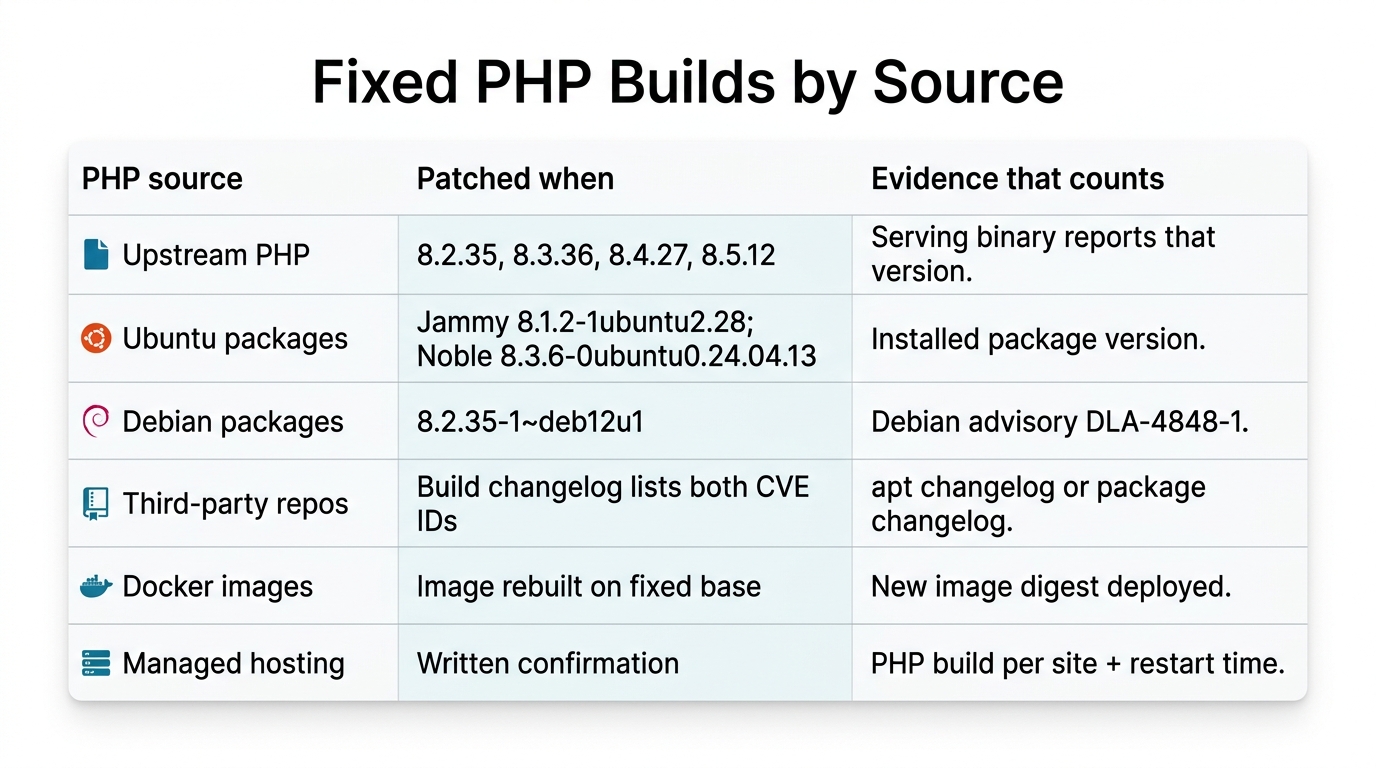
How you prove the fix depends on where your PHP came from. Upstream builds use plain version numbers. Linux distributions often keep an older-looking version string and ship a distribution backport of the fix, so for them the version number is not proof; the changelog or security notice that names both CVE IDs is.
| Where PHP comes from | Fixed when | Evidence that counts |
|---|---|---|
| Upstream PHP | 8.5.12, 8.4.27, 8.3.36 or 8.2.35 | The serving binary reports that version |
| Ubuntu packages | Jammy (22.04) php8.1 8.1.2-1ubuntu2.28; Noble (24.04) php8.3 8.3.6-0ubuntu0.24.04.13; Resolute (26.04) php8.5 8.5.4-0ubuntu1.5; older releases through Ubuntu Pro (ESM) |
Installed package version, per Ubuntu's PHP2Shell fix notice |
| Debian packages | bookworm php8.2 8.2.35-1~deb12u1 |
Debian advisory DLA-4848-1 |
| Third-party package repositories | A build whose changelog lists both CVE IDs | apt changelog or the package changelog, not the version number |
| Docker images | An image rebuilt on a fixed base | New image digest deployed; running containers replaced |
| Managed or shared hosting | The host's written confirmation | PHP build per site plus the restart time |
PHP 8.1 and older no longer get updates from the PHP project. The advisory says some distributions and long-term support vendors provide backported fixes, and the PHP security team published minimal source backports for 7.4, 8.0 and 8.1. If your branch has no vendor backport, the real options are an upgrade or a vendor that supports your branch. If you install PHP from the volunteer-run Remi repository, the PHP project said it would not have updates on release day and urged switching to distribution packages or building from source. CISA goes further: systems that cannot be updated, or that still run PHP 8.1 or earlier, should be taken offline until they are patched.
The last column is the important one. An installed package is not a running fix. A PHP security update only counts once the PHP-FPM pool or web server that serves the site has restarted, and once rebuilt containers have actually replaced the old ones.
WordPress, WooCommerce, Magento and Laravel updates do not patch PHP
PHP2Shell sits below your application. Updating WordPress core, WooCommerce, a Magento or Adobe Commerce release, Laravel or your Composer packages changes the code that runs on PHP, not the engine that runs it. A fully up-to-date WooCommerce store on an unpatched PHP-FPM pool is still exposed, and no plugin can repair the PHP2Shell vulnerability, because the flaw is reachable before any plugin loads. Sansec's researchers make the same point: you cannot fix PHP2Shell from within your store code.
This is where agencies and store owners get caught. The application team does its job, the hosting layer belongs to someone else, and nobody owns the gap. For a commerce site, put the PHP runtime on the same checklist as the platform release. Our Adobe Commerce development team treats them as one job for exactly this reason.
End-of-life PHP is the harder case. Many older sites stay on PHP 7.x or 8.0 because an upgrade breaks a theme, an extension or custom code. PHP2Shell changes that calculation: staying on an unsupported branch now means relying on a backport for every future engine flaw. If that is your situation, modernizing the application one release at a time with AI-assisted development and modernization is worth scoping now rather than during the next emergency. The first release can be as small as the PHP security update that gets you onto a supported branch.
On managed hosting: get it in writing
If you cannot reach the server, verification becomes a written question to your host. Ask for three things per site:
- The exact PHP build serving the site, including the package release or patch level.
- Confirmation that the build includes the fixes for both PHP2Shell vulnerabilities.
- The time the serving PHP process was last restarted.
A version dropdown in a control panel, or a general status-page statement, does not answer those questions. Keep the reply with your security records, because it is the evidence an auditor or insurer will ask for later. If the host cannot confirm a fixed build, treat the site as exposed and use the interim measures below while you push for a date.
Ask per site, not per account. A host can run different PHP branches on different plans or servers, so a single "we are patched" statement does not tell you which build serves your store, your marketing site and your staging copy. Agencies managing client sites on several hosts should keep one table: site, host, PHP build, CVE confirmation, restart time.
Interim mitigations buy time, they are not a PHP2Shell fix
The PHP security advisory is clear that updating is the complete fix, and it lists temporary measures for teams that cannot update immediately. Each one blocks only the confirmed attack paths: set memory_limit=-1 in a way applications cannot override (for example php_admin_value in the FPM pool), set session.upload_progress.enabled=0, and on PHP 8.5 set fatal_error_backtraces=0, then restart every worker. The advisory warns not to rely on ini_set() or a .user.ini file. An unlimited memory limit lets one request use all of a server's memory, so watch memory use and restore the limit once PHP is updated. Sansec notes that every known trigger is a multipart/form-data request, so some teams block or restrict those at the web server for a short window.
Web application firewall rules help too. Cloudflare deployed WAF rules for the PHP vulnerabilities, and CISA says a WAF may provide some protection until systems are updated. "Some protection" is the right expectation: a WAF blocks known request patterns, and attackers vary patterns. Cloudflare recommends keeping its WAF protection enabled even after you update, as an extra layer. The configuration changes are different: put an end date on each one and reverse it once the PHP2Shell patch is verified on the serving build.
After the PHP2Shell patch: what to check
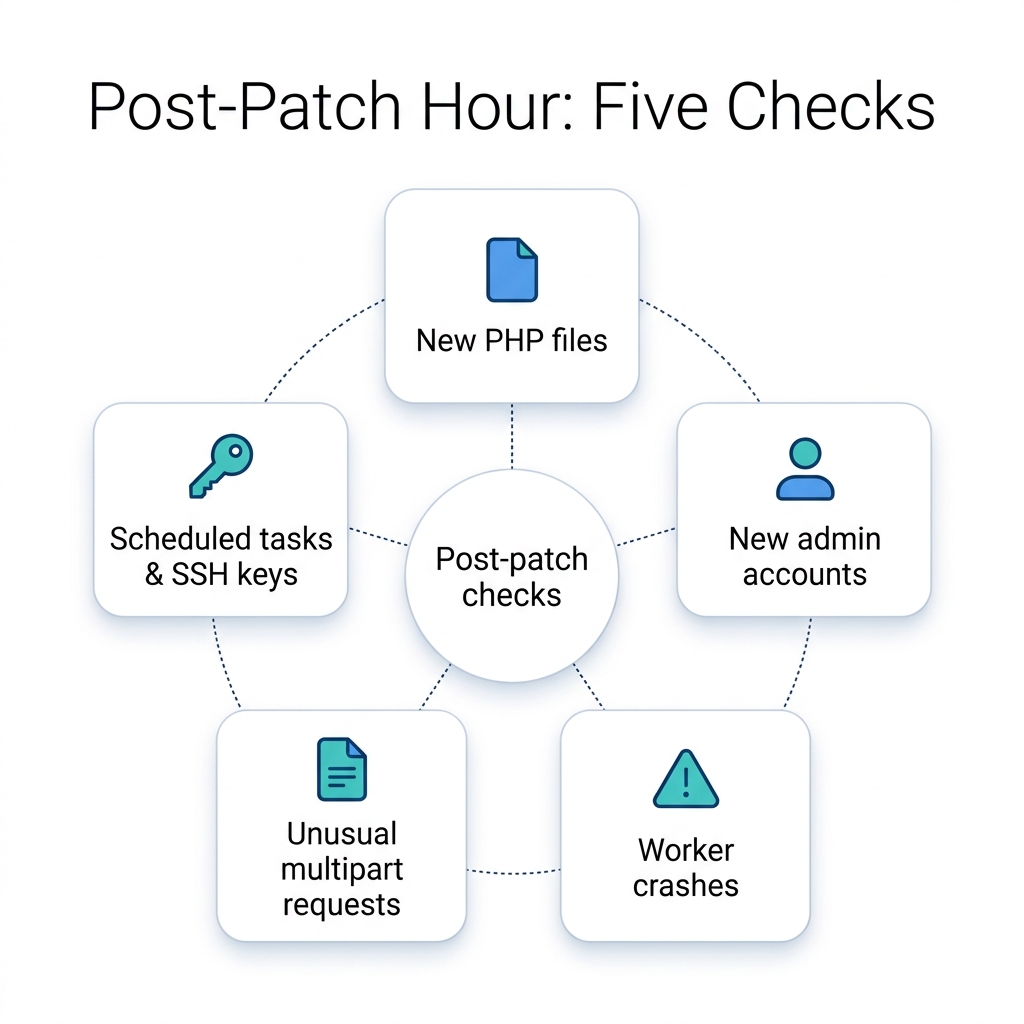
Patching closes the door. It does not tell you whether someone came in before you closed it. Once the serving build is fixed and restarted, run these checks within the first hour:
- New PHP files in web roots,
wp-content/uploads,pub/mediaor cache folders, especially files created in the days before you patched. - New administrator accounts in WordPress, Magento admin or your application's user table.
- Unexplained PHP worker crashes or memory errors in the PHP-FPM and web server logs.
- Unusual multipart POST requests in access logs, particularly ones followed by server errors.
- Scheduled tasks and SSH keys that nobody on the team added.
Sansec notes that the write-ups and an exploit tool are public, so the logs from the days before you patched deserve the closest look.
Rotate secrets even if you find nothing. SecurityWeek reports that the flaws can also be used to read sensitive process memory, which may contain credentials, API keys and other secrets. A memory read leaves no file or account behind, so for an internet-facing site that ran a vulnerable build, rotate database passwords, API keys and application secrets after patching.
If anything looks wrong, treat it as an incident: preserve the logs, rotate credentials and database passwords, and restore from a known clean backup rather than deleting files one by one.
What this looked like on our own server
When the PHP2Shell advisory landed, we used our usual six-step method on our own multi-site server, which hosts several sites on more than one PHP branch. It took one afternoon:
- Understand. We mapped every site to its PHP handler, which is how we found the command line and the main website on different branches.
- Simplify. Before patching anything, we took unused sites offline and closed a catch-all site that answered for unknown hostnames. Fewer sites running means fewer PHP-FPM pools to patch and prove.
- Choose. Our PHP packages come from a third-party repository, so rather than trust version numbers we read the changelogs and confirmed each branch's new build listed both CVE IDs. Backports were the right PHP2Shell patch today; moving older branches forward is a planned release, not a rushed one.
- Build. We backed up the PHP and web server configuration, ran a dry run (only PHP packages would change, nothing new installed, nothing removed), then upgraded and restarted every PHP-FPM pool.
- Prove. We compared each site's response before and after, and swept for signs of compromise: new files in web roots since the week before, new admin accounts, unexpected processes and scheduled tasks.
- Improve. So that the next engine flaw finds less to fix, we then hardened our own WordPress sites with changes such as a security update within the same version line, a block on an abused API route and two-factor sign-in for administrators.
None of this needed special tools. It needed an understanding of what was running, a simpler estate, a clear choice, a controlled change and proof at each step, which is all a PHP2Shell response really is.
Prove it, then make it routine
The patch you cannot prove is a patch you do not have. For each site, write down the PHP handler that serves it, the fixed build or CVE evidence, and the restart time. Do it once for PHP2Shell and you have the start of an inventory that makes the next engine flaw a one-hour job instead of a scramble. Keep that record next to your backup and access-review evidence. When an auditor, insurer or client asks how quickly you applied a critical patch, a dated list per site answers the question in minutes rather than days.
If you run many sites, mixed hosting or end-of-life PHP and are not sure where you stand on PHP2Shell, bring us that problem. In a free 30-minute Next-Step Review a solution lead walks through how your sites are served today, and within two working days you get a one-page brief: the likely gaps, the step we recommend, and whether it is a patch, a hardening pass or a release to modernize. If improving what you already have is enough, the brief will say so. Book a free Next-Step Review.
Frequently Asked Questions
How do I know if my site is patched for PHP2Shell?
Find the PHP build that serves the site through its web server handler, not php -v. It must be 8.2.35, 8.3.36, 8.4.27 or 8.5.12 (or later on the same branch), or a distribution build whose changelog lists CVE-2026-109618 and CVE-2026-109619, and the PHP-FPM pool or web server must have restarted after the update.
Does updating WordPress or WooCommerce fix PHP2Shell?
No. PHP2Shell is a flaw in the PHP engine, so application, plugin and theme updates do not change it. You need a PHP security update on the server, followed by a restart of the process that serves the site.
I am on PHP 8.1 or older. Is there a fix?
Not from the PHP project. Some distributions and long-term support vendors ship backported fixes, so check whether your package changelog lists both CVE IDs. If no backport exists, upgrade to a supported branch; CISA advises taking unpatchable PHP systems offline until they are updated.
Are WAF rules enough to stop PHP2Shell?
No. WAF rules and settings such as session.upload_progress.enabled=0 reduce risk while you patch. The PHP project says updating PHP is the only complete fix.
What should I check after applying the PHP2Shell patch?
Look for new PHP files in web roots and upload folders, new administrator accounts, unexplained PHP worker crashes, unusual multipart requests in access logs, and scheduled tasks or SSH keys nobody added. Treat any finding as an incident.
Cloud migration and modernization
Plan, migrate and keep systems patched without stopping the business.
See cloud services
Krishna is the Founder and CEO of Webuters, a technology leader specializing in Generative AI, intelligent automation, enterprise software, and digital transformation. He helps organizations leverage emerging technologies to drive innovation, operational efficiency, and business growth. Through his writing, Krishna shares insights on AI adoption, technology leadership, product innovation, and the future of work, helping leaders navigate change and build future-ready organizations.
Follow Krishna on LinkedIn