

Litify AI: When to Use Native Capabilities and When to Build a Custom Workflow
Litify AI decisions should start with what the platform already gives you, and move beyond it only when a named gap remains. That is the thesis of this guide, and it is worth saying plainly before the vendor decks get another meeting. This is not a story about artificial intelligence in the abstract. It is a story about one managing partner, one legal operations lead, and a Litify AI decision that too many firms make with their instincts instead of a framework.
The managing partner leans back and asks the question every legal operations lead dreads: "Is this actually our problem, or are we buying someone else's solution?" It is the third pitch this quarter, and the answer still is not clear. The anxiety is not about whether artificial intelligence can help a law firm. It is about knowing which Litify AI decision is right for a specific environment. Every vendor promises speed, every internal champion promises quick wins, and nobody has written down what success should look like.
Here is the one-sentence answer that can stop the cycle: Litify AI should start with the native capabilities the platform already provides, and move to an external service or custom workflow only where a specific gap remains that native features cannot close. That framing sets the default correctly, and it is not caution for its own sake. A native-first stance is a workable model for AI governance, because every capability you adopt expands the surface area someone has to own. It also keeps your options open, since a platform already in production is easier to extend than a greenfield build.
The problem is not a lack of options. It is that legal operations teams are being pressured to build or buy before they know if a gap exists. A vendor can make a compelling case for a custom tool, a specialist can promise better extraction, and a Salesforce admin can demo a prototype in a week. Without a clear way to decide, a team can end up buying a solution for a problem it does not have, or building a legal AI workflow that duplicates a feature already included in the Litify AI platform. For readers new to the platform, what Salesforce Litify is explains the foundation.
In the sections ahead, we will look first at what the platform already provides, then walk through the three paths for a Litify AI decision—native capabilities, an approved specialist service, and a custom workflow. From there we will compare the paths with a decision matrix, follow one worked example of intake summarization end to end, and close with an evaluation checklist and a short list of what not to automate yet. By the end, you should be able to identify one named gap worth acting on and document exactly what it requires. The goal is not to eliminate every AI evaluation risk. It is to make the next Litify AI decision defensible.
What the Platform Already Provides, Stated Plainly
When a law firm runs on Litify, the first conversation should not start with "What can we build?" It should start with "What do we already own?" Litify describes its own capabilities directly on its site. According to Litify's stated AI capabilities, the platform includes AI capabilities designed for legal workflows, such as cross-matter reasoning, multi-step agentic workflows, and firm-wide intelligence for legal teams. In other words, a substantial set of AI functions is built directly into the platform, not added as an afterthought. That means the default position for any request is to exhaust what is already contracted and supported, treating the native layer as a baseline rather than a separate experiment.
Native capability for law firms on Salesforce is functionality available inside the platform without additional custom development. Because Litify is built on Salesforce, as described on Litify's platform page, those native features sit inside the existing data model. That is a structural advantage rather than a marketing claim: when a capability is native to your Litify AI environment, it inherits the platform's permission model, data residency, and update cycle. When you build something custom, your team—or a partner—owns all of that.
Maintenance ownership is the quiet differentiator. A native feature gets updated by the vendor, tested against the platform, and supported through the same help channel as the rest of the platform. A custom legal AI workflow carries a different burden. Someone has to monitor model drift, adjust prompts, retest after Salesforce releases, and answer the auditor's question six months later. That burden can be worth carrying, but only when the native feature genuinely cannot do the job.
Any Litify AI decision should be written down rather than debated verbally, because the paper trail is what turns a hunch into a project. The rest of this guide assumes you have already looked at what you own. If you have not, start there. The three paths below are for the moment when native is not enough—or when you need to prove to a stakeholder that it is. Having that proof ready is often what separates a funded Litify AI program from a stalled proposal.
The Three Paths for AI in Litify
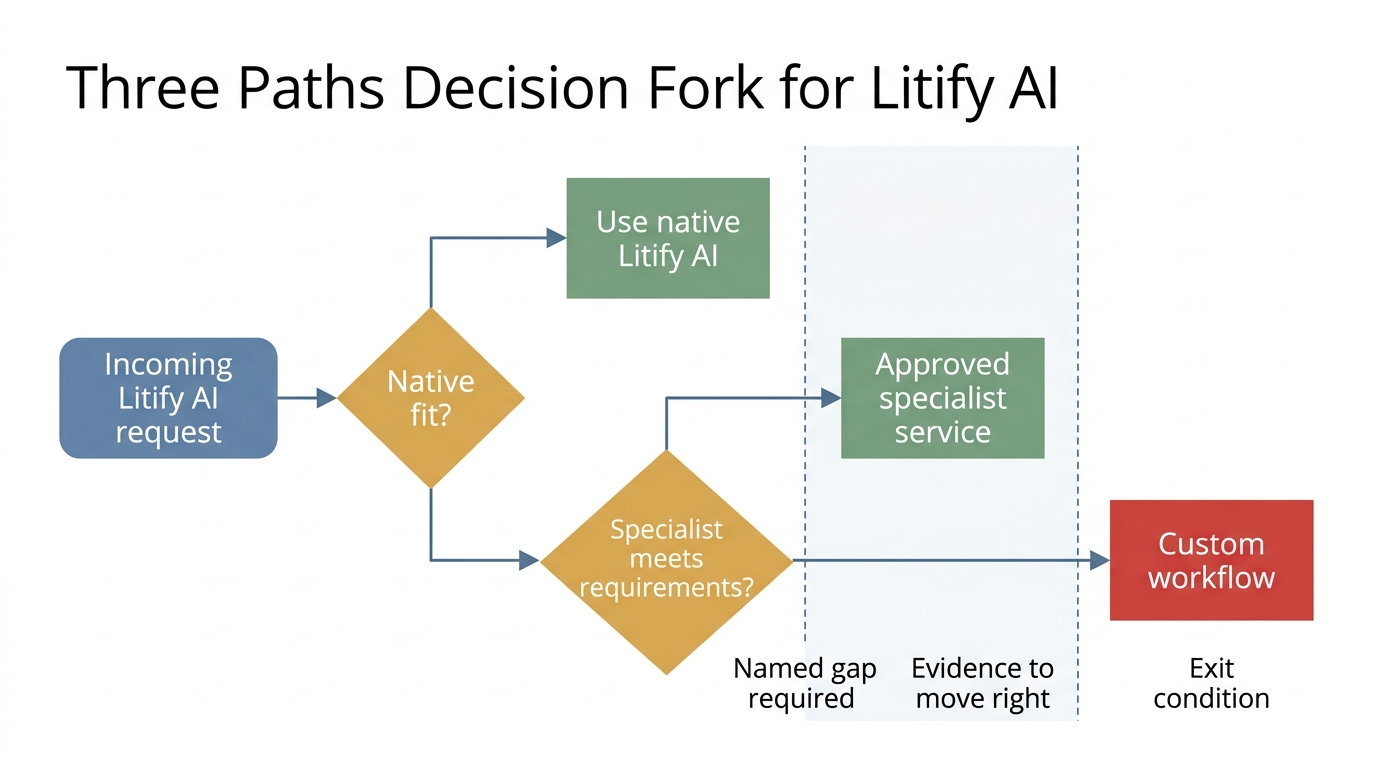
Use what the platform already gives you; move beyond it only when a specific, named gap remains.
Think of the three paths as triage in a busy emergency department. You do not order a custom surgical procedure before checking whether the patient's own system can recover with the approved treatment already in the room. Inside a Litify AI program, that approved treatment is native, and the decision to move past it needs a reason that survives scrutiny.
Path One: Native Litify AI
Native is the default. This path requires no new build, no new vendor, and no new maintenance burden. The exit condition is simple: you have tested the native capability against your actual use case and it does not fit. "Does not fit" must be written down—ideally with a specific data flow, permission requirement, or output format that native cannot satisfy. If it lives only in someone's head, it is not yet a gap. A documented gap is what turns a hunch into a project, and it is also the first artifact any future Litify AI review will ask for. For most firms, this path should absorb the majority of incoming AI requests.
Path Two: Approved Specialist Service
A specialist service is the middle path when a capability is genuinely outside the platform's scope but still standard enough that a product team already solves it. A document processing service that extracts specific clauses from contracts might be a better fit than building a custom model inside Salesforce, for example. The key word is "approved." The service must meet your data residency, security, and contractual requirements before it touches any client data. This path keeps custom code out of your instance and keeps the problem in the hands of a vendor whose whole business is that problem. At the same time, it demands that your Litify AI program maintain clear integration boundaries so that data moving between systems stays governed.
Keep this path distinct from Salesforce's platform-level agent capabilities. Salesforce's platform-level agent capabilities are not the same as Litify's native features, and they are not automatically the answer for your workflow. In an AI for law firms Salesforce context, Agentforce may be part of a broader Salesforce architecture, but the decision to use it inside a Litify matter should still go through the same three-path filter. Platform-level tooling expands what is possible; it does not remove the need for a decision. When you do connect a specialist service, the same care applies: Salesforce integration services can help you connect that service without destabilizing your data model.
Path Three: Custom Workflow
Custom is justified only when the gap has been named in writing: a specific legal process, a specific data shape, a specific decision the business makes that no existing product addresses. If you cannot write that gap in one sentence, you are not ready for custom. The exit condition for the specialist path is that the specialist cannot meet your data residency, permission, or integration requirements. Only then does custom become the rational choice for your roadmap. Every other path should be ruled out first, on paper, with reasons. Every other path, in other words, should be tested before a Litify AI build request reaches a development team. When custom is genuinely required, Salesforce development services provide the engine for the workflow.
A Decision Matrix for Comparing the Three Paths Before You Commit
The three paths sound clean in theory. In practice, the choice depends on criteria that every legal operations team can evaluate, and the answer is rarely unanimous on the first pass. For teams weighing AI for law firms Salesforce environments, the table below uses a simple legend: strong fit, conditional fit, weak or requires written justification. Treat it as the first draft of your Litify AI decision record, not the final word.
| Criterion | Native | Approved Specialist Service | Custom Workflow |
|---|---|---|---|
| Data sensitivity | Strong: stays inside platform boundary by default | Conditional: requires contractual and technical controls for data leaving platform | Weak unless fully scoped: data handling is your responsibility |
| Fit with existing process | Strong: maps to steps already in Litify | Conditional: may require new handoff or queue | Requires written justification: only if no product fits the specific process |
| Maintenance ownership | Vendor-owned | Vendor-owned for the service, but integration maintenance is shared | Your team or partner owns everything |
| Evaluation effort | Low: vendor provides evidence and updates | Medium: you verify service output against your cases | High: you build and maintain your own test set |
This matrix is not a precision instrument. It is a way to write down the rationale for a Litify AI decision. For intake summarization, data sensitivity may push toward native if source documents already live in Litify. Process fit, on the other hand, may push toward custom if your intake team uses a non-standard scoring rubric that no product models. The table makes that tension visible before you commit budget to it, and it keeps the Litify AI decision grounded in evidence rather than enthusiasm.
In practice, the decision often lands as conditional fit on two criteria and strong on one. That is normal. The point is to have a defensible written rationale, not to achieve a perfect score. AI evaluation is the discipline that turns that rationale into something a reviewer can inspect, because a matrix without a test method is just an opinion with columns. That evidence layer is what makes your Litify AI choice auditable six months later. The matrix is also a useful artifact for the next quarterly review, because it shows what you believed when you made the call. Beliefs change, and the paper trail should show why.
Worked Example: Intake Summarization End to End
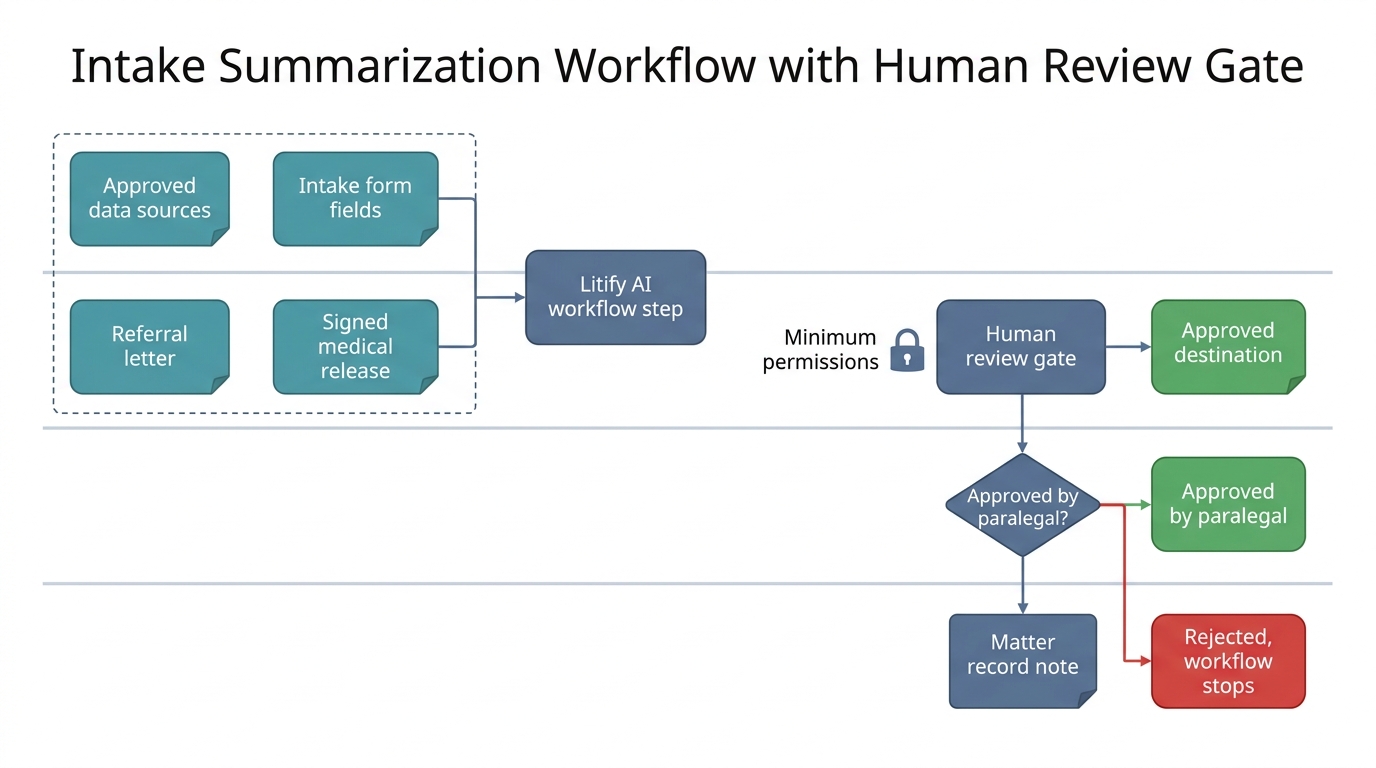
Let's make this concrete with intake summarization, one of the most common entry points for a legal AI workflow. A plaintiff firm receives a new matter, and documents arrive from a referring attorney, a client intake form, and a medical records release. The goal is to produce a short summary that a paralegal can use to prepare for the first call. This is the kind of narrow, repeatable task where a Litify AI workflow step can earn its place quickly. It is also where a failed experiment is cheap, which makes it a sensible place to start. Intake summarization, in other words, is a safe place to test a Litify AI idea before it touches the client.
Approved data sources. A Litify AI workflow step may read only the specific fields and documents you list in advance. For this example, that means the intake form fields, the referral letter, and the signed medical release. Anything not on the list is out of scope, and that boundary is written down before development starts. Writing it down is the whole point.
Permissions. The automated step must operate under a defined identity with the minimum permissions required, rather than inheriting an admin profile. It should be able to read the approved source fields, create a draft summary in a designated note field, and nothing else. It cannot modify the intake form, cannot delete documents, and cannot send anything without a person. Narrow permissions are what make a bad output a minor event rather than an incident, and they are also what keeps an AI governance reviewer comfortable with the design.
Evaluation criteria. You need a small, representative test set of real cases—for illustrative purposes, imagine ten past intakes with summaries written by experienced paralegals. That number is a starting point, not a benchmark, and each firm should calibrate its own. You agree what a good summary contains: the client name, matter type, key dates, and the immediate next step. Then you run the workflow against those cases and compare. That test set is a governance artifact, not a one-time check, so you keep it and rerun it whenever the model or the workflow changes. Scheduled AI evaluation is the habit that keeps confidence honest, and it is the single best defense against a Litify AI deployment that quietly drifts.
Human review. For client-facing legal output, the default is that a qualified person reviews and approves before anything is sent, filed, or relied upon. In intake summarization, that means a paralegal opens the draft summary, compares it against the source documents, edits where necessary, and marks it as reviewed. The design question is not "can the model do this" but "where does a person check it and what happens when they disagree." If the reviewer changes the summary, the edit is recorded. If the reviewer rejects it, the workflow does not proceed. Human review is what keeps the program honest in front of clients, and it is the step auditors ask about first.
Destination in the workflow. The approved summary lands in a specific record, in a specific field or note, with a link back to the source documents and a clear marker that it is machine-generated and reviewed. That marker matters for audit and for client trust, and it turns the summary into part of the matter record rather than a floating chat message. Getting that destination right is what makes a Litify AI output usable months later, when the original reviewer has moved on to other matters.
The same five steps apply to document extraction, another common legal AI workflow. Source documents are named, permissions are scoped, a test set is defined, a reviewer confirms each extracted value, and confirmed values are written to the matter record while unconfirmed values are flagged for follow-up. The architecture is identical. Only the output format changes. Document extraction becomes just another pattern with the same controls.
An Evaluation Checklist for Any Litify AI Workflow
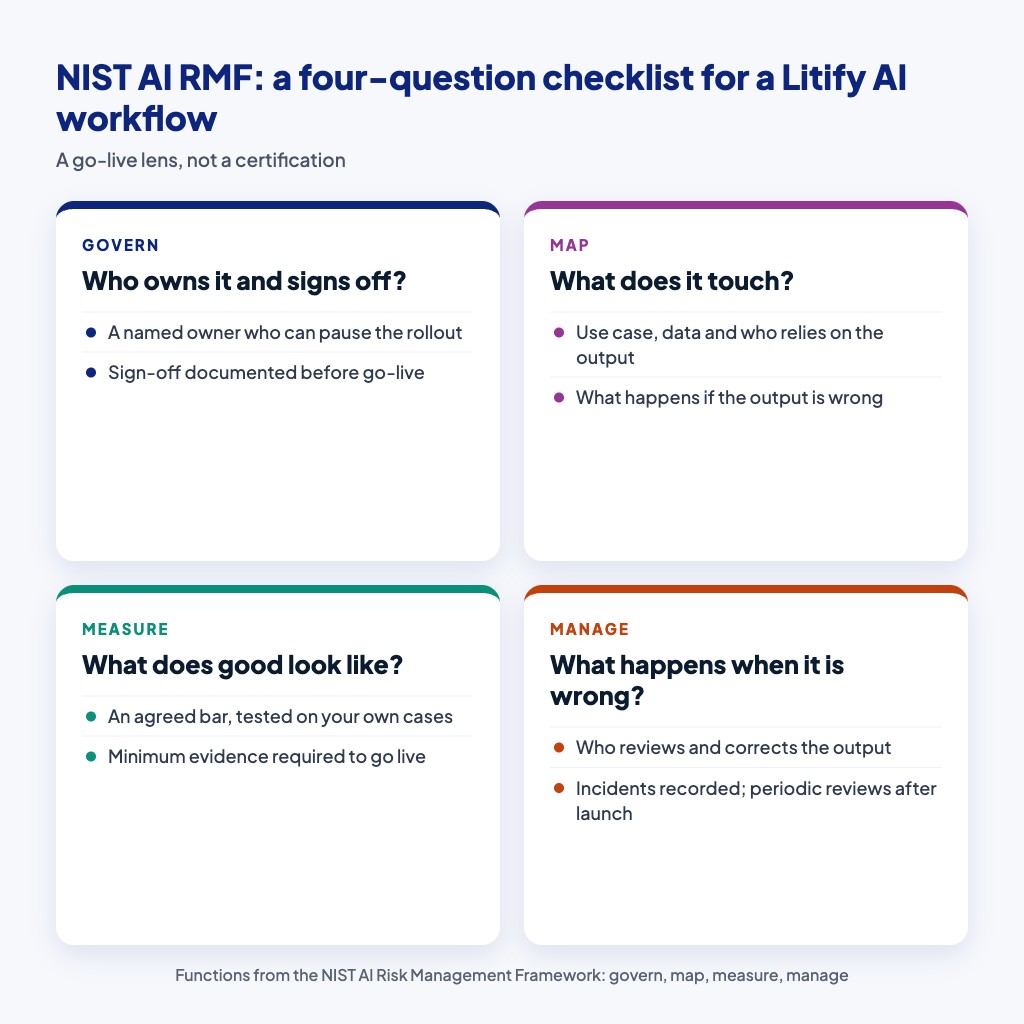
The NIST AI Risk Management Framework is not a law-firm-specific standard, but its four core functions—govern, map, measure, and manage—map cleanly onto the questions a team already asks before go-live. This AI governance framework is a reasonable foundation for any Litify AI effort. The NIST AI RMF Playbook provides practical guidance for turning those functions into actions, and it is a reasonable place to start if your team wants a shared vocabulary for risk conversations. Any serious Litify AI effort benefits from that shared language, because it lets operations, legal, and technology talk about the same thing using the same words.
Here is a short checklist you can screenshot. It is a lens, not a certification, and it applies whether you are using native features or something further out.
Govern
Who owns this Litify AI workflow? Who signs off before go-live, and where is that decision documented? If you cannot name the owner, the workflow has no accountability when something goes wrong. In a law firm, that owner might be the legal operations lead or the managing partner, but it must be a real person with the authority to pause the rollout. AI governance is easiest when one name sits next to the workflow in the project record. It is also the fastest way to end a stalled debate, because someone can simply decide.
Map
What is the specific use case, what data does it touch, who is affected by its output, and what happens if the output is wrong? Map the context before you map the model. For intake summarization, the context includes the client, the referring attorney, and the paralegal who relies on the summary to prepare for a call. Projects that skip this step usually discover the missing context during testing, which is the most expensive place to find it. A half-hour mapping session at the start can save weeks later in any Litify AI initiative.
Measure
What does good look like, how will you test it, and what is the minimum evidence required to go live? The AI evaluation set from the worked example lives here. You are not asking whether the model is "smart." You are asking whether it meets the agreed bar on your own cases, with the people who will actually use it in the room. This step is the evidence layer that makes every later conversation easier, and it is where a Litify AI program either earns trust or loses it. Measurement is not bureaucracy; it is the difference between a demo and a deployment.
Manage
What happens when the output is wrong, who reviews it, how is it corrected, and how is the incident recorded? Management is ongoing, not a launch checklist item. The AI RMF Core emphasizes that risk management continues after deployment, which means periodic reviews rather than a one-time sign-off. That periodic review is where a Litify AI workflow either matures or quietly becomes shelfware. Scheduling the first review before launch is a simple way to make sure it actually happens.
What Not to Automate Yet
Human review is the default for anything a client sees, files, or relies on. This is not a limitation of the technology; it is a design choice that protects the client relationship. Some work should not be automated yet regardless of vendor pressure, particularly anything where the cost of a plausible-but-wrong output to a client relationship exceeds the time saved by generating it automatically.
So the test is not "can the model do this" but "what happens to the client relationship if the model is confidently wrong and no one catches it in time." An internal intake summary used by a paralegal to prepare for a call is a reasonable early Litify AI use case. A client-facing demand letter generated without review is not. The difference is not the tool's raw capability; it is the consequence of error. Every legal AI workflow should pass that test before it goes live, and the test should be applied to the workflow as a whole rather than to individual model outputs.
Say no in writing. A documented decision not to automate is as valuable to your risk management story as a documented decision to automate. If you need language for a meeting, use this: "We are not automating this yet because the cost of a wrong answer to the client relationship is higher than the time we would save." That sentence ends the pitch without ending the conversation. Programs earn trust partly by what they decline to automate, and that trust is what funds the next sensible Litify AI project. If the same conversation comes back six months later, the written record is what makes the second review faster than the first.
Frequently Asked Questions About Litify AI
Should we always use Litify's native AI features first?
Yes. Native features are already contracted, supported, and integrated with the platform's data model and permissions. Any Litify AI rollout should exhaust them before considering a specialist service or custom workflow. Only move on when you can document a specific gap.
When is an approved specialist service the right choice?
Use a specialist when the capability is outside the platform's native scope but still standard enough that a vendor product already solves it. This is a common pattern in AI for law firms Salesforce environments, where a specialized tool handles one well-defined task while Litify AI manages the overall matter. The specialist should meet your data residency and security requirements, and the integration should be documented as part of your AI governance record.
When is a custom workflow justified?
Custom is justified only when you can name a specific legal process, data shape, or decision that no existing product addresses. If you cannot write that gap in one sentence, you are not ready for custom. Litify AI programs benefit from that rule most, because it forces the gap to be specific before development starts. The burden of proof sits with the custom build, not with the existing options.
What is the most important governance step before go-live?
Define human review. For client-facing output, a qualified person must review and approve before anything is sent or relied upon. Document where the review happens, what happens on disagreement, and how edits are recorded. It is the control that keeps a Litify AI rollout honest, and it is also the control auditors ask about first.
Do we need the NIST AI Risk Management Framework for every legal AI workflow?
You do not need a formal certification, but the four functions—govern, map, measure, manage—provide a practical checklist that makes your decision defensible. Use them as a lens, not a badge. The value is in the conversation they force, not in the paperwork they produce, and that value compounds every time a new Litify AI use case enters the queue.
Making the Next Litify AI Decision Defensible
Thesis, restated plainly: your Litify AI strategy should begin with what the platform already provides, and extend beyond it only when a specific, named gap remains. That is not a cautious stance for its own sake. It is the operating principle that keeps governance, cost, and client trust aligned as your AI program grows.
The business implication is straightforward. Firms that decide in writing—native first, specialist second, custom last—will spend less on duplicate tooling, move faster through reviews, and build a paper trail that answers the auditor's questions before they are asked. Firms that skip that discipline will keep relitigating the same Litify AI question every quarter, and each cycle will cost more than the last.
One concrete next step: open your current backlog of AI requests and pick the single workflow with the clearest, narrowest scope. Map it through the three paths—native, approved specialist, or custom—and write down the data sources, permissions, AI evaluation criteria, human review step, and destination before any build begins. If the decision points to custom, Litify consulting, customization and integration services can help you pressure-test the gap and execute the build only when the evidence supports it. For broader context on legal use cases, see where AI helps law firms most. Webuters does not start every conversation in this space with "build." Sometimes the right answer is to use what you already own, and a good partner will tell you that directly. When the gap is real, though, the same partner should be able to design the Litify AI workflow, connect the specialist, or build the custom component—with the right controls built in from the first step.

Loading...