
AI Task Routing Won’t Save Your Hotel – Unless You Ground It in One Workflow
AI task routing fails without workflow ownership and cost controls. Get a practical filter, implementation sequence, and governance model with Webuters.

It’s 7:14 on a Tuesday morning at a 200-room hotel, and AI task routing is the last thing on anyone’s mind. A guest on the third floor reports a leaking faucet through the mobile app. Housekeeping flags a missing bathrobe on the second floor. The front desk needs a rollaway bed in room 412, and the GM wants last night’s occupancy report before the operations stand-up. Each request arrives through a different channel: SMS, internal chat, email, phone. Without a clear routing protocol, every request bounces between departments, waiting for someone to claim it. The front desk forwards the leak to maintenance, but the chief engineer never sees it. Housekeeping marks the bathrobe as delivered when it wasn’t. The rollaway bed request disappears into an email thread, and the occupancy report sits in a spreadsheet nobody updated after the night audit.
That morning isn’t unusual; it’s what happens when routing is left to habit and assumption. Now imagine adding an AI layer on top of that chaos. In theory, AI task routing could read every incoming request, classify it, and assign it to the right person instantly. But that theory ignores a fundamental truth: without a single workflow owner, every misroute, retry, and verbose model response quietly consumes tokens on your monthly invoice. The promise of efficiency turns into an expensive way to shuffle tickets.
Here’s the core thesis: AI task routing delivers real value only when it’s anchored in one well-defined workflow with a designated owner, explicit success metrics, human approval gates for ambiguous cases, and cost governance from day one. In our experience, treating routing as a technology experiment rather than a business process redesign is the fastest way to lose both control and budget. That doesn’t mean AI can’t help; it means the order of operations often matters more than the model you choose—but that’s a planning principle, not a fixed promise.
In the sections ahead, we’ll walk through exactly how to decide if AI task routing is worth it for your hotel or service operation. First, we’ll diagnose why broad AI routing fails without workflow ownership. Then we’ll show you a practical filter to evaluate which workflows deserve automation. From there, we’ll cover implementation sequence, AI cost visibility, the hidden cost of token spend, where humans must stay in the loop, the systems you need connected, the metrics that matter, and how to scale without losing control. By the end, you’ll have a decision framework you can use this week—even before you speak to a vendor. Throughout, we’ll emphasize measurable business outcomes over tech spectacle.
Why AI Task Routing Fails Without Workflow Ownership
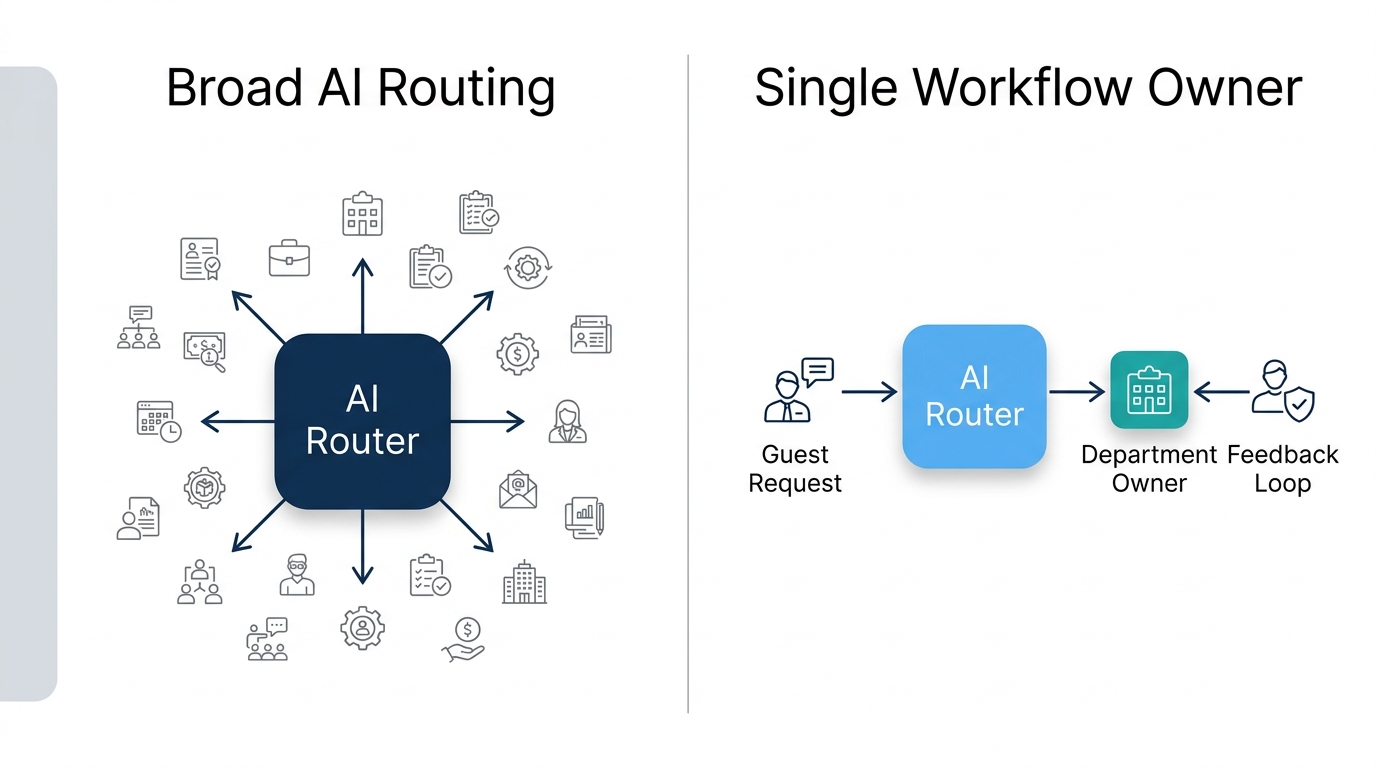
The most common mistake we see is leaders asking, “Where can we plug in AI?” instead of “Which single workflow are we willing to own, measure, and fund?” That question flips the whole initiative. When AI task routing is applied across multiple vague processes—say, “all guest requests” or “all staff communication”, no one is accountable for the outcome. The AI becomes a black box that occasionally routes something useful, but more often sends a request to the wrong queue and then someone manually fixes it. In our experience, the root cause of failure is rarely the model’s accuracy; it’s missing workflow ownership. Without that ownership, you also face an unclear cost per AI workflow, because no one tracks the true expense of each misroute or retry.
Think of AI task routing as a digital concierge. A great concierge doesn’t just smile and wave; she has a routing slip in her head. For a simple request like extra towels, she sends it to housekeeping without a second thought. For a VIP guest complaining about noise, she escalates to the front office manager. For a fire alarm, she knows to call the chief engineer immediately no AI required. The AI is just the digital concierge; the routing slip is your workflow. Without that slip, the AI is guessing, and every guess costs tokens.
Here’s where hidden costs creep in: a misrouted guest request that triggers three retries and two tool calls can consume five times the tokens of a single correct route. Multiply that across hundreds of requests daily, and you’ve silently inflated your operational expenses without any clear return. In fact, uncontrolled token spend is one of the most common reasons hospitality leaders freeze their AI experiments after the first month. They see the invoice, not the outcome. That’s why AI cost visibility must start with clear workflow ownership. You need to see exactly how much each step of the AI task routing chain costs, otherwise you’re flying blind.
To avoid that trap, start with a concrete workflow…say, maintenance requests….rather than “all housekeeping issues.” That single workflow has a clear input, owner, and success metric, making it possible to measure whether AI routing is actually helping. As the team at Salesforce emphasizes in their free workflow automation resources, process clarity must come before any AI deployment. Only when you know who owns the process can you hold the AI and the humans accountable. This is where AI budget governance begins: by tying each model action to a person who owns the result. For example, when a maintenance request takes longer than expected, the workflow owner can spot the delay and decide whether the routing rule or the model needs adjustment, turning a silent cost leak into a visible, actionable item.
Once you understand the failure mode, the next question is: how do you choose which workflow deserves AI routing in the first place? Not all tasks are equal some are ripe for automation, others will drain your budget and erode guest trust. For teams evaluating this next step, seeing how a structured CRM and ERP backbone supports workflow clarity can be a useful reference point, as our own approach to Webuters’ CRM ERP implementations demonstrates.
How to Evaluate AI Task Routing: The Workflow-First Filter
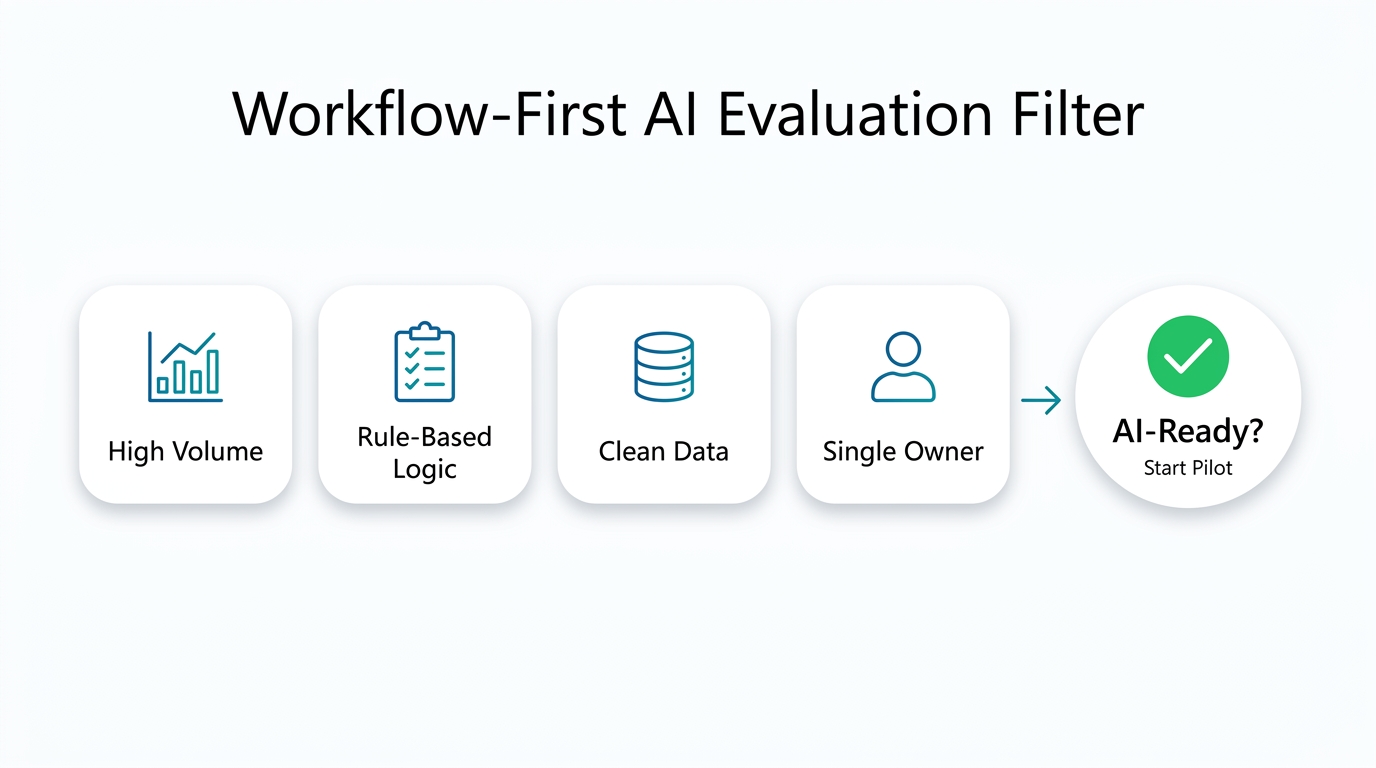
The best candidates for AI task routing share four traits: high volume, rule-based logic, clear data availability, and a single owner. Housekeeping restock requests are a perfect example. They happen dozens of times a day, follow simple rules (“if guest asks for towels, route to housekeeping”), have clean data from the PMS, and the housekeeping manager owns the outcome. You can measure success right away: time from request to delivery.
On the other end, tasks like handling guest complaints about service quality are poor initial candidates. They are ambiguous, emotionally charged, and require empathy…human judgment that AI is not ready to replace. The cost of a wrong route is high: a misrouted complaint can turn a minor issue into a negative review. That doesn’t mean AI can’t help triage complaints; it just means the human should stay in the loop for the final response. You need AI agents with human approval for any escalation path. Those AI agents, when well designed, can flag ambiguous cases for human approval, which is a key trust control in this architecture. As you evaluate AI task routing options, remember that the goal is to support your team, not to replace them.
To make the filter practical, use the table below. It scores common hospitality workflows on frequency, rule clarity, data availability, and cost of error. A “Yes” for AI-ready means you can start with a pilot. “Later” means the workflow needs process cleanup first. “No” means keep it human.
| Workflow Example | Frequency | Rule Clarity | Data Availability | Cost of Error | AI-Ready? |
|---|---|---|---|---|---|
| Housekeeping restock requests (e.g., towels) | High | High | High | Low | Yes |
| Guest maintenance complaints (e.g., leaking faucet) | High | Medium | Medium | Medium | Yes, with human approval |
| Front desk call routing to specific departments | High | High | Medium | Medium | Yes |
| VIP guest experience personalization (e.g., amenity preferences) | Low | Medium | High | Low | Later |
| Handling guest complaints about service quality | Medium | Low | Medium | High | No—keep human |
| Emergency maintenance (e.g., fire alarm) | Low | High | Medium | Very High | No—human judgment required |
When you see a workflow that scores “Yes” but still lacks a clear owner, fix that first. AI cannot route chaos. In our work with clients, we’ve seen that the most successful AI routing projects are those where the process owner was already named and accountable before any model was selected. For instance, one property we worked with had a clear owner for housekeeping requests but not for maintenance; after assigning a chief engineer as the owner, the AI routing accuracy jumped within a week—though that’s an anecdote, not a guarantee. If you need help assessing your workflows, our AI consulting services can guide you through that filter without jumping to a vendor pitch. But even with the filter, remember that AI task routing is only as effective as the people behind it.
Once you’ve shortlisted a workflow, the next step is to think about sequencing. Implementation isn’t a big-bang; it’s a phased journey that builds trust and shows ROI early.
A Practical Implementation Sequence: Start Small, Own the Outcome
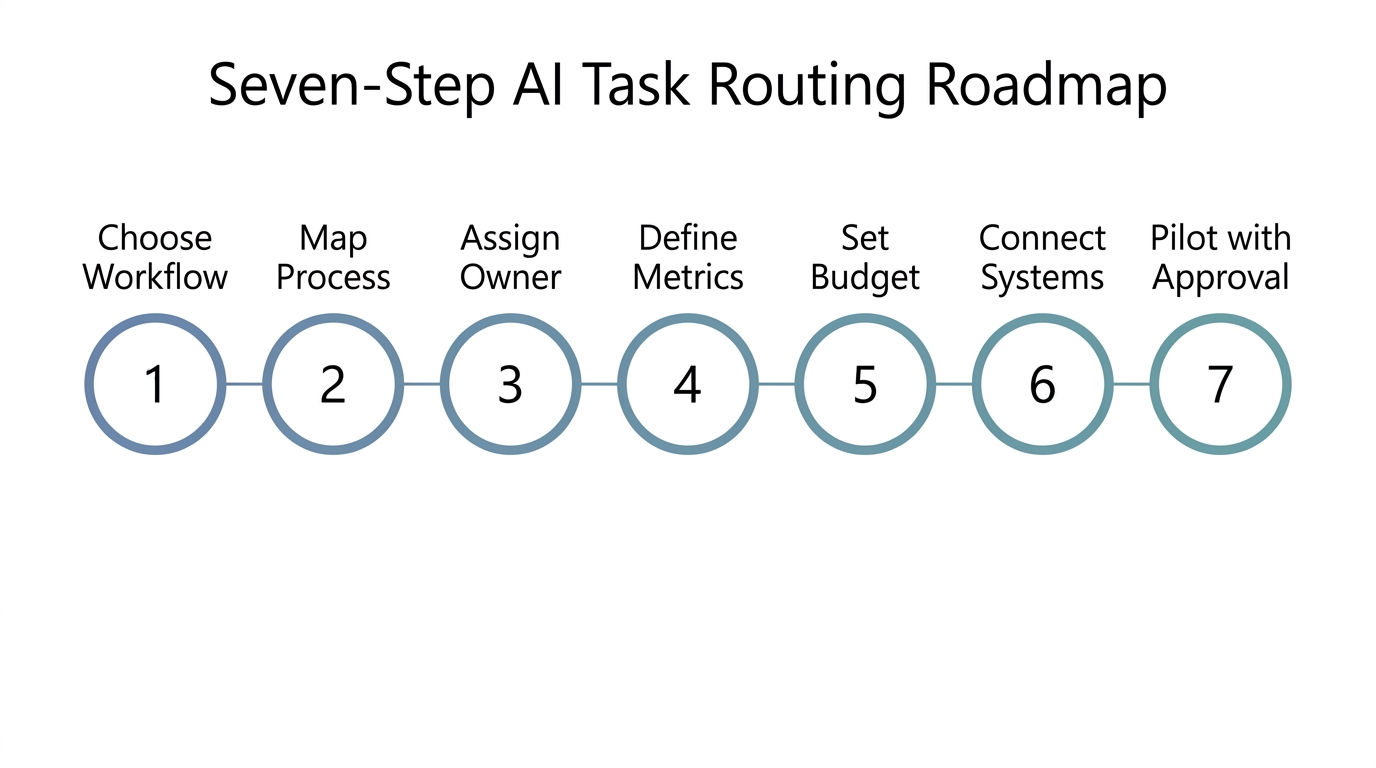
Here is the implementation roadmap we recommend to leaders who want to avoid the “AI pilot graveyard.” This roadmap builds workflow ownership into every phase, ensuring measurable business outcomes rather than a tech showcase:
- Choose the workflow. Pick one that scores “Yes” in the table above. Don’t pick two.
- Map the current process. Document every step as it happens today, including pain points and manual workarounds.
- Assign a single workflow owner. This person is accountable for the AI routing outcome, from accuracy to cost.
- Define measurable business outcomes. For example, you might target reducing time from maintenance request to assignment from 45 minutes to 5 minutes, or cutting guest complaints about delayed towels by 30%. These targets should be based on your current baseline and operational constraints, not external benchmarks.
- Set cost guardrails. Decide on a maximum token budget per request and per month. Include human review time in your cost model. This step is the foundation of LLM cost optimization and prevents high AI token usage from becoming a surprise on your invoice.
- Connect required systems. Ensure the AI has access to the PMS, CRM, or work order system it needs. More on this later.
- Pilot with human approval. Start with a small volume, say one floor or one shift, and require a human to approve every AI-generated route before it executes.
This sequence deliberately places business process redesign before technology. It forces you to own the workflow before the AI takes over. For example, a hotel we advised began with housekeeping restock requests on a single floor. They measured turnaround time and guest complaints for two weeks, adjusted the routing rules, and only then expanded to the whole property. The AI didn’t replace the housekeeping manager; it gave her a clear view of every request and a way to escalate exceptions. That is the real shift. Each phase of this implementation roadmap brings you closer to AI task routing that actually pays off.
If you already have Salesforce in your stack, you can leverage its workflow automation capabilities. Our implementation of salesforce einstein analytics and customization case study shows how a disciplined implementation approach can turn analytics into action. The same mindset applies to AI routing: start with a clean process, not a clean model.
With a sequence in place, the elephant in the room is cost. AI token spend can explode silently, eroding any ROI you hoped to achieve. Next, we dig into why “per token” is the wrong lens for LLM cost optimization.
The Hidden Cost Trap: Why Per-Token Thinking Kills Your ROI
Token-based pricing from providers like Anthropic means that every request, retry, and tool call has a direct cost. If your AI task routing sends a maintenance request to the wrong queue and it retries three times, you’ve paid for four model calls instead of one. If a verbose model like Claude Opus is used for a simple “where do I put the towels?” request, you’re burning premium tokens when a cheaper model would do. According to Deloitte, navigating AI’s new spend dynamics requires enterprise-wide governance, not just engineering decisions. That governance starts with asking: what does it cost to route one request successfully? And that’s where AI task routing often goes wrong, teams forget to tie costs back to outcomes.
Most teams measure cost per token, which is like measuring a car’s fuel efficiency by counting drops of gasoline. It doesn’t tell you if you arrived at your destination. Instead, track cost per resolved request. That metric includes AI token cost, human review time, and any integration overhead. For a housekeeping restock request, the cost per successful delivery might be, for example, $0.05 in tokens plus two minutes of human oversight total around $3.50 in labor and AI. If the AI misroutes and a human spends ten minutes fixing it, the real cost could jump to $15. These figures are illustrative, not promises. That is the number you need to see. That clarity is what reveals an unclear cost per AI workflow.
Model routing cost control is a key lever here. Not every task needs the most powerful model. Simple classification tasks like “is this a maintenance issue or a housekeeping issue?” can run on a small, fast model. Complex reasoning tasks like “is this complaint a safety hazard requiring immediate escalation?” might justify a larger model. You can set rules to route between models based on complexity, which directly controls token spend. Anthropic’s pricing page shows a clear cost difference between models, so choosing the right one matters.
Set budget caps and alerts from day one. Without them, high AI token usage becomes an uncontrolled variable that can silently double your monthly opex. We recommend a monthly review of token spend by workflow, with a named owner responsible for explaining variances. That simple habit changes AI from a cost center into an investment. This is token spend management in practice: not just tracking tokens, but managing them with the same rigor as any other line item. It’s also an essential part of AI budget governance, ensuring that each workflow stays within its agreed envelope.
Cost control is not just about budgets; it’s also about designing the workflow so that the AI doesn’t run wild. That’s where human approval gates come in—not as a brake, but as a steering wheel.
When to Keep Humans in the Loop: Designing Approval Gates
AI task routing works best when humans approve the edges. For routine, low-stakes requests, let the AI route automatically. For ambiguous or high-stakes requests, require a human to review before the route is finalized. That hybrid approach builds trust while preserving speed. It also strengthens trust controls across the whole system. Trust isn’t just about avoiding errors; it’s about making sure your AI task routing is something your team actually relies on.
Consider these three scenarios:
- Simple and safe: A guest asks for extra pillows. The AI routes to housekeeping automatically. No approval needed.
- Moderately ambiguous: A guest reports a leaking faucet. The AI routes to maintenance but flags it for the chief engineer’s review because it could indicate a larger plumbing issue. Human approves, then it executes.
- High-stakes: A guest complains about a possible safety hazard. The AI pauses and alerts the front office manager immediately. Human judgment takes over completely.
This gate design is not about slowing down; it’s about preventing costly mistakes. As Salesforce’s workflow best practices highlight, human-in-the-loop automation is essential when the cost of error is high. Over time, as the AI’s accuracy improves, you can relax some gates. But for the first few months, err on the side of human oversight for anything that could damage guest trust or physical safety.
Even with humans in the loop, AI task routing can only be as effective as the systems it connects to. Next, we cover the “plumbing”—the systems and data that must be wired up before you switch on the router.
Wiring the Plumbing: Systems and Data That Must Be Connected Before You Route
AI task routing without connected data is like a concierge without a guest list, it can’t route well. The AI needs to know who the guest is, what room they’re in, whether they have VIP status, and who is available to handle the request. That context lives in your systems: Property Management System (PMS), CRM, work order management, and internal communication tools.
If your PMS says the guest is in room 412 but your CRM has a different room number, the AI will route to the wrong floor. Data hygiene is not optional. Before you switch on the router, audit the data fields that the AI will rely on. Are room numbers consistent across systems? Is VIP status up to date? Are staff schedules integrated? If the answer is no, fix that first. A small data mismatch can cause a cascade of misroutes that erode both efficiency and trust. For AI task routing to work, you need that data to be accurate and accessible.
Integration needs vary. An API connection might suffice for a straightforward integration, but more complex data synchronization could require deeper data engineering to unify records. If you already run Salesforce, you can extend it to support AI routing rules. Our salesforce development team has helped hospitality companies customize Salesforce to fit their exact workflow needs. Similarly, our experience with salesforce netsuite integration improved a nonprofits lead to invoice process shows that connecting systems is often the unsung hero of process automation.
Don’t underestimate the plumbing. The best AI model in the world will fail if it can’t see the right data at the right time. Once the systems are connected, you can finally turn on the router but with a measurement plan in place, not after the fact.
With systems connected and humans in the loop, you might be tempted to turn on AI everywhere. But before scaling, you must learn to measure what matters not just tokens, but measurable business outcomes. That’s the final piece of the puzzle.
What to Measure Before You Scale: Moving from Token Count to Business Outcome
Define the business metric before launch. For a maintenance routing workflow, the metric might be median time from guest report to engineer assignment. Before AI, it was 45 minutes; after, it should drop to under 5. But also track guest satisfaction scores for the departments involved. A faster route that sends the wrong engineer is not a win.
Track cost per AI outcome relentlessly. That means total AI + human cost divided by number of successful resolutions. If the AI routes 100 requests at $0.10 token cost each but requires 20 minutes of human fixes per day, your real cost per outcome is higher than you think. Use A/B testing: run AI routing on one floor while another floor uses the old manual process. Compare response times, guest complaints, and total labor cost. That comparison will tell you if AI routing is truly better or just newer. When you measure the impact of AI task routing, you’re not just counting tokens; you’re assessing the overall value.
Also review model routing performance. Are you using a premium model for tasks that a lightweight model handles just as well? A simple FAQ query about check-out time doesn’t need Claude Opus. In our experience, by downgrading those calls, you can often cut token spend significantly without affecting quality, though the exact savings depend on your workload. Deloitte’s analysis of AI tokens emphasizes that enterprise cost governance requires exactly this kind of per-workflow model routing discipline.
When you see positive results from your single workflow, you’ll be tempted to route everything else. But resistance is not futile, it’s wise. The final section brings it all together: how to grow your AI routing footprint without losing control.
Scaling Without Falling: Governance for Sustainable AI Task Routing
Scaling AI task routing across a hotel group is not about flipping a switch; it’s about repeating a disciplined process. Establish a governance board with representatives from IT, operations, and finance. That board reviews monthly token spend and cost per outcome for every AI-routed workflow. If a workflow’s cost per outcome rises above its target, the board can investigate and adjust—not after a quarterly surprise, but in real time.
Keep a central registry of all AI routing workflows, each with a named owner, success metric, and budget cap. Before adding a new workflow, run it through the same filter you used for the first one. Does it have high volume? Is it rule-based? Does it have a single owner? If not, don’t add it. This simple governance prevents AI sprawl, where dozens of disconnected routing scripts drain budget and create confusion. For mature AI task routing, governance is what separates sustainable operations from chaotic experiments.
Gradually relax human approval gates as the AI proves reliable, but keep a feedback loop for exceptions. When a guest complaint is misrouted, log it, review it, and update the routing rules. That continuous improvement loop is what separates a one-time AI experiment from a durable operational asset. Our Generative AI services and solutions can help you set up that governance framework, including budget monitoring and model routing policies.
With a governance framework in place, you can sleep easier. The cycle is never done, you measure, adjust, and improve, but you’re no longer flying blind.
The Bottom Line: Treat Routing as a Discipline, Not a Magic Layer
AI task routing is not a magic layer; it’s a management discipline. The technology works, but only when you put the workflow owner before the model. Pick one repetitive, high-volume process. Assign a single owner. Define the success metric. Set a token budget. Keep a human in the loop for edge cases. Connect the systems. Then pilot, measure, and scale with governance. Tracking cost per AI outcome metrics for each workflow helps you spot which ones genuinely need attention. Don’t ask where AI can route tasks. Ask which single workflow you are willing to own, measure, and fund, then let the AI work inside that box.
If you skip any of those steps, you’ll end up with an expensive way to shuffle tickets. If you follow them, you’ll build trust with your guests and your team while keeping costs transparent. The choice is yours. And whether you’re just starting to explore AI agents or you’re ready to invest in full workflow automation, the same discipline applies. AI task routing, done right, is a durable advantage.
If you’re ready to turn AI task routing from a gamble into a managed investment, our AI consulting team can help you pick that first workflow and set it up the right way. Let’s design your routing protocol together, starting with one workflow.
Frequently Asked Questions
How should teams evaluate AI task routing?
Teams should evaluate AI task routing using the workflow-first filter: high volume, rule-based logic, clean data, and a single owner. Score each workflow on frequency, rule clarity, data availability, and cost of error. Only proceed if the workflow scores “Yes” or “Yes, with human approval” and has a named process owner.
Which workflow should leaders prioritize for AI task routing?
Leaders should prioritize a high-volume, rule-based, repetitive task with a clear single owner and measurable business outcomes. Housekeeping restock requests and guest maintenance complaints are strong starting points because they occur frequently, follow predictable rules, and have immediate operational impact.
What should teams measure before scaling AI task routing?
Before scaling, teams must measure cost per AI outcome—total AI + human cost divided by successful resolutions—along with response time, guest satisfaction, and employee workload. Avoid measuring only token counts; they don’t reflect business value.
Where should humans stay involved in AI task routing?
Humans should stay involved at high-stakes or ambiguous decision points: safety hazards, VIP complaints, or any action that could damage guest trust. Design approval gates so that routine tasks route automatically, while edge cases require human review before execution.
What systems and data should connect before implementing AI task routing?
At minimum, connect your Property Management System (PMS), CRM, work order management, and internal communication tools. Ensure data fields like room numbers, VIP status, and staff schedules are accurate and consistent across systems before you switch on the router.
How do you control AI token spend in task routing?
Control token spend by setting per-request and monthly budget caps, using model routing (small models for simple tasks, large models only when necessary), and reviewing cost per outcome monthly. Assign a workflow owner accountable for budgets and variances. That’s the essence of token spend management and LLM cost optimization.
AI adoption and workflow automation
Start with one workflow, prove it in production, then scale what works.
See AI services
Ashish leads cross-functional engineering teams at Webuters to deliver scalable, AI-powered digital solutions. His expertise spans React, Node.js, Generative AI, Ecommerce, Shopify Plus, SFCC, and modern JavaScript frameworks like MERN and MEAN. From ecommerce migrations to AI consulting and adoption, he bridges complex tech with real business outcomes. As a hands-on leader in architecture, cloud, and full-stack innovation, he shares insights to help development teams build smarter and stay ahead in an evolving tech landscape.
Follow Ashish on LinkedIn