
Insurance CRM Features: The 12 That Matter Most
Every insurance CRM demo goes the same way. Clean screens. A pipeline that only moves forward. A dashboard with numbers that always look good.
Then you buy it, and you discover the thing it cannot do. Usually in month four, usually at renewal.
The insurance CRM features that decide whether a system pays for itself rarely appear in that demo. This is the checklist of twelve that matter, what good looks like for each, and the question that exposes a weak answer.
This is a buyer’s checklist, not an introduction. Most guides list five features and stop. If you are still working out whether your firm needs a CRM at all, start with our guide to CRM for insurance and come back when you are ready to compare products.
How to read this list
Vendors all claim the same insurance CRM features. The claim is worthless. What separates products is depth.
So for each of the insurance CRM features below, ask one question. What breaks in my firm if this is missing or shallow? Then make the vendor prove the depth on screen, with your data shape, not theirs.
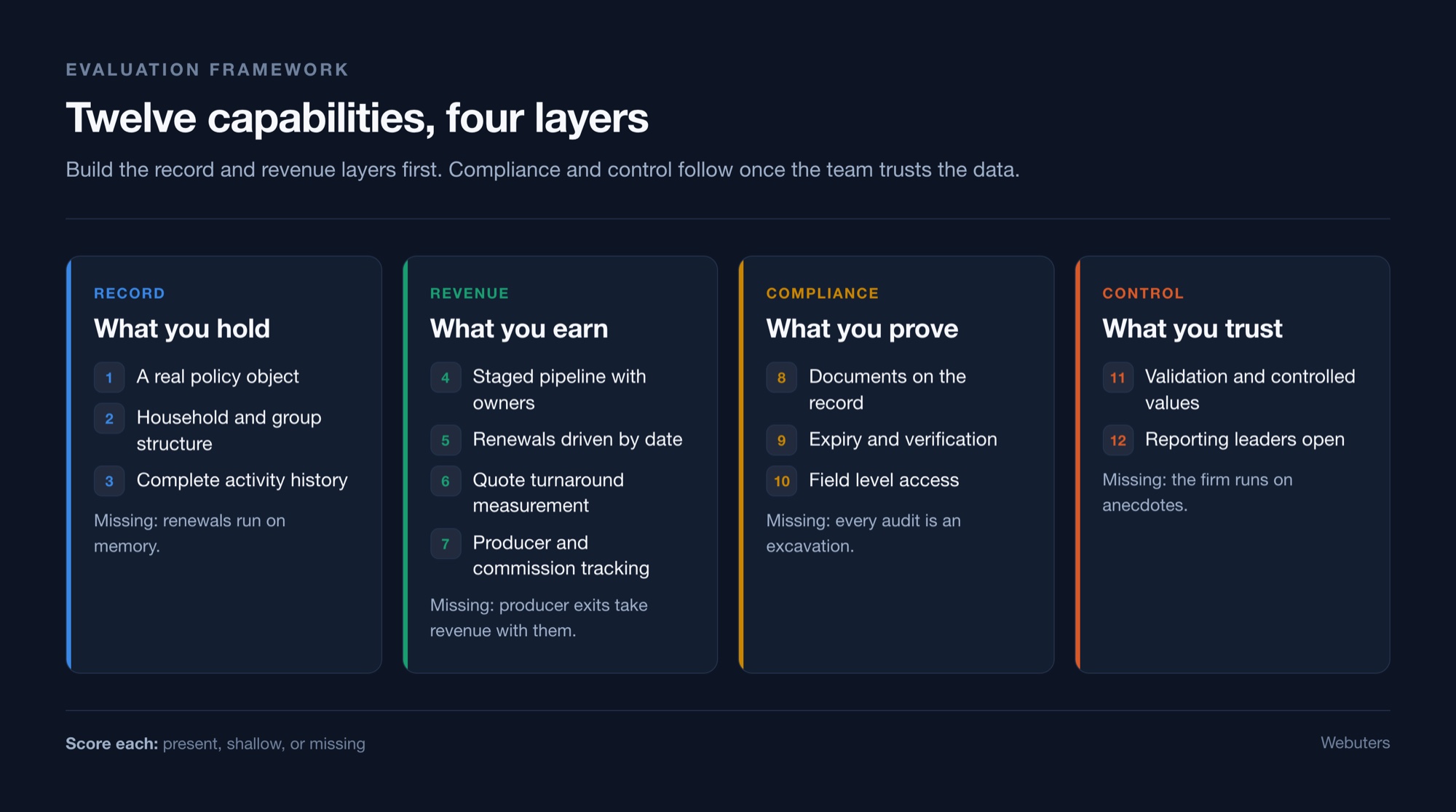
The record layer
1. A real policy object
The system needs a genuine place to hold a policy. Line of business, premium, effective date, renewal date, carrier, endorsements. If the vendor shows you a deal record with custom fields bolted on, expect pain at renewal.
What good looks like: the policy is its own record with its own lifecycle, separate from the opportunity that won it. Renewals do not pollute new business reporting.
Without it: renewals run on memory.
2. Household and commercial group structure
One client can hold six policies. A commercial client can span three legal entities with one decision maker. The CRM has to show that shape without custom development.
What good looks like: a parent account with child accounts, a single view of total premium across the group, and the ability to report at either level.
Without it: you cross sell blind and you consistently understate the size of your relationships.
3. Complete activity history
Every call, email, quote and note sits on the record with a name and a timestamp. Email capture has to be one click or it will not happen.
What good looks like: native Outlook and Gmail integration that logs without leaving the inbox.
Without it: the answer to “who spoke to them last” stays a guess.
The revenue layer
4. Staged pipeline with enforced ownership
Named stages. One owner per opportunity. A required next action before a record can advance.
What good looks like: stage specific required fields, so an opportunity cannot move to proposal without the data proposal needs.
Without it: deals stall quietly and nobody notices until the quarter closes.
5. Renewal management driven by date
The system tracks what renews in 90, 60 and 30 days and assigns the work automatically.
What good looks like: a renewal queue by producer, escalation when a task goes untouched, and a record of why a policy lapsed.
Without it: you lose policies you already paid to win.
6. Quote tracking and turnaround measurement
You can see how long quotes take, broken down by producer, line and carrier.
What good looks like: a timestamp at submission received and at quote delivered, with the gap reported automatically.
Without it: you cannot fix a speed problem you cannot see.
7. Producer ownership and commission tracking
Ownership is explicit on the policy. Splits are recorded. Book transfers are a process, not a favour.
What good looks like: split percentages held at policy level, with history retained when ownership changes.
Without it: producer exits take revenue with them and you argue about commission for months.
The compliance layer
8. Documents attached to the record
Files live on the client, policy or vendor they belong to. Not in an email thread and not on a shared drive named after somebody’s initials.
What good looks like: version control and a clear indicator of which document is current.
Without it: every audit turns into an archaeology project.
9. Expiry and verification tracking
Each document carries a status, a verifier, a verification date and an expiry date. The system warns you before it lapses.
What good looks like: a renewal reminder date that is independent of the expiry date, so you get warned with time to act.
Without it: you learn a licence expired when somebody outside the firm tells you.
10. Field level and role based access
Bank details and statutory data are visible to the people who need them and invisible to everyone else.
What good looks like: permissions at field level, not just record level, plus an audit log of who viewed what.
Without it: you carry a risk you have never priced.
The control layer
11. Validation rules and controlled values
The system rejects a record missing what the next stage needs. Picklists replace free text for anything you intend to report on.
What good looks like: validation you can change yourself, without a developer and without a release cycle.
Without it: data quality degrades a little every week and your reports follow it down.
12. Reporting leadership will actually open
Retention by producer. Pipeline by line. Compliance items due. Quote turnaround.
What good looks like: scheduled reports that arrive in an inbox, because dashboards people have to visit go unvisited.
Without it: you run the firm on anecdotes.
Three insurance CRM features firms buy and never use
Budget disappears here. These demo beautifully and sit idle in production.
Heavy marketing automation. Most insurance firms lack the content volume to feed it. You license a campaign engine and send four emails a year. Put that budget into renewal outreach instead.
Deep forecasting models. Forecasting works when pipeline data is clean and stages mean something consistent. On day one neither is true. Earn forecasting in year two.
A client portal nobody logs into. Portals work when clients have a recurring reason to return. For most personal lines books that reason does not exist. Test demand before you build.
Spend the money on migration and training instead. Those two decide whether anything else gets used at all.
How these features map to outcomes
Boards do not fund features. They fund outcomes. Here is how the list above connects to the four numbers leadership actually tracks.
Retention comes from features 1, 5 and 7. A real policy object, renewal dates that drive work, and ownership that survives a resignation. If you only fix three insurance CRM features this year, fix these.
Quote turnaround comes from features 3, 4 and 6. Activity capture, enforced pipeline stages and measurement. You cannot compress a cycle you have never timed.
Audit readiness comes from features 8, 9 and 10. Documents on the record, expiry tracking and field level access. These three are also the insurance CRM features most often deferred, and the most expensive to retrofit.
Trustworthy reporting comes from features 11 and 12. Controlled values at entry, and reports that reach people without being visited.
Map your gaps to this list before you build a business case. A gap that touches retention justifies itself quickly. A gap that touches reporting rarely does on its own.
How to test these in a demo
Never ask whether the product has a feature. Every vendor says yes.
Instead, hand them one scenario before the call and make them run it live.
Use this one. A commercial client holds three policies across two legal entities. The renewal is in 45 days. The producer who owned the relationship left last month. One certificate of insurance expires next week.
Then watch. How many clicks to see the full relationship? Can they reassign ownership and keep the history? Does the expiring certificate surface on its own, or does somebody have to know to look?
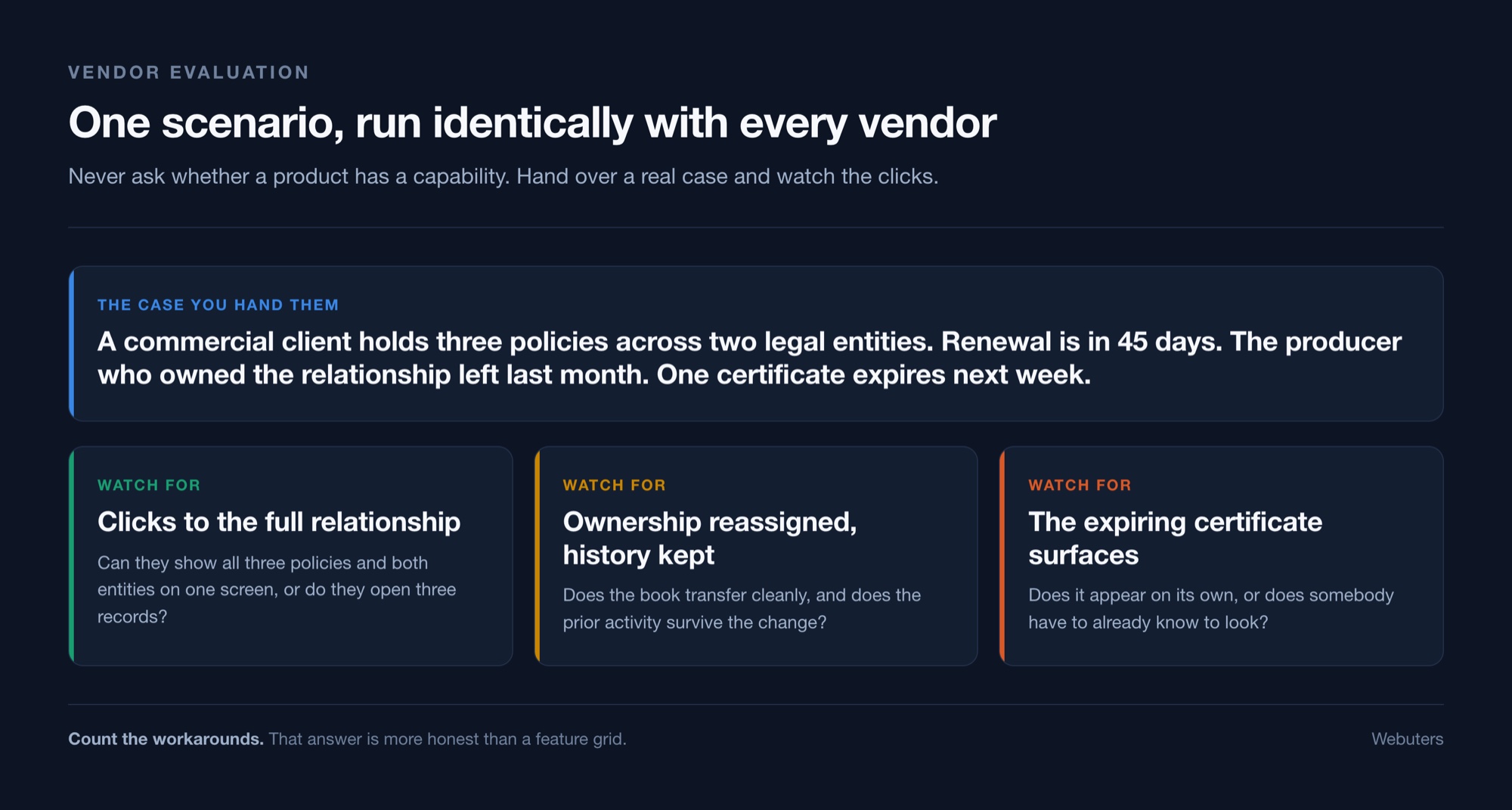
Count the clicks and the workarounds. That is your answer, and it is far more honest than a feature grid.
Run the same scenario with every vendor. Identical inputs make the comparison real, and they expose which insurance CRM features are genuinely native rather than bolted on for the demo.
Common questions
Which insurance CRM features matter most for a small agency?
Numbers 1, 5 and 11. A real policy object, renewal dates that drive action, and validation that keeps data clean. Everything else can follow once those three hold.
Do we need all twelve on day one?
No, and trying is the most common cause of a stalled rollout. Build the record and revenue layers first. Add compliance and automation once your team trusts the data.
Can we add these to the system we already own?
Often yes. Platforms like Salesforce and Zoho are configurable, so the real question is effort rather than possibility. Start by scoring which of the twelve you already have.
What about AI features?
Treat them as a later layer. AI reads and drafts well, but it needs structured records underneath. Fix the data model first and the AI gets better on its own.
Score your system before you shop
Go through the twelve insurance CRM features and mark each one present, shallow or missing. Count the gaps.
Fewer than four gaps usually means you have a configuration project, not a purchase. More than eight usually means the data model underneath is wrong, and no amount of configuration will fix that.
Once you know which insurance CRM features you need, the next question is which route to take. Our guide to insurance CRM solutions covers packaged products, configured platforms and extending what you already own.
Webuters implements insurance CRM on Salesforce and Zoho for agencies, brokers and MGAs. Book a working session and we will score your current setup against these twelve with you, on your data, and tell you which gaps are worth closing first.

Loading...