
Insurance CRM Solutions: Finding the Right Fit for Your Firm
Two agencies of the same size buy the same insurance CRM in the same quarter. A year later one has 90 percent adoption and a renewal process that runs itself. The other still keeps the real book in a spreadsheet.
The software was identical. The fit was not.
There is no best insurance CRM. Insurance CRM solutions only work when they match how your firm actually makes money, and most selection processes never ask that question. The firms that choose well start from their own operating model, then filter insurance CRM solutions against it.
This is not a vendor roundup. Product lists date within months and they rarely tell you what fits. If you want the fundamentals first, read our guide to CRM for insurance.
Start with your operating model
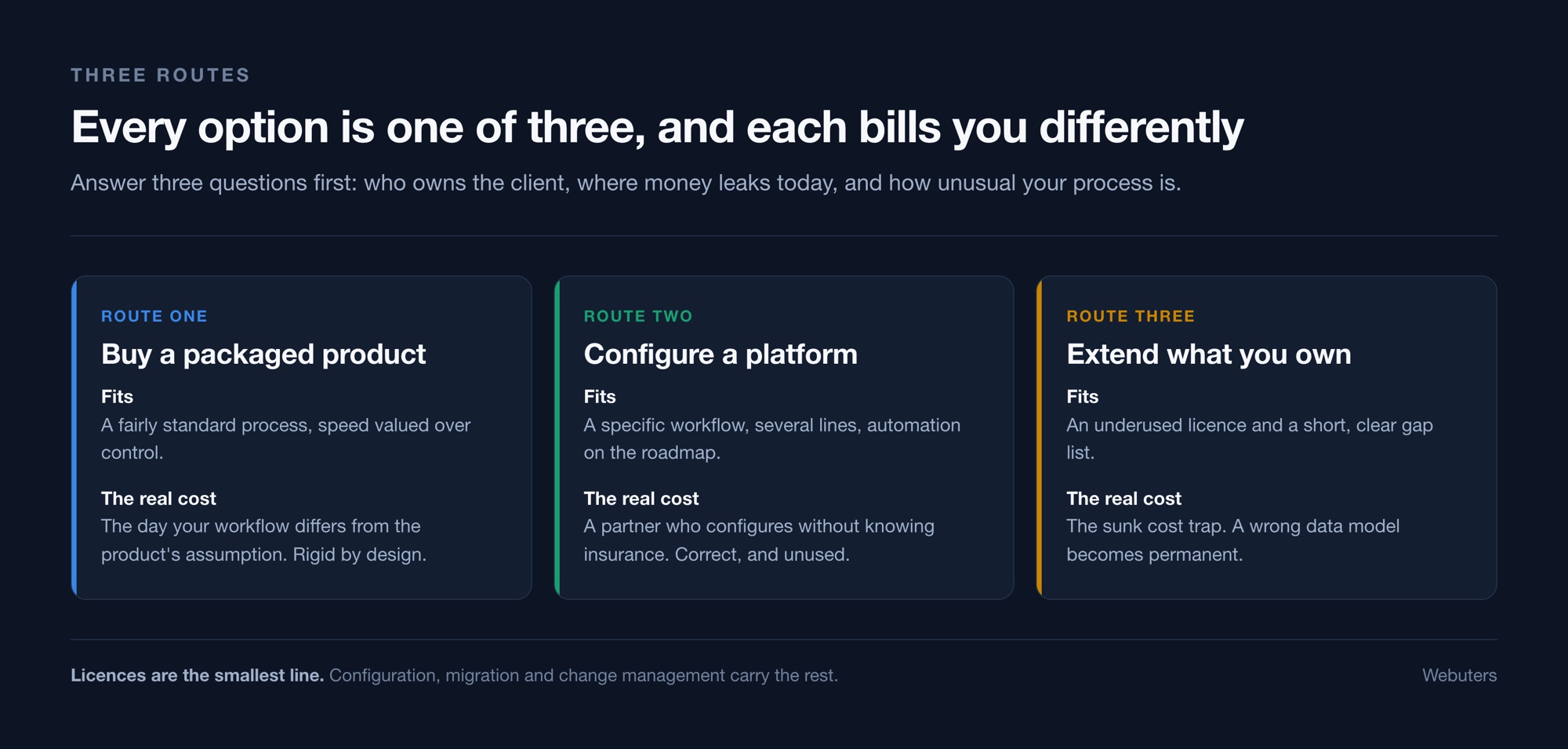
Three questions decide most of the answer. Write your answers down before you take a single demo.
- Who owns the client? A producer, a service team, or the firm itself. This determines your sharing model and your commission design.
- Where does money leak today? New business, renewals, or service cost. Fix the leak you have, not the one a vendor wants to sell you.
- How unusual is your process? Standard enough for a packaged product, or specific enough to need configuration.
Those three answers eliminate most insurance CRM solutions before you waste a week on demos.
The three routes to insurance CRM solutions
Route one: a packaged insurance product
Built for insurance out of the box. Policies, renewals and commissions are already modelled, and the vocabulary matches how your team speaks.
Fits: firms with a fairly standard process who value speed over control.
The real cost: the day your workflow differs from the product’s assumption. Packaged products are rigid by design. Ask what happens when you need a field the product does not have, and who pays for it.
Route two: a configured platform
Salesforce or Zoho, shaped around your process. You define the policy object, the stages, the permissions and the compliance layer.
Fits: firms with a specific workflow, multiple lines of business, or plans to add automation and AI later.
The real cost: a partner who configures without understanding insurance. You get a technically correct system that no producer will use. Ask what they have shipped in insurance and to speak to that client.
Route three: extend what you already own
Many firms own a capable platform and use a fraction of it. Sometimes the fix is configuration, not purchase.
Fits: firms with an underused licence and a clear, short gap list.
The real cost: the sunk cost trap. If the underlying data model is wrong, extending it makes the problem permanent. Audit the model before you commit to this route.
Fit by firm type
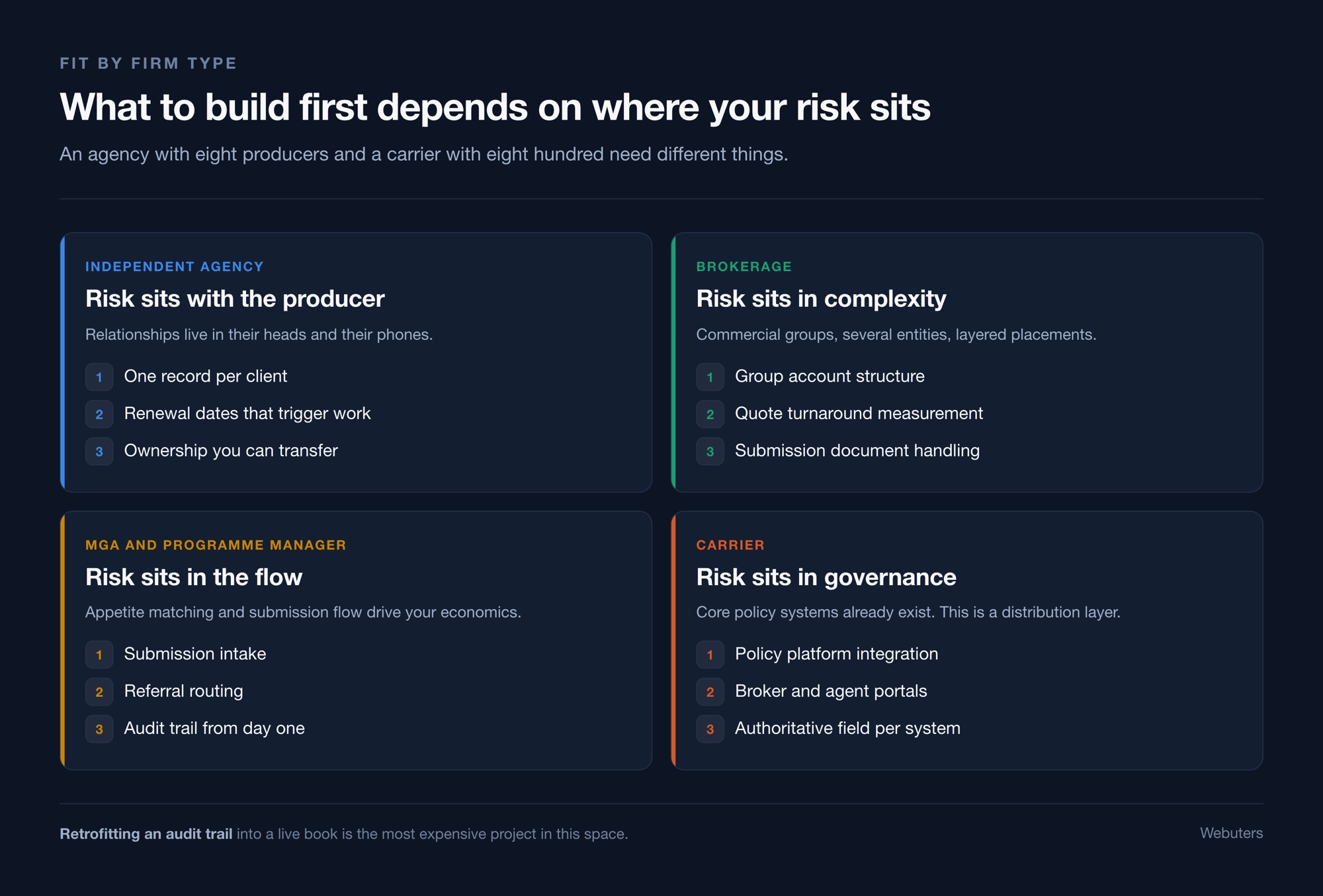
Independent agencies
Your risk sits with the producer. Relationships live in their heads and their phones, and the book is only as portable as their goodwill.
Prioritise one record per client, renewal dates that trigger work automatically, and producer ownership you can transfer cleanly. Keep the first build deliberately small. Producers abandon anything slower than what they do today, and you rarely get a second chance at adoption.
Brokerages
You run higher volume and more complex clients. Commercial groups, multiple entities, layered placements and several carriers per risk.
Prioritise group account structure, quote turnaround measurement and submission document handling. Reporting by line of business matters far more here than in a small agency, because your mix drives your negotiating position with carriers.
MGAs and programme managers
You sit between carriers and distribution. Appetite matching and submission flow drive your economics directly.
Prioritise submission intake, referral routing and carrier reporting. Build the compliance and audit trail from the start. Retrofitting an audit trail into a live book is one of the most expensive projects in this space.
Carriers
You already run core policy systems. The CRM is a distribution and service layer, not a system of record for policies.
Prioritise integration with policy administration, broker and agent portals, and service case management. Data governance comes before features. Decide which system is authoritative for each field before anyone configures anything.
What the decision usually turns on
Across insurance CRM solutions, four things settle it in practice. None of them appear on a feature grid.
Integration reality. Your CRM has to talk to your policy platform. Ask for a reference customer running that exact pairing, then ask that customer how long the integration took and what still does not sync.
Compliance depth. Document expiry, verification status, field level access. Products vary enormously here and it is expensive to add later, because it touches every record you have already created.
Room to grow. If AI agents and automation sit on your roadmap, a configurable platform gives you far more room than a closed product. Ask what the extension model is and whether you need the vendor for every change.
Who will run it. Someone has to own the system after go live. If you have no internal owner, buy something simpler than you think you need.
What it actually costs
Across insurance CRM solutions, licences are the number everyone compares and the smallest part of the total.
Plan for four cost lines. Licences, which scale with users. Configuration, which scales with how unusual your process is. Migration, which scales with how messy your current data is and is almost always underestimated. Change management, meaning training, documentation and the internal time your team spends learning.
Migration deserves particular attention. Ask the vendor what they will refuse to migrate. A partner who says they will move everything has not looked at your data yet.
Migration is where these projects actually fail
Ask any partner which stage kills implementations and they will say migration. Ask most buyers how much time they allocated to it and they will say very little.
The problem is rarely technical. It is that your current data encodes decisions nobody remembers making. A column called status means four things depending on who typed it. Renewal dates sit in three formats. Two spreadsheets disagree about who owns an account, and both have been right at some point.
No tool resolves that. People do, and it takes longer than anyone budgets.
Three rules keep migration honest. Decide what not to move. Dead prospects and superseded records add noise and cost. Reconcile against a source. Check migrated premiums and renewal dates against the policy system, not against the spreadsheet you migrated from. Freeze the old system on a date. Parallel running feels safe and guarantees two versions of the truth.
When you compare insurance CRM solutions, ask each vendor to describe their migration method in detail. The ones who have done this often will talk about reconciliation and exclusions. The ones who have not will talk about their import tool.
Five questions to ask their references
Vendors choose references who say pleasant things. Ask questions that resist a script.
- What went wrong, and how did they handle it? Every project has a bad month. The answer tells you about the partner rather than the product.
- How long until your team stopped using the old system? Parallel running for six months means adoption failed.
- What did you cut from scope? This reveals what the product struggles with.
- Who administers it now? If the answer is the vendor, you bought a dependency rather than a system.
- Would you buy it again? Then wait through the pause before they answer.
A shortlist you can defend
Take three insurance CRM solutions to your board, not seven. For each, write a single page covering four things.
- What it fixes, described in your own operational language.
- What it will not do, stated plainly.
- What it costs across all four lines in year one and year three.
- Who owns it internally after go live.
The option that survives that page is usually the right one. If none survive, you have not found the right option yet, and another round of demos will not change that.
One more discipline helps. Write down what would make you switch away from your chosen option in three years. If you cannot answer, you have not understood the commitment you are making.
Common questions
Is Salesforce or Zoho better for insurance?
Both work well and the logo matters less than the fit. Salesforce suits larger firms with complex integration needs and the budget to match. Zoho suits firms that want strong functionality at lower cost with faster configuration. Your integration requirements and internal capacity decide it.
How do we avoid buying twice?
Most insurance CRM solutions demo well. Test the data model before you sign. Ask the vendor to model one genuinely complex client from your book during the evaluation. If that needs custom work in a demo, it needs far more in production.
Do insurance CRM solutions work for a two person agency?
Yes, and the calculus is different. At that size the constraint is time, not process complexity. Buy something you can configure yourself in days, and avoid anything that needs an administrator you do not have.
Can we start small?
Yes, and you should. Pick the process that leaks most, usually renewals. Ship that, prove it, then extend. Phased rollouts adopt better than complete ones.
What if we outgrow the choice?
Plan for it. Ask how data gets out, in what format, and what it costs. A vendor who makes leaving difficult is telling you something about their confidence.
Your next step
Write down your three answers from the top of this guide. Firm type, leak point, process fit. That single page is enough to shortlist insurance CRM solutions with confidence, and it will save you weeks of demos aimed at the wrong problem.
If you want to compare capabilities in detail first, work through the insurance CRM features checklist and score what you already own.
Webuters implements insurance CRM on Salesforce and Zoho for agencies, brokers and MGAs, including the integration and compliance work that decides whether a rollout sticks. Talk to our team and we will tell you which of the three routes fits your firm, even when the answer is that you already own what you need.

Loading...