
Your CRM Migration Is Doomed Without Field Rules and Clean Data — Here’s the Step-by-Step Fix
A successful CRM migration starts with field rules and data hygiene, not with choosing a new tool. Duplicate contacts, vanishing pipeline stages, and evaporated trust are the real cost of treating the move as a lift-and-shift exercise. Most CRM migration efforts fail because the data is dirty, fields are undefined, and the organization hasn't agreed on what clean data looks like.
Here's the truth: the platform barely matters. What matters is the discipline you bring before you press "migrate." In this article, we'll unpack why field rules are the most critical pre-migration work, the unique challenges of migrating from a marketing platform, a four-phase plan with a built-in rollback point, how AI can assist (without replacing human judgment), and a post-migration verification checklist that catches hidden gaps. A thorough CRM migration plan must address each of these elements.
The Real Risk Is the Mess You Bring
Most teams obsess over choosing between Salesforce, Zoho, or another platform. But the real danger lies in years of ad-hoc data entry, undefined custom fields, and duplicate records. When you migrate that noise into a pristine new environment, you don't get a fresh start—you get amplified chaos. A CRM migration without field rules is like moving without packing: everything ends up in the wrong place, and half breaks on the journey.
Consider a sales team that migrates without reconciling picklist values. The "Lead Source" field in the old system had 30 options ranging from "Trade Show" to "Google Ad—Brand." The new CRM has a tidy list of 10. During transfer, unmapped values get truncated, defaulted to "Other," or rejected outright. Suddenly, years of reporting on campaign provenance become meaningless. A proper CRM migration requires defining field rules before anything else. Document every field, its validation rules, dependencies, and target mapping—ideally in a shared spreadsheet. Only then can you separate useful data from debris. This discipline is the bedrock of any CRM migration.
Field Rules: The Invisible Guardrails of a Clean Migration
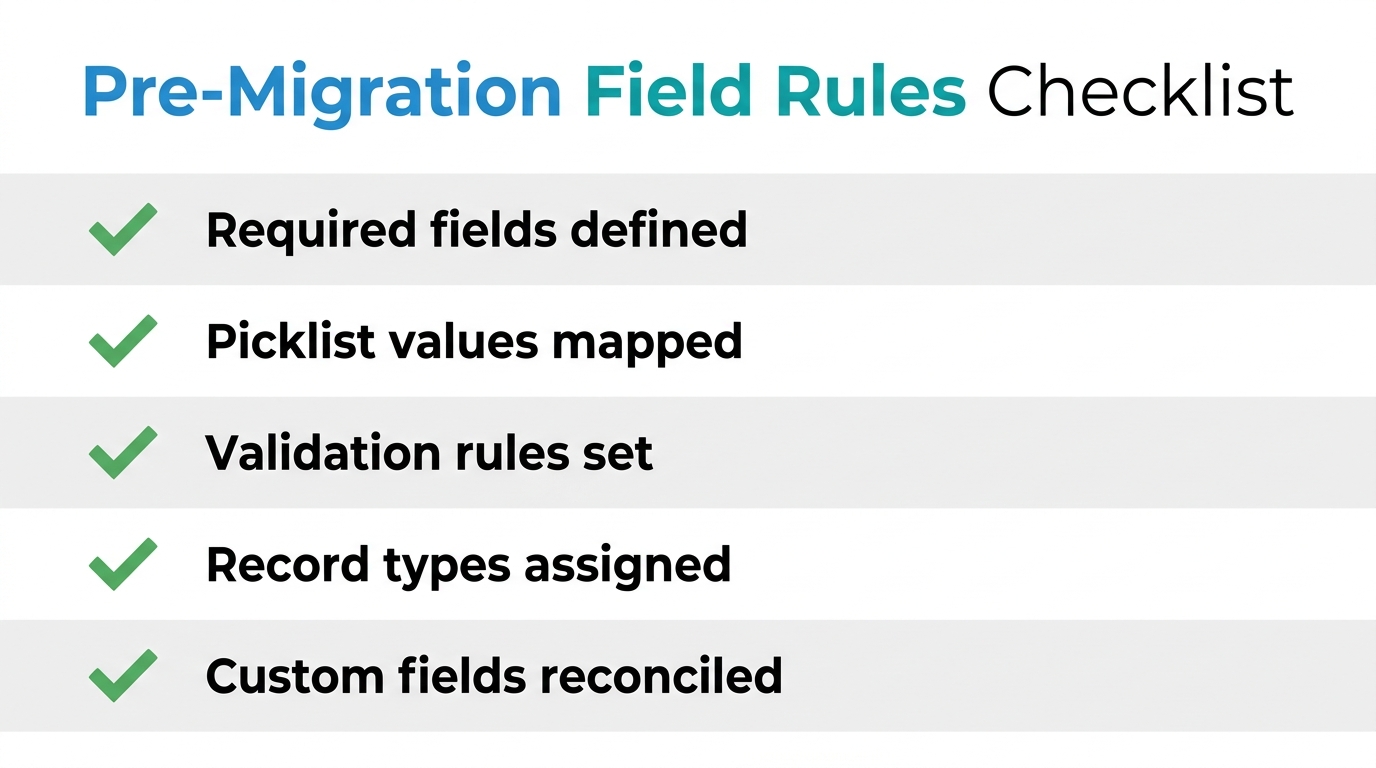
Field rules are the constraints and definitions that determine what your CRM will accept, where it will live, and how to behave. They include required fields, picklist values, validation rules, and record-type associations. Without them, your new CRM is a dumping ground. A well-executed CRM migration depends on these guardrails.
Salesforce's own data migration best practices emphasize the need for a clear field mapping document before any data load. That document should answer: Which fields are mandatory? Which picklist values from the old system map to new ones? Are there custom fields to recreate or retire? How will record types and page layouts affect where data is displayed? In practice, you must:
- Export all object schemas and field metadata from both systems.
- Reconcile differences: standard fields often map automatically, but custom fields need explicit mapping.
- Normalize picklist values with a translation table that converts every old value to its new counterpart.
- Set validation rules in the target system before loading data, so bad records fail on import and can be fixed.
- Assign record types and layouts so that accounts, contacts, and deals land in the correct buckets.
This step is tedious but non-negotiable. A single overlooked required field—like "Close Date" on won opportunities—can cause dozens of records to be rejected during the data load, leaving gaping holes in your pipeline history. Every CRM migration must include this meticulous field rule definition.
The Marketing Platform Trap: Why Migrating From a Marketing Platform Is Different
If your CRM data lives inside a marketing platform like HubSpot, Mailchimp, or Marketo, the CRM migration adds another layer of complexity. Marketing platforms are built around contacts and their activities, while CRMs are built around accounts and opportunities. The data models don't align. This is a classic data-model clash that increases CRM switching costs if not handled carefully. A successful CRM migration from a marketing platform requires special attention to these structural differences.
For example, in a marketing platform, every email open, click, or form submission attaches to a contact record. In a CRM, that activity history may need to be linked to a specific account, deal, or campaign. During the move, you risk losing that thread. A B2B company moving from HubSpot to Salesforce discovered that all email threads and meeting logs were stored as contact-level notes, not related to the opportunities they were negotiating. The historical activity data became unusable for sales forecasting.
Another common issue: marketing platforms often use tags or custom fields to store critical data like "Last Donation Date" or "Lifecycle Stage." A non-profit moving donor records from Mailchimp to Zoho found that "Last Donation Date" was stored as a tag, not a date field. In the new CRM, it didn't map to the standard "Last Donated" date field, so the information was lost until a manual cleanup was done.
To avoid these traps:
- Export all activity data and decide which pieces are essential (e.g., opens, clicks) and where they should live in the CRM (custom objects, activity timeline).
- Map lifecycle stages to the CRM's lead status or opportunity stage fields.
- Integration re-wiring is often required: email sync, landing page forms, and automation workflows must be reconfigured to point to the new system.
For teams evaluating this next step, Webuters' Zoho services and solutions can provide a practical reference point.
The 4-Phase CRM Migration Plan: Audit, Clean, Map, Migrate
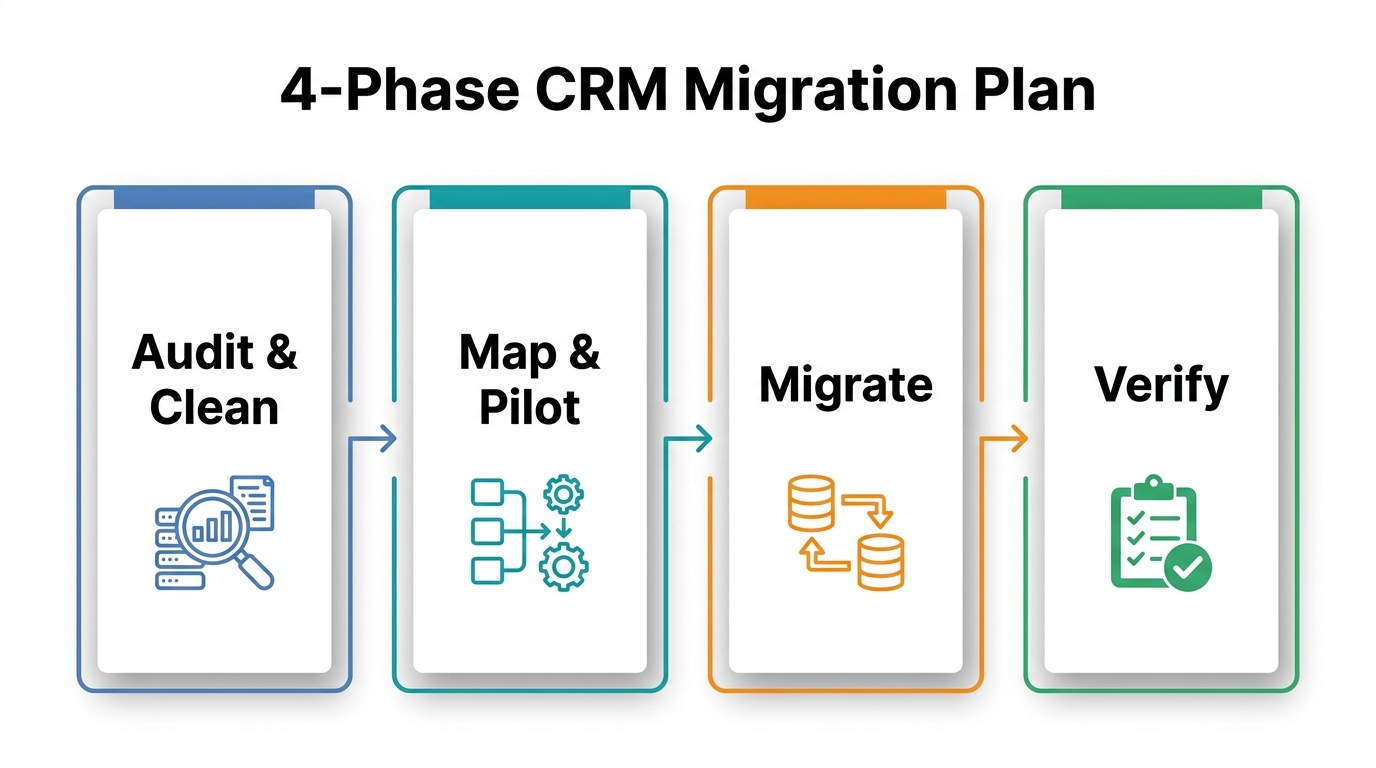
With field rules defined and marketing platform nuances accounted for, you can execute a structured plan. We've developed a four-phase approach that works across Salesforce, Zoho, and custom implementations. It pairs with our step-by-step CRM implementation guide.
| Phase | Key Activities | Typical Duration | Success Metric |
|---|---|---|---|
| Audit & Clean | Data quality reports, dedup, archive | 1-2 weeks | <1% duplicate records |
| Map & Pilot | Field mapping, sandbox, pilot load | 1 week | 100% field mapping validated |
| Migrate | Batch migration, cutover | 1 weekend (2-3 days) | All records transferred with <0.5% errors |
| Verify | Record counts, pipeline checks, integration tests | 3-5 days | All integrations operational, user login rate >80% |
Phase 1: Audit & Clean. Run data quality reports from your current system. Identify duplicates using fuzzy matching, flag missing required fields, and standardize date and phone number formats. Archive records that haven't been touched in two years—they rarely add value and slow down the transition. This is where AI-assisted data cleanup shines, as AI agents can scan thousands of records and flag duplicates. Proper CRM data hygiene here prevents future headaches.
Phase 2: Map & Pilot. Set up a sandbox in the target CRM, load a representative subset of 100–200 records, and validate every field mapping. A manufacturing company we worked with discovered during sandbox testing that their "Lead Status" picklist was missing two critical values. Correcting it then saved hours of rework. This pilot is a crucial step in any CRM migration.
Phase 3: Migrate. Schedule a cutover weekend. Keep the old system live in read-only mode as your rollback plan. Use bulk APIs or migration tools to move data in batches. Monitor error logs in real time. Have a defined rollback trigger—for instance, if you see a pattern of repeated validation failures that suggests structural issues, revert to the source system. Fix the issues before a second attempt. This disciplined approach ensures minimal business disruption during your CRM migration.
Phase 4: Verify. Once data is loaded, don't celebrate yet. Run record counts by object, compare pipeline totals, and test every integration. A healthcare firm caught a $50,000 discrepancy in opportunity amounts due to a currency conversion error this way—just in time. The final step is thorough verification.
How AI Agents Assist Migration (Without Replacing Human Oversight)
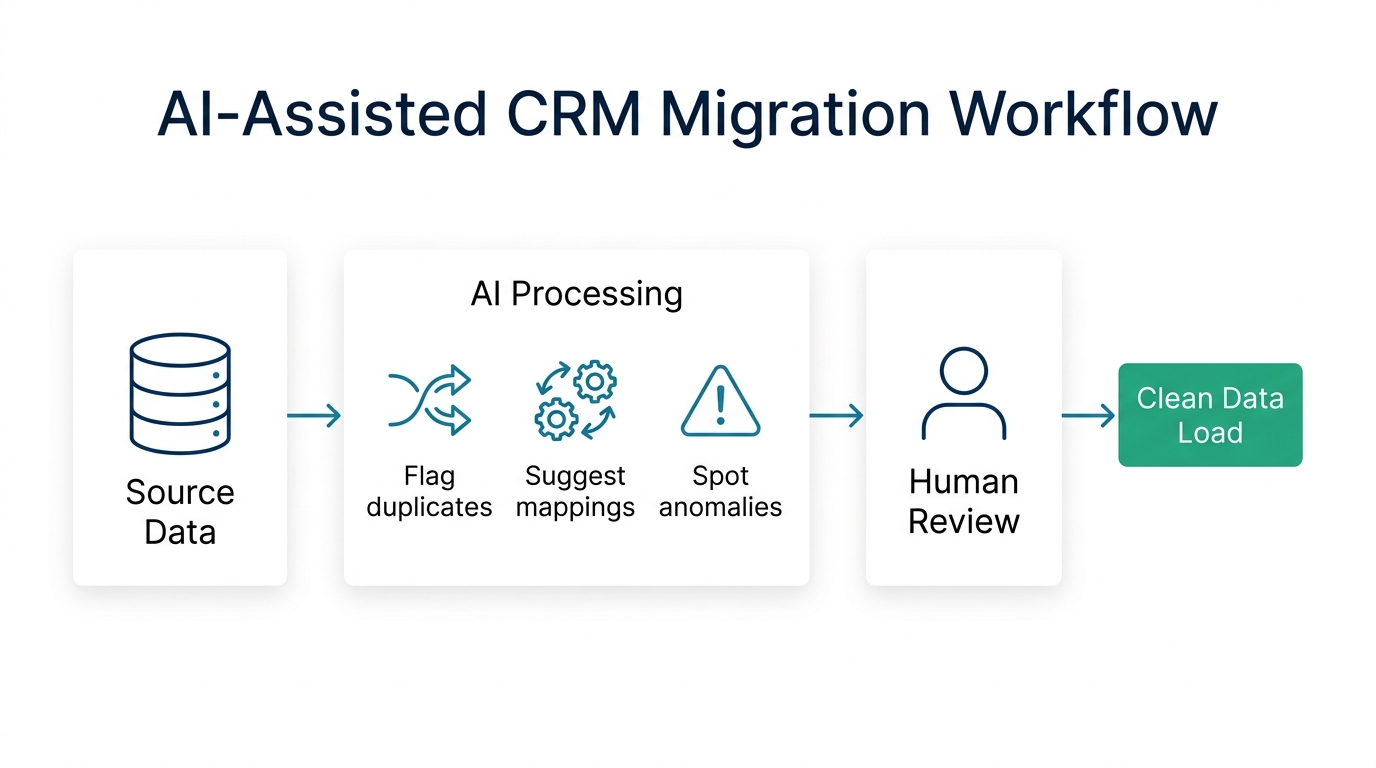
Throughout these phases, AI can shoulder much of the repetitive work. Modern AI agents, whether built into platforms like Zoho or as custom scripts, can analyze metadata, suggest field mappings, and flag anomalies at scale. For instance, an AI agent might scan 10,000 records and confidently identify 1,200 duplicates based on name, email, and phone similarity. It can present these in a review queue for a human to approve or reject. That's a step that used to take days of manual work.
We've used AI consulting services at Webuters to help clients accelerate the audit phase. In one Zoho migration, a custom script analyzed field metadata and suggested mappings to Salesforce standard objects. During that project, data ownership rules were clarified early, preventing conflicts later. The team reported that the mapping step was completed notably faster than manual efforts, though the exact percentage reduction depends on each dataset's complexity. But the final decisions on ambiguous fields—like whether "Partner" should map to "Account" or "Contact"—required a business stakeholder's judgment.
AI is a force multiplier, not a replacement. It can flag improbable dates, empty required fields, and inconsistent picklist values, but it can't know that "ABC Corp" and "ABC Corporation" are the same entity without human confirmation. The rule: let AI do the heavy lifting, but keep a human reviewer in the loop for context-sensitive choices. For any CRM migration effort, human oversight remains non‑negotiable. This balance makes your CRM migration both efficient and reliable.
Post-Migration Verification: The Checklist That Saves Your Sanity
After the data lands, verification is your last line of defense. Here's a checklist to run before celebrating:
- Record counts: Compare totals for accounts, contacts, leads, and opportunities between source and target. Any significant discrepancy means something was missed.
- Pipeline integrity: Pull key reports. Do deal stages, amounts, and close dates match? Look for anomalies like deals stuck in "New" stage from two years ago.
- Integration testing: Verify that email sync (Outlook/Gmail), calendar sync, marketing automation triggers, and third-party apps (QuickBooks, Slack) are functioning. Send test emails and create test records to confirm.
- User adoption after migration: Over the first two weeks, monitor login frequency. Offer drop-in training sessions and collect feedback on data accuracy. If reps can't find historical data, they'll revert to spreadsheets.
- Document fixes: Keep a running list of issues and assign priority. A small task force can tackle them in a follow-up sprint.
A checklist keeps you from missing critical gaps. In one scenario, a sales ops team realized that the "Account Owner" field wasn't populated for 200 accounts, causing assignment rules to fail. They fixed it during the verification window, not three weeks later when leads went unanswered. Every step in this checklist is vital for a complete CRM migration.
Migrating Right Means Resetting Your Data Culture
A CRM migration isn't just a technical lift—it's a chance to reset your organization's relationship with data. When you define field rules before moving systems, enforce data hygiene, and run a phased execution, you're not just moving records. You're building a foundation for accurate reporting, smarter automation, and better user adoption after migration. A disciplined approach pays dividends long after the cutover weekend. Whether you're moving to Salesforce, Zoho, or a custom stack, the principles remain constant: field rules come first, marketing platform data needs special handling, and AI can speed things up, but human oversight stays essential.
If this resonates and you're staring down your own CRM migration, we can help. Webuters has spent over a decade delivering CRM and ERP implementation for US and global clients, from field rule workshops to AI-assisted data cleanup. Let's start a conversation.
Frequently Asked Questions
What are the most critical field rules to define before a CRM migration?
Required fields, picklist value mappings, validation rules, and record type assignments. Without these, your new CRM will reject or misplace critical data. Proper field mapping is essential for a smooth transition. This is a foundational step in any CRM migration.
Why does moving from a marketing platform to a CRM cause so many problems?
Marketing platforms use a contact-centric model with activity tracking, while CRMs use an account-opportunity model. Data structures differ, leading to lost history and required integration re-wiring if not mapped carefully.
How can AI help with CRM data migration?
AI agents can identify duplicates, suggest field mappings, flag anomalies (like improbable dates), and accelerate data cleanup. However, human review is essential for context-sensitive decisions. AI-assisted data cleanup speeds up the CRM migration process.
What should be included in a post-migration verification checklist?
Record counts, pipeline integrity (stages, amounts, close dates), integration functionality (email, calendar, third-party apps), and user adoption metrics (login rates, feedback).
When is the right time to roll back a CRM migration?
Have a defined rollback trigger. For example, if you see a pattern of repeated validation failures that suggests structural issues, or if key integrations break during cutover, revert to the source system. Keep the old system read-only until verification is complete.
For teams evaluating this next step, Webuters' benefits of CRM for insurance agents and agencies can provide a practical reference point.

Loading...