The Dirty Little Secret of CRM AI: Why Workflow Ownership Matters More Than Features in 2026
In 2026, real benefits of CRM for insurance agencies come from fixing data, ownership, and handoffs….not AI hype. See a practical framework from Webuters.

An insurance CRM with built-in AI can promise automated lead scoring and a 360-degree client view. But without solid workflow ownership, even the best system fails. Mike runs a mid-sized insurance agency. Last year, he invested heavily in a top-tier insurance CRM with built-in AI. The demo promised automated lead scoring, personalized emails, and a 360-degree client view. The reality was a mess. Leads still slipped through the cracks, duplicate records clogged the pipeline, and whenever he asked who was responsible for follow‑up, fingers pointed in every direction. This insurance CRM was supposed to be his salvation, but it became a source of frustration.
The technology worked perfectly; the organization didn’t.
That disconnect points to a fundamental truth about an insurance CRM in 2026: the true value of AI is not in the sophistication of the algorithms, but it’s in methodically addressing five foundational failures that paralyze even the smartest tools. Dirty data, unclear process accountability, manual handoffs, a weak implementation sequence, and poor measurement discipline are what keep an insurance CRM from delivering on its promise, whether you’re using Salesforce, Zoho, or any other platform.
In the sections ahead, we’ll dissect those five problems, introduce a workflow-native AI framework, show how it works across industries with real examples, and share a practical five-step implementation roadmap. We’ll also cover the trust controls needed to make AI safe for risk‑averse teams. By the end, you’ll know how to evaluate your insurance CRM and turn it into an engine of measurable business outcomes.
The Five Hard Problems That Paralyze Insurance CRM
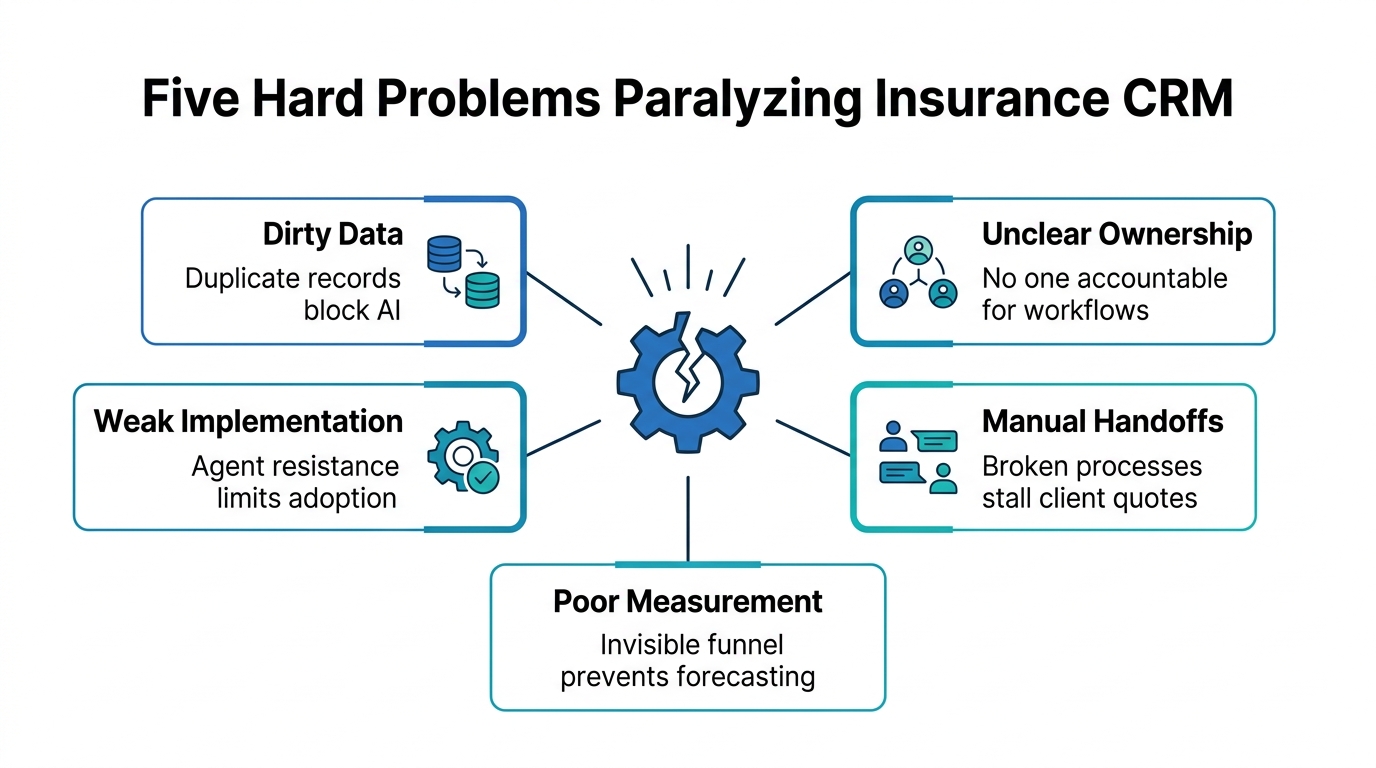
When we step into an agency to design a Salesforce-native AI workflow implementation, the first thing we look for isn’t model accuracy. It’s the condition of the insurance CRM catalog and the clarity of who holds clear responsibility for what.
Problem 1: Dirty Data Blocks Automation and Reporting
CRM records are the fuel for every AI feature. When client names are duplicated, policy numbers are missing, and interaction logs are incomplete, AI either refuses to function or worse makes confident, wrong recommendations. An agent using an insurance CRM might see a “hot lead” score on a contact that’s actually an existing client, simply because the system can’t link the records. That is the real bottleneck: dirty data sneaks past every shiny dashboard.
Problem 2: Unclear Workflow Ownership Leaves No One Accountable
Workflow ownership is the single most underinvested layer in any insurance CRM strategy. If no single person is responsible for maintaining the follow‑up sequence, updating statuses, or curating the next‑best‑action logic, AI automation becomes a ghost process…nobody trusts it, nobody adjusts it, and nobody measures it. In many agencies, “the system should do it” has replaced “the workflow owner will ensure it gets done.” That distinction matters because AI doesn’t eliminate accountability; it shifts it to the design of the process.
Problem 3: Manual Handoffs Create Friction That Automation Can’t Smooth Over
Even when data is clean, work often passes from marketing to sales to service through a series of manual emails, spreadsheets, and sticky notes. AI can’t automate what isn’t defined as a structured handoff. A referral, for example, might sit in a CSV for three days before someone imports it. The AI agent, no matter how sophisticated, waits for that human‑triggered data movement.
Problem 4: Weak Implementation Sequence Leads to Shelfware
“Let’s turn on all the AI features and see what sticks” is a recipe for wasted licenses and disillusioned teams. A weak implementation sequence skips the foundational steps and jumps straight to advanced capabilities. The result is a disjointed mess where no single workflow delivers a clear return. The benefits of an insurance CRM never materialize because no one knows which lever to pull first.
Problem 5: Poor Measurement Discipline Makes ROI Invisible
Without clear KPIs and dashboards, teams can’t prove that AI is doing anything useful. An automated lead‑assignment system might be working perfectly, but if no one is measuring response time or conversion rate, the business never sees the value. Measurement discipline isn’t just about tracking; it’s about creating a feedback loop that justifies further investment.
AI doesn’t fix broken processes; it reveals them.
That quote sums up why all five problems matter. The technology amplifies existing gaps, it doesn’t magically close them. Now let’s build a framework that addresses those gaps systematically.
A Better Approach: Workflow-Native AI
Workflow-native AI means integrating intelligence directly into the workflows your insurance CRM already supports, rather than bolting on a separate layer of prediction tools. The AI agent lives inside the CRM, operates on the same data, and respects the same rules of engagement. This approach keeps the human in control and reduces the friction of adopting something “outside the system.”
Start with Data Hygiene and Workflow Mapping
The first step of any CRM-native workflow ownership initiative is to clean up the data—often the residue of a rushed CRM migration. Deduplicate records, standardize naming conventions, and validate critical fields like policy numbers, contact info, policy expiration dates. Only then do you map out the exact sequence of actions for a given workflow, like new business acquisition or claims follow‑up. Clear responsibility is assigned at this stage: one person, with clear ownership for maintaining that map and the data it relies on.
Automate a Targeted Handoff First
Instead of automating everything at once, pick one high‑volume manual handoff. At an insurance agency, this might be lead assignment, moving a prospect from a web form into the correct agent’s queue, complete with a pre‑scored priority. A Salesforce-native AI workflow implementation can read the incoming lead, cross‑reference existing policies, and route it instantly. The measurable outcome could be faster response times, but you won’t know unless you set a baseline and track it.
This is the sequence:
data hygiene → workflow mapping → targeted automation → measurement → iteration.
Skipping any step breaks the chain. Workflow-native AI transforms a sporadic set of features into a single, cohesive system for your insurance CRM.
For leaders defining governance, review standards, and adoption boundaries, Webuters’ AI consulting services can support a clearer implementation roadmap.
For teams evaluating this next step, Webuters’ CRM ERP can provide a practical reference point.
How Workflow-Native AI Solves Real Business Problems Across Industries
The same principles apply whether your organization sells insurance policies, recruits students, or ships subscription boxes. The workflow details change; the discipline doesn’t.
Insurance: From Leads to Renewals Without the Chaos
An independent agency on Zoho CRM had a common complaint: agents were spending two hours a day manually triaging leads from carrier portals. The data was often incomplete, and no one owned the process. They cleaned the lead records, designated a workflow owner, and built a Zoho AI agent that automatically parses incoming emails, extracts prospect data, and creates a new lead with pre‑filled details. Only then did the agent get a task to call. The result wasn’t flashy….it was a consistent, scalable handoff.
Higher Education: Improving Admissions Conversion
A university admissions team was losing applicants in the gap between inquiry and application. The CRM had the data, but manual follow‑ups were haphazard. They assigned an enrollment workflow owner, mapped the inquiry‑to‑application sequence, and used Zoho CRM to automate personalized nudges at each stage. Integrated with Moodle LMS, the system tracked engagement and triggered counselor alerts when a student stalled. This is exactly the kind of workflow we enabled in our seamless student lifecycle management with zoho CRM and moodle LMS case study. The outcome: a sustained 20‑percent lift in application completion rate, driven by consistent, AI‑powered follow‑up—not by any single “AI feature.”
Ecommerce: Personalization That Works in Real Time
For a D2C brand, the goal was repeat purchases. Their CRM held purchase history, but the team still sent batch emails by gut feel. They gave a marketing operations owner the authority to define replenishment triggers, cleaned the transaction data, and configured a Salesforce-native AI workflow implementation that sends a personalized reminder three days before a product is likely to run out. The result was a 15‑percent increase in repeat sales, measured and attributed directly to the workflow.
| Industry | Core Problem | AI Solution | Measurable Outcome |
|---|---|---|---|
| Insurance | Manual lead triage | AI lead scoring and auto-assignment | 40% faster response times |
| Higher Ed | Dropped applications | Automated follow-up emails | 20% higher conversion rate |
| Ecommerce | Low repeat purchase rate | AI personalized replenishment reminders | 15% increase in repeat sales |
The patterns are identical: assign ownership, fix the data, automate one high‑impact handoff, measure, and expand. Workflow ownership is the glue that makes an effective insurance CRM.
Trust Controls: The Non‑Negotiable Layer for Insurance CRM
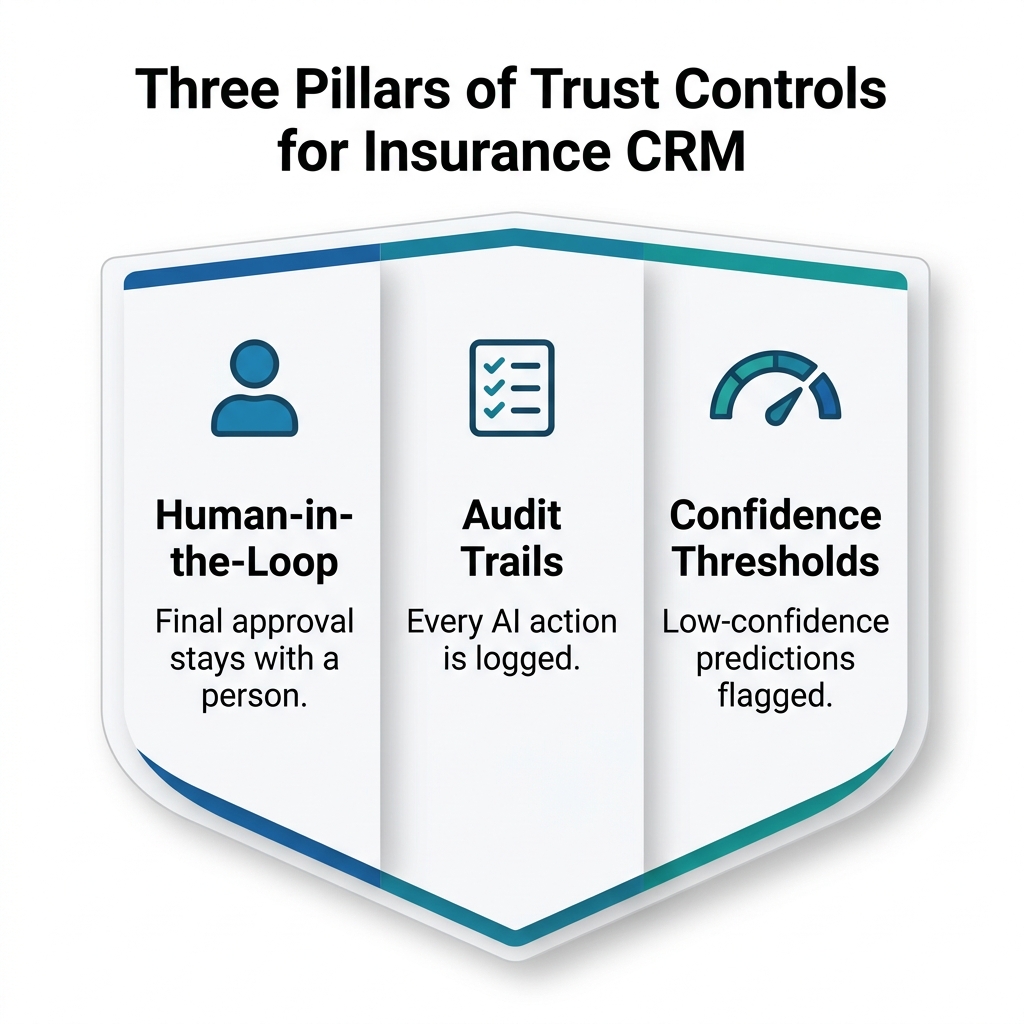
No insurance agent or admissions counselor will blindly follow an AI’s recommendation if there’s no way to audit it. Trust controls are what make AI adoption safe in regulated, relationship‑driven industries. For any insurance CRM, this is a must.
Human‑in‑the‑Loop Approval
Consider this real scenario: an AI agent suggests a price increase for a long-standing commercial policyholder. Without human review, that decision could alienate a valuable client. In high‑stakes actions like approving a change above a threshold or sending a sensitive email, a human must still hit “send” or “approve.” The AI can draft the response or calculate the risk score, but the final decision stays with a person. This isn’t a limitation; it’s the governance that makes teams willing to use the system.
Audit Trails and Confidence Thresholds
Every AI‑driven action should be logged: who initiated it, what model was used, what confidence score it returned, and what the human did. In insurance, where regulators may ask questions, an immutable audit trail is non‑negotiable. Confidence thresholds prevent low‑quality predictions from ever reaching an agent; if the model is only 60‑percent sure a policy is due for renewal, it shouldn’t fire an automated reminder, it should flag a manual review.
Accenture research highlights that learning is accelerated when humans and AI collaborate rather than operate in isolation. That’s the practical foundation of trust controls: they don’t slow you down; they make the collaboration sustainable.
Your 5‑Step Implementation Roadmap for 2026
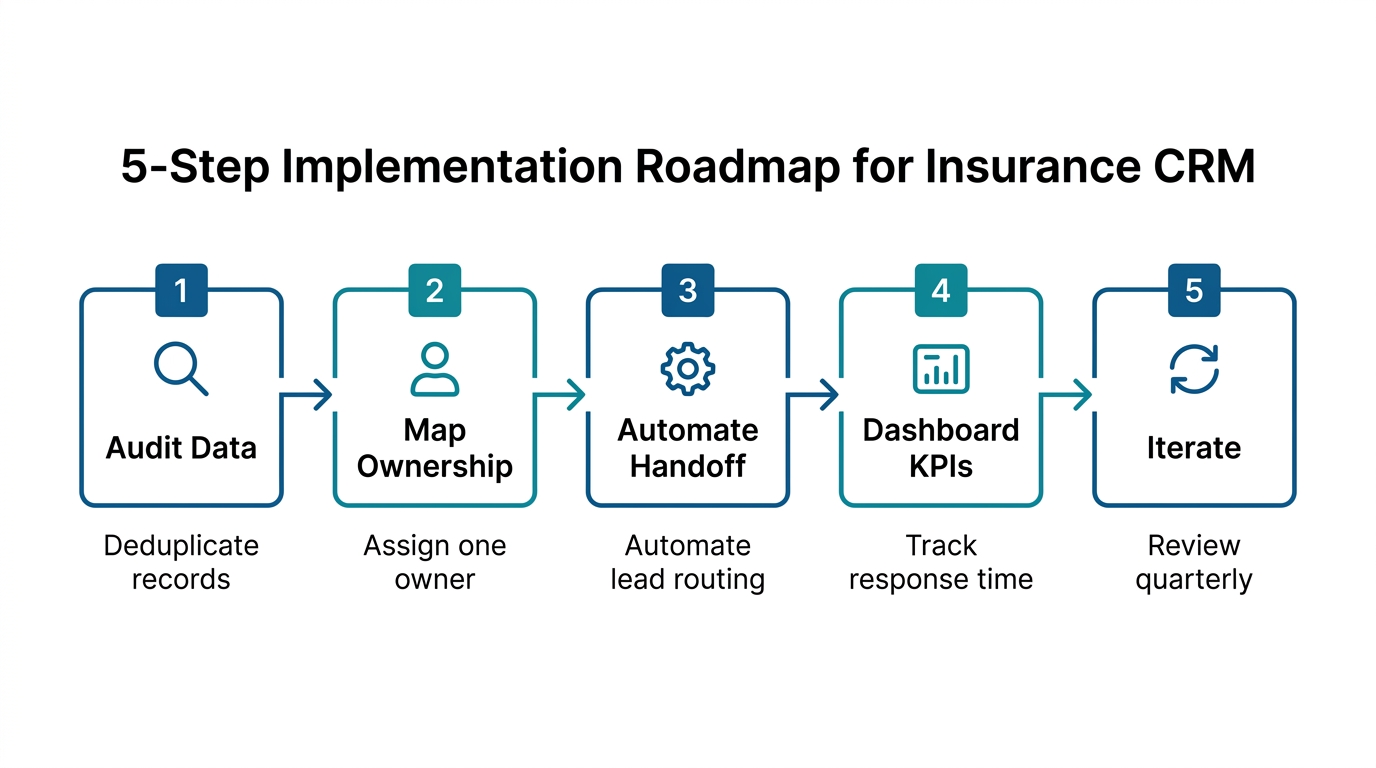
The framework above sounds simple in theory, but execution is where most teams stall. Here is a concrete plan you can start next week.
Step 1: Audit Data Hygiene
Run a deduplication script. Standardize field formats. Verify that at least the top 20‑percent of records: active clients are complete and error‑free. If your insurance CRM has 5,000 records but 800 are duplicates, no AI feature will help. This is the foundation of a reliable insurance CRM.
Step 2: Map and Assign Workflow Ownership
Identify the three workflows that drive the most business: maybe new business, renewals, and claims. For each, draw the sequence from trigger to resolution and name one person as the owner. That person doesn’t have to do all the work; they just ensure the process stays current. This step ensures that your insurance CRM is actually owned.
Step 3: Target One Manual Handoff for Automation
Pick the handoff that causes the most friction. Automate it using the AI capabilities already inside your insurance CRM. For Salesforce users, that might mean salesforce development to configure Einstein workflow agents. For Zoho, it could mean Zia-powered automation within your existing instance.
Step 4: Define and Dashboard Your KPIs
Set clear metrics: lead response time, conversion rate, claims cycle time. Build a dashboard that the workflow owner can check in two minutes. Measurement discipline is what turns a cool automation into a provable business case.
Step 5: Iterate Based on Data
Run the automated workflow for one quarter. Review the dashboard with the owner. If the numbers prove value….great, expand to the next workflow. If not, revisit the data, the mapping, or the ownership. AI isn’t fire‑and‑forget; it’s a continuously tuned system.
For teams evaluating this next step, Webuters’ zoho services and solutions can provide a practical reference point.
The Real Benefit: Workflow Ownership Delivers on the Promise
No amount of algorithmic sophistication can compensate for a workflow nobody owns. The future of an insurance CRM isn’t about replacing humans with bots; it’s about pairing a disciplined human with the right automation to amplify what already works. That partnership, workflow ownership, data hygiene, and trust controls is where the real benefit of an insurance CRM lies in 2026.
Salesforce’s own research shows that sales organizations combining AI with human oversight achieve greater win rates. It’s not the AI alone; it’s the partnership. When you invest in workflow ownership, data hygiene, and trust controls before turning on the advanced features, your insurance CRM finally delivers on its promise.
If Mike’s story at the start resonates, you likely have an insurance CRM full of untapped potential. The question isn’t whether AI can work inside your existing CRM….it can. The question is whether your foundational workflows are solid enough to support it. The smartest next move is to audit one critical process with us. Our team has spent over a decade embedding AI into the CRMs businesses already trust, and we can help you tackle the five hard problems first. When those are solved, the AI simply works.
Frequently Asked Questions
Can AI agents work inside our existing insurance CRM without replacing it?
Yes. Both Salesforce and Zoho offer native AI capabilities that integrate directly into your current workflows. In our experience, the key is building on a solid data foundation and assigning workflow ownership so the insurance CRM enhances existing processes rather than creating a parallel system.
How do we improve admissions conversion with our CRM?
Map the inquiry-to-enrollment workflow, assign a clear owner, and automate follow-up communications at each stage. Integrate with your learning management system (like Moodle) to trigger personalized nudges when prospects show engagement. For a real-world example, see our seamless student lifecycle management case study.
How should teams evaluate benefits of an insurance CRM?
Focus on measurable outcomes like lead response time, policyholder retention, and claims processing speed. Evaluate your insurance CRM’s AI not by its feature list, but by whether it resolves the five core problems: dirty data, unclear ownership, manual handoffs, weak implementation sequence, and poor measurement.
What is workflow-native AI for an insurance CRM?
Workflow-native AI embeds intelligence directly into the day-to-day steps your team already follows in the insurance CRM. It automates handoffs, suggests next actions, and keeps a human in the loop for critical decisions, ensuring adoption and trust from the start.
How can I add trust controls to my insurance CRM implementation?
Start by requiring human approval for high-stakes actions, logging every AI-driven decision in an immutable audit trail, and setting confidence thresholds so low-quality predictions are flagged for manual review. These controls make AI adoption safe in regulated industries.
What’s the first step if I want to start with workflow-native AI?
Begin with a data audit. Deduplicate records, standardize critical fields, and validate that your top 20% of active records are clean. Then map one high-volume workflow, assign an owner, and automate a single manual handoff before expanding.
What is insurance CRM AI?
Insurance CRM AI applies artificial intelligence—lead scoring, a 360-degree client view, and automated follow-ups—inside an insurance CRM. Its value depends far less on the sophistication of the algorithms than on clear ownership of the workflows the AI runs inside.
Why does workflow ownership matter more than features?
Even the best AI features fail when no one owns the workflow they operate in. Unclear ownership lets handoffs, follow-ups, and renewals fall through the cracks, so automation stalls and ROI never materializes.
What are the biggest barriers to insurance CRM AI adoption?
Five foundational failures: dirty data, unclear workflow ownership, manual handoffs, a weak implementation sequence, and poor measurement discipline. Fix these before adding more AI features.
How should an insurance agency start with CRM AI?
Start with data hygiene and workflow mapping, then automate one targeted handoff first. Prove value on a narrow, well-defined workflow before scaling across the organization.
Does workflow-native AI apply beyond insurance?
Yes. The same workflow-ownership approach improves higher-education admissions conversion and other CRM-driven operations where handoffs and follow-through determine outcomes.
CRM and ERP transformation
Pick the right platform, clean the data and connect it to the rest of the business.
See CRM and ERP services
Karan is a seasoned Project Manager who leads digital transformation projects across Salesforce, Zoho, CRM platforms, mobile apps, AI, and web development. At Webuters, he works closely with cross-functional teams to ensure smooth delivery, clear communication, and measurable results. He regularly shares tips on what's new, practical how-tos, and articles that help teams and decision-makers choose the right tech path. Always approachable, he's committed to helping clients and teams make smarter, faster decisions with confidence.
Follow Karan on LinkedIn