Your Core App Is Too Risky to Change: What to Do When It Is Stuck on Old PHP
Stuck on end-of-life PHP? A rewrite is rarely step one. Buy time safely, do the PHP upgrade one release at a time, and replace only what cannot move.

A PHP upgrade feels risky when the app has no tests, one person understands it, and every release is a gamble. Then the auditor's report names an end-of-life PHP version, and the only quote on the table is a full rewrite that costs more than the risk it is meant to remove. The business is stuck: it cannot leave the app as it is, and it cannot afford to stop the business while it is rebuilt.
If your core app runs on an end-of-life PHP version, a full rewrite is rarely the right first step. First, keep security fixes coming with backported packages or paid extended support. Then do the PHP upgrade one release at a time, with tests that pin today's behaviour, and replace only the parts that cannot move. A rewrite is the right call only when the framework has no in-place upgrade path, the libraries you depend on no longer exist for supported PHP, or the app no longer fits how the business works.
In the sections below, we look at where your PHP and framework versions stand, what extended support does and does not fix, how a PHP upgrade works one release at a time, and when replacing part of the app is justified. We end with five questions to ask before you accept a rewrite quote.
Where your PHP version stands
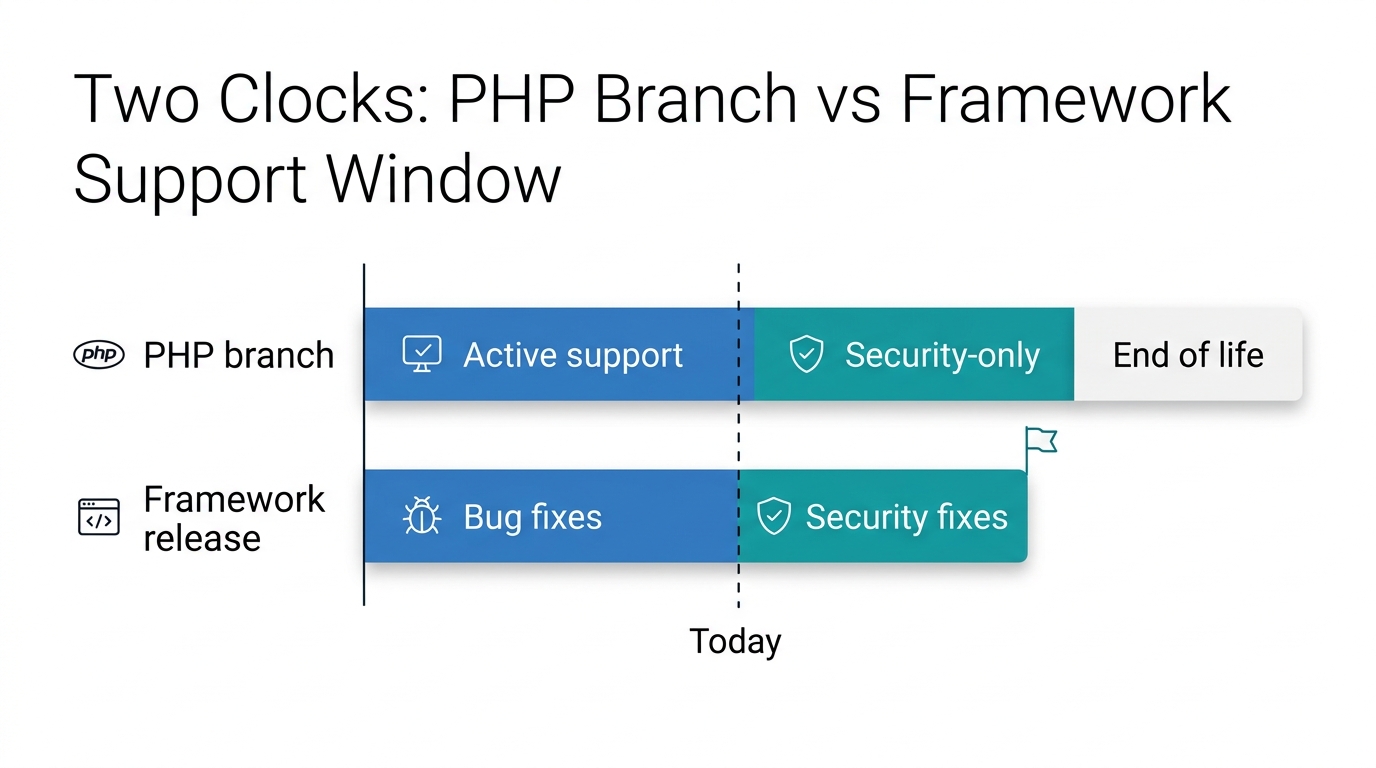
PHP support is time-boxed. Each branch gets two years of active support, then two years of security-only support, and then it reaches end of life. PHP's official supported versions page says users of an end-of-life release should upgrade as soon as possible. The branches supported today, with their security-support end dates, are 8.2 (31 December 2026), 8.3 (31 December 2027), 8.4 (31 December 2028) and 8.5 (31 December 2029). So PHP 8.1 and everything older no longer gets security fixes, and PHP 8.2 joins them on 31 December 2026. Knowing which branch you run is the first step of any PHP upgrade. The full list of retired branches is on PHP's unsupported branches page.
The language is only one clock. Your framework has its own. Under the Laravel support policy, each release gets 18 months of bug fixes and two years of security fixes, as set out in the Laravel release notes. The framework can therefore go out of support before or after the language underneath it. A PHP upgrade plan has to look at both dates, because the one that expires first sets your deadline.
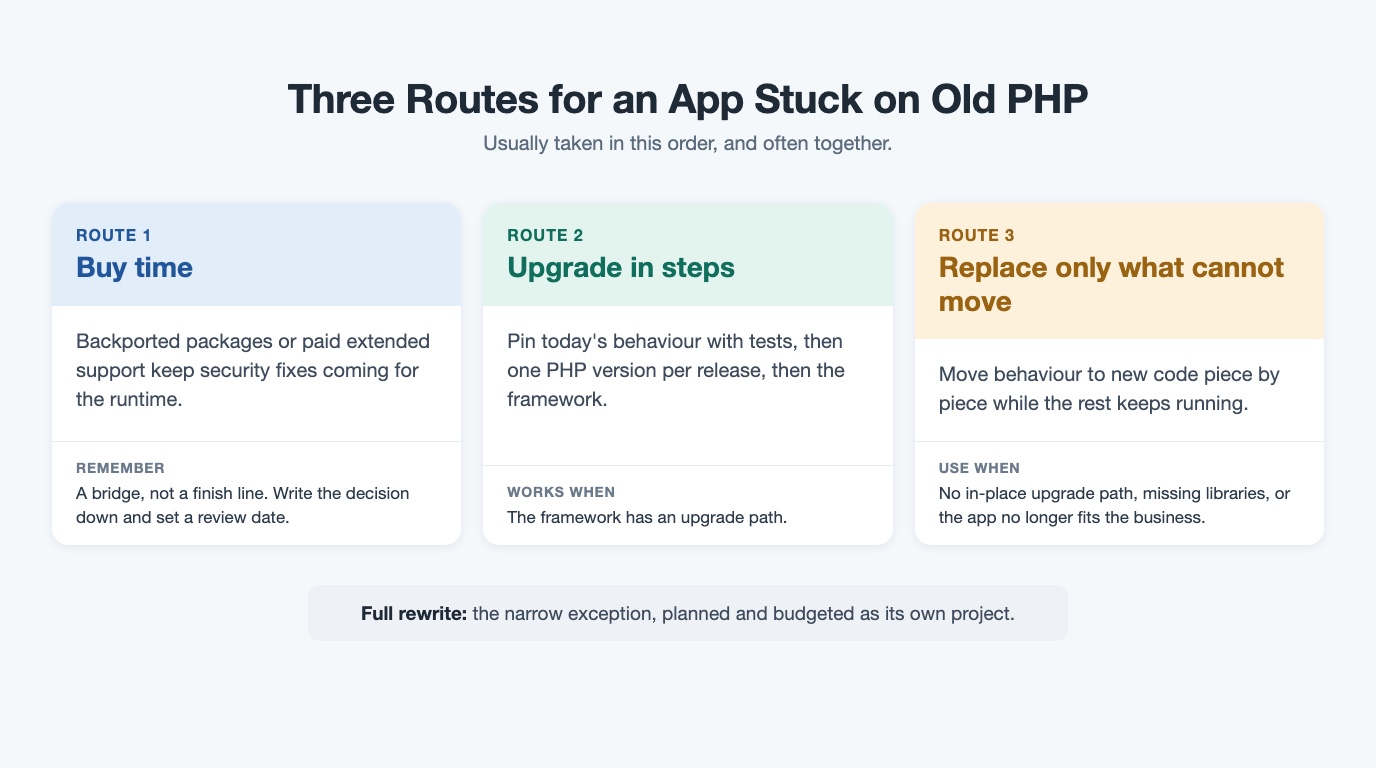
Once you know which clock runs out first, the question stops being "rewrite or wait?" and becomes "which of three routes fits this app?"
Route 1: buy time without pretending you are done
Route 1 keeps security fixes coming while you plan. For Ubuntu servers, Ondřej Surý's PHP package archive publishes packages for several PHP versions, including older branches; Debian and newer Ubuntu releases get them from packages.sury.org. For PHP extended support with a contract behind it, Freexian's PHP LTS service is a paid service, run with Ondřej Surý's help, that provides security support for multiple PHP releases over an extended period. At the operating-system level, Ubuntu's Expanded Security Maintenance extends security updates for an Ubuntu release beyond its standard support window.
This answers the question an auditor or insurer is asking: is the runtime still getting security fixes? It does not answer the others. These packages do not update your framework or libraries, do not fix compatibility, and do not make the code easier to change. The app can run on a patched PHP build while its framework and libraries are still out of support. Buying time is a bridge, not a PHP upgrade.
The UK NCSC guidance on obsolete products puts the principle plainly: the only fully effective way to mitigate the risk of an obsolete product is to stop using it, and a decision to continue at risk should be revisited regularly. So take Route 1 deliberately. Write the decision down, name an owner, and set a review date for the PHP upgrade.
We did exactly this ourselves. During PHP2Shell, we patched every PHP branch on our own server, all of them end of life, with backported packages the day after the fix shipped. That bought time; it did not finish the job. The rest of that story, including what we fixed first, is in what our server security audit found. The trap is letting Route 1 become the plan, so start Route 2 at the same time.
Route 2: a PHP upgrade one release at a time
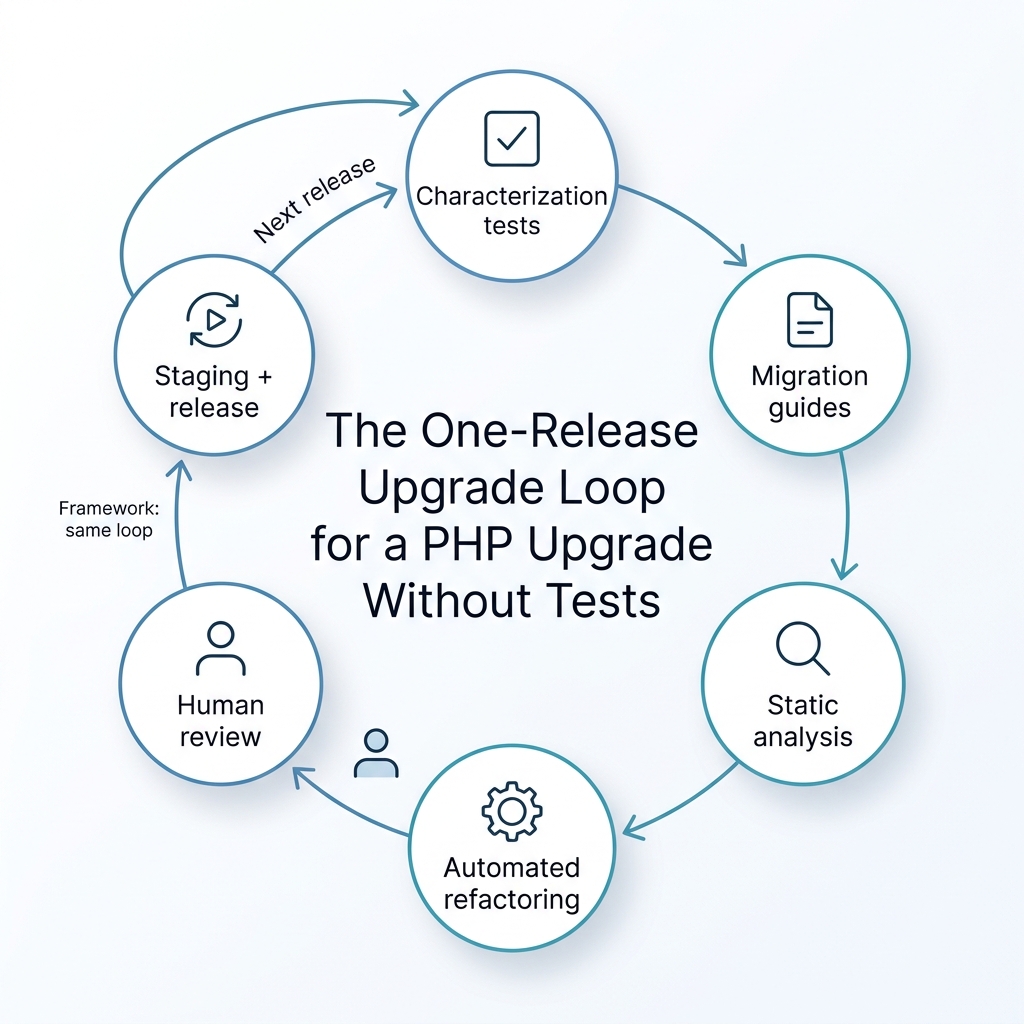
Route 2 finishes the job for any app whose framework has an upgrade path. A PHP upgrade done this way has four steps.
1. Pin today's behaviour. Before a PHP upgrade changes any code, write characterization tests on the paths the business depends on: sign-in, checkout, billing runs, and the integrations nobody wants to touch. A characterization test records what the system does today, so an unintended change shows up as a failing test rather than a customer complaint. If the app has no tests at all, the first release can add these tests and change nothing else. That release is worth shipping on its own.
2. Read the migration guides. PHP publishes the backward-incompatible changes and deprecations for each version, for example the backward-incompatible changes in PHP 8.0 and the deprecations in PHP 8.1. These tell you what a PHP upgrade is likely to break before you find out in production.
3. Run static analysis. PHPStan finds bugs in your code without writing tests, which is exactly what you need on a legacy PHP application with no test suite and one person who understands it.
4. Apply the mechanical changes with tooling. Rector applies known upgrade changes and refactorings automatically, so the repetitive part of the PHP upgrade is done by a tool and reviewed by a person rather than typed by hand.
Then keep the rhythm: one PHP version per release, tested on a staging environment, with a rollback ready, before the next step. Upgrade the framework the same way, in its own releases. Do not combine a language jump and a framework jump in one release. Each PHP upgrade release should be small enough to explain to a non-technical stakeholder in one sentence.
AI helps with the slow parts of a PHP upgrade: reading migration guides and changelogs, finding deprecated calls across a large codebase, and drafting the first version of the characterization tests. People review and approve every change and every release; no tool upgrades an application on its own. This is how our AI-assisted development and modernization work runs: we modernize one release at a time, with a person accountable for each one.
Route 3: replace only the part that cannot move
Route 3 is for the parts Route 2 cannot reach. The strangler fig approach, as Martin Fowler describes it, starts with small additions built on top of, yet separate from, the legacy code, then moves behaviour across piece by piece until the old part can be retired. Microsoft documents the same idea in its cloud architecture patterns. The old system keeps running while each piece moves, which is what makes this different from a big-bang rewrite.
When is replacing a part, or the whole app, the right call? There are three honest cases:
- The framework has no in-place upgrade path. The CodeIgniter 4 upgrade documentation is candid about this: CodeIgniter 4 is a rewrite of the framework and is not backwards compatible, so it is more appropriate to think of converting your app than upgrading it.
- The libraries or extensions the app depends on no longer exist for supported PHP versions. There is nothing to upgrade to.
- The app no longer fits how the business works. A PHP upgrade of the same code would only modernize the mismatch.
For a website built on a CMS rather than a custom application, the questions are different, and our guide on do you need a rebuild for an outdated CMS covers that case.
| Your situation | Where to start |
|---|---|
| End-of-life PHP, framework still supported | Route 1 now, Route 2 started at the same time |
| Old framework with a clear upgrade path | Route 2, a PHP upgrade one release at a time |
| Framework with no in-place upgrade path (for example CodeIgniter 3 to 4) | Route 1 to buy time, Route 3 for the affected parts |
| Libraries or extensions missing for supported PHP | Route 3 for those components |
| App no longer fits how the business works | Route 3, or a scoped replatform |
Five questions before you accept a rewrite quote
These questions are not meant to defeat the quote. They test whether a rewrite is the right route or just the most expensive one. Listen for precise answers rather than reassuring ones.
- Which PHP and framework versions are we on, and when does each one stop getting security fixes?
- Has anyone tried a PHP upgrade one release at a time, with tests that pin today's behaviour? If not, why not?
- What exactly cannot move (the framework, a library, or the fit with the business), and could that part alone be replaced while the rest keeps running?
- What happens to security support for the old system while the rewrite is built, and for how long?
- What is the smallest first release that proves the plan works, and how will we know it did?
If your first question is whether you are patched right now, start with our PHP2Shell patch check guide. When you are ready to decide what comes next, Book a free Next-Step Review: a 30-minute conversation about the app nobody wants to touch, followed by a one-page brief within two working days. If buying time and upgrading in steps is enough, the brief will say so.
Frequently Asked Questions
What does PHP end of life mean?
PHP end of life means a version no longer gets security fixes from the PHP project. According to PHP's supported versions page, each branch gets two years of active support and then two years of security-only support before it reaches end of life, after which users should upgrade as soon as possible. Known vulnerabilities found after that date will not be fixed upstream.
Can I use extended support instead of a PHP upgrade?
Extended support buys time, but it does not replace a PHP upgrade. Backported packages or a paid service such as Freexian's PHP LTS keep security fixes coming for the runtime, but they do not update your framework, fix compatibility or make the code easier to change. The UK NCSC advises that the only fully effective way to mitigate the risk of an obsolete product is to stop using it, so treat extended support as a bridge with a review date.
How do I upgrade a legacy PHP application without tests?
Start the PHP upgrade by writing characterization tests that pin the current behaviour of the business-critical paths. Then use the PHP migration guides to find breaking changes, run static analysis with PHPStan, and apply known changes with Rector. Move one PHP version per release, test on a staging environment and keep a rollback ready.
When is a full rewrite the right answer?
When the framework has no in-place upgrade path (CodeIgniter 4, for example, is a rewrite that is not backwards compatible with CodeIgniter 3), when the libraries you depend on no longer exist for supported PHP versions, or when the app no longer fits how the business works. If none of these applies, a PHP upgrade one release at a time is usually the better first step.
What is the strangler fig pattern?
It is an approach described by Martin Fowler: start with small additions built on top of, yet separate from, the legacy code, then move behaviour across piece by piece until the old part can be retired. For a legacy PHP application, it means replacing only the module that cannot be upgraded while the rest of the app keeps running and gets a normal PHP upgrade.
Legacy application modernization
Move an ageing application forward one reviewed release at a time.
See modernization services
Ashish leads cross-functional engineering teams at Webuters to deliver scalable, AI-powered digital solutions. His expertise spans React, Node.js, Generative AI, Ecommerce, Shopify Plus, SFCC, and modern JavaScript frameworks like MERN and MEAN. From ecommerce migrations to AI consulting and adoption, he bridges complex tech with real business outcomes. As a hands-on leader in architecture, cloud, and full-stack innovation, he shares insights to help development teams build smarter and stay ahead in an evolving tech landscape.
Follow Ashish on LinkedIn