I Asked AI to Help Me Write About a PHP Flaw. It Told Me to Fix Our Own Server First
Researching PHP2Shell, our AI assistant flagged our own server. What our server security audit found, what we fixed first, and a checklist for yours.

On the morning of October 22, I sat down to plan a blog post. A critical PHP flaw called PHP2Shell had been patched the day before, my feed was full of it, and I wanted to write something useful for our clients. So I asked Claude, the AI assistant I work with every day, to help me plan it. The first thing it said was not about the article. It said: "Before the blog plan, there's a more urgent finding about our own site." This post is the story of what happened next, and the server security audit that followed it.
The point of the story is simple. A server security audit on a long-lived web server rarely finds anything exotic. It finds drift: unused websites, tools nobody turned off, accounts nobody removed, software versions nobody tracked. Web server security on an older server is mostly about that drift. Removing that drift took more risk off our server than any single patch. If you run a server that has grown over the years, the same server security audit will probably take an afternoon and pay for itself.
In the sections below I'll walk through the moment the AI flagged our own site, what we found when we checked, what we fixed and in what order, and a short security audit checklist you can run on your own servers.
The Moment the AI Pointed at Our Own Site
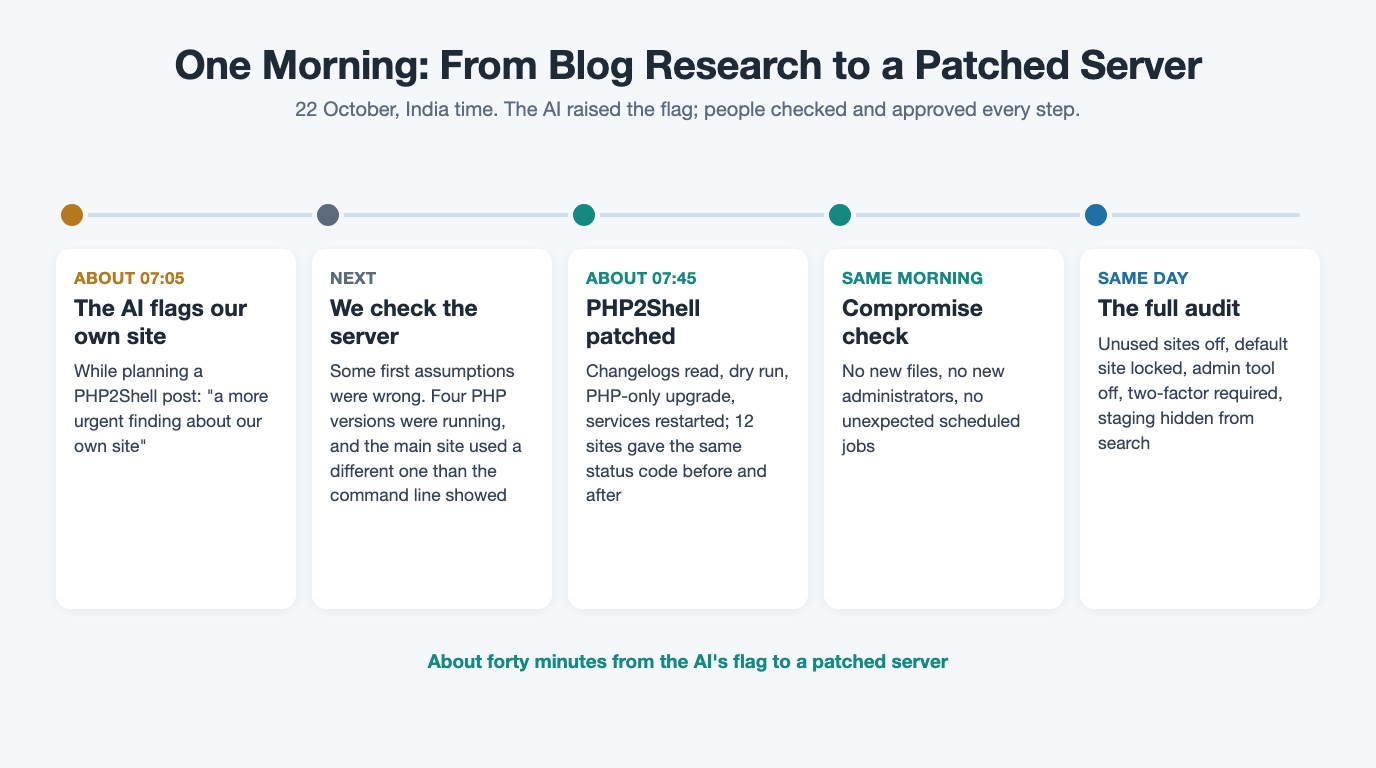
The AI had noticed that our website's content system runs on PHP, and it put two and two together. It listed what it could see from outside, said our site was exposed, and included a line I have repeated to my team since: publishing a "patch now" article from our own unpatched site "would undercut it."
It was right about the urgency. It was also wrong about some of the details, and that matters. From the outside it assumed our server ran the operating system's default PHP. It did not. It also flagged a separate WordPress flaw that, once we checked the exact affected versions, did not apply to the version we run. Only logging in and checking the server gave us the real picture. That is the first rule of any server security audit: verify on the server, not from the outside.
So the AI did what it is good at: it connected a news story to our own setup faster than I would have, and it asked the uncomfortable question. People still had to verify every detail before touching anything. That is the way we want to use AI with clients too: AI where it pays, people in control where judgment matters.
The fix for PHP2Shell itself was quick once we knew what we had. The AI did the legwork and we approved each step: it read the package changelogs to confirm the new builds fixed both PHP2Shell vulnerabilities, ran a dry run, upgraded only the PHP packages and restarted every PHP service. We checked twelve sites before and after, and each returned the same status code both times. About forty minutes after the AI raised the flag, the server was patched. We also checked for signs of compromise, such as new files, new administrator accounts and unexpected scheduled jobs, and found none. Then we decided to do the job properly: a full server security audit and a round of server hardening, using the same method we use for clients.
What We Found When We Actually Looked
The first surprise of the server security audit was the PHP itself. The command line reported one PHP version, while our main website was served by a different one. Four PHP versions were running side by side for different sites, and all of them were end-of-life PHP branches that no longer get upstream fixes, so each depended on our package provider's backported fix. If we had trusted the command line, we would have checked the wrong thing. That one finding is why our PHP2Shell patch check guide tells readers to check what actually serves each site.
The rest of the server security audit found the kind of drift every long-lived server collects, and most of it was attack surface we did not need. Nothing here was evidence of a breach; it was years of small decisions nobody had revisited. We acted on every row before I wrote this post; two of them still need full upgrades, which I cover below.
| What we found | Why it mattered | What we did |
|---|---|---|
| Five unused websites were still online | Each one was a permanent patching obligation | Taken offline, and the DNS records that still pointed at them removed |
| The default virtual host answered anyone who typed the bare server address | Apache uses the first virtual host for any request that matches no site name, so it exposed folders by path | Locked down to deny everything |
| A database admin tool was reachable from the internet | phpMyAdmin notes it applies no special security methods of its own to the database server | Switched off |
| The staging site's noindex was hidden from search engines by its robots.txt | Private test pages could stay listed in search | Noindex header on every response, and robots.txt opened so crawlers can see it |
| An administrator account nobody was using was still active | A login nobody watches is a standing risk | Disabled |
| Administrators had no two-factor authentication | Multifactor sign-in protects an account more than a username and password alone | Two-factor authentication now required for every administrator |
| Every site ran end-of-life PHP | Each PHP branch gets four years of support in total, then no more fixes | Patched for PHP2Shell with the package maintainer's backported fixes; upgrades still to come |
| The content system was several versions behind | WordPress backports security fixes to older versions only as a courtesy | Latest security update for its branch applied, file editor disabled, scripts blocked from running in uploads |
Why Simplifying Came First
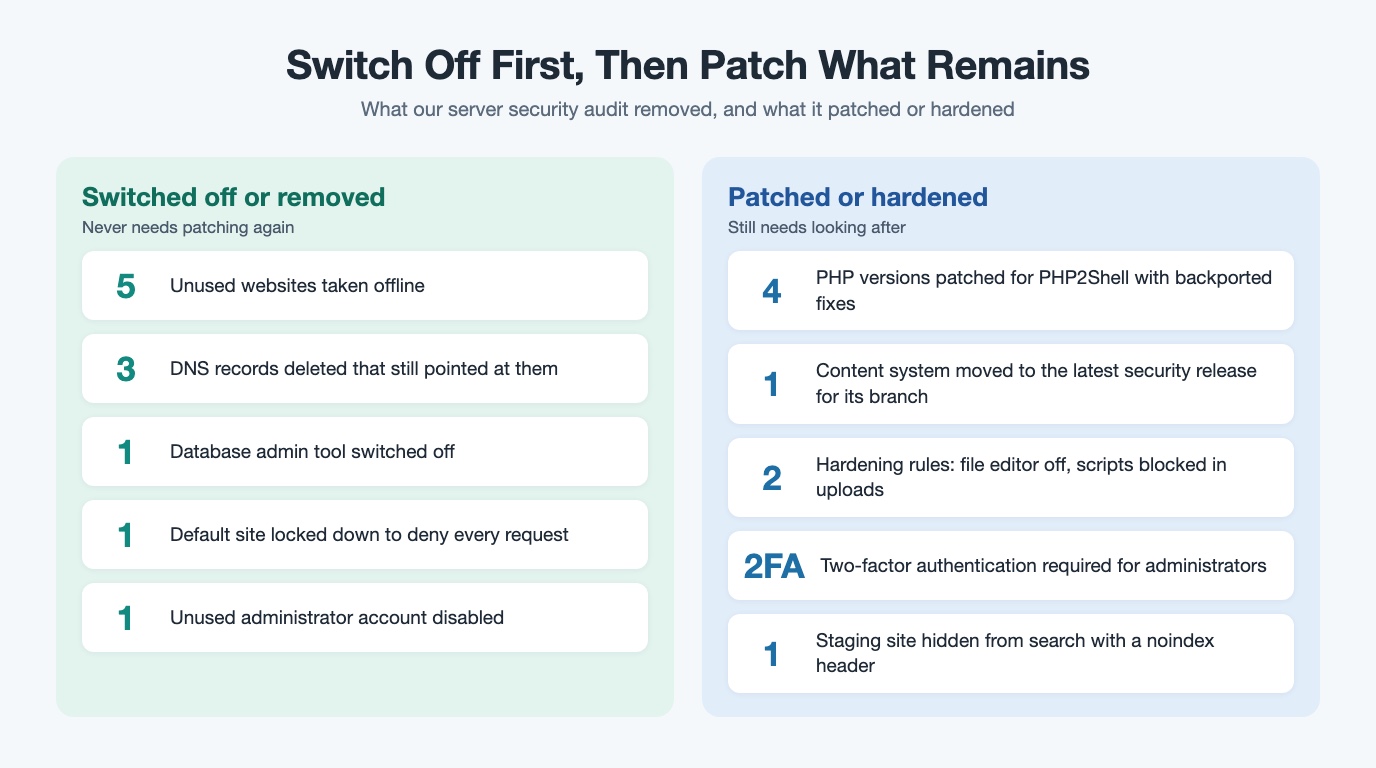
We ran the audit with our usual method: Understand, Simplify, Choose, Build, Prove, Improve. The order is deliberate, and the Simplify step did the most good.
Understand meant listing every site, which PHP version actually served it and whether anyone still used it. Simplify meant switching off unused websites and tools before any further patching or upgrade work, which shrank the attack surface in one step. Every site, tool and account you switch off is one you never have to patch, monitor or explain again. The UK National Cyber Security Centre makes the same point about obsolete products: the only fully effective way to remove the risk is to stop using them. Choose meant deciding what to fix that day (security updates within the same branch and server hardening) and what to plan (major upgrades). Build was the changes themselves. Prove meant checking that every site we kept still answered exactly as before and every blocked path was really blocked. Improve meant writing the remaining upgrades down as open items, with the main site first.
Every site, tool and account you switch off is one you never have to patch, monitor or explain again.
The business case is easy to see. Fewer things running means fewer emergency windows, fewer surprises during the next patch week, and a shorter answer when a client or insurer asks what we run and whether it is patched. NIST frames patching as a critical part of preventive maintenance, a cost of doing business, and a regular server security audit is how you keep that maintenance small. Good security on a server is mostly about having less to look after.
Run the Same Server Security Audit on Your Servers
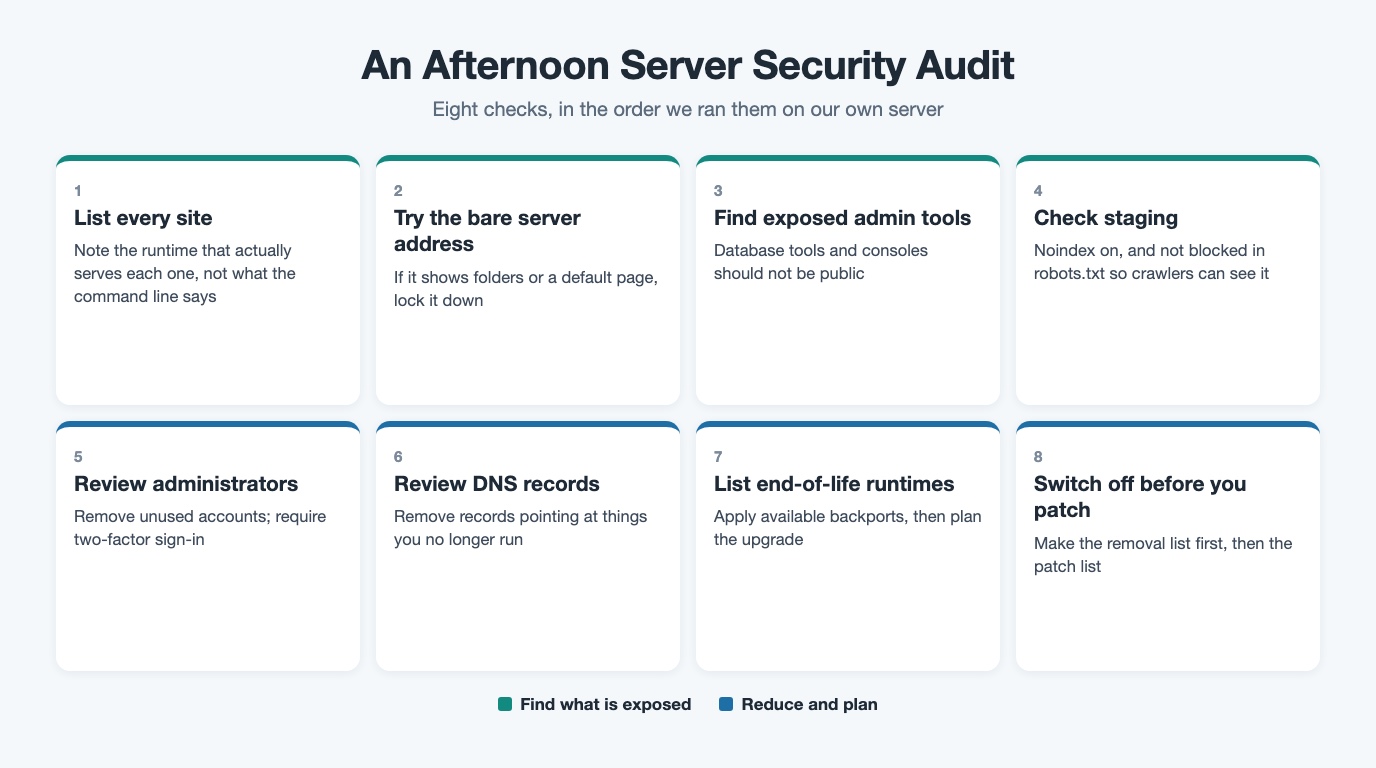
You can do most of this in an afternoon. Here is the security audit checklist we used, in the order we used it.
- List every site and what actually serves it. Note the runtime version each site uses, not what the command line says.
- Check what answers on the bare server address. If the default virtual host shows a folder listing or a default page, lock it down.
- Find admin tools exposed to the internet. A database admin tool or admin console should not be public unless there is a deliberate, protected reason.
- Check your staging site is not indexable. Set noindex, do not block it in robots.txt so crawlers can see it, and confirm it.
- Review administrator accounts. Remove people who have left, and require two-factor authentication for every administrator.
- Review DNS records. Remove records that point at things you no longer run.
- List end-of-life PHP and other runtimes. Patch them with whatever backports exist, then plan the upgrade.
- Decide what to switch off before what to patch. Make the removal list first.
If several critical updates land in the same week, start with what to patch first this week. And if your content system is several versions behind and someone has quoted you a rebuild, read do you need a rebuild for an outdated CMS first.
What Is Still Open, and What I Took From It
Not everything from our server security audit is finished, and that is normal. The end-of-life PHP versions and the content system need proper upgrades, and those are planned one release at a time instead of as a risky big-bang change. That is the same approach our AI-assisted development and modernization service takes for clients.
What I took from it: we write about patching, and our own house needed attention. The AI did not fix anything on its own authority, and its first read was partly wrong. But it asked the right question at the right moment, and that is what AI vulnerability discovery is changing for everyone: problems get found faster, and the work of fixing them still belongs to people.
If you have a server nobody has looked at in a while, Book a free Next-Step Review. It is a 30-minute conversation, followed by a one-page brief within two working days. If improving what you have is enough, the brief will say so.
Frequently Asked Questions
What is a server security audit?
A server security audit is a structured review of everything a server runs and exposes: sites, runtimes, admin tools, accounts and DNS records. The goal is to remove what you do not need, then patch and harden what remains.
Did the AI fix your server?
Not on its own. It flagged that our own site was exposed while we were researching PHP2Shell, and some of its first assumptions were wrong. It then ran the checks and changes we approved; people approved every change, ran the WordPress hardening themselves and checked the results.
Why switch things off before patching them?
Every unused website, tool or account you remove is one you never have to patch again. The NCSC says the only fully effective way to remove the risk of an obsolete product is to stop using it.
Do you need to rebuild a server to fix drift?
No. Most of what our server security audit found was fixed by switching things off, applying security updates within the same branch, and server hardening. Major upgrades were planned separately, one release at a time.
How do I know which PHP version serves my site?
Do not rely on the command line alone; check the web server's handler and pool for each site. Our PHP2Shell patch check guide walks through it step by step.
Cloud migration and modernization
Plan, migrate and keep systems patched without stopping the business.
See cloud services
Krishna is the Founder and CEO of Webuters, a technology leader specializing in Generative AI, intelligent automation, enterprise software, and digital transformation. He helps organizations leverage emerging technologies to drive innovation, operational efficiency, and business growth. Through his writing, Krishna shares insights on AI adoption, technology leadership, product innovation, and the future of work, helping leaders navigate change and build future-ready organizations.
Follow Krishna on LinkedIn