Your CMS Is Out of Date. Do You Need a Rebuild?
An outdated CMS is a risk, not a rebuild order. Find which of four situations you are in, what to fix this week, and when a rebuild is the right call.

An outdated CMS is a risk, not automatically a rebuild order. The usual moment goes like this: a security review lands, the summary says the website is a liability, and the fix on offer is a full rebuild. That means months of work, a large budget line and a freeze on the campaigns you had planned, while the site keeps taking orders. It is reasonable to wonder whether the quote is bigger than the risk of the outdated CMS itself.
Here is the direct answer. If your CMS still has a supported upgrade path, apply the latest security release now, harden the site, turn on two-factor sign-in and plan the move to the current version in steps. A website rebuild is justified when the platform itself no longer gets security updates, when the runtime underneath cannot be upgraded without replacing the platform, or when the site no longer fits how the business sells. With an outdated CMS, the real task is diagnosis, not demolition.
For anyone responsible for an outdated CMS, this guide gives you a four-case table to find your situation, a hardening checklist you can act on this week, honest criteria for when a rebuild is the right call, a staged path that avoids a big-bang freeze, and five questions to ask before you sign a rebuild quote.
An outdated CMS is a risk; a rebuild is a project. Reduce the risk first, then plan the project.
Check Which Situation Your Outdated CMS Is In
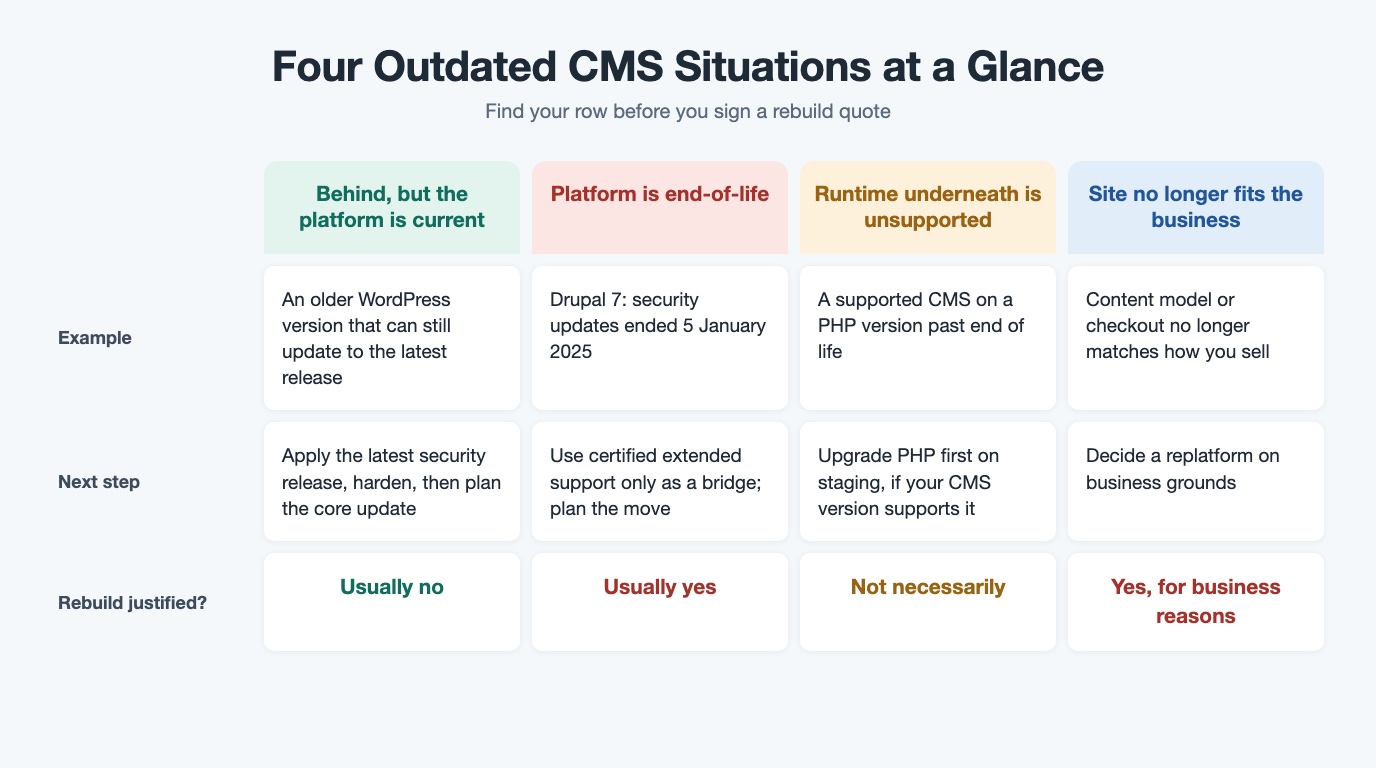
"Out of date" is not one condition, and an outdated CMS is not one problem. It covers four different situations, and each points to a different next step. The facts in this table come from the platforms' own security and lifecycle pages, so you can check your outdated CMS against the source.
| Situation | What it means | Sensible next step | Rebuild justified? |
|---|---|---|---|
| You are behind, but the platform is current | WordPress officially supports only the latest version; its Security Team backports fixes to older versions as a courtesy, not a commitment, and the release archive says only the most recent release is safe to use and actively maintained | Apply the latest security release now, harden, then plan the move to the current version; for WordPress that is usually a core update, not a rebuild | No, not on this alone |
| The platform is end-of-life | Drupal 7 end of life: security and compatibility updates ended on 5 January 2025; paid extended security support is available from vendors certified through a Drupal Association program | Treat staying as a dated risk decision; use extended support if needed; plan a move | Usually, yes |
| The platform is supported, the runtime underneath is not | Adobe Commerce support does not include fixes for third-party dependencies such as PHP and MySQL that reach end of life during its support period, and on Adobe's cloud, unsupported versions can lead to traffic being suspended; each PHP branch gets two years of active support and two more of fixes for critical security issues only | Check whether your CMS version supports a current PHP version; if it does, upgrade the runtime first on staging; if not, the CMS has to move too | Not necessarily |
| The site no longer fits the business | A business problem, not a security one: the content model or checkout no longer supports how you sell | Decide a replatform on business grounds | Yes, on business grounds |
In our experience, most outdated CMS sites we review sit in the first or third row. The first row almost never justifies a rebuild on its own. The third often calls for a runtime upgrade, not new software. Only the end-of-life platform and the business-fit case make a strong rebuild argument, and even then the timing is yours to plan.
Improve What You Have First
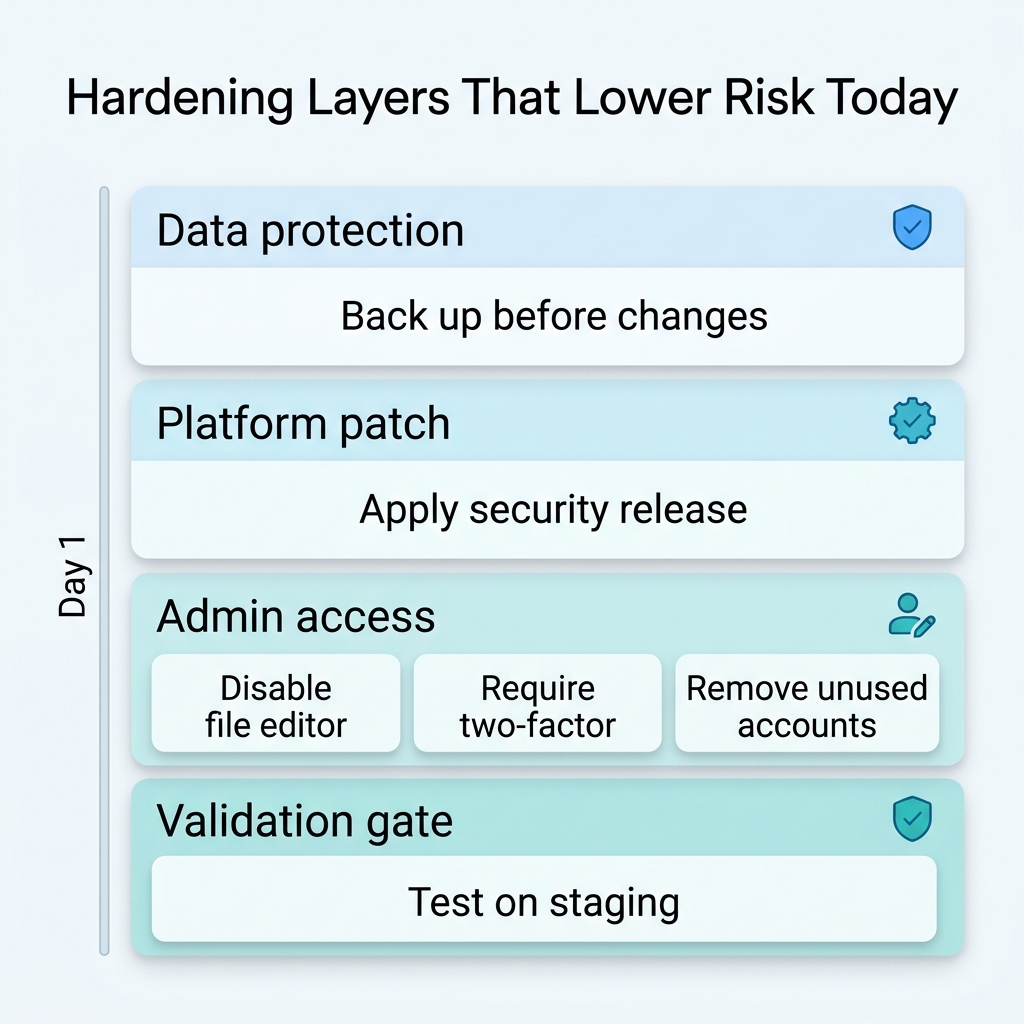
If your outdated CMS is in the first row, or the milder end of the third, the next move is the unglamorous work of making the site safer. Most of the steps below come from WordPress's hardening guidance and its guide to updating WordPress, and the same thinking applies to any CMS. Testing on staging first is our own practice.
- Back up, then apply the latest security release. Since WordPress 3.7, most sites can apply minor and security updates automatically in the background, so check that yours actually does and that nothing has switched those WordPress security updates off.
- Disable the dashboard file editor with
DISALLOW_FILE_EDIT. WordPress notes this will not stop an attacker uploading files, but it might stop some attacks. - Consider limiting database privileges, carefully. WordPress needs only SELECT, INSERT, UPDATE and DELETE for normal operation, but it advises against revoking the others, because major updates and some plugins need them.
- Require two-factor sign-in for administrators. The Two Factor plugin supports time-based one-time passwords and backup codes, and advises keeping those codes somewhere safe; it supports only the last two major WordPress versions, so on an older site check compatibility first.
- Remove what you do not use, and keep plugin updates current. Old plugins, themes and administrator accounts on an outdated CMS are attack surface with no benefit; WordPress advises keeping plugins updated and deleting the ones you do not use.
- Test on a staging site first. Updates and hardening are exactly when a working site breaks.
We did this on one of our own older WordPress sites this month, an outdated CMS by any definition (the full story is in what our server security audit found). Instead of a rebuild, we applied the latest security release, disabled the file editor, blocked scripts from running in the uploads folder, turned on two-factor sign-in for administrators and removed unused accounts, all tested on staging first and done in a day. The move to the current version is now scheduled in steps. That is the point: hardening an outdated CMS reduces risk quickly, but it does not remove the need for the upgrade plan.
When a Website Rebuild Is the Right Call
Being honest about rebuild criteria is what makes the "improve first" advice credible. For an outdated CMS, a website rebuild or replatform is the right call when one of these is true:
- The platform is end-of-life and you have no extended support, or the extended support is only buying time.
- The PHP runtime or hosting stack cannot move forward without the CMS moving too.
- Customizations are so heavy that every update breaks something, and the update history proves it.
- The site no longer supports how the business sells, so the case is commercial rather than technical.
The UK's National Cyber Security Centre is clear on obsolete products: the only fully effective way to mitigate the risk is to stop using the obsolete product, and a decision to continue at risk in the short term should be revisited regularly. That turns a rebuild into a risk decision with a date attached, not a verdict on your team. For an end-of-life CMS, the question is when and how, not whether.
What a rebuild should not be is the default answer to a scanner report, or the only option offered when a supported update path still exists. An outdated CMS with a supported upgrade path is a managed risk. An end-of-life CMS with no support path is a project you schedule deliberately, with a clear view of what you are replacing and why.
Modernize One Release at a Time
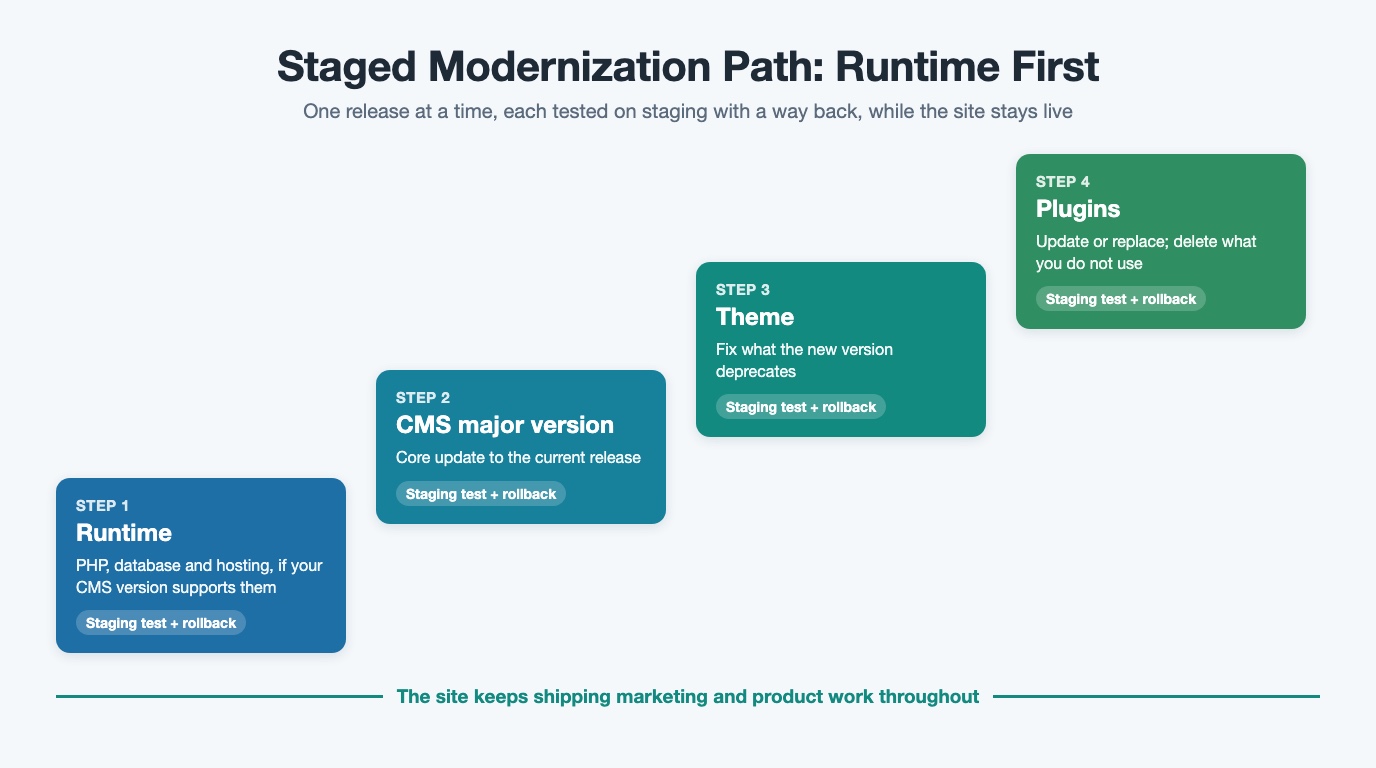
For most outdated CMS sites, the credible alternative to a big-bang rebuild is a staged CMS upgrade. Upgrade the runtime first (PHP, database, hosting), then the CMS major version, then the theme and plugins. Each step is tested on staging and released on its own, with a way back if something breaks. The order matters: where your current CMS version supports the newer PHP, moving the runtime first removes the unsupported-runtime risk and makes the later CMS move smaller.
If the runtime is the weak link, start with how to check your site is really patched for PHP2Shell. Even a fully updated CMS does not protect you from a flaw in the PHP engine underneath it, and an outdated CMS often sits on an old PHP branch.
AI helps where it pays in this work: reading changelogs across several versions at once, finding deprecated code that will break on the next major version, and writing upgrade and regression tests so each release is proven, not hoped for. People approve each release. This is how our AI-assisted development and modernization service works, and the business benefit is simple: the site keeps shipping marketing and product work while the upgrade happens in small, reversible steps.
Five Questions Before You Sign a Rebuild Quote
The age of an outdated CMS is a fact; the size of the response is a decision. Before you approve any quote, ask:
- Does our branch still receive security fixes, and where is that documented?
- Is the platform itself end-of-life, or only the runtime underneath it?
- What does the rebuild remove that a security release, hardening and two-factor sign-in could not?
- Which of our problems are security problems, and which are business-fit problems?
- If we take the staged path, what is the first release, and what will it prove?
If you are not sure which situation you are in, bring us the site you are told needs a rebuild. Book a free Next-Step Review: a 30-minute conversation about your branch, your runtime and your business fit, followed by a one-page brief within two working days. If improving what you have is enough, the brief will say so.
Frequently Asked Questions
Is an outdated CMS always a security emergency?
No. If your platform is current and a security release exists for your version, the risk is real but manageable: apply the release, harden the site and plan the upgrade. It becomes urgent when the platform or its runtime no longer gets security updates.
How do I know if my CMS branch still gets security fixes?
Check the platform's own pages. For WordPress, the security page explains the courtesy backport policy and the release archive shows the latest release for each branch, while stating that only the most recent release is safe to use. For Drupal 7, the end-of-life date is published. For Adobe Commerce, the lifecycle policy sets out support periods and what it does not cover.
Can security plugins replace an upgrade?
No. They add a layer, but they cannot supply a security fix the platform no longer ships. The NCSC's view of obsolete products is that the only fully effective mitigation is to stop using them.
What should we do if we are on Drupal 7?
Drupal 7 security support ended on 5 January 2025, and paid extended support is available from certified vendors. Use it only as a bridge, and plan a move to a supported platform with a proper migration path.
Where should a CMS upgrade start?
For an outdated CMS, usually with the runtime. Each PHP branch gets two years of active support and two more years of fixes for critical security issues only, so an old PHP version can leave a supported CMS exposed. Upgrade the runtime on staging first, then the CMS, then the theme and plugins.
Legacy application modernization
Move an ageing application forward one reviewed release at a time.
See modernization services
Ashish leads cross-functional engineering teams at Webuters to deliver scalable, AI-powered digital solutions. His expertise spans React, Node.js, Generative AI, Ecommerce, Shopify Plus, SFCC, and modern JavaScript frameworks like MERN and MEAN. From ecommerce migrations to AI consulting and adoption, he bridges complex tech with real business outcomes. As a hands-on leader in architecture, cloud, and full-stack innovation, he shares insights to help development teams build smarter and stay ahead in an evolving tech landscape.
Follow Ashish on LinkedIn