Litify Customization: When to Configure, Use Flow, or Build Custom Code
Litify customization starts with configuration and Salesforce Flow, and custom code only when earned. A decision guide to protect upgrades and cut technical…
Litify customization usually starts with a small, reasonable request. A partner wants a new field on the intake screen. A paralegal asks for an approval step that branches by case type. A legal ops lead needs a dashboard that shows litigation deadlines, adjuster contacts, and document status in one view. Each request feels harmless. Then the quarterly release arrives, and the org cannot take the latest Litify package because a component built two years ago blocks the upgrade. Nobody remembers who built it, why it exists, or what else depends on it.
Litify customization should start with configuration and Salesforce Flow, and use custom code only where those tools cannot meet the requirement, because every custom component adds maintenance and testing work. That sentence is the decision filter for everything that follows. It is not a vendor slogan. It is the rule that keeps your Salesforce org upgradeable for the life of the subscription: the more layers you add, the more you own.
The real problem is rarely the first build. It is the lifetime after it. A custom Apex class, a Lightning Web Component, or an external integration does not end when the request is closed. It becomes part of every future release test, every package upgrade, and every handover to a new administrator or a new vendor. Without a documented decision trail, Litify customization quietly increases technical debt and dependence on whoever built it.
In the sections below, we cover the four layers of extension, a decision table, upgrade safety, a delivery handover checklist, and the requests that should not be built at all.
The Four Layers of Litify Customization and What Each One Really Costs
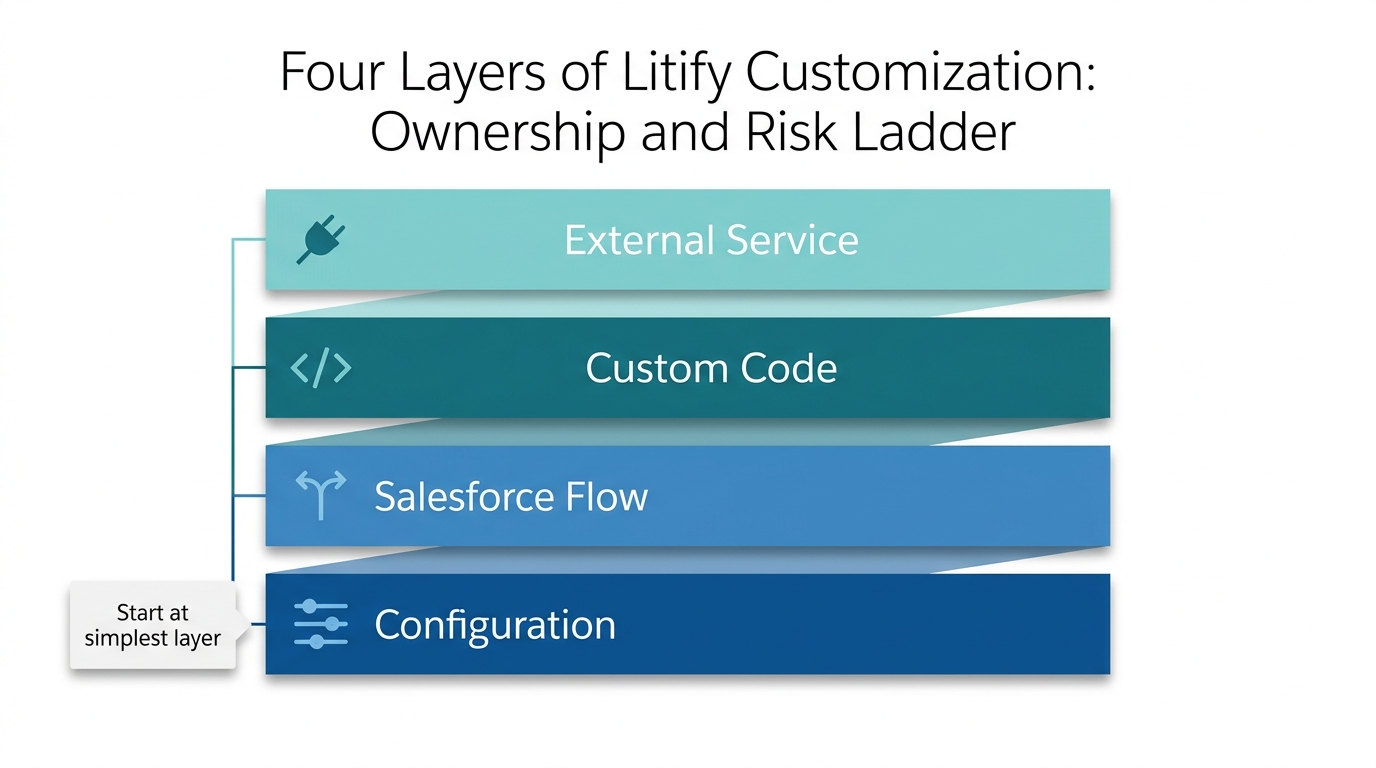
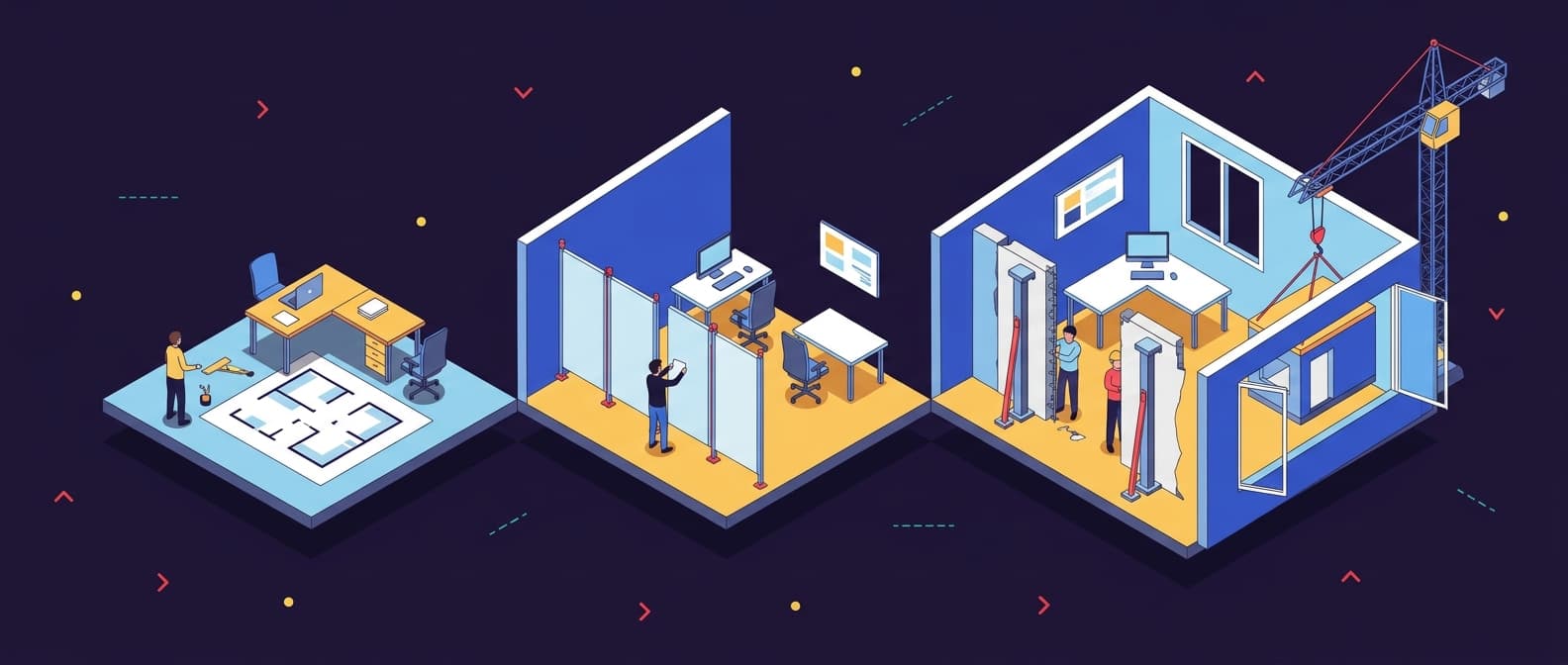
Every Litify customization request lands on one of four layers: Litify configuration, Salesforce Flow, custom code in the form of Lightning Web Components or Apex, or an external service. Think of it as renovating a leased office space. Rearranging furniture is configuration. Adding a partition wall is Flow. Knocking down a load-bearing wall is custom code. Hooking up a new utility line from the street is an external service. Only the first two let you skip a structural engineer on every future inspection. If you are still getting oriented, our guide on what Salesforce Litify is explains the platform fundamentals.
Each step outward adds ownership, testing, and upgrade risk. The right question is never 'Can we build this?' but 'What is the simplest layer that satisfies this requirement?' Disciplined Litify customization treats the simplest viable layer as the default, not as a limitation.
Configuration: The Furniture You Can Rearrange
Configuration covers fields, page layouts, validation rules, permission sets, and other declarative changes that live inside the Salesforce platform. These changes move through standard deployment tools and do not introduce a separate codebase, which makes configuration the most upgrade-safe layer. A new intake field, a picklist value, or a page layout adjustment is typically configuration work. Salesforce itself describes configuration and Flow as first-class platform capabilities, not workarounds (Salesforce platform capabilities, S2), and Litify's own positioning reinforces the idea that the product is designed to be configured and extended on Salesforce (Litify platform positioning, S1). Starting here is the intended path, not a shortcut, and most routine Litify customization never needs to look further.
Salesforce Flow: The Partition Wall You Can Still Move
Salesforce Flow is low-code automation that handles routing, approvals, and multi-step logic without writing Apex. It is maintainable by admins and generally upgrade-friendly, though complex flows still need testing. A rule that routes new matters to the right practice group based on case type and attorney availability is a classic Salesforce Flow for Litify use case. The business can own that automation without a developer in the loop, which matters once the original developer moves on. A lot of well-scoped Litify customization stops here, at a clean Flow with a clear owner.
Custom Code: The Load-Bearing Wall
Custom code means Lightning Web Components and Apex. Layered on top of the package, it adds a codebase that must be versioned, tested, and maintained for the life of the subscription. In Litify customization, code earns its place only when configuration and Flow genuinely cannot meet the requirement. A custom matter screen with drag-and-drop behaviour or a complex fee allocation calculation across multiple parties might justify it. That kind of Litify custom development can be the right call, but every future release must then retest that component, and someone must understand the code when the original developer leaves. For help deciding when a request genuinely requires code, see our Salesforce development services.
External Service: The Utility Line from the Street
An external service adds an integration contract: another system, another failure point, another set of credentials and monitoring. It should be reserved for requirements that are truly outside the platform, such as pulling data from a client's ERP or pushing matter data to an external billing system. IBM's application integration explainer makes the point clearly: integration introduces its own lifecycle, monitoring, and failure modes that must be owned (IBM's application integration explainer, S3). Because it combines code, configuration, and an external dependency, this is the most expensive layer over time, and this depth of Litify customization should be scoped as a deliberate design decision, not an afterthought.
A Decision Table for Common Litify Requests
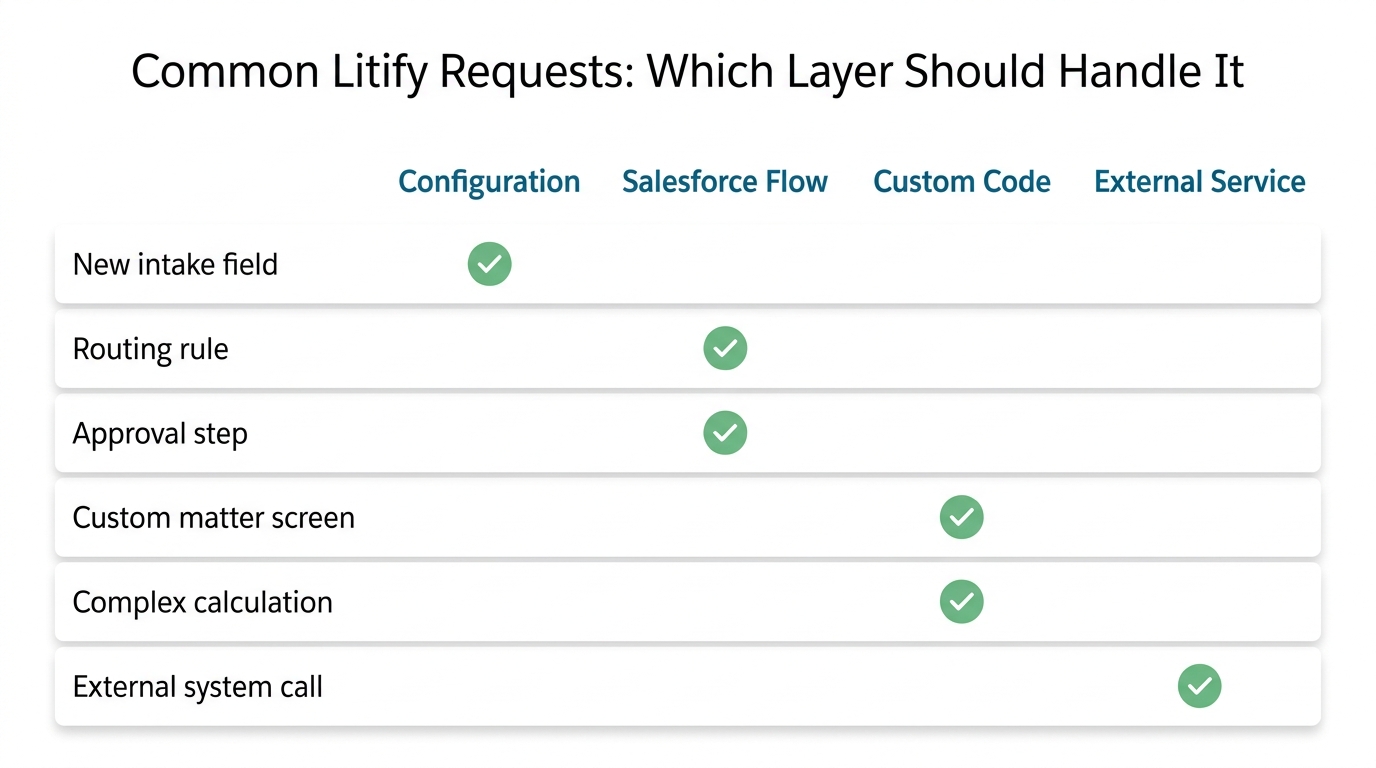
On Monday morning, a partner says, 'I need this by Friday.' The table below maps typical law firm requirements to the recommended layer. The 'Why' column matters most: it captures the reason in plain language so the choice can be defended later, and it turns a private judgment call into a shared Litify customization record.
| Requirement | Configuration | Flow | Code | External Service | Why |
|---|---|---|---|---|---|
| New intake field | ✅ | No code, upgrade-safe, admin can maintain it. | |||
| Routing rule (assign by practice area or geography) | ✅ | Declarative automation, easy to adjust without a developer. | |||
| Approval step with parallel branches | ✅ | Flow expresses multi-step approvals; simple one-step approvals can use Litify configuration. | |||
| Custom matter screen with non-standard layout or interaction | ✅ | Declarative page layouts cannot express the required user experience. | |||
| Complex calculation (e.g., fee allocation across parties) | ✅ | If Flow cannot express the logic clearly, Apex code may be the more maintainable option. | |||
| External system call (e.g., e-signature, ERP) | ✅ | Data lives outside the platform, so an integration contract is required. |
The table is a starting point, not a rulebook. When a request falls between two layers, choose the simpler layer and document the reason. Without that evidence trail, the next administrator inherits a black box. Revisit the table whenever the scope of a request starts to grow, because this is where governance of Litify customization either holds or quietly erodes.
Maintenance and Upgrade Safety Inside the Litify Managed Package
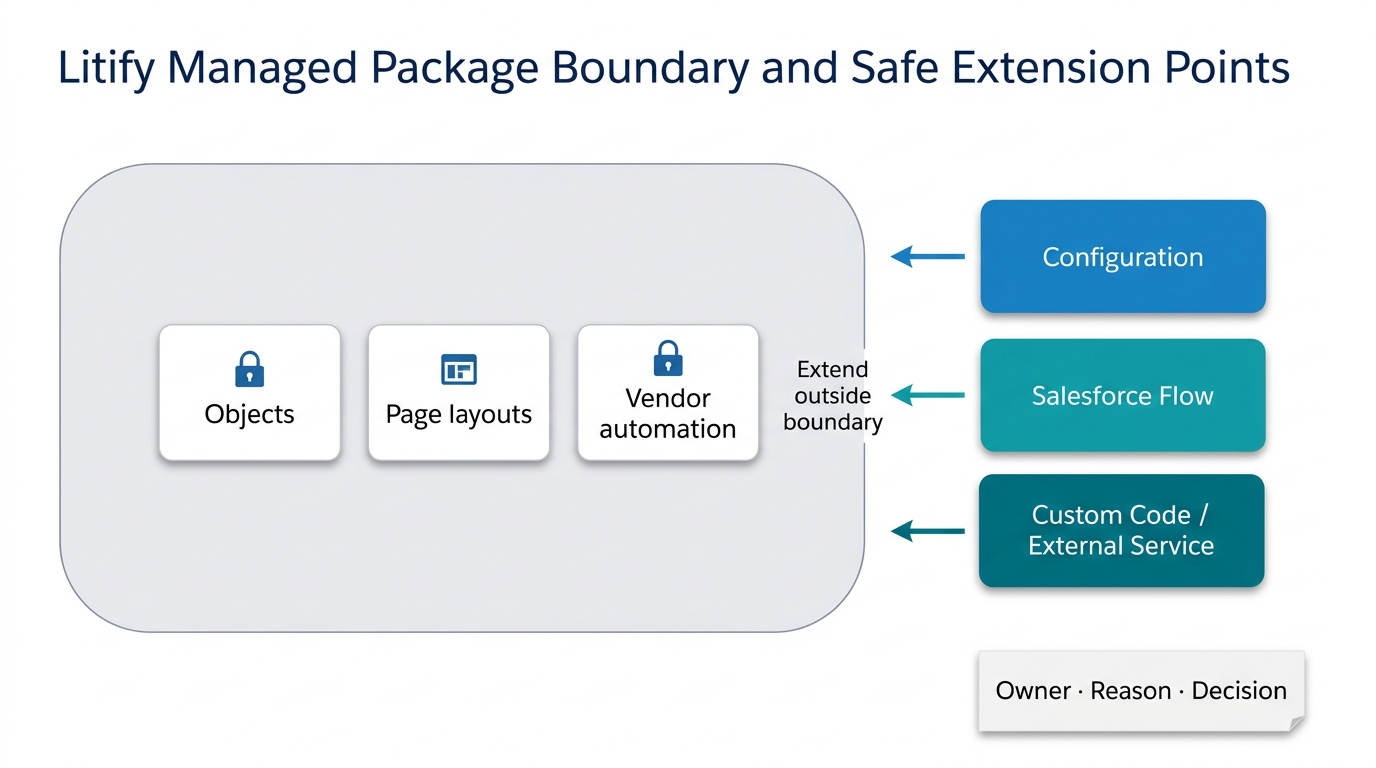
No extension lives in isolation. Litify is typically delivered as a managed package on Salesforce, a common industry pattern where the vendor controls the package boundary and local work sits outside it. That means every Litify customization must survive every package upgrade and Salesforce release. An upgrade can change page layouts, object definitions, or automation in ways that collide with local work, and without dependency awareness a custom component can break silently. The most sophisticated implementation often contains the least custom code, because unsupported work is the first thing to break.
Regression testing is not optional. Every deployment that touches a Litify customization should include sandbox validation and a documented test pass before it reaches production. A firm that builds a custom Apex trigger to enforce a business rule may discover two releases later that the same rule can now be handled declaratively. The trigger still runs, but now it conflicts with the new automation. Unless someone tested it, the conflict appears only in production.
Every package extension needs an owner, a documented reason, and a recorded design decision. Microsoft's guidance on architecture decision records advises maintaining an ADR to capture the context, decision, and consequences of each architectural choice (Microsoft's guidance on architecture decision records, S6). Applied to Litify customization, it means writing down what you changed, why you changed it, and what happens if you reverse it. Without that record, release management becomes guesswork.
A simple register works, with columns for owner, reason, layer, and last test date. Before each release, review the register and run targeted regression tests on every custom item. This costs far less than the upgrade failure it prevents, and it is the clearest sign that a Litify customization program is being run deliberately rather than reactively.
What Good Delivery Hands Over: A Checklist for Legal Ops and IT
A delivery partner should leave behind the full decision trail, not just working code. Without it, the firm does not own its Litify customization; it rents it forever. A complete handover includes the following.
Requirements
A written record of what the business asked for, in business language, with acceptance criteria. For example, 'route matters with case type = plaintiff and state = CA to the West Coast team' is a requirement. 'Make it faster' is not.
Design Decision Record
The chosen layer (configuration, Flow, code, external service) and the reason. This turns the decision table's 'Why' column into a permanent asset that protects the firm from future vendors who might propose a different approach without understanding the original trade-off.
Implementation
The actual build, whether that is a set of configuration changes, a Flow, a Lightning Web Component, or an Apex class. Anything that is code should live in source control with proper naming and comments, so each Litify customization stays small and legible for the next admin.
Test Evidence
The results of regression testing before each release, including what was tested, in which sandbox, and by whom. It proves the Litify customization has not broken the package. If a vendor cannot show test evidence, assume they did not test.
Deployment Instructions
The steps required to move the change from sandbox to production, including any manual steps, dependencies, and rollback notes. These must stay current, especially when the original admin leaves or the firm switches partners.
Handover Documentation
A plain-language guide that explains what the change does, who owns it, and when it should be revisited. For a related perspective on evaluating an existing org, see our guide on what to look for in a Salesforce audit. We also documented this pattern in an extending Salesforce Accounting Seed on a live system case study.
Webuters applies this same rigor to packaged-app work: extend at the package boundary, test on every release, and document why each change exists. The technology may be different, but the governance discipline behind sound Litify customization is identical.
When Not to Customize: Process Changes and Training That Remove the Requirement
Not every request for change is a technology problem. Sometimes the requirement exists because a legacy process was carried over without question, or because a team has not been trained on a feature that already exists. Before choosing a layer, ask: 'If we changed this step in the process, would the requirement disappear?' If yes, the build is a workaround, not a solution, and the cheapest Litify customization is the one you decide not to build.
Training is a legitimate fix. A firm may request a custom approval workflow because approvers are not checking their queue; a training session and a reminder automation solve the problem without custom code. Another team may ask for a custom intake screen because the existing screen has confusing labels; configuration and relabeling solve it. Sometimes the furniture is fine, and the real problem is that no one has been shown how to use the room.
This is not an argument against building. A good partner adds value by asking 'Do we need to build anything at all?' instead of taking the order, and a disciplined review usually ends with fewer builds than it started with.
Building a Governance Practice That Outlasts Any Single Release
Mature Litify customization starts small and stays small wherever possible. The goal is not to avoid change. The goal is to customize deliberately, document why, and keep the org upgradeable for the life of the subscription.
You now have a framework for every future Litify customization request. Evaluate it against the four layers, classify it with the decision table, protect the org through regression testing and documentation, and demand a complete handover. When a vendor proposes custom code, ask for the design decision record. When a partner cannot produce test evidence, treat that as a red flag.
If you are running Litify on Salesforce and want a partner who starts with configuration and treats custom code as a deliberately earned decision, Litify consulting, customization and integration services can help you identify which decisions need to be revisited, documented, or reversed before the next release. We would rather help you avoid a load-bearing wall than build one and hand you the bill.
Frequently Asked Questions
Should I always start with Litify configuration and Flow before considering custom code?
For most firms, yes. Configuration and Flow are upgrade-safe and maintainable by admins, while custom code adds a codebase and lifetime maintenance. Only move to code when declarative tools cannot meet the requirement.
How do I know if a custom component will break during a Litify upgrade?
You cannot know without testing. Validate your changes in a sandbox before each package upgrade, run targeted regression tests on all custom code, and document the results. A pattern of skipped tests is how Litify customization turns into a permanent upgrade blocker.
How should a legal team plan a Litify customization before writing code?
Start with a written requirement in business language, then map it against configuration, Flow, and code in that order. Record which layer you choose and why before a developer is involved.
What is a design decision record and why does it matter?
A design decision record is a written note capturing the context, decision, and consequences of a Litify customization choice. It preserves the reasoning for future admins and vendors, preventing technical debt and vendor lock-in.
Can a Salesforce admin handle this work, or do I need a developer?
Most common requests, such as fields, layouts, and simple automations, can be handled by a trained Salesforce admin using configuration and Flow. Litify custom development that involves Apex or Lightning Web Components requires a developer.
What should I do if a vendor proposes custom code right away?
Ask for the design decision record that justifies why configuration or Flow cannot meet the requirement. If they cannot provide one, treat it as a warning sign and seek a second opinion.
When is it better to change a process instead of customizing Litify?
If a process change or training can remove the requirement, the build is unnecessary. Examine the workflow before committing resources to any Litify customization.
Review your Litify customization backlog with us. We will help you classify each request, document the decisions that were never written down, and set up a regression testing cadence that keeps your org upgradeable.
Litify consulting, customization and integration
We help legal teams pressure-test the gap first, then build only when the evidence supports it.
See Litify services