

The 9-Phase CRM Implementation Guide to Build an AI-Ready Foundation
CRM implementation often starts with high hopes and ends in quiet frustration. You’ve spent months and a fortune rolling out a new system. You walk the floor expecting relief and efficiency. Instead, you hear grumbles: “Another duplicate record,” “Why do I have to fill in this field?” and “I thought AI was supposed to make things easier.” That sinking feeling is all too common. But it doesn’t have to be this way. The difference between a CRM that drags your team down and one that becomes your strategic backbone lies not in the software but in the implementation process you follow. A successful CRM implementation is more than a tech project; it’s a business transformation. This guide walks you through a disciplined, phase-gated approach that turns your CRM into a launchpad for growth.
Many leaders believe that buying the right CRM platform guarantees success. The truth is, the platform is just a tool. Like any tool, its value depends on how well it’s built and maintained. In the age of AI agents—where your CRM will automatically route leads, trigger follow-ups, and predict renewals—the quality of your implementation becomes the single most important factor for downstream intelligence. Get it right, and your CRM becomes the launchpad for automated, data-driven growth. Get it wrong, and AI doesn’t fix the mess; it amplifies it. That’s why this guide focuses not just on the steps, but on the discipline that makes them work.
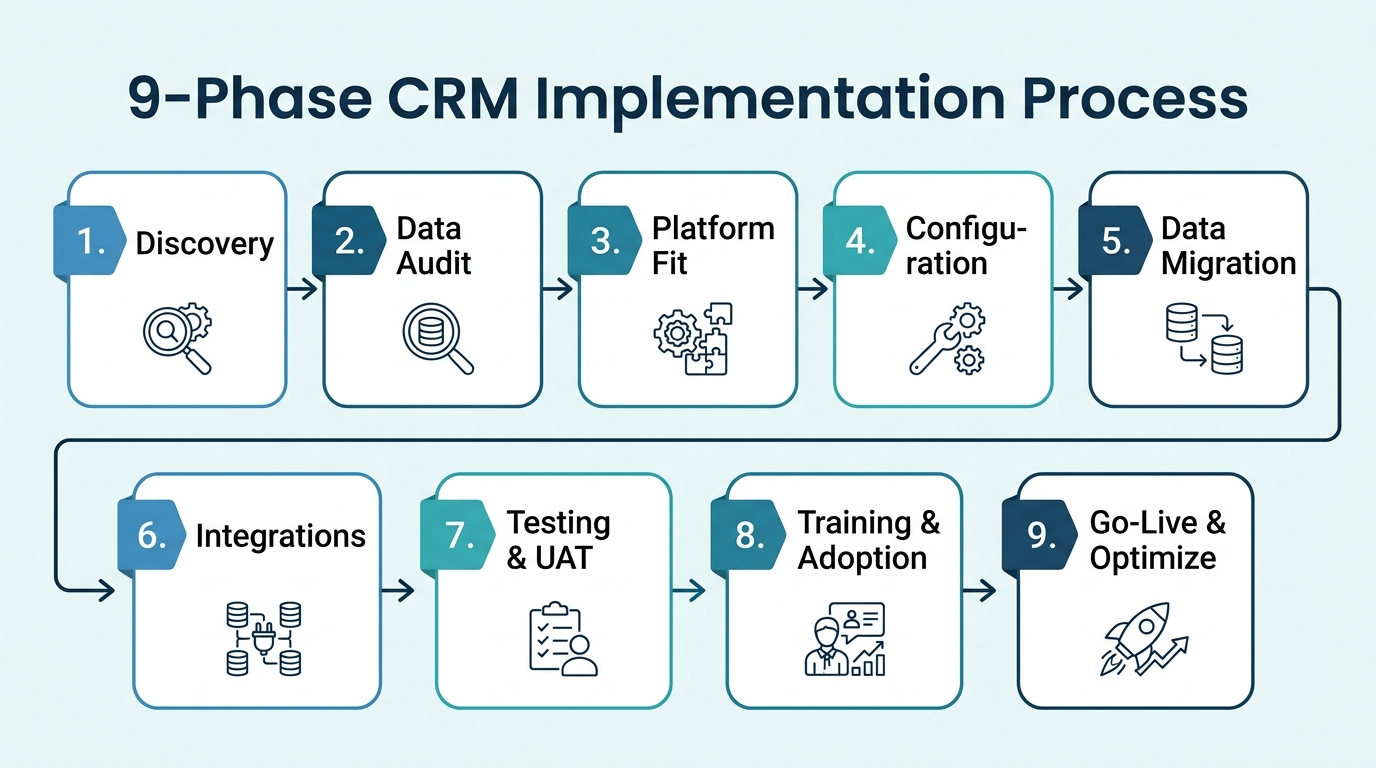
In the sections ahead, we’ll look at why CRM projects fail, realistic timelines, then walk through all nine phases—from discovery to continuous optimization—with what happens in each, who needs to be involved, and the most common pitfall that derails teams. You’ll also get a checklist to keep you on track, an honest look at how AI agents fit into the picture, and a set of frequently asked questions. Most importantly, we’ll show how every decision you make during CRM implementation is actually AI-readiness work—preparing your CRM for a future where AI agents and humans collaborate seamlessly.
Why Most CRM Projects Go Off the Rails (and It’s Not the Software)
For years, CRM failures have been attributed to the wrong vendor or missing features. But the evidence points elsewhere. Dirty data, absence of an executive sponsor, over-customization, and zero change management are the real culprits. When you strip away the hype, these four factors account for the majority of stalled projects and under-adopted systems.
Dirty data is the silent killer. Duplicate contacts, outdated information, and inconsistent formatting mean your team can’t trust reports, AI models can’t learn, and every automated action risks being wrong. Imagine a hot lead routed to the wrong sales rep because the industry field says “Tech” instead of “Technology.” Cleaning this up after go-live is ten times harder than fixing it upfront.
Without an executive sponsor, CRM implementation becomes an IT project instead of a business transformation. There’s no top-down authority to enforce data standards or resolve cross-department conflicts. The marketing team wants one field set; sales wants another. Without a sponsor, the resulting compromise is a cluttered, confusing interface nobody uses.
Over-customization is born of good intentions: adding fields and workflows “just in case.” Each extra field adds friction, slows down data entry, and scares users away. The best systems do less but do it better.
Then there’s the change management void. Users are handed a new tool with an hour of training and told to “just use it.” Within weeks, shadow spreadsheets pop up, and the CRM becomes a stale database. Real adoption requires communication, role-based training, and visible leadership reinforcement.
AI amplifies every one of these failures. A lead-scoring AI agent working on dirty data will misprioritize leads. An automated follow-up agent will send emails to the wrong contacts. AI doesn’t fix a broken process; it accelerates it in the wrong direction. That’s why a disciplined CRM implementation is non-negotiable.
These failures are predictable and preventable. The antidote is a structured, phase-gated approach to implementation. Let’s walk through each phase, with clear goals, key players, and the most common mistake to avoid.
Realistic Timelines: How Long Does CRM Implementation Really Take?
Before diving into the phases, set your timeline expectations. Every company’s journey is unique, but size and complexity drive most variance. The CRM implementation timeline can range from a few weeks to over a year, depending on your organization's scale.
| Company Size | Typical Timeline | Key Drivers |
|---|---|---|
| Small Business (up to 50 users) | 4-8 weeks | Minimal data volume, simple processes, limited customization |
| Mid-Market (50-500 users) | 3-6 months | Multiple departments, moderate data, integrations |
| Enterprise (500+ users) | 6-12+ months | Complex processes, large data sets, cross-system integration, heavy change management |
These timelines assume disciplined execution. Scope creep, data surprises, or stakeholder indecision can easily double the effort. The phases below keep you on track.
For a small business with just a few sales reps, a four-week deployment might be feasible if you stick to out-of-the-box features and a handful of custom fields. As soon as you have multiple departments—sales, marketing, support—each with its own terminology and data entry habits, you should expect months of work to reconcile conflicting definitions and map handoffs. In enterprise settings, with thousands of users and dozens of legacy systems, a year-long rollout is not unusual because you have to coordinate change management across many teams. Your timeline is also shaped by how much data you need to clean: a legacy system with years of duplicates and inconsistent formatting can add weeks to the project. Many teams underestimate this and end up delaying their go-live date by a significant margin. Effective CRM implementation requires realistic scheduling.
Phase 1: Discovery and Requirements Gathering — Know What You’re Building
What happens in this phase is simple: you interview sales, marketing, support, and leadership to map current-state processes and pain points. That output becomes a future-state blueprint with prioritized requirements. As part of the CRM implementation process, this discovery ensures you build something people will actually use.
The executive sponsor, department heads, user representatives, and an implementation consultant are typically involved. If you’re looking for an expert partner, Webuters’ CRM and ERP transformation services can guide you through this phase.
The most common failure here is treating discovery as a checkbox. Collecting a wishlist without tying each requirement to a business goal leads to feature bloat and missed fundamentals. For example, a B2B company might discover that its sales cycle spans multiple departments, so requirements include handoff automation and SLA tracking. That clarity prevents ad-hoc tool sprawl later. Effective requirements gathering is the bedrock of any successful CRM implementation.
Take the time to document how deals move through your pipeline today, including every manual step and spreadsheet handoff. When you know where the friction is, you can design a CRM that removes it rather than replicating it. Without this detailed map, you risk building a system that automates chaos and leaves your team no better off than before. This discovery phase is the foundation of a solid CRM implementation.
Phase 2: Data Audit and Cleanup — Your AI-Ready Foundation
Why does this matter so much? Because CRM data is the raw material for every business decision and AI model. Duplicates, missing fields, and inconsistencies will kill user trust and AI accuracy. This phase is where AI-readiness truly begins. In fact, data cleanup is often the most time-consuming part of a CRM implementation, but skipping it is a recipe for disaster.
You’ll inventory all data sources—spreadsheets, legacy systems, emails—and assess duplicates, formatting, and completeness. Then you define data quality standards and run automated and human-led cleanup. A thorough data audit reduces duplicate records that plague many systems. Maintaining field hygiene ensures that every entry follows the same rules, making the data reliable for both humans and AI.
The data steward, IT, business users who understand what good data looks like, and a consultant with migration expertise are key players. Underestimating data complexity is the most common failure. Data lives in scattered places, often maintained by different people with conflicting conventions. For example, one sales rep may log “NY” while another writes “New York,” and neither matches the drop-down list the new system expects. Skipping a thorough audit means migrating dirty data into the new system, undoing months of effort.
AI can assist here with deduplication, field standardization (e.g., turning “NY” and “New York” into a consistent state name), and even completing missing values—always with human rules and oversight. The goal is to get to a state where every record is complete, consistent, and ready for automated processing later. A data audit is a critical step in any CRM implementation.
A clean data foundation is your first line of defense against future chaos. As you prepare for migration, our CRM migration guide provides a step-by-step approach to moving data without errors. Proper migration is critical for maintaining trust in your new system. This phase sets the stage for every later stage of CRM implementation.
Phase 3: Platform Fit — Choosing the Right CRM for Your Organization
With requirements in hand, you shortlist vendors, request demos, run proof-of-concept trials, and evaluate total cost of ownership. The goal is to match your blueprint to a platform’s native strengths—not to be swayed by feature checklists alone.
The executive sponsor, RevOps, IT, and end-user representatives are typically involved. Buying on features alone without testing real workflows is the most common failure. A platform might have an AI readiness reputation, but if it can’t handle your industry’s data model, you’ll struggle.
When evaluating, prioritize platforms with open APIs, strong field-level security, and native or extensible AI capabilities. Your CRM must be able to integrate future AI agents without massive rework. For example, if you’re a manufacturing company with complex account hierarchies, you need a platform that supports parent-child relationships out of the box. If you’re a services firm that sells projects rather than products, you need a CRM that tracks milestones and time entries. Request a proof-of-concept with your own data to see how the system handles real scenarios before you commit.
This stage is where your CRM implementation best practices start to pay off, as you align the tool with your business needs. A platform that looks great in a demo but fails your core use cases will cause frustration and abandonment later. Choosing the right platform is a key decision in any CRM implementation.
Phase 4: Configuration — Balancing Customization and Standardization
In this phase, you configure standard objects and fields, create custom fields only when there’s a clear business case, automate core workflows, and build dashboards that answer the right questions.
The implementation team, business process owners, and system administrator are key. Over-customization is the most common failure. Adding fields “just in case” or building complex automation that duplicates existing tools creates maintenance nightmares and user resistance.
A best practice is to follow the 80/20 rule: use out-of-the-box features for the majority of needs and customize only the critical differentiators. Each customization should be evaluated for its long-term impact on data models and AI training. For example, a company might resist adding twenty new lead fields; instead, it trims to ten that directly feed sales forecasting and an AI lead-scoring model. The result is cleaner data entry and sharper insights. This configuration phase is a core part of any CRM implementation checklist.
Consider how the fields you add will be used. If a field isn’t required for reporting, automation, or a future AI model, it’s probably extra complexity. Every extra field is an opportunity for users to make a mistake or enter inconsistent data. Keep the interface simple and focused on the activities that drive revenue. During CRM implementation, resist the urge to over-customize.
Phase 5: Data Migration — Moving From Legacy to New
Here you map legacy data fields to the new system, extract data, transform it to meet quality standards, load via migration tools, and validate against sample records. A well-executed CRM data migration minimizes disruption and ensures data integrity.
The data migration specialist, IT, and business data stewards are involved. Incomplete field mapping or loading dirty data is the most common failure. If “Industry” in the old system maps to “Vertical” but nobody validates, AI agents will never correctly route leads.
A best practice is to migrate in waves—master data (accounts, contacts) first, then historical records—and run reconciliation against source systems at each step. Our CRM migration guide walks through this process in detail, with checkpoints to prevent costly mistakes.
For example, imagine you have 50,000 contacts in your old system, many with missing phone numbers or outdated job titles. Rather than moving all of them at once, you migrate the active contacts first, clean them, and then bring over the historical archive later. This staged approach lets you focus on quality for the records that matter most to daily operations. AI tools can now speed up mapping by suggesting field matches, standardizing formats, and identifying outliers that need human review. But human judgment remains the final gatekeeper. Remember, a successful CRM implementation depends on getting this phase right.
Phase 6: Integrations — Connecting Your CRM to the Ecosystem
You set up two-way sync for email, calendar, marketing platforms, helpdesk, and ERP systems. Define API or middleware connections and data conflict rules.
The integration developer, system architects, and process owners are typically involved. Overlooking data conflicts and sync frequency is a common failure, creating new silos or duplicate entry points. If the marketing system overwrites the CRM’s contact owner field, your sales team loses trust instantly.
Best practices include defining the “system of record” for each data type, agreeing on conflict-resolution rules, and testing integrations early with real-use scenarios. Process mapping comes in handy here to ensure you understand how data flows across systems. For example, sales reps expect that when a marketing campaign adds a new lead, that lead appears in the CRM with the correct source and owner within minutes. If the integration runs only nightly, the rep spends the morning importing a CSV manually. That friction kills adoption. Define the sync cadence that matches how your teams actually work. Integration planning is crucial for CRM implementation success.
Integrations open the way for AI agents in CRM to act across systems—routing leads from marketing, pulling support tickets, triggering billing actions. Integration quality directly determines how much you can automate. If your systems can’t share data reliably, AI agents will be blind and make mistakes. This is why integrations are a cornerstone of any CRM implementation.
Phase 7: Testing and UAT — De-Risking the Launch
This phase involves testing technical functionality, validating data accuracy, and running user acceptance testing (UAT) with real users in a sandbox environment using scripted scenarios. Sandbox testing allows you to catch issues without affecting live operations.
The QA team, actual business users, and project manager are involved. Rushing UAT or letting users test without realistic workflows is the most common failure. Dismissing feedback that suggests design changes also hurts—when users feel unheard, they withhold adoption.
Best practices include creating test scripts from real business cases, scheduling enough cycles to catch edge cases, and holding a formal go/no-go decision meeting. For example, a UAT user might discover that the mobile form doesn’t sync GPS location—critical for field sales. Catching that bug before launch prevents hundreds of lost location stamps.
Another example: your customer support team tests the ticketing integration and finds that case statuses don’t update in real time when a customer replies by email. Had you skipped UAT, your support reps would have juggled two systems manually for weeks. Testing gives you the chance to fix these issues before they damage customer experience.
This is the last chance to catch issues before they affect customer-facing operations. A failed test here is a gift; a skipped one is a liability. As part of your CRM implementation, thorough testing ensures you’re ready for launch.
Phase 8: Training and Adoption — Winning the User Battle
Here you deliver role-based training, create quick-reference guides, launch executive communications, and establish a feedback loop for continuous improvement. The goal is to drive user adoption from day one.
The change management lead, department managers, super-users, and the executive sponsor are involved—the sponsor reinforces the “why” across the organization. Treating training as a one-time event and not building an adoption culture is the most common failure. Users drift back to old habits, and the CRM becomes an expensive unused database.
Best practices: make training immediately relevant to each role’s daily tasks, celebrate quick wins (like a sales manager showing improved pipeline visibility), and track adoption metrics (logins, data entry quality) within the first 90 days. Effective change management CRM strategies are essential to overcome resistance.
For example, you might run a weekly 15-minute session where sales reps see the most improved pipeline reports and share how they used the CRM to win a deal. Those quick wins build momentum. When users trust the data, they will trust the AI agents that act on it. An adoption culture lays the psychological groundwork for handing off routine tasks to automation. This training phase is a critical component of CRM implementation best practices. Remember, adoption is the ultimate measure of CRM implementation success.
Phase 9: Go-Live and Continuous Optimization
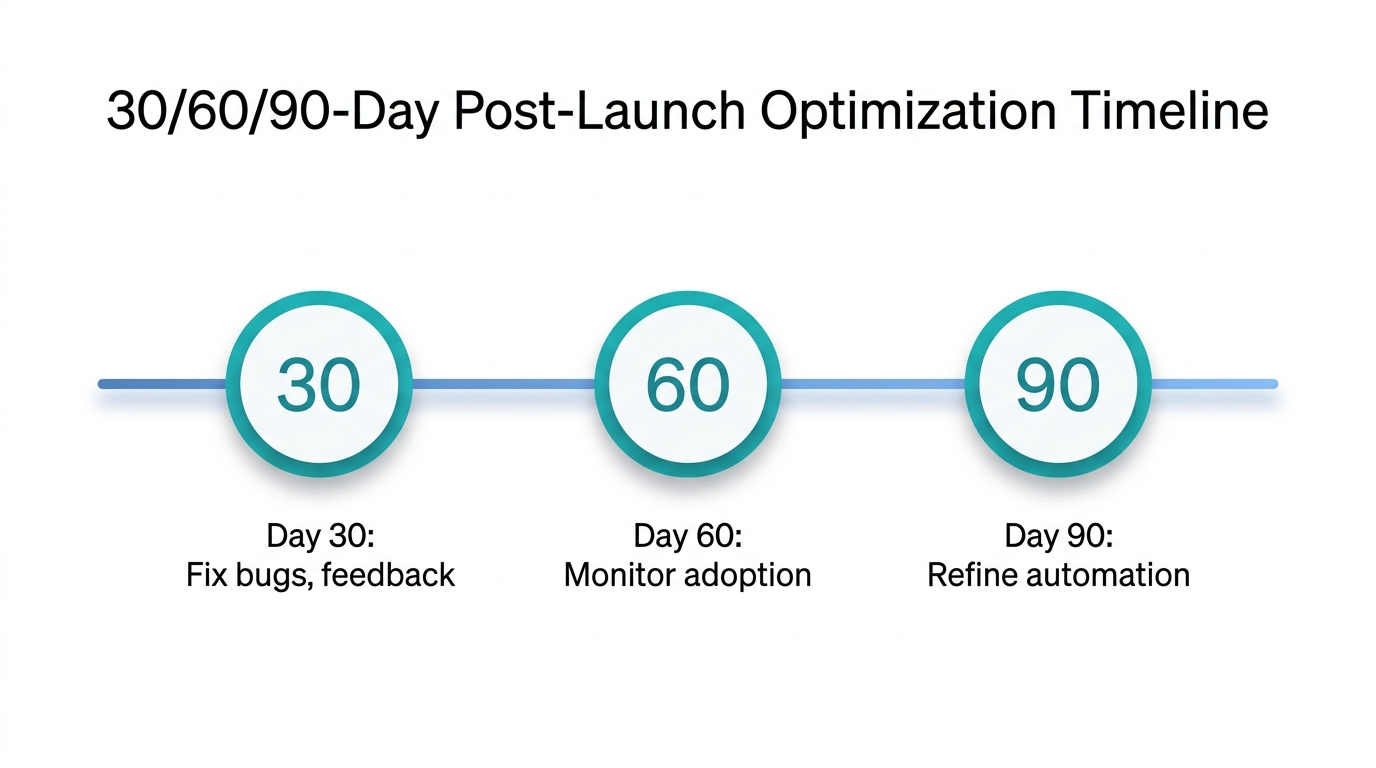
On go-live day, transition with a “war room” support team. For the first weeks, monitor performance, collect feedback, and resolve critical issues. Then shift to a cadence of enhancements based on 30/60/90-day checkpoints. A detailed go-live plan helps you manage the transition smoothly.
The support team, project manager, business stakeholders, and executive sponsor are involved. Declaring victory too soon and ceasing optimization is the most common failure. Small issues left unaddressed erode adoption and data quality month by month.
Best practices: measure adoption, data quality, and business results (e.g., sales cycle length) at each checkpoint and iterate. This is also the stage where you begin introducing AI—from AI-assisted lead routing to automated follow-ups, always with human approval workflows. For example, after go-live, a company might automate lead assignment based on territory and product interest, cutting manual triage by half. An AI agent drafts follow-up emails for stuck deals; managers review and send the best variant. Post-launch optimization ensures your CRM continues to deliver value.
During the first 30 days, focus on fixing any bugs and collecting user feedback. By day 60, you should see adoption metrics improving. By day 90, you can start refining automation rules and considering which AI agents to activate next. Your CRM is now a live system, ready for the next wave of technology. Remember, your CRM implementation doesn’t end at go-live; it’s an ongoing journey. With a solid go-live plan, your CRM implementation will sustain long-term value.
Implementing CRM in the AI Era: Why Your Foundation Determines Your Intelligence
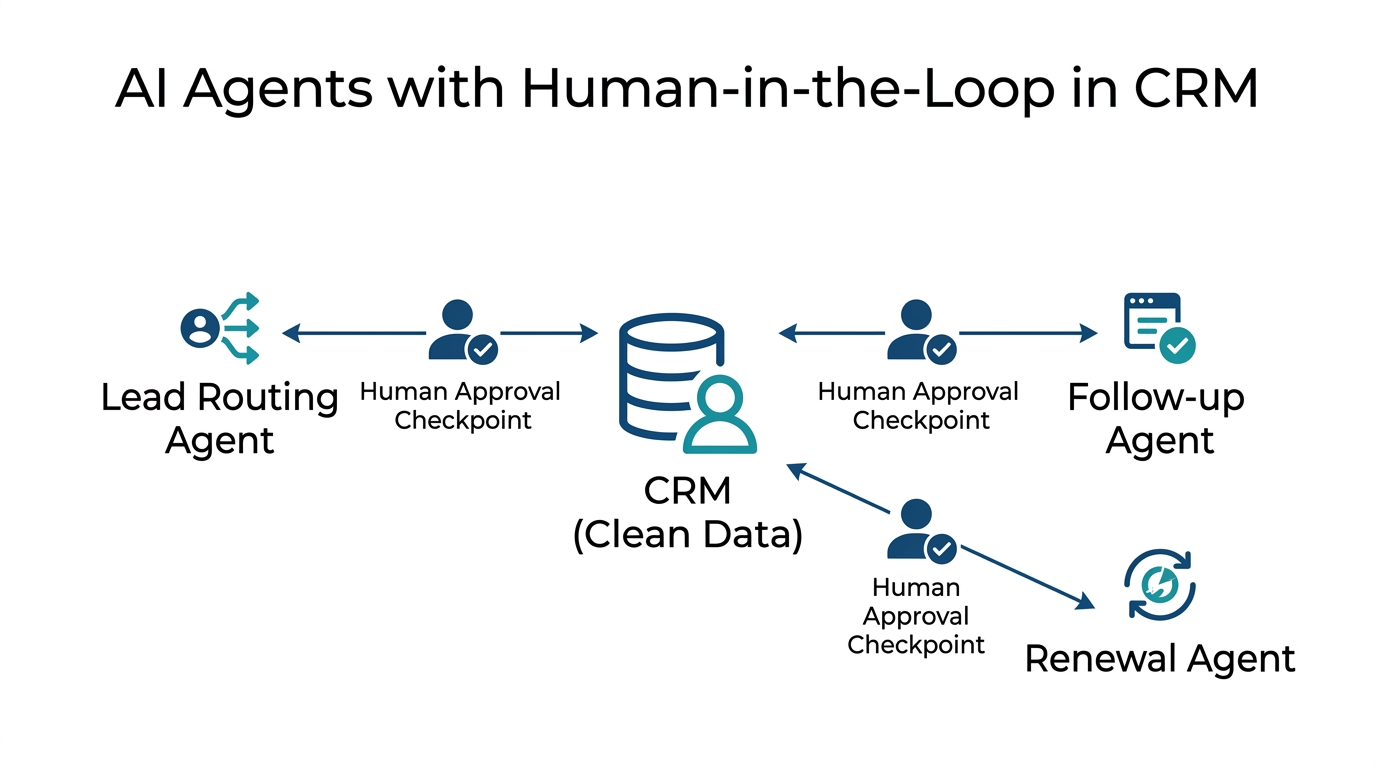
CRM is the soil where AI agents grow. Plant on barren ground, and you harvest chaos.
This isn’t a poetic aside—it’s operational truth. Every AI agent that will one day operate inside your CRM—routing leads, scoring opportunities, recommending next-best actions—relies on the data and workflows you build today. Implementation is where that foundation is poured.
Clean fields and disciplined processes are AI-readiness work. When you enforce consistency on industry codes, contact statuses, and activity logging, you’re training future AI models, not just tidying up. In the migration phase, AI already assists by spotting duplicates and suggesting field mappings, but only human governance ensures the rules are correct.
After go-live, the real agents arrive. Lead routing bots read opportunity fields to assign the right rep. Renewal agents scan contract end dates and trigger alerts. Follow-up engines draft emails based on customer activity. Each of these actions requires a human approval checkpoint—not because AI isn’t capable, but because accountability and nuance still belong to people. The system works when the CRM data is trustworthy; it fails when the data is messy. An AI-ready CRM is one that has been deliberately built on clean data and defined processes. This is the ultimate goal of any CRM implementation.
When you’re ready to activate AI agents inside your CRM, our AI consulting services help you design human-in-the-loop automation that works.
The CRM Implementation Checklist: Your Go-Live Readiness Scorecard
Use this checklist at any stage—before kickoff, mid-project, or before go-live—to see where you stand. It encapsulates the key steps of a CRM implementation process and includes the business case for CRM at each stage.
- Discovery: Business goals documented, process map completed, requirements prioritized.
- Data: Data audit done, duplicates cleaned, quality standards defined and signed off.
- Platform: Requirements matched to platform, proof-of-concept run, total cost understood.
- Configuration: Only necessary customizations present, key workflows automated, dashboards built.
- Migration: Field mapping complete, migration tested and validated, reconciliation passed.
- Integrations: System-of-record defined, sync rules set, integration tests passed.
- Testing: System and integration tests passed, UAT completed with real users, feedback acted on.
- Training: Role-based training delivered, super-users appointed, adoption metrics defined.
- Go-live: War room established, support plan in place, 30/60/90-day optimization roadmap set.
This checklist is a key deliverable for any CRM implementation project, ensuring you don’t miss critical steps. A clear business case for CRM should guide each decision. Leverage this CRM implementation checklist to keep your project on track.
The Intelligent Future: Your CRM as the Launchpad for AI
The nine-phase process we’ve walked through isn’t a rigid blueprint; it’s a shield against the chaos that derails so many CRM projects. By treating each phase with the seriousness it deserves, you transform what could be a painful disruption into a strategic advantage. Clean data, disciplined processes, and genuine user adoption are what make AI safe and productive.
Every field you map, every training session you run, and every validation check you perform is infrastructure for the future. When your CRM is implemented right, AI agents become trusted teammates rather than rogue bots. When it’s implemented wrong, they become amplifiers of every mistake. The key is to follow a proven CRM implementation roadmap that prioritizes data quality and user adoption.
If you’re planning a CRM implementation or rescuing one that’s off track, Webuters can help you build a foundation that’s AI-ready from day one. With over a decade of CRM and ERP transformation projects, we bring the process discipline and AI foresight that turns a software purchase into a strategic asset. Visit our CRM and ERP transformation services to start a conversation. The question is not whether AI will enter your CRM—it’s whether your CRM will be ready for it.
Frequently Asked Questions
How long does a CRM implementation take?
It depends on company size: small businesses (up to 50 users) typically need 4-8 weeks, mid-market (50-500 users) 3-6 months, and enterprise (500+ users) 6-12+ months. These timelines assume disciplined execution without major scope creep or data surprises. A realistic CRM implementation timeline is crucial for managing stakeholder expectations, as it sets the pace for the entire CRM implementation.
Why do CRM implementations fail?
Failure usually stems from four non-technical issues: dirty data that erodes trust, lack of an executive sponsor to enforce standards, over-customization that confuses users, and insufficient change management that leads to low adoption. The software itself is rarely the core problem. Following CRM implementation best practices can mitigate these risks, ensuring a smoother CRM implementation.
What is the most important phase of CRM implementation?
While every phase matters, discovery and requirements gathering sets the direction. Skipping this leads to a system that doesn't match real workflows. Close behind is data audit and cleanup, because all future reporting and AI depend on clean data. Effective requirements gathering is the first step in a successful CRM implementation project, and data cleanup is the second. Proper requirements gathering ensures your CRM implementation aligns with business needs.
How can AI help during CRM implementation?
AI tools now assist with data deduplication, field standardization, and migration mapping. Post-launch, AI agents can automate lead routing, follow-ups, and renewals. However, all AI actions should have human approval checkpoints to prevent errors from scaling. This ensures you're building an AI-ready CRM, not just a data repository, and that your CRM implementation stays on track. AI agents in CRM can significantly enhance efficiency.
What does “AI-ready CRM” mean?
An AI-ready CRM has clean, consistently formatted data, well-defined processes, and proper integration points. This foundation allows AI agents to operate reliably. It's built during implementation through rigorous data hygiene, minimal customization, and strong adoption practices. An AI-ready CRM is a key outcome of a well-executed CRM implementation.
Ready to build your AI-ready CRM foundation? Start with Webuters’ CRM and ERP transformation services.

Loading...