AI Agent vs Chatbot vs Workflow Automation: Pick the Right Tool for the Work
Agent vs chatbot confused? See the real difference, a hotel and lead example, and three questions that pick a chatbot, workflow automation or AI agent.

The agent vs chatbot question lands the moment a budget request reaches your desk. Three vendors used the same words to describe different things. One calls its product an AI agent. Another calls its chatbot an agent. A third sells trigger-based automation with an agent label on top. You are not buying a product. You are buying the shape of the work you will live with for eighteen months.
The terms get mixed up because the chatbot vs AI agent difference is subtle in a demo and expensive in production. A bot that answers questions looks smart. A workflow that moves data looks efficient. An agent that reaches into two systems looks like magic. But they are not versions of the same thing. They are three tools for three kinds of work, and the AI agent vs automation choice usually decides your bill.
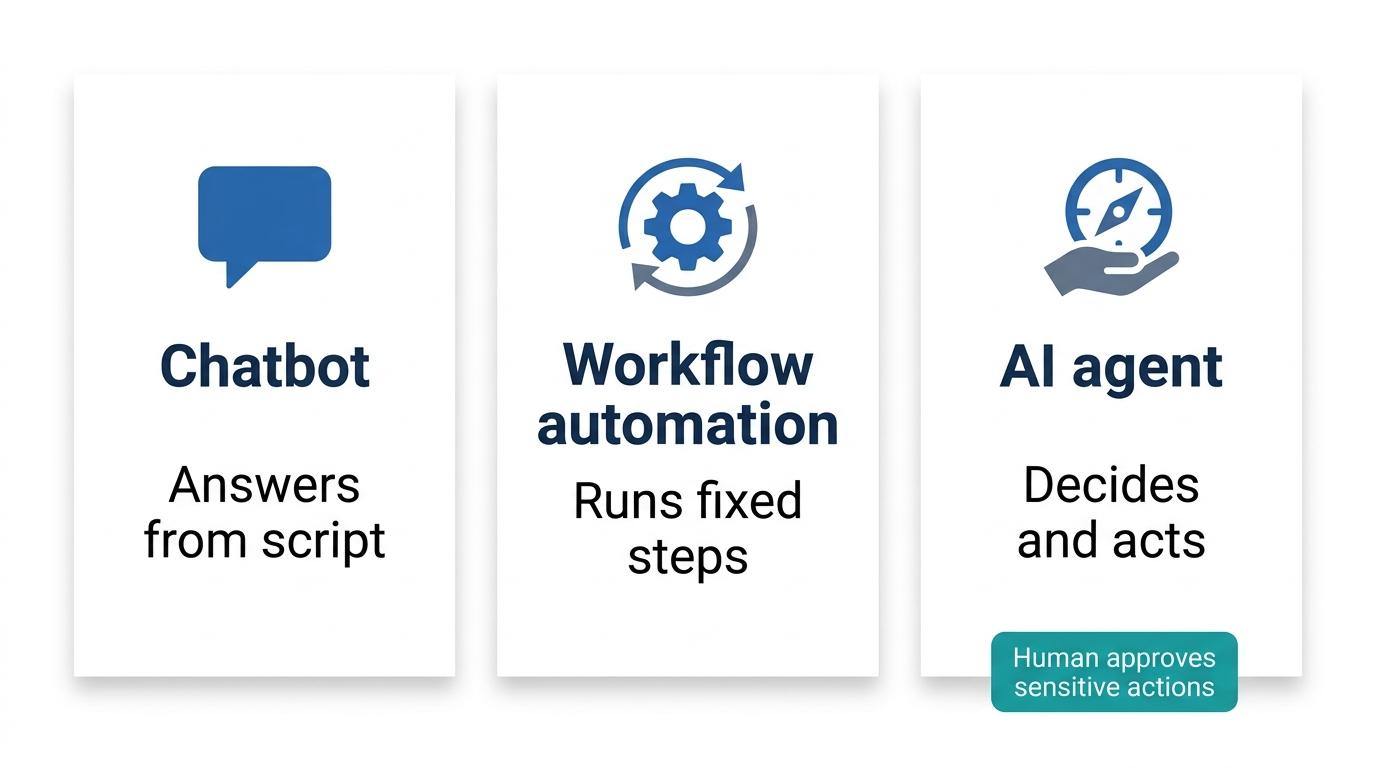
Here is the direct answer. A chatbot talks. Workflow automation follows fixed steps set in advance. An AI agent reasons about context and acts across connected systems toward a goal, with a human approving sensitive actions. The costly mistake is buying an agent for a job a scripted bot or a rule-based workflow already does well. Getting that match right is the whole game.
In the sections ahead, we define each tool in plain business terms, then walk two concrete examples: a hotel WhatsApp thread and a single lead. We show a hybrid flow where all three combine. Finally, we hand you a decision table and three questions to run over your own process before you sign anything. That is the practical shape of the agent vs chatbot decision, not a vendor slide.
The short answer: A chatbot holds a conversation. Workflow automation follows steps set in advance. An AI agent reasons toward a goal and acts across systems, with a human approving sensitive actions.
Chatbot, workflow automation and AI agent side by side
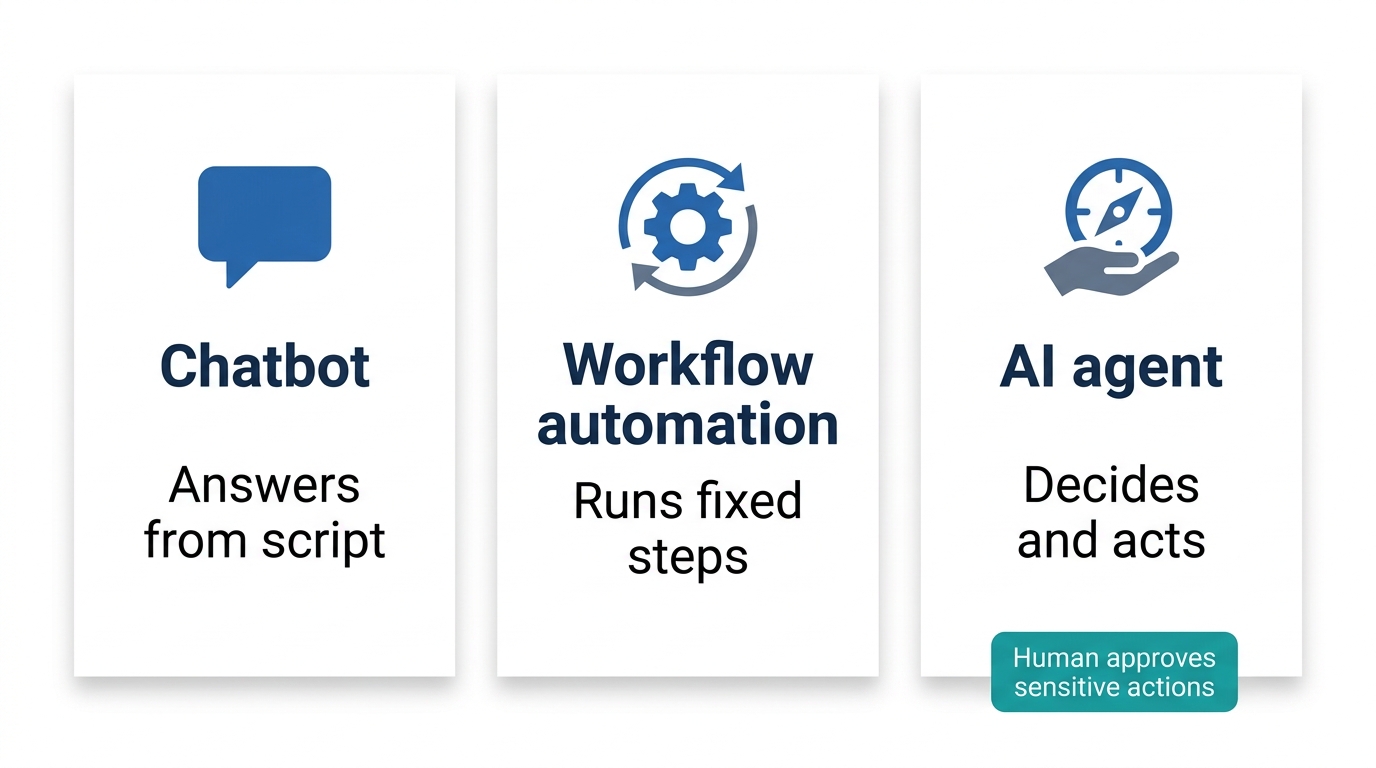
Start with the full three-way comparison, a classic agents vs chatbots vs RPA view. Use the same six rows for all three columns so you compare like with like.
| Chatbot | Workflow automation (including RPA) | AI agent | |
|---|---|---|---|
| What it does | Holds a conversation in a chat window, WhatsApp, or website widget | Runs fixed steps when a trigger fires | Reasons toward a goal and acts across connected systems |
| How it decides the next step | Chooses from scripted or model generated replies | Follows step 4 of 4 set in advance | Reads context and chooses the next tool to call |
| What it connects to | Chat channel, knowledge base, CRM form | Apps, APIs, legacy screens via RPA bots | APIs, records, tools, multiple systems |
| Where the human sits | Reads replies, can escalate | Designs the flow, handles exceptions | Approves sensitive or high risk actions |
| Best fit work | FAQs, support deflection, lead capture, self service | CRM updates, approvals, notifications, onboarding, invoice matching | Multi-step, cross-system, judgment heavy cases |
| Typical limits and cost traps | Cannot act across systems on its own | Stalls on the unexpected path | Costs more to build, test and govern; overkill for rule-shaped work |
Most businesses use more than one of these technologies together. This table is a map, not a menu. After reading a comparison like this, buyers often hit two failure modes. They buy autonomy for rule-based work, or they buy a scripted bot for judgment work. Keep both in mind as you read the next three sections. The agent vs chatbot choice starts here, with a clear view of each column. Use this table as your first filter, not your final answer. That alone settles most of the comparison before the first vendor call.
What is a chatbot in plain business terms
A chatbot is software that holds a conversation with a person. It usually lives in a chat window, WhatsApp, or a website widget. It replies from a set of answers, scripted flows, or a language model. The common jobs are FAQs, customer support deflection, lead capture, and self-service account or booking tasks.
For example, a clinic website bot answers opening hours, insurance questions and booking links without touching the practice management system. A WhatsApp bot qualifies a lead with three scripted questions and drops the details into a shared inbox. A password reset bot triggers a self-service email rather than an agent resolving an account problem end to end.
The key distinction is simple: holding a conversation alone does not make a chatbot an agent. The test is whether it decides and acts across systems, not whether it sounds smart. Conversational AI is the easy part; the harder part of the agent vs chatbot question is whether the system can finish business process automation work on its own, not just describe it. A rule-based bot follows a script. A model-backed bot handles awkward phrasing better, but it still answers rather than acts unless connected to tools. Our guide to types of chatbots goes deeper on this line. That guide also clarifies the chatbot vs AI agent boundary.
According to IBM’s chatbot definition, a chatbot is a program that simulates human conversation, often through text or voice. That definition does not include acting on your business systems. A chatbot is the smarter buy when you have a high volume of narrow questions, low risk of a wrong answer, and fast time to value. If you only need answers, do not pay for autonomy. That is the first practical test in this agent vs chatbot review.
What is workflow automation and where RPA fits
Workflow automation is software that runs a sequence of steps when a trigger fires. Each step is fixed by a person when the workflow was built. A trigger is the event that starts the run: a form submitted, a record created, a file uploaded. The actions are the steps that follow. Most buyers know this as “if this happens, then do that.” This is classic trigger-based automation and the backbone of most business process automation projects. Most of what people call rule-based automation lives here: a trigger fires, and the same steps run every time, in the same order.
Place robotic process automation (RPA) honestly as one type of workflow automation. RPA uses software robots to repeat clicks and keystrokes across systems that have no clean API. It is useful for older line-of-business apps. Consider a supplier portal that has no API. An RPA bot logs in each morning, reads new purchase orders, and types the line items into the ERP. When a price format changes on the portal, the bot stops and drops the case into an exception queue for a person to fix. That is the typical shape: fast on the expected path, blunt on the unexpected one. Getting this trigger-based automation shape right early avoids relearning the agent vs chatbot lesson later, after the budget is already spent. Microsoft’s Power Automate trigger documentation explains triggers, and UiPath documentation covers RPA in detail.
The canonical examples are CRM updates, approval chains, notifications, employee onboarding, invoice intake and matching. A new employee joins: HR record created, laptop request raised, payroll enrolled, welcome email sent, manager notified. Same five actions every time. An invoice arrives, matched against a purchase order, routed for approval above a threshold, then posted to the finance system.
Workflow automation handles the expected path beautifully and stops or escalates on the unexpected one. Exception handling is the design question, not an afterthought. Good exception handling design decides what happens before the unexpected case ever shows up, not after. Where does workflow automation win? Repeatable, high-volume, rule-stable work where a wrong step is cheap to reverse. If the steps never change, do not buy reasoning. That is the second checkpoint in our comparison, and it saves real money. This is also the cleanest way to frame AI agent vs workflow automation for your team.
For teams evaluating this next step, Webuters’ RPA development can provide a practical reference point.
What is an AI agent and when it earns its cost
An AI agent is software that works toward a goal, which is why the term goal-based AI fits. It reads the context of the case, decides the next step, and uses tools and APIs to act across connected systems. Translate “tool and API use” into plain English: the agent can look something up, create a record, send a message, or call another system, much as a person with the right logins would. That is the practical meaning of goal-based AI: the system keeps working toward the outcome instead of stopping after one reply, which is the clearest line in the agent vs chatbot comparison.
Context-aware decision-making is the core difference. The agent reads the order history, the open ticket, the customer tier and the policy before choosing what to do next. IBM’s definition calls an agent a system that can act on behalf of a user, and Google Cloud adds that agents can use tools and make decisions. Our primer on how AI agents work walks through the loop without jargon. Understanding this loop is the heart of the agent vs chatbot comparison.
Human in the loop approval is a design feature, not a limitation. Sensitive or high-risk actions such as refunds, payments, account closures or regulated decisions route to a person. The NIST AI Risk Management Framework and OECD AI Principles are two references we use for risk-based design. The NIST framework helps teams map, measure and manage AI risk. The OECD principles focus on human-centred AI. We read both as support for keeping a person in control of high-stakes decisions. That is our interpretation, not a direct quote from either document. Treat those frameworks as design inputs, not paperwork.
An agent earns its cost only where judgment and system access both matter. Multi-step automation that crosses several systems, where the right next step depends on the case, is the sweet spot. If the work is always the same, an agent is overkill and harder to govern. Multi-step automation inside one case, not just one workflow, is what human in the loop approval is designed to supervise. That is where the gap becomes obvious: the agent acts, the bot answers. This is the third checkpoint in our review, and the one most buyers skip. When the agent vs chatbot debate stalls in a meeting, this checkpoint usually breaks the tie.
Key differences: two examples that settle the argument
Abstract definitions blur. Two concrete scenarios make the lines stick. Both show the chatbot vs agent difference in real work, not in a demo. And both make the agent vs chatbot distinction concrete.
Chatbot and agent on a hotel WhatsApp thread
A guest messages the hotel on WhatsApp: “Do you have a sea-view room free on Friday?” A chatbot replies with a link and hours. It does not check the property management system. An AI agent checks availability, holds the room, creates a housekeeping task if a late checkout is requested, and routes a goodwill refund to the duty manager for approval. The channel did not change. The product category did. That is why the vocabulary confusion is expensive. See our AI agent for hotel guest requests example for a fuller walkthrough. In this trade-off, the channel is identical and only the work changes. Here the agent vs chatbot difference becomes visible to a guest.
AI agent vs automation on a single new lead
A new lead comes in through a form. Rule-based automation does this: record created, score by fixed rule, assign to the territory rep, send template email, set a three-day follow-up task. All decided when the workflow was built. Now the message is ambiguous about budget and timeline. The workflow stalls. An AI agent reads the account history, checks calendar availability, asks one clarifying question, books a slot, and routes the discount request for approval. Same input, different tool shape. This is the clearest example we can give.
Neither example says one tool wins. They say the tools are shaped for different work, and most real processes need more than one shape. The chatbot vs agent difference is really a difference in job design. In each case, the agent vs chatbot choice hinges on whether action is required.
How they combine: a hybrid flow most businesses actually need
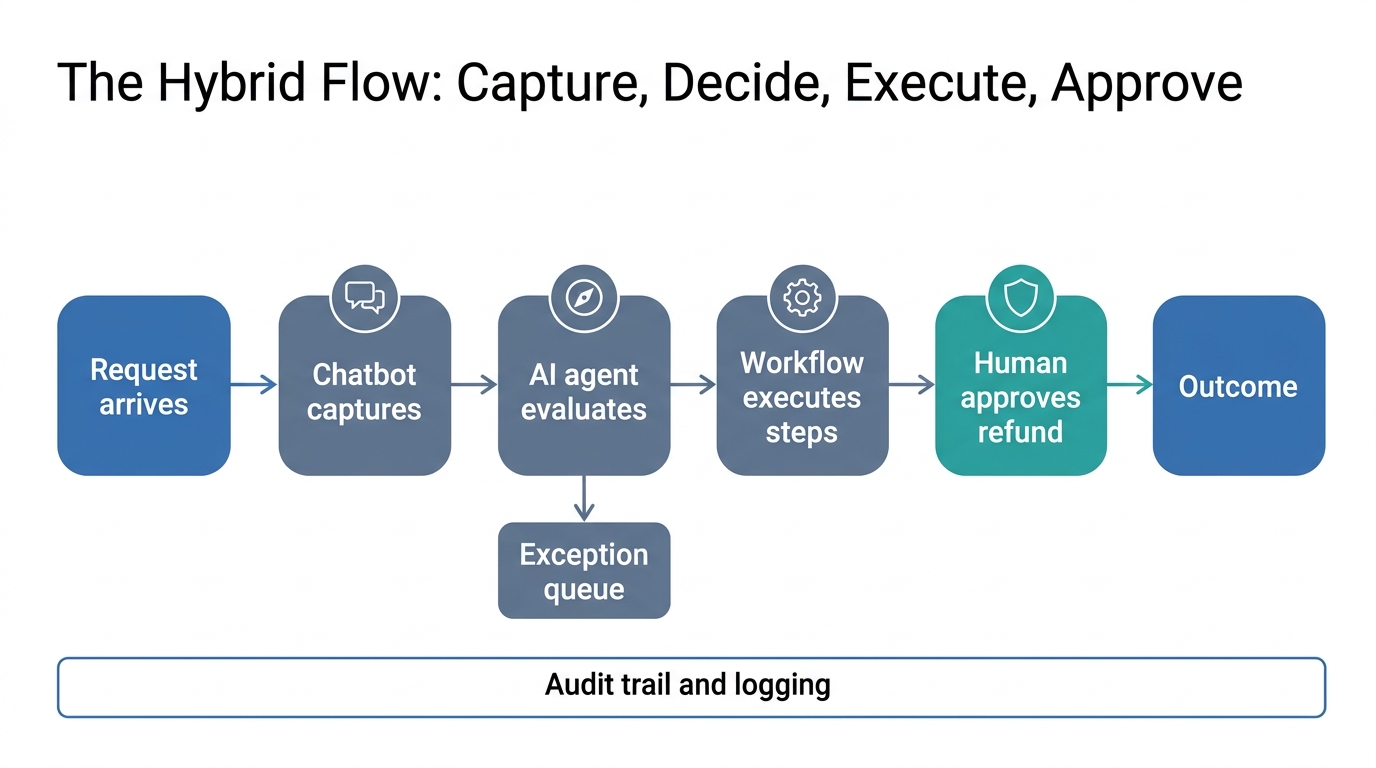
You do not have to choose only one. The most practical stack uses all three. The chatbot captures the request. The AI agent evaluates it. Workflow automation executes the predictable steps. A human approves sensitive actions. This is conversational AI at the front and goal-based AI in the middle, joined by multi-step automation. That mix is where the agent vs chatbot debate turns into an operating model. That is multi-step automation in practice, not a slogan, and it is why teams keep revisiting the agent vs chatbot question months after the first rollout.
Take a returns request. A WhatsApp chatbot collects the order number. The agent checks the policy and decides whether this is a standard return or an exception. A workflow triggers the label and the refund record. A refund above a set value waits for a human approval. Each tool does what it is best at, and exception handling lives in one named place. This split is not a rivalry. The agent and the chatbot sit in the same flow and hand work to each other. That is the mature answer to the agent vs chatbot question.
This hybrid needs a governance layer. Logging, an audit trail, clear approval thresholds and a named owner for each automation. The NIST framework is a practical starting point for risk mapping and human oversight design. If your work touches the EU market, check whether the EU AI Act applies, because it sets rules for high-risk systems. Our interpretation is that good governance tracks autonomy, not the product label. For rule-based work, business process automation is the layer that builds the workflow core, and our team can help design it without changing the governance questions that still matter most. Agents do not replace workflows or chatbots. A well-built stack uses each where it is strongest. The tension disappears once you treat them as complementary tools.
The tool is not the strategy. The work is the strategy. Buy the tool that fits the work, then connect the tools where the work crosses borders. A chatbot answers, a workflow repeats, an agent decides, and most teams need all three, connected and governed.
The three questions that decide where to invest next
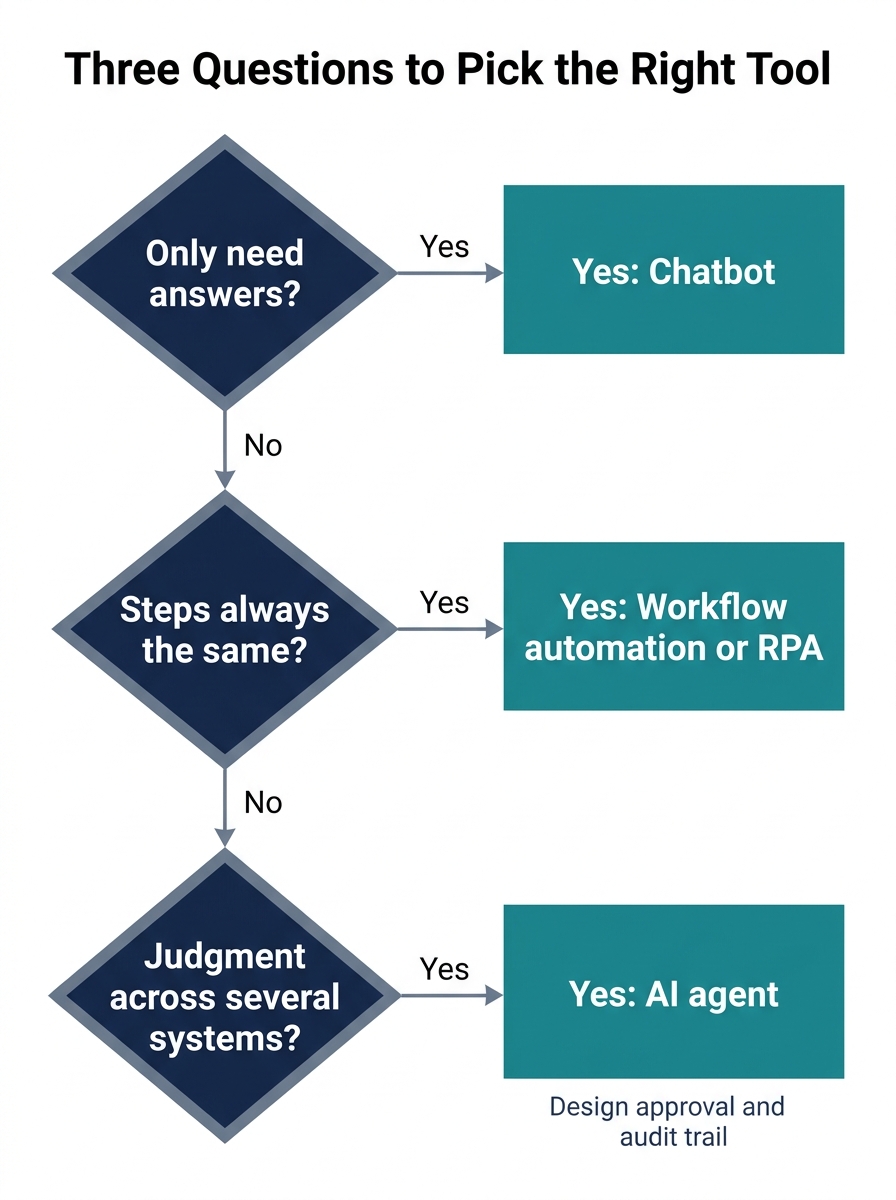
Run these three questions over any process before you open a vendor deck. They also help you settle the agent vs chatbot question with your own team.
| Question | Chatbot | Workflow automation / RPA | AI agent |
|---|---|---|---|
| Do you only need answers? | Yes | No | Overkill |
| Are the steps always the same? | No | Yes | Overkill |
| Does the task need judgment across several systems? | No | No | Yes |
Question one: do you only need answers? If yes, a chatbot is likely enough, and an agent is overkill for the money and the risk. Question two: are the steps always the same? If yes, workflow automation, including RPA, is the smarter buy, because rules are cheaper than reasoning. Question three: does the task need judgment across several systems? If yes, an AI agent earns its cost, provided you design the approval step and the audit trail from day one. Question three really asks whether human in the loop review is worth the cost for this particular case. The answer follows directly from these three answers. The AI agent vs workflow automation call, in particular, is settled by question two.
Many processes get a yes to more than one question. That is why the hybrid pattern usually wins. If your answers cluster on judgment and cross-system work, look at AI agent development services. If they cluster on repeatable steps, start with intelligent automation. The cost of a wrong pick is specific: overbuying autonomy for a rule-shaped job, or underbuying a scripted bot for a judgment-shaped one. For many teams, that agent vs chatbot comparison comes down to this table alone. That is the decision in practice.
Governance stays the same regardless of path. Approval thresholds, logging and a named owner. Backed by NIST and, where relevant, the EU AI Act. Any decision gets easier once you see that the governance burden tracks autonomy, not the label. Frame the choice as conversational AI vs AI agent only when the work itself requires action across systems. Revisit your assumptions after each process review.
Match the tool to the work, then connect the tools
The central point is simple. Chatbots, workflow automation and AI agents are three different tools for three different kinds of work. A chatbot answers. A workflow repeats. An agent decides. Most teams need all three, connected and governed, and the agent vs chatbot question is really a question about the work.
The business implication is money and risk. Buy autonomy for a rule-shaped job and you pay to build, test and govern something a cheaper workflow already does well. Buy a scripted bot for a judgment-shaped job and it stalls on the first unexpected case. Match the tool to the work first, then connect the tools where the work crosses borders. When you weigh the options, price the cost of the wrong pick, not just the licence fee.
If you are staring at that budget line and still unsure which shape of work it is, send us the process on one page. Start with Webuters AI for a practical conversation. We will tell you honestly whether it is a chatbot job, a workflow job, or an agent job, and we will say so even when the answer is the cheaper one.
Frequently asked questions
What is the main difference between an AI agent and a chatbot?
The difference comes down to action. A chatbot holds a conversation and answers from a set of replies or a language model. An AI agent reasons about context and acts across connected systems using tools and APIs. One practical way to settle the chatbot vs AI agent question is to ask whether the system can act without a script. That single test explains most of the agent vs chatbot gap.
Is workflow automation the same as RPA?
RPA is one type of workflow automation. Workflow automation includes any sequence of fixed steps that starts from a trigger. Robotic process automation uses software robots to repeat clicks and keystrokes across systems without clean APIs. Place each tool correctly in your stack before you compare vendors. Both sit inside business process automation, and both are forms of trigger-based automation at heart.
When should I choose a chatbot over an AI agent?
Choose a chatbot when you only need answers. High-volume FAQs, support deflection, lead capture and self-service tasks fit well. If the work does not require acting across systems or judgment, a chatbot is cheaper and simpler to govern. The agent vs chatbot line is mostly about access to systems, not the quality of the conversation.
When is an AI agent worth the extra cost?
An AI agent is worth it when the work crosses several systems and the right next step depends on the case. You must design human in the loop approval and an audit trail for sensitive actions. For fixed, repeatable work, skip the agent. The AI agent vs automation test is whether a fixed set of steps can cover most cases. Run the comparison on the job itself, not on the vendor pitch.
Can I use a chatbot, workflow automation and an AI agent together?
Yes. Most businesses do. The chatbot captures the request, the agent evaluates it, the workflow executes the predictable steps, and a human approves sensitive actions. This hybrid pattern avoids forcing one tool to do all three jobs. That hybrid mix is conversational AI, multi-step automation and human in the loop oversight working as one system, not three separate purchases. The agent vs chatbot choice is not either-or. It is about which tool does which part. In practice, this mix answers the agent vs chatbot question for most teams. That is the pattern we recommend for most teams.
AI adoption and workflow automation
Start with one workflow, prove it in production, then scale what works.
See AI services
Ashish leads cross-functional engineering teams at Webuters to deliver scalable, AI-powered digital solutions. His expertise spans React, Node.js, Generative AI, Ecommerce, Shopify Plus, SFCC, and modern JavaScript frameworks like MERN and MEAN. From ecommerce migrations to AI consulting and adoption, he bridges complex tech with real business outcomes. As a hands-on leader in architecture, cloud, and full-stack innovation, he shares insights to help development teams build smarter and stay ahead in an evolving tech landscape.
Follow Ashish on LinkedIn