Zoho vs Salesforce: The Mid-Market CRM Decision That Rests on Workflow Ownership, Not Features
Zoho vs Salesforce isn’t about features, it’s about workflow ownership and AI readiness. Discover a practical framework to choose the CRM your mid-market team…

When you dig deeper, the Zoho vs Salesforce debate is less about feature parity and more about how your organization operates. The real problem isn’t a missing feature on either side; both platforms have matured enormously. The frustration you feel: why do CRM projects so often stall or fail to deliver…is rarely about the platform. It’s about what happens inside your organization before and after the software is installed. Understanding the Zoho vs Salesforce decision from this angle is a differentiator for mid-market teams across the industries that rely on Salesforce.
We’ve worked with insurance agency owners, higher education enrollment leaders, and operations heads at mid-market companies. The story repeats: a team picks a CRM based on a feature checklist, invests in implementation, then watches adoption stall because no one clearly owns the processes, data is messy, and automation is turned on without guardrails. AI doesn’t fix that; it amplifies the chaos. This is why a thorough Zoho vs Salesforce analysis must start with your workflows.
Here is the thesis: the Zoho vs Salesforce decision is not about features but also about workflow ownership, implementation sequence, and your organization’s readiness to govern AI-driven processes. Understanding this is critical to any Zoho vs Salesforce analysis. In the sections below, we’ll unpack the true CRM total cost of ownership, compare CRM customization options, and show you how to evaluate AI readiness in a way that puts your team’s operational discipline first. By the end, you’ll have a framework to guide your Zoho vs Salesforce decision.
The Feature Trap: Why Your Demo Binge Isn’t Working
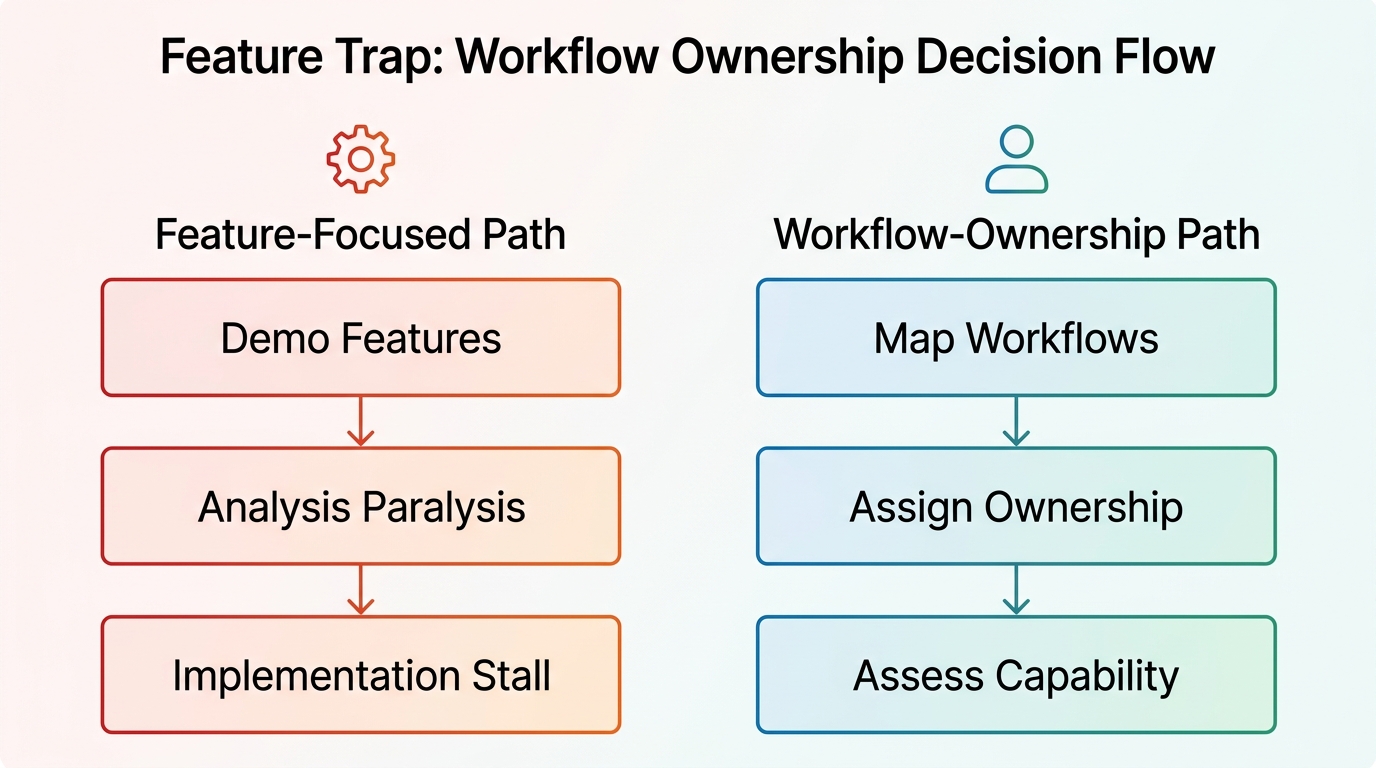
Most CRM demos show you dashboards that update in real time, AI that predicts the next best action, and automation that seems to erase manual work. But when the sales rep leaves, your team is left to figure out who populates those dashboards, who trains the AI, and who owns the automation logic. That gap is where CRM implementations die. A Zoho vs Salesforce comparison must start with process.
Feature comparisons lead to analysis paralysis because they treat the platform as a solution rather than a tool. A mid-market insurance agency we know spent months comparing reporting modules, AI assistants, and mobile apps. They chose Salesforce for its analytical depth, but six months in, claims processing hadn’t sped up. The problem wasn’t Salesforce; it was that no one had been assigned ownership of the claims workflow. The intake team thought underwriting owned it; underwriting assumed it was operations. Data fields were inconsistently filled, automation rules were never finalized, and the AI predictions were ignored because no one trusted the inputs.
That is the real trap: believing that a CRM’s features will magically fix process gaps. Both platforms are mature enough that success hinges on how you configure them, not what they offer out of the box. AI doesn’t fix broken workflows; it amplifies them. The meaningful truth is this: success is largely about implementation discipline. The real differentiator is process ownership, and that is what a proper Zoho vs Salesforce comparison should focus on.
Beyond the Sticker Price: The True Cost of CRM Ownership
A shallow Zoho vs Salesforce comparison often starts and ends with per-user pricing. Zoho advertises a free edition for up to three users, while Salesforce’s most accessible plan starts at $80/user/month. Those numbers are real, but they’re only a sliver of the story.
The true CRM total cost of ownership includes implementation services, customization, training, integration development, and ongoing maintenance over three to five years. A cost analysis from CRM Newspaper highlights that hidden expenses like data migration, third-party app connectors, and admin overhead often outweigh subscription fees. For a mid-market team, these are not one-time bumps—they recur every time processes change or the business scales. The Zoho vs Salesforce cost analysis must dig deeper than the surface.
Consider an ecommerce brand that started on Zoho to save on licenses. The subscription was economical, but as they added custom shipping workflows and integrated with multiple payment gateways, they needed API workarounds that required developer time. In contrast, a similar-sized company on Salesforce paid more upfront but used the native AppExchange ecosystem to plug in many extensions without custom code. Neither path is universally cheaper; the cost depends on your technical capacity and the complexity of your workflows. That is why a thorough Zoho vs Salesforce cost analysis must be paired with an honest evaluation of your internal team’s ability to manage the platform. If you have strong in-house developers, Salesforce’s higher license cost may be offset by lower custom-build expenses. If your team is lean and process-light, Zoho’s simplicity can keep total cost of ownership down. The key is to model costs against specific workflows, not generic user counts. Understanding total cost of ownership prevents budget surprises, and this aspect of the Zoho vs Salesforce decision is often overlooked.
Customization Depth vs. Ease of Use: Where the Real Trade-Off Lies
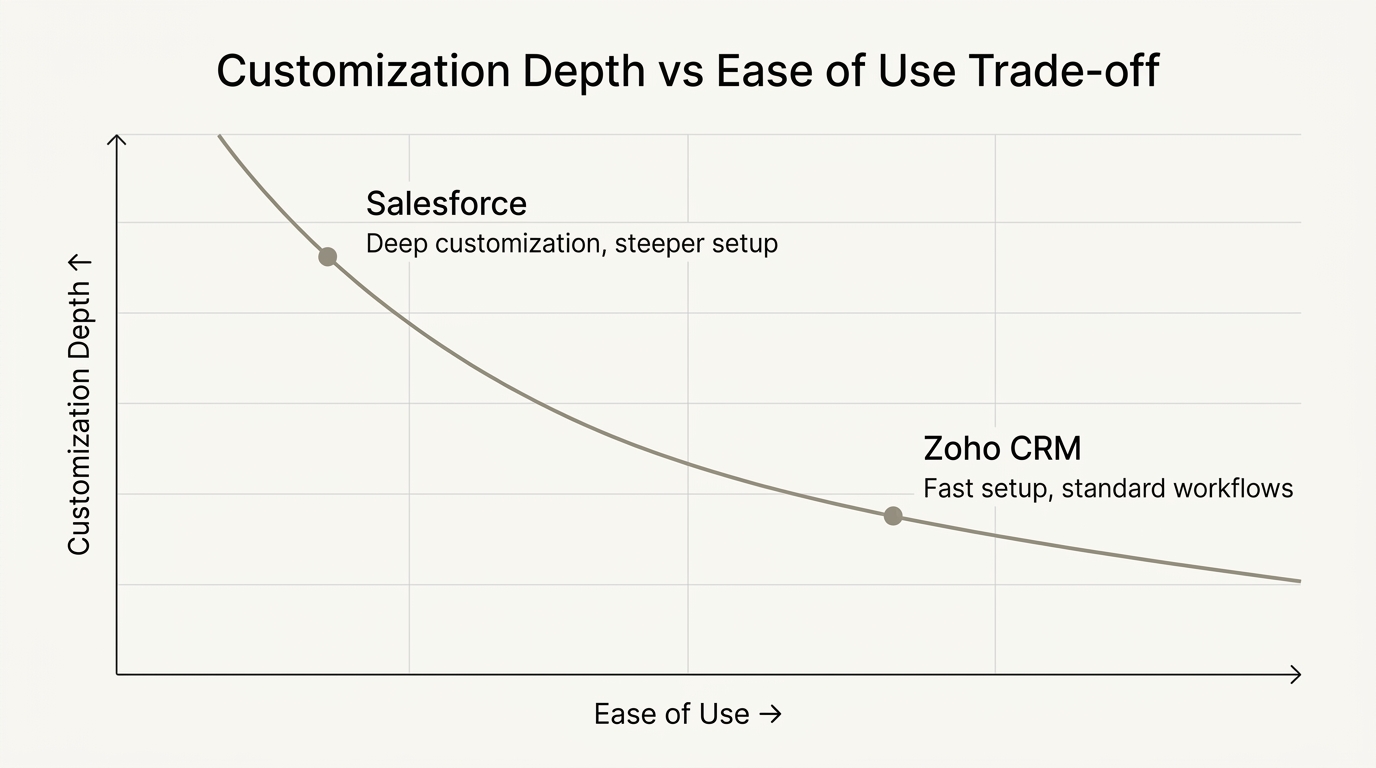
Every business has unique processes, but the degree of uniqueness determines how much customization you actually need. Salesforce offers near-limitless configuration possibilities, from custom objects to code-based Apex triggers. That flexibility is a superpower when you must match an insurance underwriting workflow with multiple approval tiers or a higher education admissions funnel with conditional logic. But it comes with a requirement: you need skilled administrators or a partner well-versed in salesforce development.
Zoho takes a different approach. Its configuration layers are shallower, but that makes them faster to deploy. A team can set up lead scoring rules, email automations, and basic dashboards in days rather than weeks. For many mid-market companies—especially those in standard service models, this is enough. Yet if your business involves complex entitlements, multi-tiered partner portals, or heavily regulated data models, Zoho’s boundaries can become constraints. You may find yourself writing custom functions or relying on third-party tools, which erodes the initial speed advantage. The Zoho vs Salesforce customization question is key here.
The decision, then, is not about which platform “customizes better.” It’s about matching your process complexity to the platform’s configuration surface. Consider an example: we helped a higher education institution implement seamless student lifecycle management with zoho CRM and moodle LMS. Their workflows were moderately complex, and Zoho’s native capabilities combined with a well-defined integration to Moodle met their needs without over-engineering. Conversely, a large insurance agency needed customization because their commission structures and compliance rules could not be modeled in a simpler CRM. Comparing CRM customization options helps clarify which platform fits.
So the real trade-off is this: choose Zoho when your processes are standard enough to fit within its configuration layer, and Salesforce when you need deep, ongoing custom logic that your team is ready to own. This Zoho vs Salesforce customization aspect is a key differentiator. Your decision hinges on your process complexity.
AI Readiness: Why Data Quality and Governance Matter More Than AI Features
Every CRM vendor now markets an AI assistant, Salesforce Einstein and Zoho Zia headline their respective demos. But AI readiness isn’t about whether the assistant can draft an email or score a lead; it’s about whether your CRM data is trustworthy enough for those actions to be useful. Any mid-market CRM selection must include an AI readiness assessment that starts with data hygiene.
Dirty CRM data blocks automation and reporting. If your sales reps use free-text fields inconsistently, or if lead sources aren’t standardized, no AI model will produce reliable predictions. We’ve seen a higher education admissions team turn on Zia’s lead scoring only to get nonsensical results because “inquiry source” was a free-text field filled with typos and abbreviations. The AI wasn’t wrong; the input signal was garbage. The Zoho vs Salesforce AI readiness evaluation should prioritize data hygiene.
Similarly, a financial services firm implemented Salesforce Einstein for next-best-action recommendations, but the recommendations were so disconnected from the actual deal stages that the sales team stopped looking at them. The root cause? The opportunity stages were defined differently across business units, and no one had ownership to harmonize the fields. The AI amplified the inconsistency, exactly what happens when process ownership is vague. An AI consulting services can help you gauge whether your data supports meaningful AI outcomes.
Trust controls and human approval loops must precede any automation. Before you let an algorithm route an insurance claim or trigger a discount, you need defined steps: Who validates the output? Under what conditions does a human override fire? These governance patterns are platform-agnostic, but they are easier to implement when your AI consulting services connect business rules to technical controls.
So when evaluating platforms for AI readiness, ask not about the AI feature list but about your data hygiene, the clarity of your process definitions, and the willingness of your team to own the governance. AI is not about automation; it’s about amplifying decisions you already understand. In any Zoho vs Salesforce evaluation, consider data hygiene first.
A Practical Evaluation Framework for the Mid-Market Team
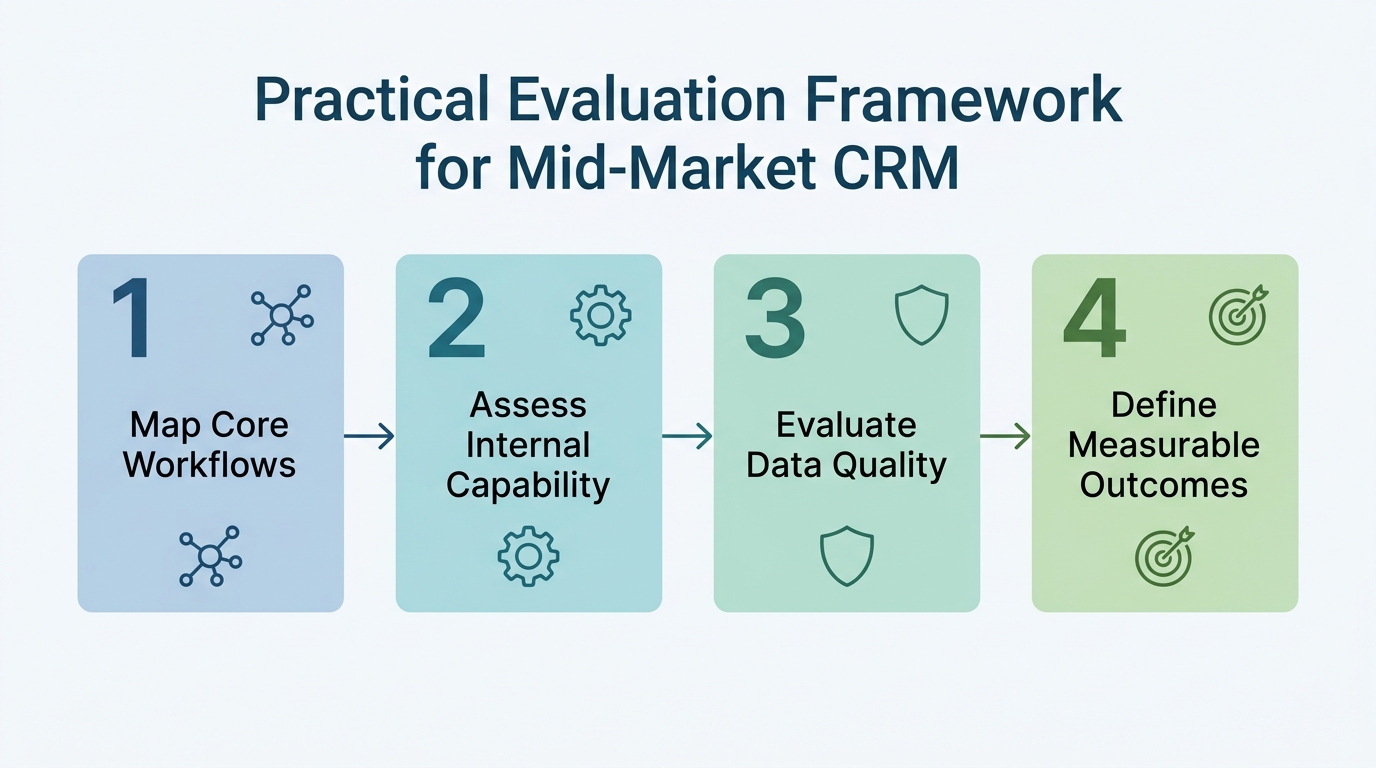
You can cut through the noise with a sequential framework that starts inside your organization. This isn’t about picking a winner—it’s about creating the conditions for either platform to succeed. A structured process simplifies your mid-market CRM selection.
Step 1: Map your core business workflows and assign workflow ownership.
Before a single demo, document three to five critical workflows—say, claims processing for an insurer, or inquiry-to-enrollment for a college. For each step, name the role accountable for its outcome. This exercise often reveals that ownership is diffuse; fixing that is more valuable than any CRM feature. We have found that CRM ERP implementations stall precisely because the mapping stage is skipped. Ensuring CRM-native workflow ownership from day one is essential. This Zoho vs Salesforce framework is applicable regardless of platform.
Step 2: Assess internal capability to manage customization and administration.
If your team has dedicated IT resources comfortable with code, Salesforce’s depth becomes a lever. If not, Zoho’s shallower but governed environment reduces risk. Be honest: a platform is only as powerful as the people who can configure it. This step is key to your selection process.
Step 3: Evaluate data quality and governance readiness.
Run a data audit on your existing system. Identify duplicate records, inconsistent field usage, and missing data points that matter for automation. If you can’t pass this test, don’t turn on AI features. Instead, invest time in cleanup and define who will maintain field standards going forward. Implement clear trust controls before enabling any AI. This foundation supports any AI initiative, whether it uses Generative AI services and solutions or native CRM assistants.
Step 4: Define measurable business outcomes.
Set specific KPIs that the CRM must improve: reduce claims processing time by 20%, increase admissions conversion by 10%, shorten sales cycle from 45 to 30 days. These become your success criteria and the lens through which you evaluate platform demos. A CRM demo that can’t show you how it directly impacts a KPI is irrelevant. An AI readiness assessment can help determine if your data supports concrete KPIs. A thorough implementation roadmap is then built on these outcomes.
Use these steps as a scorecard. Only after you’ve completed them should you compare platform capabilities. At that point, the Zoho vs Salesforce evaluation often becomes clear because you’re not comparing features in the abstract; you’re matching a platform to your organization’s maturity and specific operational needs. Your Zoho vs Salesforce decision will be grounded in reality. A clear change management plan ensures progress remains measurable and aligned with business goals.
Making the Choice: When Zoho Wins, When Salesforce Wins
No CRM is universally best. The fit depends on your workflow complexity, internal technical capabilities, and long-term scale. The table below summarizes the dimensions that matter most:
| Dimension | Zoho CRM | Salesforce |
|---|---|---|
| Starting Price | Free for 3 users; Standard $14/user/month | Professional $80/user/month |
| Customization Depth | Moderate; easy to configure | Deep; requires skilled admins |
| AI Features | Zia (assistant, predictions, anomaly detection) | Einstein AI (predictive, generative AI) |
| Best for | Mid-market teams with simpler workflows and limited IT resources | Complex, multi-department workflows with dedicated IT support |
But even that table is secondary. The real decision boils down to two scenarios:
- Zoho tends to win when you have standard sales, service, or enrollment processes, a lean team, and a need for quick time-to-value without heavy coding. A growing D2C brand or a small private college is likely to thrive here. The Zoho vs Salesforce selection becomes simpler when your workflows are straightforward.
- Salesforce tends to win when your workflows are highly customized, compliance-heavy, or span multiple departments that need a single source of truth. Large insurance agencies, universities with complex student lifecycles, or any organization that already has a dedicated CRM admin or developer team will extract more value from Salesforce’s ecosystem. A thorough Zoho vs Salesforce selection process avoids costly mistakes.
Importantly, the decision isn’t permanent, but switching CRMs mid-stream is expensive in terms of data migration and retraining. That’s why we advise running the evaluation framework thoroughly. If you have already invested in zoho services and solutions or Salesforce-native AI workflow implementation, you may already have momentum on one platform that tilts the scale. A thorough Zoho vs Salesforce selection process avoids costly mistakes.
Your CRM Journey Starts with Workflow Ownership, Not a Platform Decision
The Zoho vs Salesforce decision will continue to fill comparison websites and demo videos, but for mid-market teams, the answer is rarely found in a side-by-side list. The CRM you choose is less important than the operational discipline you bring to it.
When we help an organization implement implementation of salesforce einstein analytics and customization, we’re not just installing software. We’re helping them map ownership, clean data, and build the governance that makes AI trustworthy. The same principle applies to every Zoho project we touch—the platform is just the canvas; your workflow design is the art.
If you’re tired of feature checklists and want a CRM strategy built around measurable business outcomes, a conversation is the right next step. Whether you’re leaning toward Zoho or Salesforce, we bring experience across both platforms and a focus on the workflow ownership and governance that actually move the needle.
Frequently Asked Questions
Can AI agents work inside our existing CRM without replacing it?
Yes. Both Zoho and Salesforce allow AI features like predictions and recommendations to work within your current CRM instance. However, AI effectiveness depends on data quality and process ownership, not just the platform. The Zoho vs Salesforce comparison should include this understanding, and a proper evaluation should consider your data hygiene first.
How do we improve admissions conversion with our CRM?
Start by mapping the inquiry-to-enrollment workflow and assigning workflow ownership for each step. Then configure your CRM to automate repetitive tasks like follow-up emails and lead scoring, but only after standardizing data fields and ensuring team buy-in on process changes.
How should teams evaluate Zoho vs Salesforce?
Move beyond feature checklists. First, document your core workflows and assess internal capability for customization. Then evaluate data quality and define measurable outcomes. Only then compare how each platform supports those specific outcomes, not just generic features. A structured Zoho vs Salesforce evaluation process simplifies this.
Is the Zoho vs Salesforce decision permanent for a growing company?
No. However, switching CRMs mid-stream is expensive. That’s why we recommend running the evaluation framework thoroughly before deciding. Your choice should be based on your current workflow complexity and internal capability, with a plan for future needs.
Connect with Webuters for CRM consulting and implementation.
CRM and ERP transformation
Pick the right platform, clean the data and connect it to the rest of the business.
See CRM and ERP services
Karan is a seasoned Project Manager who leads digital transformation projects across Salesforce, Zoho, CRM platforms, mobile apps, AI, and web development. At Webuters, he works closely with cross-functional teams to ensure smooth delivery, clear communication, and measurable results. He regularly shares tips on what's new, practical how-tos, and articles that help teams and decision-makers choose the right tech path. Always approachable, he's committed to helping clients and teams make smarter, faster decisions with confidence.
Follow Karan on LinkedIn