Stop Experimenting with Zoho AI: Why Workflow Ownership Comes First
Zoho AI success starts with workflow ownership. Learn a step-by-step framework to avoid costly pitfalls and achieve measurable business outcomes. Discover how.

An insurance agency sunk $50,000 into a Zoho AI–powered chatbot to speed up lead response. Six months later, response times had gone up, not down. Agents were overriding the AI’s routing suggestions, manually reassigning leads, and complaining that the system “didn’t get it.” The operations manager finally traced the problem back to a single missing piece: nobody had clearly defined who owned the lead qualification process. The AI was trying to optimize chaos and chaos simply refuses to be optimized.
That story repeats across industries. Companies invest in Zoho AI without first nailing down workflow ownership, data hygiene, or trust controls. The result is expensive shelfware and disillusioned teams. The real question isn’t whether Zoho AI can transform operations, it can. The question is whether your organization is ready to receive that transformation in a way that sticks.
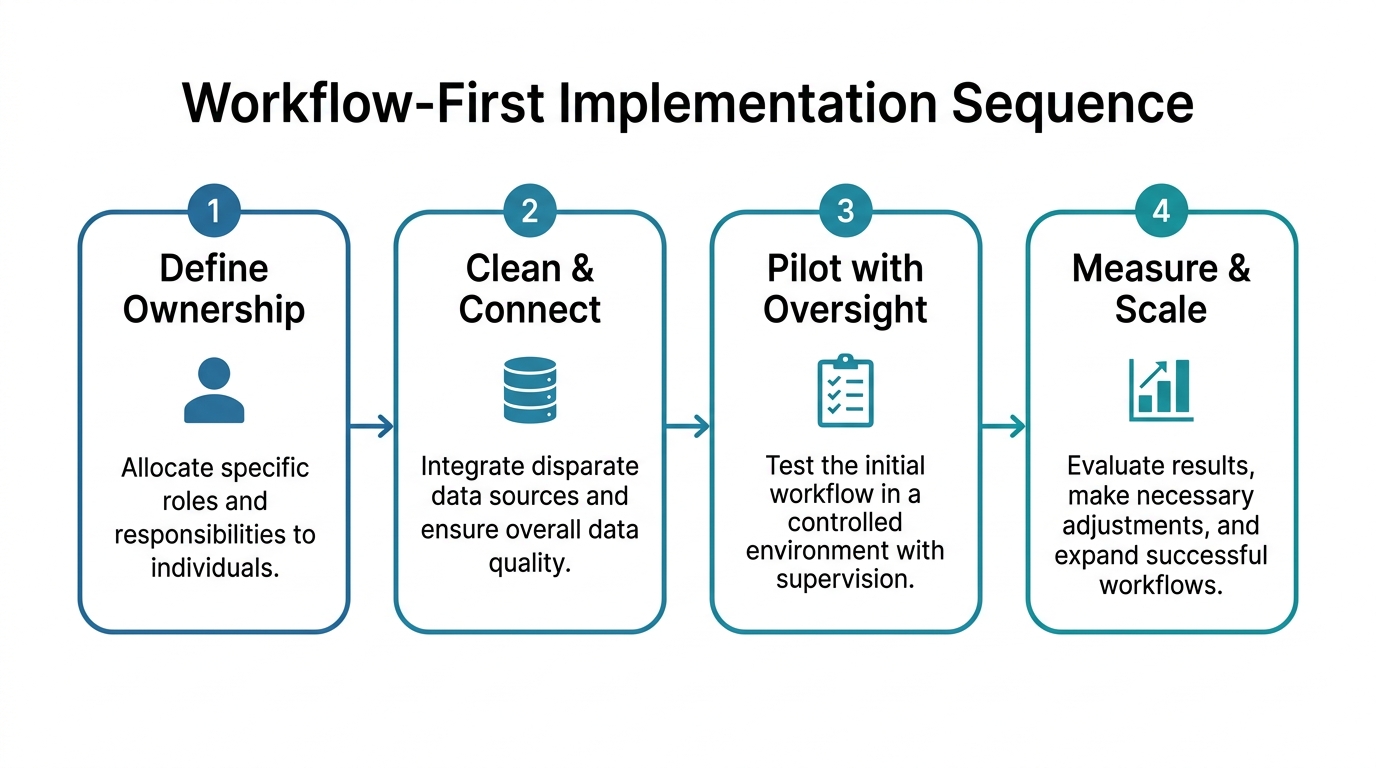
Successful Zoho AI adoption demands a deliberate sequence: define and own specific business workflows, ensure data cleanliness and system connectivity, deploy AI in low-risk, high-impact areas with human oversight, and only then scale based on measurable business outcomes. Skip a step, and you’ll build a smart façade over a shaky structure.
In the sections ahead, we’ll walk through a workflow-first framework that helps you decide what to build first and what to avoid. We’ll cover the five critical steps from prioritizing workflows to measuring ROI so you can turn Zoho AI from a risky experiment into a systematic operational asset.
Why Starting with AI Instead of Workflow Is a Costly Mistake
AI amplifies what you feed it. Feed it a broken process, and you’ll get broken outputs at scale.
Think of it like building a smart home on a cracked foundation. No amount of voice-controlled lighting or automated thermostat schedules will stop the walls from shifting. Similarly, sprinkling AI on top of ill-defined workflows doesn’t create efficiency, it creates confusion at machine speed.
Consider that insurance agency again. Their lead routing workflow was a tangle of informal rules, sales territory overlaps, and personal preferences. When the Zoho AI assistant attempted to assign leads based on historical data, it mirrored those inconsistencies. Agents lost trust. They reverted to old habits. The AI became a ghost in the machine.
The root cause wasn’t bad technology; it was absent workflow ownership. No single person was responsible for defining and maintaining the lead qualification criteria. Until that ownership gap closes, even the most sophisticated Zoho AI implementation will flounder. In our experience, many AI initiatives stumble because organizations skip the process redesign step.
This pattern holds across sectors. A university deployed Zoho AI for enrollment follow-ups, only to see staff override the generated messages. The enrollment team hadn’t agreed on the communication tone or decision logic, so they didn’t trust the output. Again, the AI wasn’t the problem; the lack of a clear process owner was.
Without a named owner, the AI becomes a solution in search of a problem. That is why the first step of the workflow-first framework is to assign ownership before anything else.
The Workflow-First Framework: What to Build First and What to Avoid
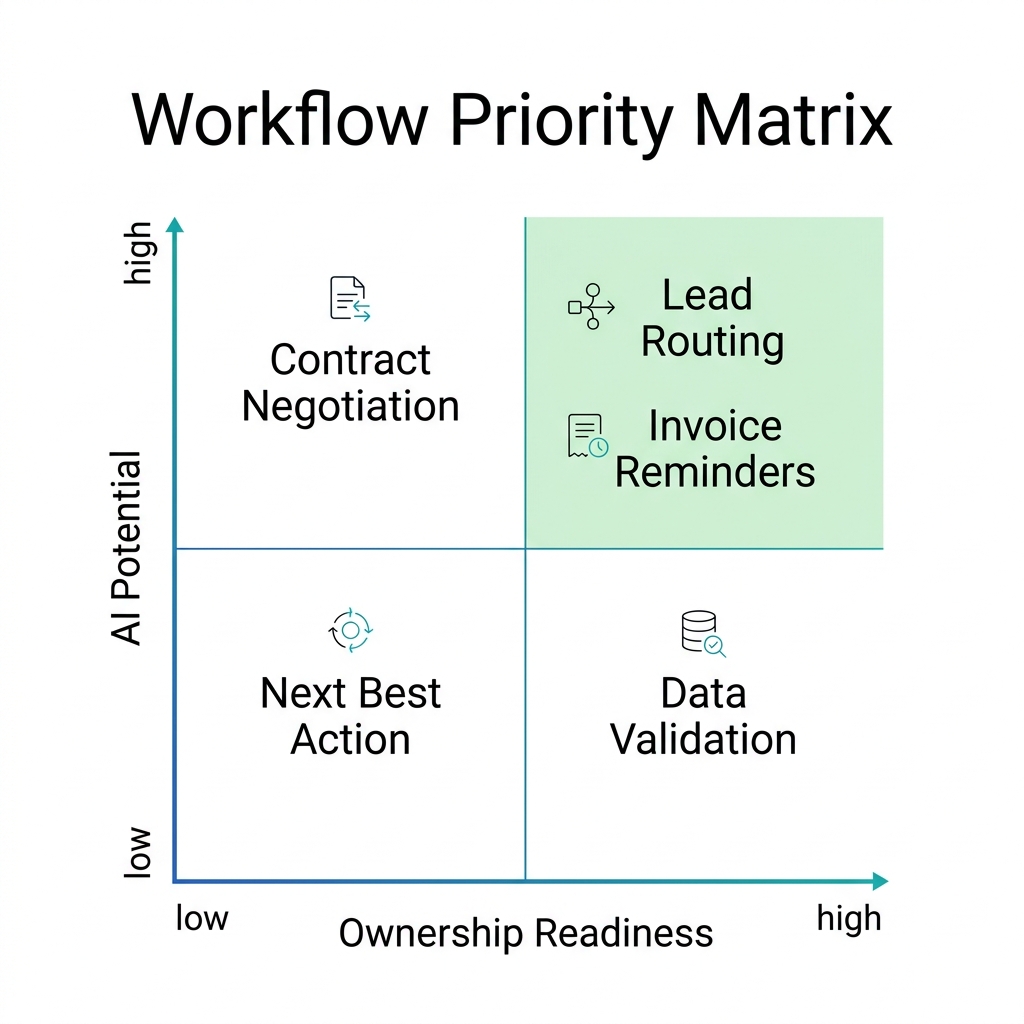
Not all workflows are equal candidates for Zoho AI. The ones that succeed share three traits: they are rule-based, high-volume, and have clear ownership.
Here’s a simple priority matrix to help you choose your first target.
| Workflow | AI Potential | Risk Level | Ownership Readiness | Priority |
|---|---|---|---|---|
| Lead routing (high-volume, rule-based) | High | Low | High | High |
| Personalized email follow-ups | Medium | Medium | Medium | Medium |
| Complex contract negotiation | Low | High | Low | Low |
| Invoice reminders | High | Low | High | High |
| Student enrollment outreach | Medium | Medium | Medium | Medium |
Start with workflows that sit in the upper-right quadrant: high potential, low risk, and strong ownership. For most businesses, that means lead routing automation, invoice reminders, or simple data validation. These are repetitive, data-driven tasks where the Zoho AI assistant can quickly show value without introducing significant risk.
Avoid workflows that lack clear decision rules or require nuanced human judgment. For example, an AI that automatically drafts legal contract clauses might seem impressive, but without a well-defined approval chain, it’s a liability. The same goes for next best action recommendations in sales: if your sales methodology isn’t uniformly adopted, the AI will produce irrelevant suggestions.
We’ve seen clients waste months on ambitious pilots that never left the sandbox simply because they picked a poorly owned workflow. Instead, pick the boring but measurable process. A common pattern among high-performing organizations is that they deliberately start small and scale after proving effectiveness. As a Zoho implementation partner, Webuters guides clients through this selection process every day. Our zoho services and solutions can help you identify the right solutions and implementation plan.
Preparing the Foundation: Data Hygiene and System Connectivity
Zoho AI is only as good as the data you feed it. Yet many teams skip this step, treating data cleanup as an afterthought.
Before you let Zoho AI touch any workflow, audit your CRM data hygiene. Look for duplicate records, missing fields, outdated contact information, and inconsistent formatting. An AI model trained on messy data will produce messy recommendations. That’s not a technology failure, it’s a governance failure.
Concrete steps you can take today:
- Merge duplicate leads and contacts using Zoho’s deduplication tools.
- Standardize field formats (e.g., phone numbers, country codes, lead source values).
- Archive or delete records older than two years that are no longer relevant.
- Validate critical data points: if a field is used by the AI, ensure it’s accurate for at least 90% of records.
Equally important is system connectivity. Zoho AI doesn’t operate in a vacuum. If your customer data lives in Zoho CRM, your support tickets in Zoho Desk, and your payment history in QuickBooks, the AI needs a unified view. Use Zoho’s native APIs or middleware to create a single source of truth.
For example, a higher education institution we worked with had student records spread across Zoho CRM and Moodle LMS. AI-generated follow-up emails were often irrelevant because they missed critical course enrollment data. After integrating the systems similar to our seamless student lifecycle management with zoho CRM and moodle LMS case the AI’s message relevance improved dramatically. That’s the power of clean, connected data.
Clean data is the fuel. Connectivity is the pipeline. Skimp on either, and the AI engine will sputter.
Building Trust with Human-in-the-Loop Controls
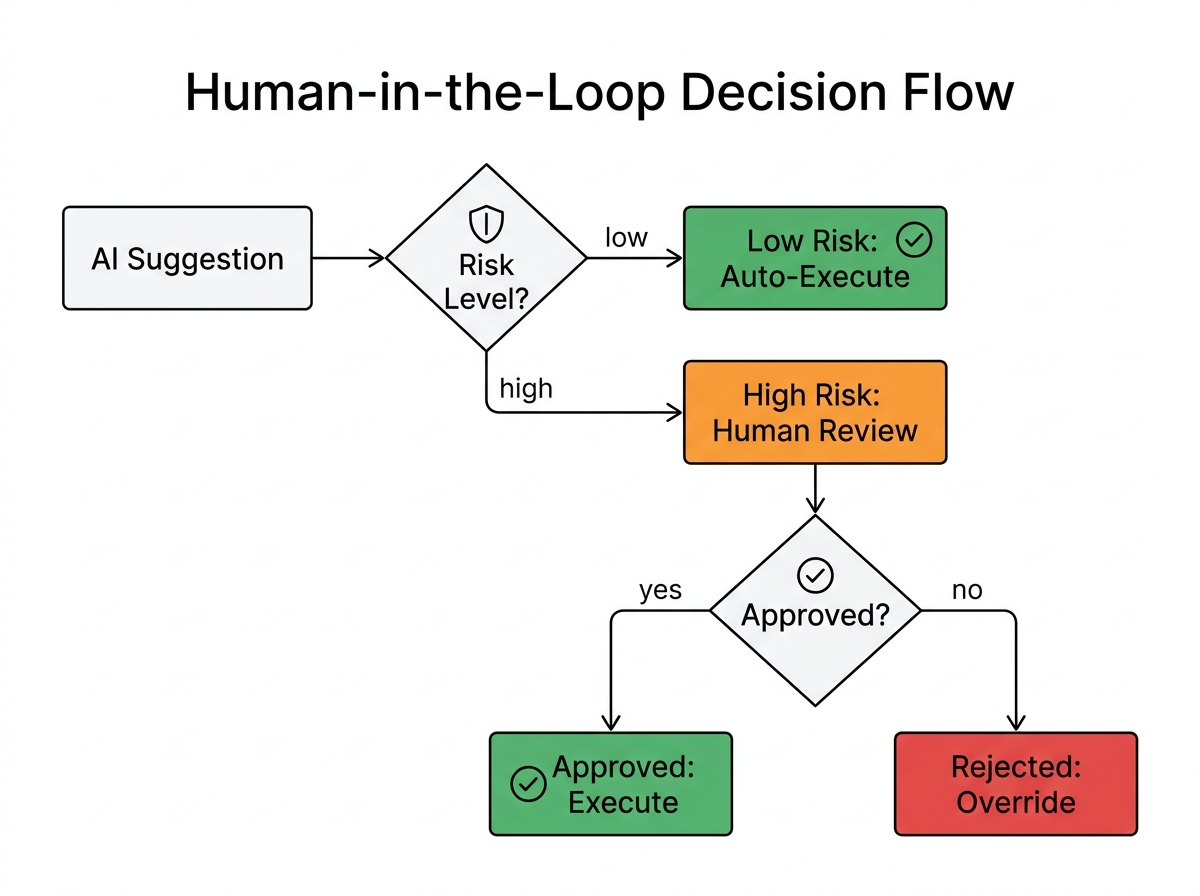
Even the best AI makes mistakes. In regulated industries like insurance or education, those mistakes can have compliance or reputational consequences. That’s why human approval workflows are non‑negotiable.
Trust is built by starting with low-stakes AIs that ask for permission, not forgiveness. Set up workflows where AI-generated suggestions require human approval before execution. For instance, Zia can score leads and propose routing, but a manager must confirm any assignment to a high-value prospect. This simple check prevents missteps and gives humans a chance to override when context matters more than data.
Use Zoho Deluge scripting to codify conditional rules. You might write a rule that says: “If the lead score exceeds 80, send to the sales director for review; otherwise, auto‑assign to the pool.” This hybrid approach keeps humans in the loop for edge cases while automating the repeatable, low-risk decisions.
Governance also requires clarity on what the AI is allowed to do without human intervention. Create a decision matrix: what happens autonomously, what triggers a review, and what is strictly human-only. Document these trust controls. When an insurance agency defines that AI can automatically send a policy renewal reminder but cannot adjust coverage levels without a human sign-off, both customers and regulators rest easier.
Monitoring is the final piece. Track the AI’s error rate, false positives, and user feedback. Adjust the model or the rules based on real-world usage. This feedback loop is what turns a one‑off project into a continuously improving operational asset.
Measuring What Matters: Proving ROI Before Scaling
If you can’t measure it, you can’t justify scaling it. Too many Zoho AI initiatives stall because nobody defined success upfront.
Before you switch on any AI workflow, establish baseline metrics. If you’re automating lead routing, measure current response times, conversion rates, and handoff errors. Run a controlled pilot: perhaps one sales region uses Zia for 30 days while another continues manually. Compare results.
Here are metrics that typically matter for common Zoho AI workflows:
- Lead response time (aiming for significant reduction)
- Lead-to-opportunity conversion rate
- Customer support ticket deflection or resolution time
- Enrollment appointment booking rate (for education)
- Invoice processing time
Don’t stop at efficiency gains. Measure quality too: customer satisfaction scores, agent feedback, and error rates. An AI that speeds up responses but floods the pipeline with unqualified leads isn’t a success.
Use Zoho CRM’s built‑in reports and dashboards to surface this data. Share results monthly with the workflow owner and the broader team. Transparency builds confidence. Once you can point to a clear net benefit. For example, a notably higher conversion rate with AI-assisted lead prioritization, you have the business case to expand to additional workflows or add more sophisticated AI agents.
We often start our clients’ journeys with a 90‑day pilot focused on a single metric. That discipline prevents scope creep and ensures you learn before you invest heavily.
Common Pitfalls in Zoho AI Adoption and How to Avoid Them
Knowing what not to do is as important as knowing what to build. The most expensive pitfalls are predictable, and they almost always trace back to skipping one of the earlier steps: unclear ownership, dirty data, or absent governance.
Consider what happens when workflow ownership is unclear. Without a named owner, the AI becomes an orphan project. Nobody defines the rules, nobody approves the output, and nobody champions adoption. The result? The system drifts, trust evaporates, and the investment sits idle. The fix is to assign a single accountable person for every workflow you automate.
Another common trap is leaving manual handoffs in place. If the AI produces a recommendation but a human still has to copy‑paste it into another system, you haven’t automated anything. Use Zoho workflow rules and integrations to eliminate those manual touches. A seamless flow from AI suggestion to action is what makes automation real.
Weak implementation sequence is another frequent mistake. Jumping to AI without data hygiene or process definition is like painting over rust. Follow the sequence: own the workflow, clean the data, connect the systems, then add AI. Each step builds on the previous one.
Poor measurement discipline also trips up many teams. Without a baseline and regular reporting, you can’t prove ROI or spot early failures. Set up dashboards from day one and review them weekly during the pilot.
Finally, limited governance controls can lead to expensive errors. Failing to define boundaries for Zoho AI autonomy means the AI might make decisions it shouldn’t. Always implement human approval for high‑stakes actions, document decision logs, and conduct periodic audits. Our AI consulting services help organizations set up these controls from the start.
Avoiding these pitfalls requires more than good intentions. It demands a structured implementation methodology that keeps the workflow owner at the center.
From Experiment to Operational Asset: The Bottom Line
The central thesis of this article is simple but often overlooked: Zoho AI delivers lasting value only when it rests on a foundation of workflow ownership, clean data, and measured trust. The insurance agency that started this story learned that lesson the hard way. But you don’t have to.
For most organizations, the business implication is clear: stop treating AI as a standalone experiment and start treating it as the final step in a well-defined operational sequence. The cost of skipping steps is wasted investment and lost momentum and eroded team confidence. When you own the process first, Zoho AI becomes a force multiplier instead of a source of friction.
If this framework resonates, a practical next step is a Zoho AI readiness audit. Webuters helps insurance agencies, universities, and growing businesses turn Zoho AI from a buzzword into a measurable operational advantage. Our zoho services and solutions and AI consulting services are designed to take you from experimentation to ROI without the chaos. Let’s start a conversation.
Frequently Asked Questions
How do I assign workflow ownership in Zoho for lead routing?
Start by naming a single person as the process owner for lead qualification. This person defines the rules, sets up Zoho CRM fields, and approves any AI-driven changes. Use Zoho’s role hierarchy to assign ownership at the team or territory level.
What is the first measurable outcome I should target with Zoho AI?
Lead response time is often the easiest to measure and improve. With Zia, you can auto-assign and auto-respond to leads, cutting response time from hours to seconds. Track the before-and-after number in a 30-day pilot.
Can Zoho AI work with non-standard data, like custom fields?
Yes, but only if those fields are clean and consistently filled. Zia and other Zoho AI tools can read custom fields, but they will produce erratic results if data is incomplete or formatted inconsistently. Clean your custom fields first.
How do I ensure compliance when using Zoho AI in regulated industries?
Set up human approval workflows for any action that involves financial, legal, or health data. Use Zoho’s audit trail to log AI decisions. For insurance or healthcare, configure Deluge scripts to flag sensitive cases for manual review.
What if my team doesn’t trust the AI’s suggestions?
Start with low-stakes tasks and show the AI’s accuracy over time. Share transparent reports comparing AI recommendations against manual outcomes. Override percentages will drop as trust builds. Involve team members in setting the rules so they feel ownership.
Should I connect my ERP to Zoho AI?
Yes, if your ERP holds customer billing or inventory data. Connecting it gives the AI a fuller picture of customer health, enabling better recommendations for upsells, renewals, or support. Use Zoho’s integration tools or Webuters’ CRM ERP expertise to bridge the systems.
CRM and ERP transformation
Pick the right platform, clean the data and connect it to the rest of the business.
See CRM and ERP services
Karan is a seasoned Project Manager who leads digital transformation projects across Salesforce, Zoho, CRM platforms, mobile apps, AI, and web development. At Webuters, he works closely with cross-functional teams to ensure smooth delivery, clear communication, and measurable results. He regularly shares tips on what's new, practical how-tos, and articles that help teams and decision-makers choose the right tech path. Always approachable, he's committed to helping clients and teams make smarter, faster decisions with confidence.
Follow Karan on LinkedIn